Luvion 75 PRO Manuel utilisateur

ICON CLEAR 75 PRO

2

3
LUVION Premium Baby products
FIGURES: FIGUREN / FIGURES / FIGURES .............................................................................. 4
ENGLISH...................................................................................................................8
NEDERLANDS............................................................................................................................18
FRANÇAIS............................................................................................................................30
DEUTSCH...........................................................................................................................42

4
PRODUCTOVERZICHT/ PRODUCT LAYOUT / DESCRIPTION DU PRODUIT
BABY UNIT / BABY APPARAAT / UNITÉ BÉBÉ / BABYEINHEIT
Fig. 1
PARENT UNIT / OUDER APPARAAT / UNITÉ PARENTALE / ELTERNEINHEIT
Fig. 2

5
LUVION Premium Baby products
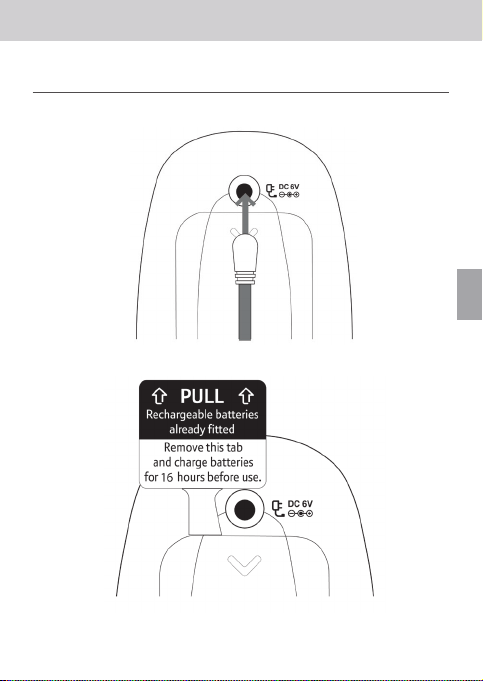
SETTING UP / INSTALLEREN / MISE EN PLACE / EINRICHTEN
Fig. 3
Fig. 4
FIGURES

6
SETTING UP / INSTALLEREN / MISE EN PLACE / EINRICHTEN
BABY UNIT / BABY APPARAAT / UNITÉ BÉBÉ / BABYEINHEIT
Fig. 5

7
LUVION Premium Baby products
MENU MAP / MENU MAP / PLAN DU MENU / MENÜ PLAN
Fig. 6
FIGURES

8
INSTRUCTION MANUAL
PACKAGE CONTENTS:
PRODUCT OVERVIEW
Baby unit (Fig. 1)
Flashes orange when your monitor is trying to nd a link. Remains solid when the
Parent and Baby units are linked to each other.
.
Press and hold to switch the power on or o.
Illuminates around the base. Press to switch the nightlight on. Press and hold for two
seconds to switch it o.
Turns the loudspeaker volume up or down when playing music or using talkback.
Make sure the sensor has space around it and isn’t in contact with any surfaces to
make sure it’s working at its best.
Switches the music on at the Baby unit. (It’ll be the same music and will play for the same
duration that you last set on the Parent unit.) Press the button again to switch the music o.
Press to switch the Lightshow on or o.
For connecting to the mains power socket using the power adapter
cable supplied.
Parent unit (Fig. 2)
The screen backlight comes on whenever you press a button. It switches o
again after 15 seconds.
Turns the speaker volume up or down and lets you scroll through the main menu.
Opens the main menu. Press again to close the main menu.
Press and hold down to talk to your baby.
for connecting to the mains power socket using the power adapter
cable supplied.
Tells you how much battery life your unit has left.
Press to conrm when you’re scrolling through the main menu.
Press and hold to turn the unit on or o.
Flashes when your monitor is trying to nd a link. Remains solid when the Parent and Baby
units are linked to each other.
remains on when your Parent unit is on mute.
INTRODUCTION

9
LUVION Premium Baby products
INSTRUCTION MANUAL
SAFETY INSTRUCTIONS
• WARNING:Keep the adapter cables out of the reach of children!
•
•
•
•
•
•
•
•
•
•
•
•
•
•
•
SETUP & USE
1. PARENT UNIT SETUP
1.1 Setting up
1.
2.
3.
4.
EN

10
Warning: Only use the power adapters supplied. Using incorrect power adapters may
permanently damage your product.
1.2 Battery low alert on Parent unit
Warning: Always use rechargeable batteries in the Parent unit. Only use the type we’ve
recommended – 2 x AA NiMH 1300mAh batteries. Charge the batteries as instructed in
this user guide. The Parent unit can still be used when it’s charging.
2. BABY UNIT SETUP
2 .1 Setting up
1.
2.
2.2 Switching on and linking the Parent and Baby units
1.
2.
2.3 Deciding where to put your units
Important: The two units will need to be linked before you can start using them. If the link
between the units is broken, the Link indicator lights will ash while they try to look for each
other and The Parent unit will show “I’m Linking...”. After 30 seconds, if the link is still broken,
the Link indicator lights will ash red and the Parent unit display will show “Not Linked”. If
the link is broken, check that:
• the mains power is plugged in and switched on at the Baby unit
• both units are switched on
• the batteries are charged in the Parent unit
• the Parent and Baby units are within range of each other (in ideal conditions, that’s up
to 330 metres outdoors and 50 metres indoors).
3. USINGYOUR LUVION ICON CLEAR 75 PRO AUDIO BABY MONITOR
3.1 Switching the Baby unit on
1.
Table des matières
Langues :
Autres manuels Luvion Instrument de mesure
Manuels Instrument de mesure populaires d'autres marques

Endress+Hauser
Endress+Hauser Proline Promag 50 Caractéristiques techniques

Siemens
Siemens SITRANS F Coriolis FCT030 Manuel de la liste des pièces

KLINGER
KLINGER CMF V Series Manuel utilisateur

EXFO
EXFO FTB-2 Manuel d'exploitation et d'entretien

Keysight
Keysight M8290A Manuel utilisateur

ADTEK
ADTEK MW-5 Manuel utilisateur