
Longshine LCS-8056C Manuel utilisateur

56KAnalogModem
User’sManual
January2010

1
Copyright
Copyright©2010bythiscompany.Allrightsreserved.Nopartofthispublicationmaybe
reproduced,transmitted,transcribed,storedinaretrievalsystem,ortranslatedintoany
languageorcomputerlanguage,inanyformorbyanymeans,electronic,mechanical,
magnetic,optical,chemical,manualorotherwise,withoutthepriorwrittenpermissionof
thiscompany.
Disclaimer
Thiscompanymakesnorepresentationsorwarranties,eitherexpressedorimplied,with
respecttothecontentshereofandspecificallydisclaimsanywarranties,merchantabilityor
fitnessforanyparticularpurpose.Anysoftwaredescribedinthismanualissoldorlicensed
"asis".Shouldtheprogramsprovedefectivefollowingtheirpurchase,thebuyer(andnot
thiscompany,itsdistributor,oritsdealer)assumestheentirecostofallnecessaryservicing,
repair,andanyincidentalorconsequentialdamagesresultingfromanydefectinthe
software.Further,thiscompanyreservestherighttorevisethispublicationandtomake
changesfromtimetotimeinthecontentshereofwithoutobligationtonotifyanypersonof
suchrevisionorchanges.
Caution
Thisdevicecomplieswithpart15oftheFCCrules.Operationissubjecttothefollowingtwo
conditions.
(1)Thisdevicemaynotcauseharmfulinterference,and
(2)Thisdevicemustacceptanyinterferencereceived,includinginterferencethatmaycause
undesiredoperation.
PerFCC15.21,youarecautionedthatchangesormodificationsnotexpresslyapprovedby
thepartresponsibleforcompliancecouldvoidtheuser’sauthoritytooperatethe
equipment.
Allbrandandproductnamesmentionedinthismanualaretrademarksand/orregistered
trademarksoftheirrespectiveholders.

2
Contents
1.Introduction ..............................................................................................3
1.1SystemRequirements..................................................................3
1.2PackageContents ........................................................................3
2.HardwareInstallationInstructions ............................................................3
2.1PCIInterfacedAnalogModemCard.................................................3
2.2RS232AnalogModem.....................................................................3
2.3PocketsizedRS232andUSBAnalogModem...................................4
3.SoftwareDriverInstallation ......................................................................4
3.1ForWindows7................................................................................4
3.1.1LSIPCIModem.....................................................................5
3.1.2LSIExternalModem .............................................................6
3.1.3LSIUSBModem....................................................................7
3.1.4ConexantPCIModem ..........................................................8
3.1.5MotorolaPCIModem.........................................................10
3.2ForWindowsVista........................................................................11
3.2.1LSIPCIModem...................................................................11
3.2.2LSIExternalModem ...........................................................13
3.2.3LSIUSBModem..................................................................14
3.2.4ConexantPCIModem ........................................................15
3.2.5MotorolaPCIModem.........................................................17
3.3ForWindowsXP,2000,ME ...........................................................18
3.4ForWindows98SE ........................................................................21
3.5AdditionalLSIModemNotes.........................................................25

3
1.Introduction
ModemInstallationCDisanAll‐In‐OneinstallationutilityforbothinternalandexternalFax,
Voice/FaxandVoice/FaxwithSpeakerPhoneAnalogModems.Itautomaticallydetectsand
installsrecentlyinstalledmodemhardwareunderWindows98SE,ME,2000,XP,Vistaand
Windows7.ThisutilityincludesInstallDriverandUserManual.ClickInstallDrivertostart
analogmodemdevicedriverinstallationprocess.UserManualincludesthisuser’smanual
andspecsforallmodemsthisutilitysupports.
1.1 SystemRequirements
zPentium100MhzCPUorfaster
z32MBsystemmemoryormore
z10MBfreespaceonyourharddrive
z256‐colorVGAorhigherresolution
zCD‐ROMdrive
zOneavailablePCIslotforinternalmodem;oneavailableUSBconnectororRS232
connectorforexternalmodems
zMicrosoftWindows98SE,ME,2000,XP,VistaorWindows7operatingsystem
1.2 PackageContents
zOneinternal/externalAnalogModem
zOneRJ‐11Cable
zOneUSBCableforUSBmodel;OneRS232CableforRS232model
z9VACadapterforRS232AnalogModem
zFaxModemInstallationCDCD‐ROMdisk
zQuickInstallationGuide
Ifanyofaboveitemsismissingordamaged,pleasecontactyourlocaldealerimmediately.
2.HardwareInstallationInstructions
2.1PCIInterfacedAnalogModemCard
1) OpenPCcaseandinsertPCICardintoanavailablePCIslot.
2) ClosePCcase,thenplugoneendofRJ‐11cablesintomodem’sLINEjackandtheother
endintotelephonewalljack.
2.2RS232AnalogModem
1) ConnectmodemandPCwithRS232cable.
2) PlugoneendofRJ‐11cableintomodem’sLINEjackandtheotherendintotelephone
walljack.
3) PluginACpoweradapter.

4
2.3PocketsizedRS232andUSBAnalogModem
1) ConnectmodemandPCwithRS232/USBcable.
2) PlugoneendofRJ‐11cableintomodem’sLINEjackandtheotherendintotelephone
walljack.
3.SoftwareDriverInstallation
InsertModemInstallationCDintoCD‐ROMdrivethenwindowbelowwillappear.
InstallDriver:ClickInstallDrivertostartanalogmodeminstallationprocess.
UserManual:UserManualincludesthisuser’smanualandspecsforallmodemsthisutility
supports.
3.1ForWindows7
Whenpluginthemodemintothecomputer,insertFaxModeminstallationCDintoCD‐ROM
drive.AftertheinstallationCDauto‐runandshowsthemainscreenasbelow,click“Install
Driver”tobegintheInstallation.

5
3.1.1LSIPCIModem
Step1:AfterclickInstallDriver,Setupwizardwillshowbelowscreen.ClickOKtoinstallthe
modemdriver.
Step2:AfterSetuphasfinishedinstalling,clickExittoendtheprogram.
Step3:Tocheckifmodemisproperlyinstalled:Right‐Click“Computer”ontheDesktopÆ
Select“Properties”ÆChoose“DeviceManager”

6
3.1.2LSIExternalModem
Step1:AfterclickInstallDriver,Setupwizardwillshowbelowscreen.ClickOKtoinstallthe
modemdriver.
Step2:SelectCountry/Regionforthedrop‐downlistandclickOKtocontinue.
Step3:AfterCountrySetsuccessfully,clickOKtoexitwizard.
Step4:AfterSetuphasfinishedinstalling,clickExittoendtheprogram.
Step5:Tocheckifmodemisproperlyinstalled:Right‐Click“Computer”ontheDesktopÆ
Select“Properties”ÆChoose“DeviceManager”

7
3.1.3LSIUSBModem
Step1:AfterclickInstallDriver,Setupwizardwillshowbelowscreen.ClickOKtoinstallthe
modemdriver.
Step2:AfterSetuphasfinishedinstalling,clickExittoendtheprogram.
Step3:Tocheckifmodemisproperlyinstalled:Right‐Click“Computer”ontheDesktopÆ
Select“Properties”ÆChoose“DeviceManager”

8
3.1.4ConexantPCIModem
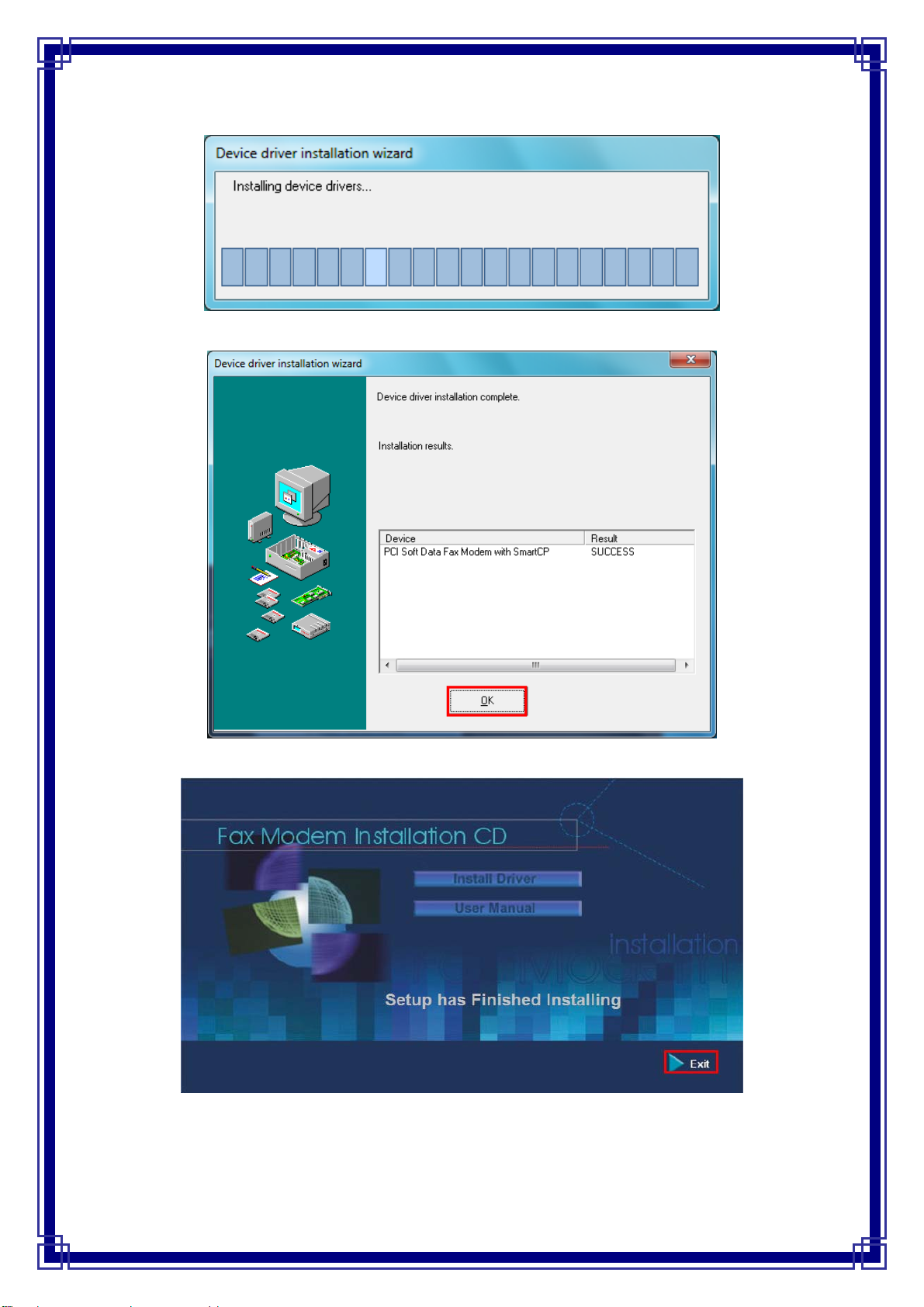
Step1:AfterclickInstallDriver,Setupwizardwillshowbelowscreen.ClickOKtoinstallthe
modemdriver.
Step2:ClickInstalltocontinue.
9
Step3:Pleasewaitforwhileduringthemodemdeviceisinstalling.
Step4:ClickOKwhendevicedriverinstallationcomplete.
Step5:AfterSetuphasfinishedinstalling,clickExittoendtheprogram.
Step6:Tocheckifmodemisproperlyinstalled:Right‐Click“Computer”ontheDesktopÆ
Select“Properties”ÆChoose“DeviceManager”
Table des matières
Autres manuels Longshine Modem

Manuels Modem populaires d'autres marques

Davicom
Davicom DM562AP Manuel utilisateur

EpiValley
EpiValley TATA indicom SXC-1080 Manuel utilisateur

Zte
Zte WiMAX Manuel utilisateur

Intelimax
Intelimax MA-2060 Manuel utilisateur

SMC Networks
SMC Networks D3CM1604V Manuel d'utilisation et d'entretien

Telstra
Telstra Wi-Fi 4G Advanced Pro X Manuel utilisateur


US Robotics
US Robotics 3453C Manuel utilisateur

MaxTech
MaxTech Plug & Play Internal Voice/FAX/Data/SVD... Manuel utilisateur

Zte
Zte MF823 Manuel utilisateur

Four-Faith
Four-Faith F1403 Manuel utilisateur

Sierra Wireless
Sierra Wireless AIRLINK MP595W Manuel utilisateur

Gemtek
Gemtek WiMAX WIXFBR-103 Manuel utilisateur