
LG AC Smart II Manuel utilisateur

OWNER’S MANUAL
Please read this manual carefully before operating
your set and retain it for future reference.
P/NO :MFL62077720 www.lge.com
TYPE : AC Smart II (Advanced Control Smart II)
Option function manual
ENGLISH ITALIANO ESPAÑOL FRANCAIS DEUTSCH
NEDERLANDS
РУССКИЙЯЗЫК
繁體中文

2AC Smart II (Advanced Control Smart II)
AC Smart II (Advanced Control Smart II)
Content
Introduction to AC Smart II option function .........................................................................3
Characteristics of option function .....................................................................................3
Components of option function.........................................................................................4
Activation of option function .................................................................................................5
Web schedule function .........................................................................................................11
Managing schedule group ..............................................................................................12
Creating schedule pattern ..............................................................................................21
Applying schedule ..........................................................................................................38
Checking schedule .........................................................................................................46
Running/Stopping schedule............................................................................................49
Power consumption statistics function ..............................................................................51
Accumulative power consumption...............................................................................................................52
Monthly power consumption ........................................................................................................................55
Setting power consumption view condition ................................................................................................57
Saving power consumption information......................................................................................................59

Option function manual 3
Introduction to AC Smart II option function
Introduction to AC Smart II option function
AC Smart II additionally provides various convenient option functions for the users to sue. These
additional functions are provided in SD card format. When the user inserts the SD card to the main
unit of the AC Smart II, the option function can be activated and used.
The characteristics of the option function of AC Smart II are as follows.
■Web based schedule setting function
By using the web server function of AC SMART II, you can set and apply the schedule of AC SMART
II even from remote locations. The administrator can manage the schedule of AC SMART II through
the network free from where he or she is and reduce any unnecessary operations of the unit by using
the schedule functions.
■Power consumption statistics function
You can view the power consumption information of the air conditioner. The power consumption is
provided in various methods including total usage, usage by period, monthly/daily usage etc. By using
the statistics information, the administrator can effectively analyze and manage the energy usage.
To use the power consumption statistics function, the PDI and watt-meter to measure the power
consumption must be connected to AC SMART II.
Characteristics of option function
ENGLISH
Reference: Type of option function sold
The option functions can be sold in 2 types.
- Web schedule + Power consumption statistics function (PQCSE342A0)
- Web schedule function (PQCSE341A0)
If you have purchased only the Web schedule function, you cannot use the Power
consumption statistics function.

AC Smart II (Advanced Control Smart II)
4
Introduction to AC Smart II option function
The following components are included in the packaged box of AC SMART II option function as
shown below. Open the box of AC SMART II and check whether the applicable components are
included.
Quick guide Manual CD SD card (Option kit)
Components of option function

Option function manual 5
ENGLISH
Activation of option function
To use the operation function from AC SMART II, use the SD card provided in the box to activate the
function.
To activate the option function, proceed as follows.
1. To use the option function, insert the provided SD card into the SD card slot located at the bottom
of the AC SMART II terminal.
Insert the card having the part with the product name facing up as shown below. Push the card in
until you hear the ʻClickʼ sound.
2. With the AC SMART II terminal turned on, press the keyboard button and the software keyboard
will be displayed on the screen.
Activation of option function
Keyboard button
Software keyboard

Activation of option function
AC Smart II (Advanced Control Smart II)
6
3. After pressing the ʻCtrlʼ key from the software keyboard, press the ʻEscʼ key to display the menu on
the left side of the screen.
4. Select ʻProgram (P)ʼ ➠ʻWindows Explorerʼ from the menu.
When you press the
‘Ctrl’ and ‘Esc’ key, the
menu will be displayed
Select ‘Windows
Explorer’ from the
menu.

Activation of option function
Option function manual 7
ENGLISH
5. Windows Explorer will be displayed. Double click on the ʻSDMMC Cardʼ.
6. Double click on the ʻACSmartActivator.exeʼ file located within the SDMMC Card folder to execute
the file.
Double click on
‘SDMMC Card’ fo l der.
Double click on
‘ACSmartActivator.exe’ file.

Activation of option function
AC Smart II (Advanced Control Smart II)
8
7. ʻAC Smart Activatorʼ screen will displayed. Click on ʻActivate internal functionʼ button.
8. ʻPassword inputʼ screen will be displayed. Use the software keyboard to enter the service
administrator password and click on the [OK] button.
The service administrator password is set to ʻdigital21ʼ.
Click on [Activate
internal function]
button.
After entering the password,
click on the [OK] button.
Reference: Change language
When you select the language from the ʻLanguageʼ item, the text displayed on the AC Smart
Activator screen will change to the selected language.
Activation of option function
Option function manual 9
ENGLISH
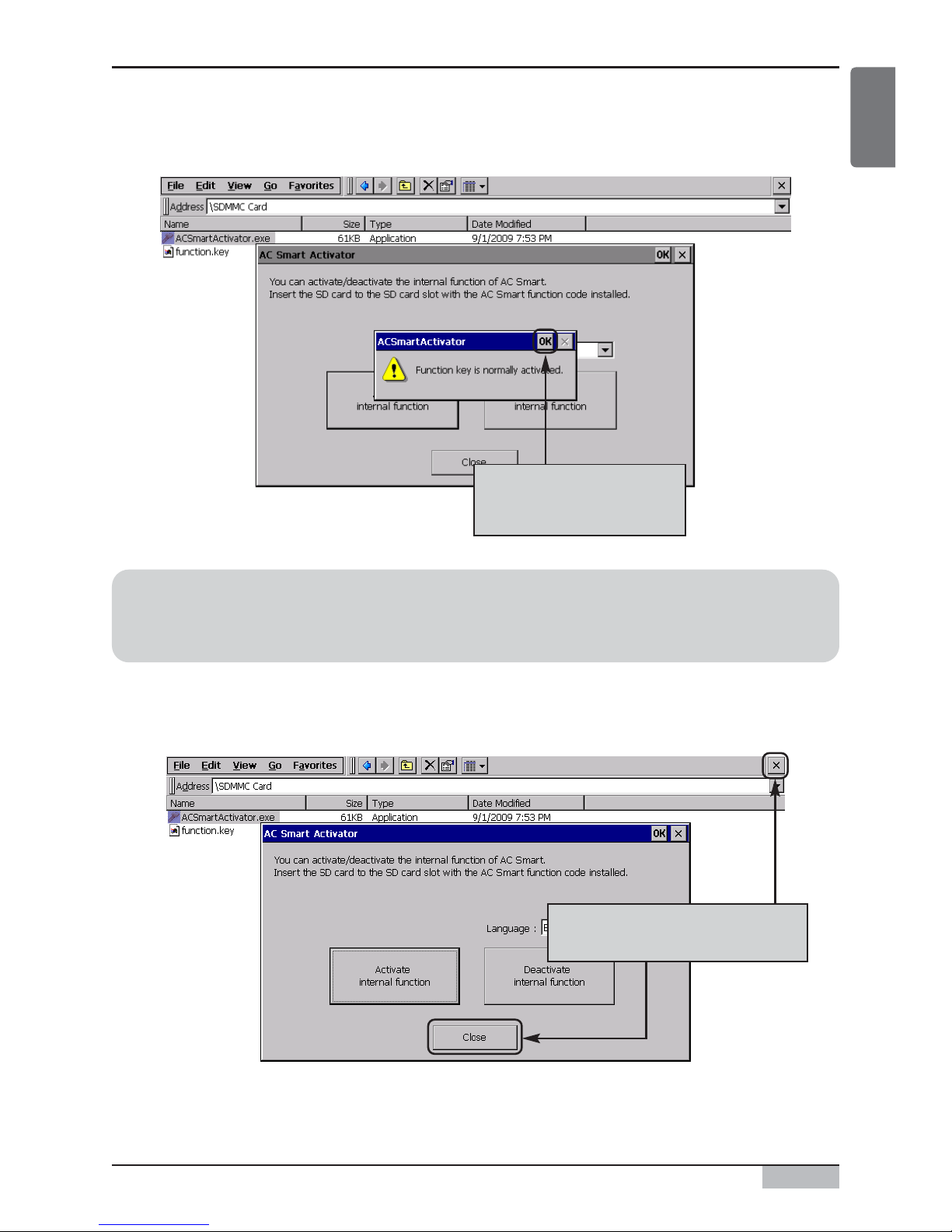
9. When you enter the password correctly, the message saying ʻFunction key has been successfully
activatedʼ will be displayed. Click on the [OK] button.
10. Click on the [Close] button of AC Smart Activator and then click on [X] button on the Windows
Explorer to end the applicable program.
When the message is
displayed, click on the
[OK] button.
Reference: Change language
When you select the language from the ʻLanguageʼ item, the text displayed on the AC Smart
Activator screen will change to the selected language.
Click on [Close] button and [X]
button to end the program.

Activation of option function
AC Smart II (Advanced Control Smart II)
10
11. It will return to the screen of AC SMART II. Check whether the option function is activated. For
example, connect to the AC SMART II web server function to check whether the schedule menu
can be set.
Check whether the schedule
menu can be set through the web
Table des matières
Autres manuels LG Terminal tactile


Manuels Terminal tactile populaires d'autres marques

Wincor Nixdorf
Wincor Nixdorf iPOS plus Advanced Manuel utilisateur

Ingenico
Ingenico AXIUM EX4000 Manuel utilisateur

Heisei Electronics
Heisei Electronics Q-POS 815 Manuel utilisateur

Amano
Amano MTX-15 Manuel utilisateur

FLOWBIRD
FLOWBIRD CWT Compact Touch Manuel utilisateur

Demco
Demco SP7 Manuel utilisateur


