
Leaptronix SU-320 Manuel utilisateur

User's Manual
SU-320 & SU-3280

User's Manual
Content
Chapter 1 Product Overview ………………………… 1
Chapter 2 Safety Information ……………………… 1
Chapter 3 Appearance Description ……………… 2
3–1 SU-3280 Front Panel ………………………………………… 2
3–2 SU-3280 Side Panel …………………………………………… 2
3–3 SU-320 front Panel …………………………………………… 3
3-4 SU-320 Side Panel …………………………………………… 3
Chapter 4 Stand-along Operation ………………… 4
4–1 Turn on Page ………………………………………………… 4
4–2 System Mode Selection ……………………………………… 4
4–3 Project List …………………………………………………… 4
4–4 Project Information ………………………………………… 5
4–5 Project Execution & Option ………………………………… 5
4–6 IC Processing ………………………………………………… 6
4–7 IC Status on Socket …………………………………………… 6
Chapter 5 PC Software Operation ………………… 7
5–1 Installation …………………………………………………… 7
5–2 Software Interface …………………………………………… 8
5−2-1 Main Page ……………………………………………… 8
5−2-2 IC Status on Socket …………………………………… 10
5−2-3 Project Manager Pagee ………………………………… 12
5−2-4 Options Setting Page ……………………………………12
Chapter 6 Tutorial ………………………………………… 17
6–1 PC Software Operation ……………………………………… 17
6–2 Stand-along Operation ……………………………………… 21

User's Manual
– 1 –
SU-3280/320 is made for high speed programming for engineering design and small &
mass production. It supports PC-based and Stand-along programming modeswhich through
LCD and keypad download the file to the inside 3.2GB memory. Moreover, SU-3280/320 adopts
modular design. With the universal DIP module, you can just use general type adapter on the market
for different package.
All of the operation, maintenance and service must adhere to the following safety
notes. We will not be responsible for any unexpected results caused by misuse.
Chapter 1 Products Overview
Chapter 2 Safety Information
1. Please turn off the power when changing the socket module. Be careful when removing the
original socket module. You must pay attention to the direction of insertion. Moreover, check
the pins situation of connectors . Make sure everything is OK, and then turn on the power
again.
2. Socket module is consumable. The IC insertion times, delicate operation, and IC surface
cleanliness all affect the quantity of contact between the socket and DUT IC and
programming quantity. When the programming fail rate increases significantly, you need to
check whether it's time to replace the socket module.
3. When programming, the programer will provide specific voltage, and if IC is misplaced or
you select the wrong IC part no, it may will damage the IC.
4. For OTP (one time programming) ICs, as they can not be programmed again, please must
be careful when operating.
5. Please pay attention to the master file version and parameter settings and
programming procedures.
6. For each new production order, must do on-board test to avoid misuse of the master file.
7. During mass production, please do random IC inspection, including programming file,
parameter setting, security setting, and certain block setting.
8. It's recommended that the operator is well trained on the operation procedures.
9. Under the warranty, please do not repair or maintain on your own unless receiving our
permission.
User's Manual
– 2 –
10. If any problem, pleas stop programming at once.
11. We will disclaim any responsibility for any loss or damage because of the above misuse.
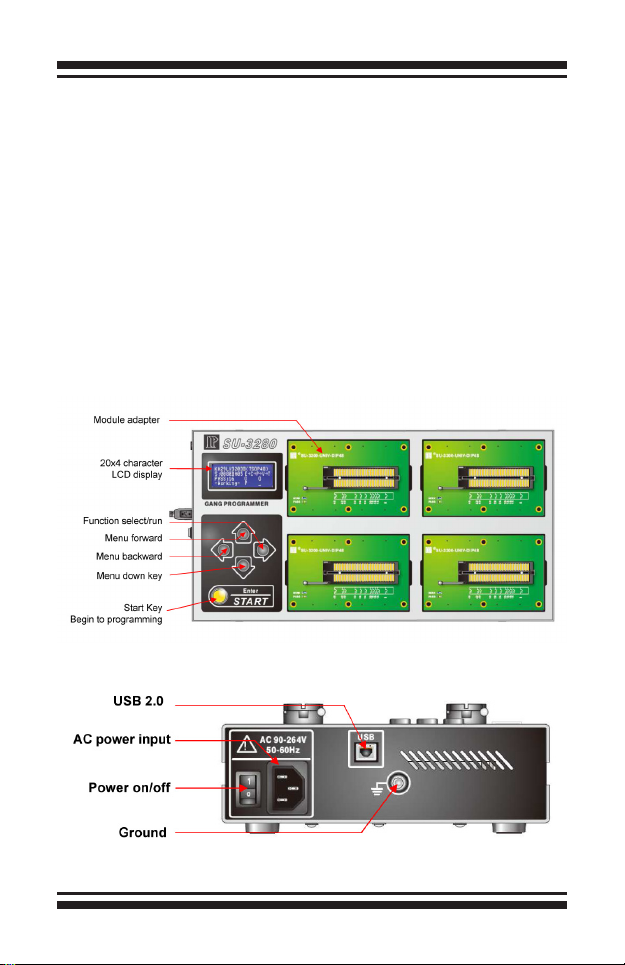
Chapter 3 Appearance Description
3-1 SU-3280 Front panel
3-2 SU-3280 Side Panel
User's Manual
– 3 –
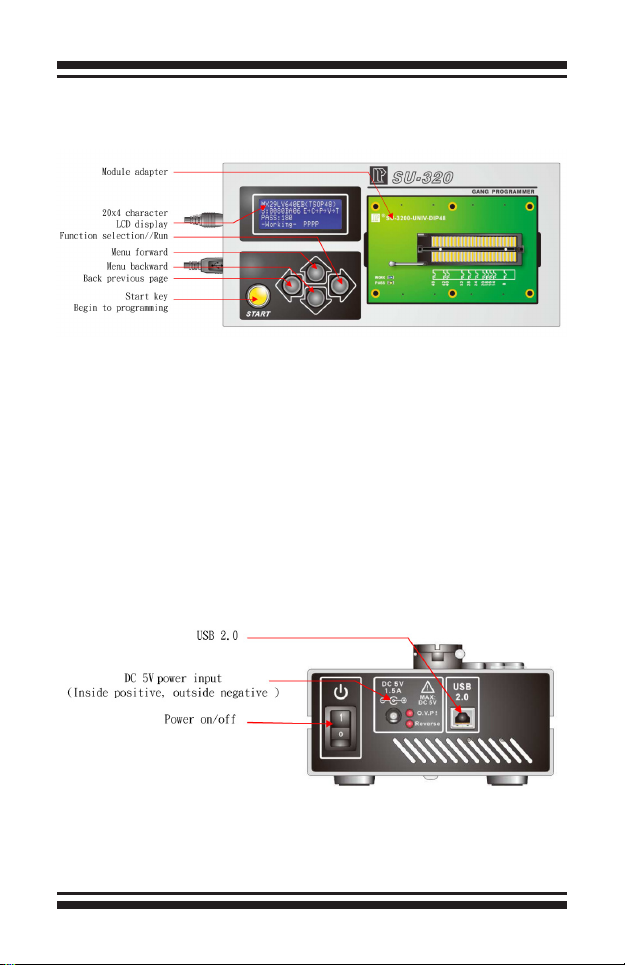
3-3 SU-320 Front panelr
3-4 SU-320 Side Panel

User's Manual
– 4 –
Chapter 4 Stand-alone Operation
4-1 Turn on Page
4-2 System Mode Selection Page
4-3 Project List
▲
◄►
►
[▲]/[▼] Up/down
[►] Select current item
SU-3280 Ver:1.0
►01.Project Select
02.Link to PC
SATRT
Line 1: GANG PROGRAMMER—Product description.
Line 2: Product model, SU-3280-- 4 socket modules, support IC up to 16.
SU-320-- 1 socket module, support up to 4 ICs.
Line 3: Show the system version and published date.
Line 4: Press any key to system mode selection page.
Line 1: Model name and Version.
Line 2: Execute Project select function
Line 3: Via USB to PC, execute remote function.
You can save up to 20 project File on SU-3280/320.

User's Manual
– 5 –
4-4 Project Information
4-5 Project Execution & Option
Line 1: Project name within 16 characters. You can save up to 20 project files on the menu with the
total limit 2GB.
Line 2: Part no. 20 characters at most.
Line 3: The master le check sum, 8-digit HEX.
Line 4: Programming procedure, Erase/Blank Check/Program/Verify/Protect
Line 1: Part no.
Line 2: 01. Run All - Execute programming procedure. Need to press Start button every time.
Line 3: 02. Auto Run – Execute auto run. Just press Start button once, after that, once new IC
is inserted, it will automatically start.
Line 4: Clear counter for the Pass quantity.
Line 5: Set the sensitivity of IC insertion for 'Auto Run' function

User's Manual
– 6 –
4-6 IC Processing
Line 1: IC part no.
Line 2: Check sum, programming procedure.
Line 3: PASS COUNTER, T9~T12 status, T13~T16 status
Line 4: Working Status, T1~T4 status, T5~8 status
4-7 IC Status on Socket
T1~T16( or T1~T4) Status symbol:
E→C→P→V→T: IC process, Erase/Blank Check/Program/Verify/
Protect
〝-〞 Socket Enable
〝 〞 Socket Disable
〝√ 〞 Under Auto Run, new IC placed properly
〝?〞 Under Auto Run, new IC pin scan FAIL
〝O〞 PASS, IC still on the socket.
〝o〞 PASS, IC taken off
〝X〞 Process fail, IC still on the socket.
〝x〞 Process fail, IC taken off

User's Manual
– 7 –
Chapter 5 PC Software
5-1 Installation
Please make sure the Universal IC Writer II and DataBase have been installed.
When installing SU-320 USB drivers, you will need to install 2 times. When installing
SU-3280, you will need to install 5 times. The USB drivers will be placed on the USBDrv
automatically as the image below shows. For SU-320, it will only show one Universal IC Writer
II.

User's Manual
– 8 –
5-2 Software Interface
5-2-1 Main Page
Software name and version
Project icon
Option icon
Current project name
Current model name
Project le information
Ce manuel convient aux modèles suivants
1
Table des matières
Manuels Carte mère populaires d'autres marques


Telit Wireless Solutions
Telit Wireless Solutions SL869-3DR Manuel utilisateur

Gigabyte
Gigabyte GA-9IVDT Manuel utilisateur

Texas Instruments
Texas Instruments ADS8372EVM Manuel utilisateur

Commell
Commell MS-C73 Manuel utilisateur

IBT Technologies
IBT Technologies MB860 Manuel utilisateur

Nvidia
Nvidia TEGRA DG-04927-001_V01 Manuel utilisateur


