
Lanoptik HD52H Manuel utilisateur
LANOPTIK TECHNOLOGIES LTD
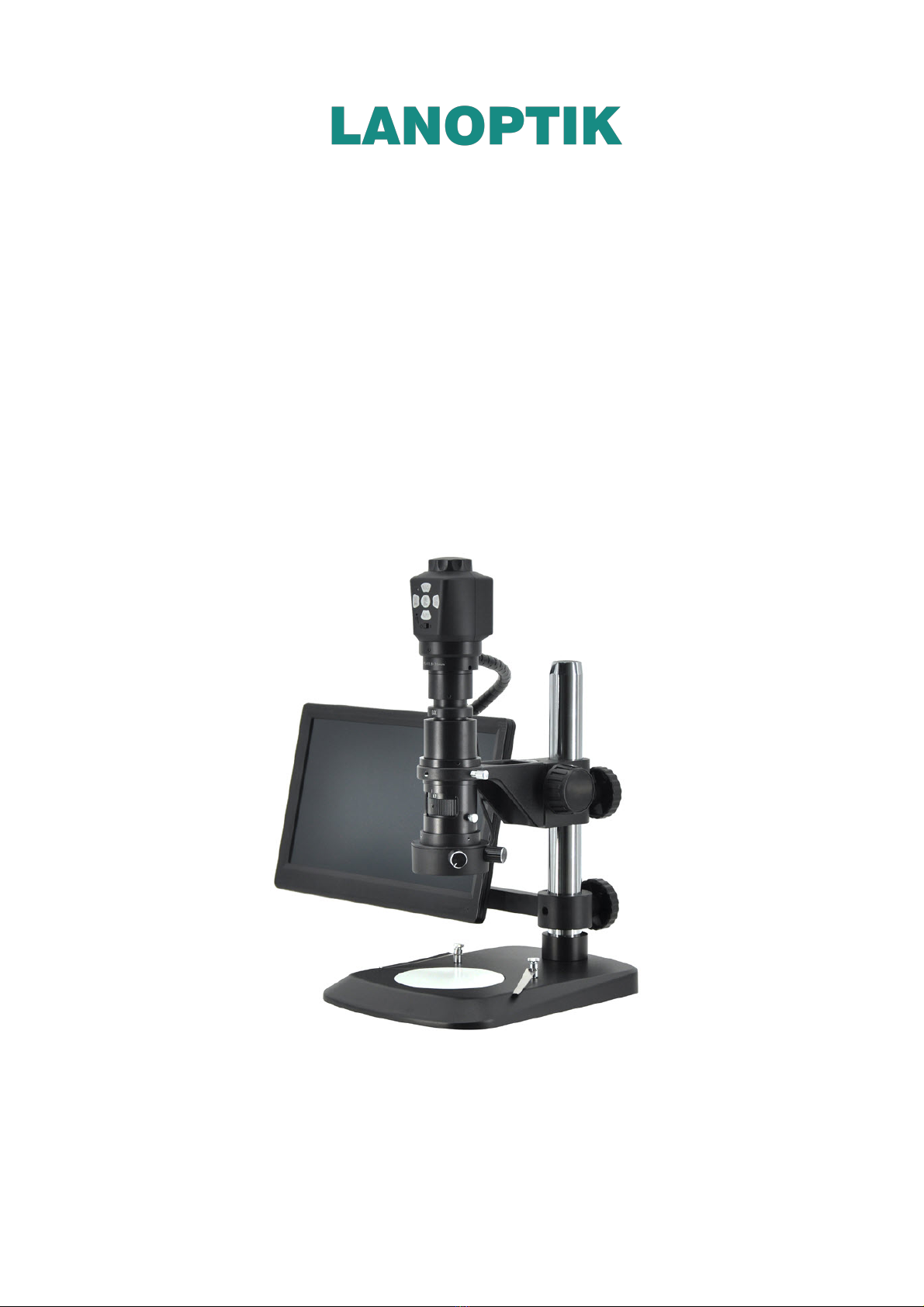
HDMI Digital Microscope
HD52H
User Manual

HD52H User Manual
Content
CHAPTER 1 NOTES AND SAFETY REQUIREMENTS ------------------------------------ 1
- 1.1 Cautions and Notes ------------------------------------------------------------- - 1
CHAPTER 2 PACKING LIST ------------------------------------------------------------ 2
CHAPTER 3 FUNCTION INTRODUCTION OF EACH PART----------------------------- --3
3.1 Name and Function for Each Part of Microscope ----------------------------------- 3
3.2Accessory Introduction ------------------------------------------------------------ - 5
CHAPTER 4 INSTALLATION GUIDE -------------------------------------------------- --6
4.1 Methods of application of electron microscope -------------------------------------6
CHAPTER 5 DIGITAL CAMERA INSTRUCTIONS ---------------------------------------- 8
5.1 Instruction of manual focusing knob on the top of the digital camera ------------ -- 8
5.2 Introduction of buttons functions -------------------------------------------------- -8
1) Picture -------------------------------------------------------------------------- -8
2) Record -------------------------------------------------------------------------- -9
3) Playback ------------------------------------------------------------------------ -9
4) Freeze ---------------------------------------------------------------------------10
5) Menu Setup----------------------------------------------------------------------10
6) Exposure Setup ------------------------------------------------------------------10
7) White Balance Adjustment -------------------------------------------------------11
5.3 Read TF card ----------------------------------------------------------------------12

HD52H User Manual
www.lanoptik.com
- 1 -
Chapter 1 Notes and Safety Requirements
1.1 Cautions and Notes
(1) To avoid danger or damage incurred to the lens, do not touch the lens
or sensor directly with your fingers.
(2) To avoid failure or electric shock hazard and so on, do not disassemble
or modify the internal structure of the device.
(3) Do not plug in or unplug the Power connection port when hands are wet.
(4) Do not use alcohol and other organic solvents to clean.
(5) If the lens or sensor is dirty or damp, you should better use dry
and non-linen fabric or professional lens tissue to wipe them. To
avoid scratches on the surface, do not touch the lens with your fingers.
Wipe the lens or sensor lightly.
(6) The products are not specifically designed for an outdoor use. Do
not expose it to outdoor environment without any protection.
Excessive temperature and humidity will damage the lens. Please
avoid using the product under the following environment: high
temperature or high humidity environment, places with direct
sunlight, dirt or vibration and places near heat source.
(7) Please use and store in the following environment:
Operating temperature :0℃~ 40℃
Storage temperature:-20℃~ 60℃
Operating Humidity:30~60%RH
Storage Humidity:10~80%RH
(8) If any foreign matter, water or liquid enter into the device by
accident, disconnect the Power line immediately. Please send it to the
maintenance center and do not use the hair dryer to dry it by yourself.
(9) To prevent microscope from being tripped over or dropped, please
put away the device's connect cable in use or standby.
(10) To avoid electric shock by accident, please power off microscope
before you move your display or equipment.
(11) The cleanliness of the device lens will directly affect clarity degree
of contents from the computer screen during preview. Problems like
various circles or spots on the screen may mostly be incurred by dirt
on the lens. When cleaning, please use professional lens tissue or
other professional detergent to clear the dirt on the lens.

HD52H User Manual
www.lanoptik.com
- 2 -
Chapter 2 Packing List
1.Main body 2. Monitor 3. Monitor bracket
4. AC/DC adapter5. HDMI cable6. USB cable
7. Reset pin8. Installation disk9. Screwdriver
10. Installation Guide 11. Wired controller (optional accessories)

HD52H User Manual
www.lanoptik.com
- 3 -
Chapter 3 Function Introduction of Each Part
3.1 Name and Function for Each Part of Microscope

HD52H User Manual
www.lanoptik.com
- 4 -
1. Focus knob
2. Buttons
3. Switch
4. Monocular microscope
Rotate the knob to implement the focus function; Rotate
clockwise: back focal length decreases and object
distance increases;
Rotate anticlockwise: back focal length increases and
object distance decreases.
In HDMI mode, 5 buttons can match to each other to
achieve different functions.
Put the switch to right: turn on the digital camera; put
the switch to left: turn off the digital camera.
Electronic eyepiece adopts standard C port. You can
adjust the magnification ratio of the microscope
according to requirements to realize object observation
under different magnification ratio.
For fixing the monocular microscope.
Adjustment range 0.7-5 times.
Aluminum alloy base with scratch-resistant film on the
surface.
Connect to the monitor with HDMI cable for signal
transmission.
Press and hold for more than 3 seconds to restore
factory settings.
Connect to the adapter with USB cable to supply power
for digital camera.
The location of TF card, photos and videos will be stored
in TF card.
Twist the bracket hand-wheel to adjust the height
accurately and realize the fine adjustment of the object
distance to make the image clearer.
Clockwise twist: turn on the diffuse reflectance light/
strengthen the diffuse reflectance lightness.
Anticlockwise twist: weaken the diffuse reflectance
lightness/turn off the diffuse reflectance light.
Clockwise twist: turn on the coaxial light/strengthen
coaxial lightness. Anticlockwise twist: weaken the
coaxial lightness/turn off the coaxial light.
Through adjusting the tightness of the fastening screws
to move the bracket quickly on the column and fix the
bracket on the column.
Lock the height of the Monitor.
5. Manual screw
6. Magnification adjustment
ring
7. Base
8. HDMI port
9. Reset
10. USB interface
11. TF card slot
12. Bracket handwheel
13. Adjustment button of
the diffuse reflectance light
14. Adjustment button of
the coaxial light
15. Fixed bolt
16. Fixed bolt

HD52H User Manual
www.lanoptik.com
- 5 -
17. Monitor switch
18. USB power supply interface
19. HDMI interface
20. Power interface
21. Shaft
22. Wired controller interface
When the switch is turned up, the monitor is turned on;
when the switch is turned down, the monitor is turned
off (the digital camera stops working after the monitor
is turned off)
It is a 5V 2A power output interface, provide power to
digital camera through USB cable.
Connect to the digital camera through HDMI cable to
receive the signal from digital camera.
Power supply to the monitor.
Support rotation and tilt of the monitor
Connect to the wired controller which is an optional
accessory to adjust parameters of the monitor.
3.2 Accessory Introduction
USB cable The digital microscope can be
powered by connecting to the
adapter.
HDMI cable
Power adapter
Wired
controller
(optional
accessories)
Connecting the digital microscope to
and monitor to achieve signal
transmission between digital
microscope and monitor.
Connect and supply power to the
monitor.
Connect to the monitor and adjust its
parameters.

HD52H User Manual
www.lanoptik.com
- 6 -
Chapter 4 Installation Guide
4.1 Methods of application of electron microscope
1. Monitor Assembly:
1)Screw out four screws on the column.
2)Fix the monitor on the column with the loose four screws.
Image 2:
Place the monitor on the column
and pay attention to the correct
placement direction of the monitor.
Image 3:
Fix the monitor
2. Bracket connections:
1) Lock the square column with monitor on the round column, shown as image 5
2) Lock the optical imaging parts (camera, lens, LED light) with bracket to the column,
shown as image 6
Image 4 Image 5 Image 6
Image1:
Screwoutfour screws

HD52H User Manual
www.lanoptik.com
- 7 -
3. Cable connections:
1) Connect the camera to the monitor with HDMI and USB cables, shown as image 7,
connect LED light to monitor with USB cable.
2) Power the monitor with the socket of AC 110-240V, shown as image 8.
Image 7 Image 8
4. Start to use:
1)Turn on the monitor, shown as image 9
2)Turn on the camera, shown as image 10
3)Adjust the focal length on the top of camera, shown as image 11
Image 9 Image 10 Image 11

HD52H User Manual
www.lanoptik.com
- 8 -
Chapter 5 Digital camera Instructions
5.1 Instruction of manual focusing knob on the top of the
digital camera
1. Connect the relevant accessories such as digital microscope and monitor, etc. (For
detailed operation, please refer to Chapter 4)
2. Switch the toggle key to status of power on.
3. Rotate the manual focusing knob clockwise or anti-clockwise to adjust the eye height
until the image is clearly displayed.
(1) Clockwise: BFL gets shorter, object distance increases, magnification
decreases.
(2) Anti-clockwise: BFL gets longer, object distance decreases, magnification
increases.
a) 5 buttons are set on the machine body.
b) Short press refers to press time 0.2s~1s. Long press refers to press time more than
2s or above. (Without special reference, press below all means short press).
c) For 10 seconds without operation, the system will automatically hide the icon on the
desktop on the screen for users to watch the video more conveniently. Users can
press any button to wake up the desktop icon. (The following operations are performed
after waking up the desktop icon)
d) Zoom in button, the maximum magnification ratio: x4. Zoom out button can only be
available when being zoomed in first.
e) The highest resolution picture is 2304x1536.
f) Record: when connect with HDMI cable, the highest resolution of recording is
1280x720.
The top right corner icon “ ” displays for photo mode(Press button, and
switch to Photo Mode). Please ensure insert the TF card before operation, press
button for picture capture. Pictures will be automatically saved into the
Photo folder under TF card of Microscope folder.
5.2 Introduction of buttons functions
1) Picture
Table des matières
Autres manuels Lanoptik Microscope


Manuels Microscope populaires d'autres marques




VWR
VWR VisiScope 384 Series Manuel utilisateur

Nikon
Nikon ECLIPSE E200 POL Manuel utilisateur

Leica
Leica DI C800 Manuel

ThermoFisher Scientific
ThermoFisher Scientific Continuµm Manuel utilisateur

ThermoFisher Scientific
ThermoFisher Scientific Continuµm Manuel utilisateur
Olympus
Olympus SZ61 Manuel utilisateur