
ITS Telecom CGW-T4 Instructions de montage

CGW-T4
March 2009
Installation and
Operation Guide
Release 1.02

CGW-T4 Installation and Programming Manual
- 1 -
CGW-T4
Installation and Programming Manual
Pre-Release 1, Revision 1, September 2008 (Preliminary version)

CGW-T4 Installation and Programming Manual
- 2 -
NOTICE
This manual describes the CGW-T4 Analog GSM/CDMA Cellular Gateway.
Additional copies of this manual may be obtained from ITS. No part of this document may be reproduced or
transmitted in any form, by any means (electronic, photocopying, recording, or otherwise) without the prior
written permission of ITS.
ITS reserves the right to modify the hardware and software described in the manual without prior notice.
However, changes made to the hardware or software described does not necessarily render this publication
invalid.
WARRANTY
In the event that the product proves to be defective in workmanship or materials within a period of one year
from date of shipment, ITS shall repair or replace the product at its discretion. Transportation will be the
responsibility of the dealer/distributor.
Under no circumstances shall ITS be liable for consequential or special damages, loss of revenue or
user/dealer expenses arising out of or in connection with the use or performance of the product,
whether based on contract, tort, or any other legal agreement.
The following shall void the above warranty: malfunctions resulting from fire, accident, neglect, abuse, or acts of
God; use of improper electrical power; or repair of, tampering with or alteration of the product by anyone other
than ITS authorized personnel.

CGW-T4 Installation and Programming Manual
- 2 -
Table of Contents
1Introduction ......................................................................................................................................................3
1.1 Main Features ..............................................................................................4
1.2 Contents ......................................................................................................4
2Physical Description ........................................................................................................................................5
3Pre-Installation .................................................................................................................................................6
3.1 GSM Cellular Channels..............................................................................6
3.2 CDMA Cellular Channels............................................................................6
4Installation ........................................................................................................................................................7
4.1 SIM Card Insertion into the Unit (GSM channels only) ............................7
4.2 CGW-T4 Installation....................................................................................8
5LCD Status Indicators and Diagnostics .......................................................................................................9
5.1 CGW-T4 LCD Status Indicators and Diagnostics ......................................9
6DTMF Programming ......................................................................................................................................11
6.1 DTMF Programming Commands .............................................................12
7Technical Data ................................................................................................................................................15
7.1 CGW-T4 Channels for GSM Network .....................................................15
7.2 CGW-T4 Channels for CDMA Network ..................................................16

CGW-T4 Installation and Programming Manual
- 3 -
1Introduction
Your new CGW-T4 is an analog 4 ports GSM/CDMA Cellular Gateway, a cost reduction tool
for mobile-to-landline and landline-to-mobile calls. It connects from the trunk interface
(analog FXO) of your PBX to a GSM network (via the inserted SIM card) or to a CDMA
network (by the built-in CDMA engine), eliminating the excessive interconnection fees and
significantly cutting your telephone costs.
The Automatic Route Select table (ARS) in the PBX defines which calls will be automatically
routed via the CGW-T4 to the predefined GSM/CDMA network. In doing so, the CGW-T4
gateway reduces the company’s telephone costs.
Integrated with the PBX analog trunk interface CGW-T4 provides Reverse Polarity and Loop
disconnection signaling for to release disconnected call.
Installation of the CGW-T4 does not require special skills. Simply insert the SIM card (GSM
networks only), connect the unit to the PBX trunk interfaces, attach the antennas and power
supply, and your CGW-T4 can immediately start saving money for you. The unit has an LCD
display for each channel, which shows the GSM/CDMA operator’s name, the signal strength
and other useful call progress information.
A number of additional parameters for the CGW-T4, such as Output Audio Volume level
setting, Conversion time-out and Restricted Digits, can be programmed via DTMF separately
for each channel.
The CGW-T4 unit displayed in Figure 1.
Figure 1. CGW-T4 Devices

CGW-T4 Installation and Programming Manual
- 4 -
1.1 Main Features
The following is a list of Main Features of the CGW-T4 GSM/CDMA gateway:
Integrated dual-band GSM module (900/1800, 850/1900 MHz) or Integrated dual-
band CDMA module (800/1900 MHz)
4 Built-in LCD’s for each cellular channel
•Signal strength indicator
•Cellular operator name indicator
•Operational status
DTMF programming
•Administrator password protection
•Call Barring (Toll Restriction)
•Maximum number of digits allowed to dial
•Conversation Time-Out
•Reverse polarity signaling support
•Audio Volume control
•Roaming Control (GSM only)
•CLIR/CLIP (GSM only)
Supports DTMF dialing
4 Line interfaces, 2-wire (RJ-11 connectors)
Plug & Play installation
High voice quality
Maintenance free
1.2 Contents
The contents of your CGW-T4 package are as follows:
No. Item Qty.
1. CGW-T4 device 1
2. CD with Installation and Operation Manual 1
3. Power Supply
(Input: 110VAC, 60Hz or 220VAC, 50Hz)
(Output: 9VDC, 5A)
1
4. SMA Cellular 2,5 dB Antenna (with cable) 4
5. RJ-11 telephone cable 4
6. Metal brackets for the 19-inch rack or wall mounting 2
7. Screws and plugs for mounting 4
CGW-T4 Installation and Programming Manual
- 5 -
2Physical Description
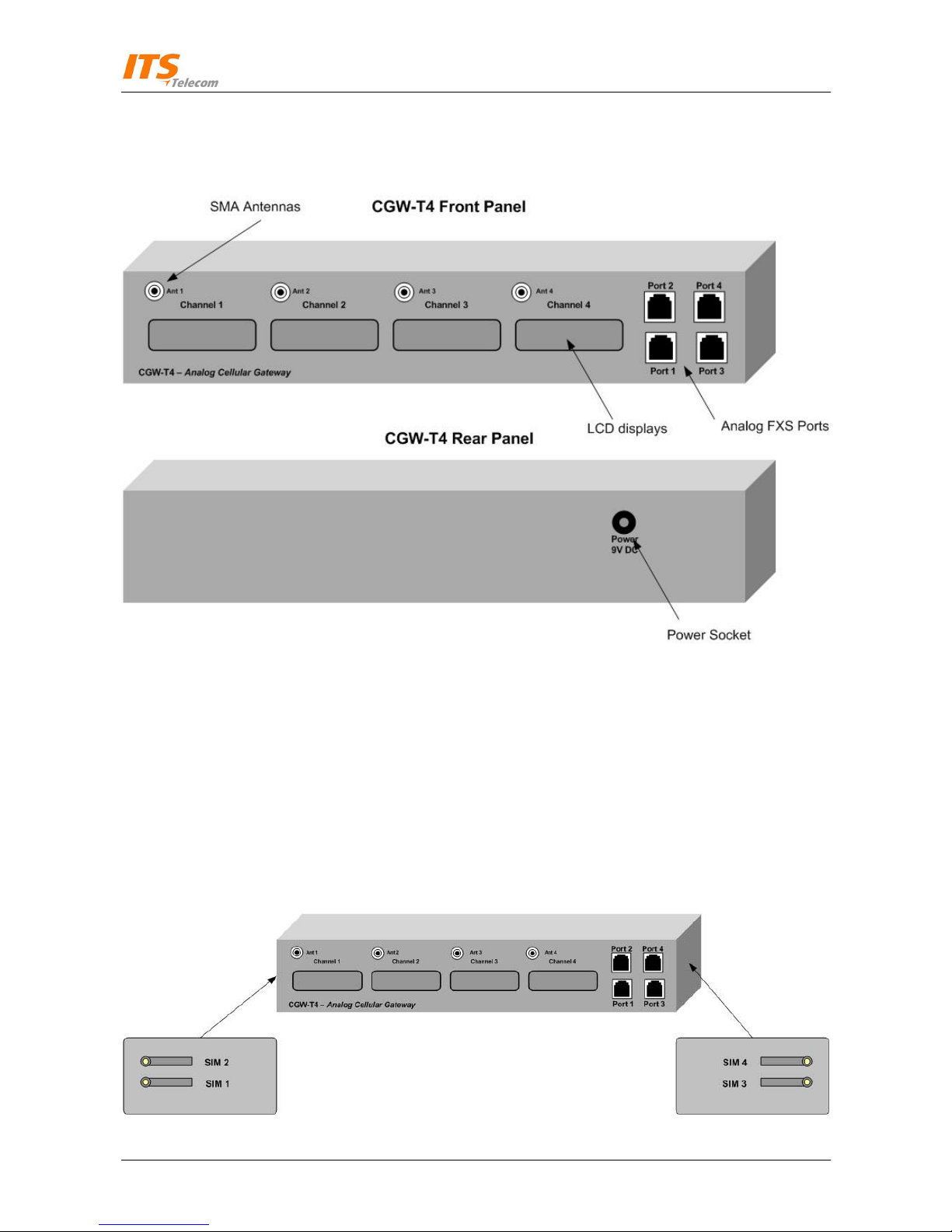
The physical features of the CGW-T4 are detailed in Figure 2.
Figure 2. CGW-T4 Physical Description
CGW-T4 front panel includes :
FXS analog telephone interfaces RJ-11 sockets
LCD displays for each cellular channel
Cellular Channel’s SMA antennas
CGW-T4 rear panel includes:
The Power supply socket
CGW-T4 side panel’s includes 2 pairs SIM card holders.
Figure 3. SIM cards holders

CGW-T4 Installation and Programming Manual
- 6 -
3Pre-Installation
3.1 GSM Cellular Channels
The CGW-T4 unit contains a GSM engines. It therefore needs a SIM cards from the local GSM
network providers. Its registration to the GSM operator is similar to the registration of a
mobile GSM phone.
3.2 CDMA Cellular Channels
The CGW-T4 (CDMA) contains a CDMA engine that needs to be activated via a local CDMA
network provider. You register the engine the way you would normally register a mobile
CDMA phone.
NOTE
It is recommended that you disable all call forwarding modes (in the events of
busy, absence, unavailability, etc.) and Call Waiting from the GSM/CDMA
operator, before installing the SIM card (GSM network), or activating the
CDMA unit.

CGW-T4 Installation and Programming Manual
- 7 -
4Installation
4.1 SIM Card Insertion into the Unit (GSM channels only)
1
CAUTION
To avoid damage to the CGW-T4 unit, disconnect the 9V adapter from the
electric power outlet.
The physical description of the unit can be used as guideline for the following steps:
SIM card’s holders can be found on the right and left lateral surfaces (See Figure 3 ). Each SIM
card holder marked with the corresponded cellular channel’s number
Using a screwdriver, push the yellow SIM release lever, so that the SIM card tray moves
towards you.
Take out the tray. You will see that the SIM card fits in the tray in one way only.
Carefully place the tray with the SIM card in the slot and slide it in with the SIM card contacts
facing down.

CGW-T4 Installation and Programming Manual
- 8 -
4.2 CGW-T4 Installation
To install the CGW-T4 unit, perform the steps as follows:
Mount the CGW-T4 unit in the 19-inch rack or on the wall by using installation brackets
or place the unit on the horizontal surface.
Connect the antennas into the ‘Ant.’ SMA connectors on the front panel of the CGW-4
unit.
Connect the analog trunk interface of the PBX to the port sockets on the front panel of
the CGW-T4 unit.
Connect the power supply to the CGW-T4 unit. The unit will start the initialization and
registration. At the end of the process, the LCD’s will display the signal status of each
cellular channel.
NOTE
Adjust the antenna location until an optimal signal level is received. The signal
level indicates on the LCD display.
Figure 4. CGW-T4 Schematic Setup displays the schematic setup of the CGW-T4 unit.
PBX
PBX
extensions
PBX analog
Trunk interfaces FXS Analog
Phone
Wall Power
Figure 4. CGW-T4 Schematic Setup
Table des matières
Autres manuels ITS Telecom Porte

ITS Telecom
ITS Telecom CelluLine CGW-T Instructions de montage

ITS Telecom
ITS Telecom CGW-D Mode d'emploi

ITS Telecom
ITS Telecom CGW-I Mode d'emploi
ITS Telecom
ITS Telecom CGW-T Instructions de montage

ITS Telecom
ITS Telecom CGW-D Manuel utilisateur

ITS Telecom
ITS Telecom CelluLine CGW-TS Instructions de montage
Manuels Porte populaires d'autres marques

LST
LST M500RFE-AS Manuel utilisateur

Kinnex
Kinnex Media Gateway Manuel utilisateur

2N Telekomunikace
2N Telekomunikace 2N StarGate Manuel utilisateur

Mitsubishi Heavy Industries
Mitsubishi Heavy Industries Superlink SC-WBGW256 Manuel utilisateur

ZyXEL Communications
ZyXEL Communications ZYWALL2 ET 2WE Manuel utilisateur

Telsey
Telsey CPVA 500 - SIP Manuel utilisateur


