
iRoom surDock-mini Manuel utilisateur

MANUAL
surDock-mini/-iPad10/11/12.9
EnglishDeutsch
intelligence. on.
iRoom surDock 2020 Lineart
iRoom surDock with device
iRoom surDock without device
iRoom surDock simple

Page 2
intelligence. on.
Package Content
• surDock Aluminum Base (1x)
• surDock Glass Bezel (1x)
• Security Screw (2x)
• Heavy Duty Rubber Band (2x)
• Installation Instructions (1x)
• Sucker (1x)
• Allen Key for Security Screws (1x)
• Power Supply High or Low voltage (1x)
• Adapter USB-A to USB-C (1x) - only included with surDock models
for iPads with a USB-C charging port
Introduction
Thank you for purchasing iRoom‘s surDock (surface-mount on-wall docking station).
This MANUAL is designed to guide you through the hardware installation.
The warranty terms are also included in this MANUAL.
For FAQ‘s or user manuals in other languages, please visit: www.iRoomiO.com
ENGLISH
Page 3
for iRoom‘s surDock
MANUAL
Important Information
All connection and installation work must be conducted by certified electricians in compliance with the general rules and directives for electri-
cal installations. The surDock has a smooth and shiny surface which is prone to scratches. Handle with care to avoid damage. We recommend
wearing soft cotton wool gloves during installation.
• Select a suitable place to mount the device.
• Do not install or use the surDock in wet or moist environments.
• The place chosen to mount the device must provide enough recess depth to allow use of the back box and the entry of the leads.
• Mount the device in a place that enables reception of a suitably strong Wi-Fi signal so that the iPad has Internet connectivity when it is
docked.
General Information
The surDock can be installed both vertically and horizontally.
Make sure that the wall mounting surface is level and smooth, so the surDock rests flat on the wall.
Description of Function
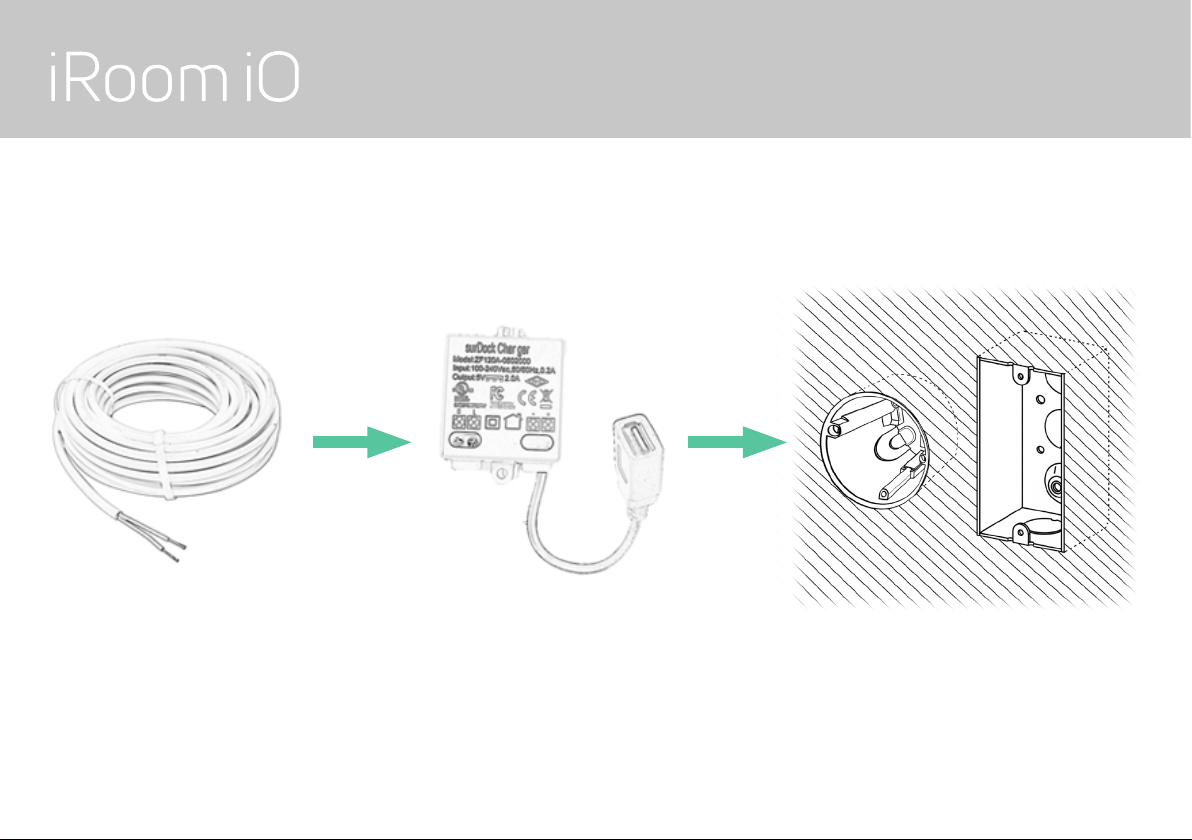
The surDock may only be used with a European standard electrical wall box or US Single gang wall box to secure mounting support.
Page 4
intelligence. on.
Preparing the Power Connection - Option 1: High Voltage
Connect the AC/USB converter to a 110-240 VAC power line and put it in the EU standard electrical wall box or US single-gang box.
This option requires a certified electrician for installation!

ENGLISH
Page 5
for iRoom‘s surDock
MANUAL
Preparing the Power Connection - Option 2: Low Voltage
1. Plug the included
primary power adapter
110-240 VAC to 36 VDC
into a power outlet.
2. If needed, run a 2-wire extension
cable (not included) from the 36VDC
output to the next converter.
3. Put the second converter (included) in the EU wall box or US single-gang
box and connect the extension cable from the primary power adapter.
CAUTION: Determine correct polarity!

Page 6
intelligence. on.
Installation
1. Feed the USB cable of the power supply through the round
opening of the surDock Aluminum base.
2. Screw the surDock Aluminum base to the EU standard electrical
wall box or US single-gang box. Don‘t tighten the screws before
aligned the Aluminum base horizontally or vertivcally depending
on what orientation of the surDock you choose.
3. Connect the original Apple charging cable to the USB port of the
included 110-240 VAC to 36 VDC power supply.
4. Connect the iPad to charging cable. If you install an iPad with
USB-C charging port use the included USB-A to USB-C adapter.
5. Put the iPad on the backside of the glass bezel and secure it
with the included rubber bands. Pay attention to correct positio-
ning of the rubber band clips.
6. Push the glass bezel into the aluminium base. Make sure you
do not damage the power leads. Ensure a proper locking of the
magnetic mounting system.
7. Use the two included security screws to secure the glass bezel
in order to protect the iPad from theft.
8. Switch on main power supply.
9. To remove the dock from the aluminium frame use the included
sucker.
Rubber Band Clips

ENGLISH
Page 7
for iRoom‘s surDock
MANUAL
Specifications iRoom’s surDock
Type surDock-mini / surDock-iPad10 / surDock-iPad11 / surDock-iPad12.9
Dimensions surDock-mini (WxHxD) 274mm x 175,4mm x 22mm / 10.8“ x 6.9” x 0.9”
Dimensions surDock-iPad10 & 11 (WxHxD) 305mm x 215mm x 22,5mm / 12.0” x 8.5” x 0.9”
Dimensions surDock-iPad12.9 (WxHxD) 359mm x 294mm x 22,5mm / 14.1“ x 11.6“ x 0.9“
Function Description Store & charge the iPad
Low Voltage Power Supply Primary: 100-240VAC to 36 VDC 1A. Secondary: 8-52 VDC to USB 5VDC/2A
High Voltage Power Supply Power Supply 100-240VAC to USB 5VDC/2A
Operating Temperature 0 - 35°C or 32 - 95°F
Operating Humidity 20% - 90% RH non-condensing
Cleaning
The product requires no special care, but only a regular cleaning of the glass. Do not use any abrasive/harsh cleaners
and unplug power supply before cleaning. For general cleaning of the surfaces please use a soft cloth with screen
cleaner. If possible frequently change the cloth so that no dust particles get stuck in the towel causing scratches.
!

Page 8
intelligence. on.
Electrical Safety Information
1.) Compliance is required with respect to voltage, frequency, and current requirements indicated on the manufacturer’s label. Connection to a
different power source than those specified may result in improper operation, damage to the equipment or pose a fire hazard if the limita-
tions are not followed.
2.) There are no operator serviceable parts inside this equipment. Service should be provided only by an authorized
service technician.
Protection against Theft
iRoom’s surDock comes with two security screws that secure the glass bezel in order to protect the iPad from theft. However, the security
screws do not provide any protection against theft. Unauthorized and/or forceful removal of the iPad cannot be prevented. iRoom GmbH does
not accept any liability for the theft of an iPad!
Limited Warranty
iRoom GmbH warrants that the product(s) furnished hereunder shall be free from defects in material and workmanship for a period of two (2)
years from the date of purchase made by the original end-customer or for a period of 3 years from the date of shipment by iRoom GmbH under
normal use and operation.
iRoom‘s GmbH sole and exclusive obligation and liability under the foregoing warranty shall be for iRoom GmbH, at its discretion, to repair or
replace any product that fails to conform to the above warranty during the above warranty period. The expense of removal and reinstallation of
any product is not included in this warranty. The warranty period of any repaired or replaced product shall not extend beyond its original term.

ENGLISH
Page 9
for iRoom‘s surDock
MANUAL
Returns
No Products will be accepted for replacement or repair without obtaining a Return Materials Authorization (RMA) number from iRoom GmbH
or during the warranty period, and the Products being received at iRoom GmbH facility freight prepaid in accordance with the RMA process
of iRoom GmbH. Products returned without an RMA number will not be processed and will be returned freight collect or subject to disposal.
Information on the RMA process and obtaining an RMA number can be found at: www.iRoomiO.com/support/warranty.
Warranty Conditions
The above warranty does not apply if the product:
1.) has been modified and/or altered, or an addition made thereto, except by iRoom GmbH, or iRoom GmbH
authorized representatives, or as approved by iRoom GmbH in writing;
2.) has been painted, rebranded or physically modified in any way;
3.) has been damaged due to errors or defects in cabling;
4.) has been subjected to misuse, abuse, negligence, abnormal physical, electromagnetic or electrical stress,
including lightning strikes, or accident.
5.) has been damaged or impaired as a result of using third party firmware;
6.) has no original serial number label, or is missing any other original label(s);
7.) has not been received by iRoom GmbH within 30 days of issuance of the RMA.
In addition, the above warranty shall apply only if: the product has been properly installed and used at all times in
accordance, and in all material respects, with the applicable Product documentation.

Page 10
intelligence. on.
iRoom GmbH
Ziegeleistrasse 13
5110 Oberndorf
Austria
Web: www.iRoomiO.com
Email: [email protected]
Phone: +43 6272 20628
©2010-2020 iRoom GmbH. All rights reserved.
FCC Compliance Statement
This equipment has been tested and found to comply with the limits for a Class B digital device, pursuant to part 15 of the FCC Rules.
RoHS/WEEE Compliance Statement
This symbol was placed in accordance with the European Union Directive 2011/65/EU on the Waste
Electrical and Electronic Equipment (the WEEE Directive). If disposed of within the European Union, this product should be
treated and recycled in accordance with the laws of your jurisdiction implementing the WEEE Directive.
Declaration of Conformity
Hereby, iRoom GmbH, declares that this iRoom GmbH device, is in compliance with the essential requirements and other relevant
provisions of Directive 2014/35/EU & 2014/30/EU.
Subject to changes at any time. The technical details and specifications do not equate to any form of guarantee.
All products mentioned protected by international copyright and patent laws.
Apple and iPad are registered trademarks of Apple Inc. Due to periodic product improvement, all features and specifications are subject to change without notice. The tablet is NOT part of the scope of delivery!
Ce manuel convient aux modèles suivants
9
Table des matières
Langues :
Autres manuels iRoom Station d'accueil

iRoom
iRoom iBezel Series Manuel utilisateur

iRoom
iRoom iDock Portrait Manuel utilisateur

iRoom
iRoom iDock Basic Manuel utilisateur

iRoom
iRoom iTop Manuel utilisateur

iRoom
iRoom fixDock mini Manuel utilisateur

iRoom
iRoom iTop OnWall Manuel utilisateur

iRoom
iRoom touchDock Manuel utilisateur

iRoom
iRoom iDock Basic Manuel utilisateur

iRoom
iRoom miniDock Manuel utilisateur

iRoom
iRoom iDock Landscape Manuel utilisateur


