
Inrevium TB-FMCL-USB30 Guide de l'utilisateur

Inrevium USB30 Startup Guide
1
Rev.2.00
inrevium USB30
Startup Guide
Rev.2.00

Inrevium USB30 Startup Guide
2
Rev.2.00
Revision History
Version
Date
Description
Publisher
Rev.1.00
2012/06/25
Initial release
Yoshioka
Rev.1.10
2012/12/20
Supported by Cypress FX3 SDK for Windows ver.1.2.1
Kiguchi
Rev.2.00
2014/09/29
Supported by Cypress FX3 SDK for Windows ver.1.3.1
Kiguchi
Please read this software license agreement carefully before downloading or using the Software. By
downloading the Software, you are agreeing to be bound by the terms of this software license. If you
do not agree to the terms of this software license, you may not download, install or use the Software.
Software License Agreement
Tokyo Electron Device Limited (“Licensor”) and Customer (“Licensee”) agree to the terms of this
software license as follows:
1. Licensor grants Licensee a nonexclusive license to use, copy, modify and distribute the
Software solely for development, production and sell of Licensee’s own products.
2. Licensee acknowledges that all title to the copyright and all other intellectual property
rights in and to the Software, its accompanying documentation and any copy made by
Licensee are the exclusive property of and remain with Licensor.
3. The Software is provided AS IS and without any warranty of any kind. In no event will
Licensor be liable to Licensee for any software problems (no obligation to render
technical support), infringement of any intellectual property rights, or any direct, indirect,
consequential, incidental damages or loss of profit arising out of the use of this Software
by Licensee or other third parties.
4. (1)Licensee shall not disclose any confidential information relating to Licensor’s
technical and marketing information on the Software (hereafter referred to as
“Confidential Information”). Licensee shall not disclose the Confidential Information
even within its organization except for authorized employees and the board
members.
(2)The Confidential Information does not include information which (a) is within the
public domain, (b) is already known to Licensee before the time it receives the same
from Licensor or disclosed by a third party as a matter of right and (c) is
independently developed by Licensee.

Inrevium USB30 Startup Guide
3
Rev.2.00
Table of Contents
1. Overview..................................................................................................................................................................................... 5
2. Design Development.............................................................................................................................................................. 5
2.1. Board.......................................................................................................................................... 5
2.2. Reference Document ................................................................................................................. 5
3. Distributed Data ...................................................................................................................................................................... 6
3.1. Distributed Data Structure.......................................................................................................... 6
4. Board Setup.............................................................................................................................................................................. 7
4.1. TB-7K-325T-IMG Jumper Settings............................................................................................. 7
4.2. TB-FMCL-USB30 Jumper Settings............................................................................................ 7
4.3. TB-7V-2000T-LSI Jumper Settings ............................................................................................ 8
4.4. TB-7VX-690/980/1140T-PCIEXP Jumper Settings .................................................................... 8
4.5. Board and Cable Connections ................................................................................................... 9
5. FPGA Configuration.............................................................................................................................................................11
6. Installing Driver Software ..................................................................................................................................................12
6.1. Open Device Manager ............................................................................................................. 12
6.2. Searching for Driver Software.................................................................................................. 12
6.3. Specifying a Driver Store Folder .............................................................................................. 13
6.4. Executing Driver Installation..................................................................................................... 13
6.5. Completion of Driver Software Installation............................................................................... 14
7. Downloading USB3.0 Firmware........................................................................................................................................14
7.1. Running CyControl.exe ............................................................................................................ 14
7.2. Programming the Firmware...................................................................................................... 15
7.3. Completion of Programming..................................................................................................... 15
8. Running Sample Application .............................................................................................................................................16
8.1. Run FMCFx3RefDesign.exe .................................................................................................... 16
8.2. Single Access Test (Internal).................................................................................................... 16
8.3. Single Access Test (AXI) .......................................................................................................... 17
8.4. Burst Access Test..................................................................................................................... 17
8.5. Speed Test................................................................................................................................ 18
9. FAQ ............................................................................................................................................................................................19
9.1. Will the board run on XXX’s PC? ............................................................................................. 19
9.2. Does the TB-FMCL-USB30 board run in standalone?............................................................. 19
9.3. Is an USB3.0 cable attached?.................................................................................................. 19
9.4. Not recognized as USB when connected to PC. What are the causes of this?.................... 19
9.5. Can the board function as a USB3.0 Host Controller? ............................................................ 20
9.6. Is the associated software source code provided?.................................................................. 20
9.7. Can other vendor’s carrier boards be connected? ................................................................... 20
9.8. Tell us the operating system (OS) support for sample software? ............................................ 20
9.9. Are samples corresponding to USB2.0 OTG available?.......................................................... 20

Inrevium USB30 Startup Guide
4
Rev.2.00
List of Figures
Figure 3-1 Distributed Data Structure ................................................................................................ 6
Figure 4-2 TB-7K-325T-IMG Jumper Settings ................................................................................... 7
Figure 4-3 TB-FMCL-USB30 Jumper Settings................................................................................... 7
Figure 4-2 TB-7V-2000T-LSI Jumper Settings................................................................................... 8
Figure 4-2 TB-7VX-690/980/1140T-PCIEXP Jumper Settings........................................................... 8
Figure 4-5 TB-7K-325T-IMG + TB-FMCL-USB30 Cable Connections .............................................. 9
Figure 4-5 TB-7V-2000T-LSI Cable Connections ............................................................................ 10
Figure 4-5 TB-7VX-690/980/1140T-PCIEXP Cable Connections .................................................... 10
Figure 6-1 Updating Driver Software................................................................................................ 12
Figure 6-2 Specifying a Search Method........................................................................................... 12
Figure 6-3 Specifying a Driver Store Folder..................................................................................... 13
Figure 6-4 Install Driver without Signature....................................................................................... 13
Figure 6-5 Completion of Driver Software Installation ..................................................................... 14
Figure 7-1 CyControl........................................................................................................................ 14
Figure 7-3 Completion of Programming........................................................................................... 15
Figure 8-1Sample Application Structure........................................................................................... 16
Figure 8-2Single Access Test (Internal) ........................................................................................... 16
Figure 8-3 Single Access Test (AXI)................................................................................................. 17
Figure 8-4 Burst Access Test............................................................................................................ 17
Figure 8-5 Speed Test...................................................................................................................... 18

Inrevium USB30 Startup Guide
5
Rev.2.00
1. Overview
This document provides a description about how to unpack and use the TB-FMCL-USB30,
TB-7V-2000T-LSI and TB-7VX-690/980/1140T-PCIEXP boards in the early part and how to embed
interface circuits in the carrier board FPGA design in the latter part.
For frequently asked questions, refer to Section.FAQ. Read them before buying.
2. Design Development
This document assumes the following design environment.
2.1. Board
TB-FMCL-USB30 (TB-7K-325T-IMG)
TB-7V-2000T-LSI
TB-7VX-690T-PCIEXP
TB-7VX-980T-PCIEXP
TB-7VX-1140T-PCIEXP
2.2. Reference Document
TED –TB_7K_325T_IMG_HWUserManual_x.xx.pdf
TED –TB_FMCL_USB30_HWUserManual_x.xx.pdf
TED –TB_7V_2000T_LSI_HWUserManual_x_xx.pdf
TED –TB_7VX_xxxT_PCIEXP_HWUserManual_x_xx.pdf
(Please download the latest version of documents from support website)
Inrevium USB30 Startup Guide
6
Rev.2.00
3. Distributed Data
This section describes distributed data used in this document.
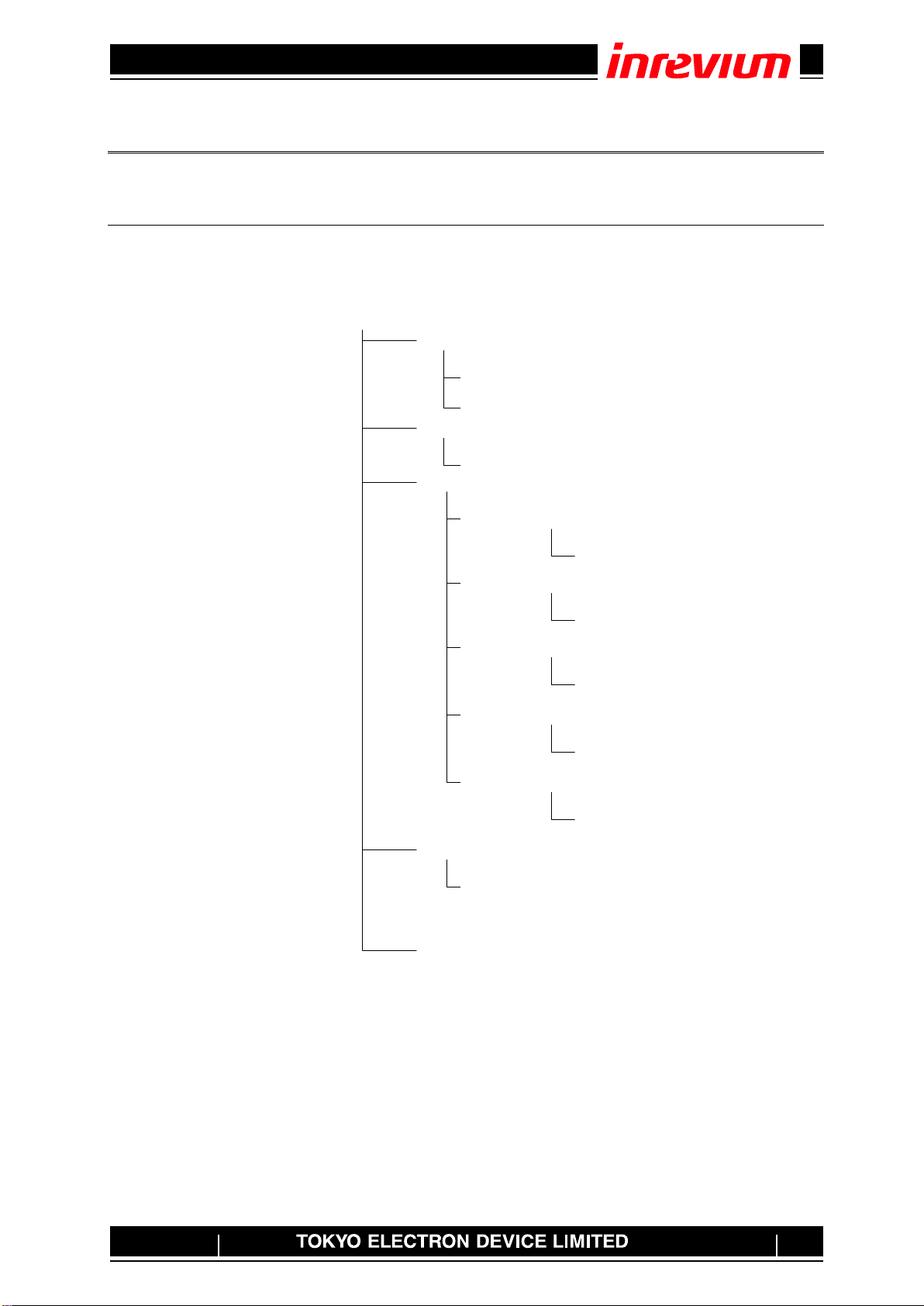
3.1. Distributed Data Structure
Zip files available from the TED Support Website
When the inrevium_USB30_Startup_x_xx.zip is expanded, the following data files will appear (partly
omitted)
Figure 3-1 Distributed Data Structure
inrevium_USB30_Startup_x_xx
App
FMCFx3RefDesign.exe
testdata
Firm
inrevium_fx3bd_ufw_1_00.img
FPGA
K7_325T.bit
Sys
win7
CyControl.exe
TB-7K-325T-IMG
TB-7V-2000T-LSI
V7_2000T.bit
TB-7VX-690T-PCIEXP
V7_690T.bit
TB-7VX-980T-PCIEXP
V7_980T.bit
TB-7VX-1140T-PCIEXP
V7_1140T.bit

Inrevium USB30 Startup Guide
7
Rev.2.00
4. Board Setup
This section provides a brief description of board settings for operational testing.
4.1. TB-7K-325T-IMG Jumper Settings
Figure 4-1 shows the TB-7K-325T-IMG board jumper settings.
Figure 4-1 TB-7K-325T-IMG Jumper Settings
4.2. TB-FMCL-USB30 Jumper Settings
Figure 4-2 shows the TB-FMCL-USB30 jumper settings.
Figure 4-2 TB-FMCL-USB30 Jumper Settings
JP35/36
1-2 Short
3-4 Open
5-6 Open
JP2 1-2
JP3 1-2
JP4 Open
JP5 1-2
JP6 1-2
JP7 1-2
JP8 1-2

Inrevium USB30 Startup Guide
8
Rev.2.00
4.3. TB-7V-2000T-LSI Jumper Settings
Figure 4-1 shows the TB-7V-2000T-LSI board jumper settings.
Figure 4-3 TB-7V-2000T-LSI Jumper Settings
4.4. TB-7VX-690/980/1140T-PCIEXP Jumper Settings
Figure 4-1 shows the TB-7VX-690/980/1140T-PCIEXP board jumper settings.
Figure 4-4 TB-7VX-690/980/1140T-PCIEXP Jumper Settings
JP53 : NC
JP52 : 1-2
JP51 : 1-2
CN5 : NC
CN6 : 1-2
CN7 : 1-2

Inrevium USB30 Startup Guide
9
Rev.2.00
4.5. Board and Cable Connections
Connect PC to USB3.0 TypeB using a USB3.0 cable (TypeAto TypeB).
Figure 4-5 TB-7K-325T-IMG + TB-FMCL-USB30 Cable Connections
Power
USB3.0 TypeB

Inrevium USB30 Startup Guide
10
Rev.2.00
Figure 4-6 TB-7V-2000T-LSI Cable Connections
Figure 4-7 TB-7VX-690/980/1140T-PCIEXP Cable Connections
Power
USB3.0 TypeB
Power
USB3.0 TypeB
Ce manuel convient aux modèles suivants
5
Table des matières
Autres manuels Inrevium Matériel informatique


Manuels Matériel informatique populaires d'autres marques

EMC2
EMC2 VNX Series Manuel du propriétaire

Panasonic
Panasonic DV0PM20105 Manuel utilisateur

Mitsubishi Electric
Mitsubishi Electric Q81BD-J61BT11 Manuel utilisateur

Gigabyte
Gigabyte B660M DS3H AX DDR4 Manuel utilisateur

Raidon
Raidon iT2300 Manuel utilisateur

National Instruments
National Instruments PXI-8186 Manuel utilisateur


