
Innosonian Brayden Baby Manuel utilisateur

Instructions for Use
Rev.1.0
ENGLISH
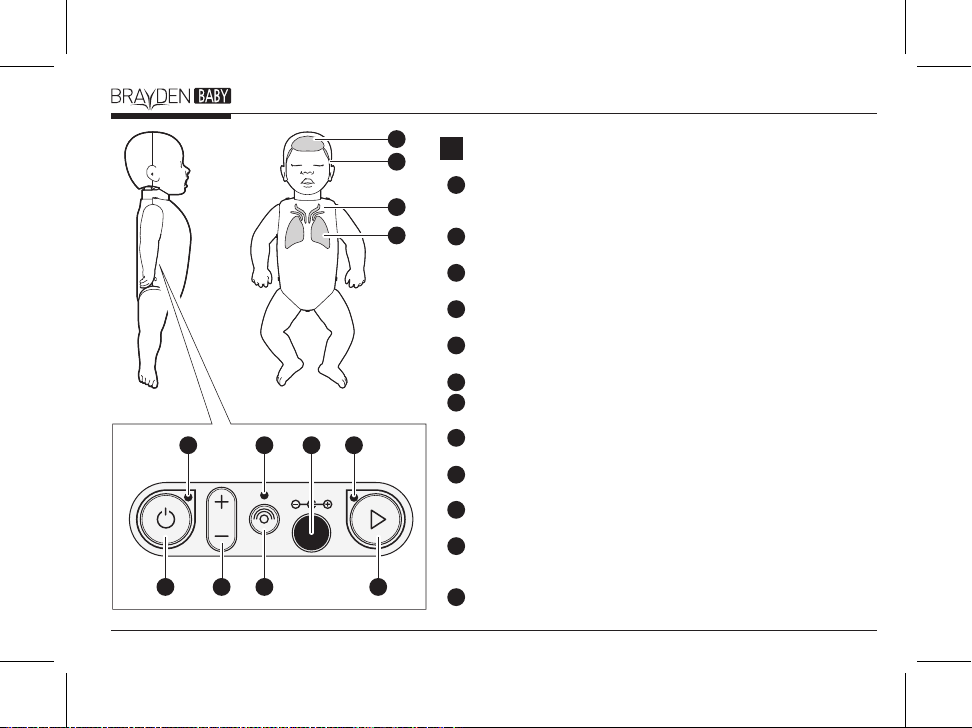
Component partsA
CPR quality indication light The CPR quality indication light
illuminates if the correct chest compression depth, speed, release are
performed and the correct fingers (or thumbs) position detected.
Chest compression rate indication light Indicates the speed /rate of
chest compressions performed.
Chest compression depth indication light Indicates the depth of
chest compressions performed.
Ventilation indication light Indicates the ventilation volume
performed.
Power button Press the power button for approximately 1 second to
turn on/turn off the manikin.
Volume button Set the volume level. (Brayden Baby Pro only)
Bluetooth disconnect button Terminates the Bluetooth connection.
(Brayden Baby Pro only)
Scenario mode button Sets the scenario mode.
(Brayden Baby Pro only)
Power status indication light Illuminates blue if the battery is normal
and flashes red if the battery is low.
Bluetooth connection status indication light Illuminates blue if the
Bluetooth connection is established.
Scenario mode indication light Illuminates blue to indicate that the
manikin is operating currently in scenario mode.
(Brayden Baby Pro only)
AC Adaptor connection socket Allows the optional AC adaptor to be
connected.
DC IN 9V
4
12
8
11
7
10
6
9
5
3
2
12
11
10
9
8
7
6
5
4
3
2
1
1
2

What the CPR real time feedback
lights indicate
C
1. Ventilations
a. The Ventilation indication light will illuminate when
ventilations are delivered at the correct volume and
will flash when an excessive volume is delivered.
2. Chest Compressions
a. The Chest compression depth indication light
illuminates according to the depth of compressions
delivered. All the lights flash if the depth of the chest
compressions are too excessive.
b. The Chest compression rate indication light (which go
from the chest to the head) illuminates according to the
rate/speed of the compressions delivered. If too fast,
then the rate/speed is too fast.
c. The CPR quality indication light only illuminates if the
correct chest compression depth, speed, release are
performed and the correct fingers (or thumbs) position
detected.
(Note)
- When the manikin is turned on, an initial automatic
calibration will be carried out for approx. 2 seconds. It is
recommended that chest compressions are not
performed on the manikin at this time.
(Note) for Brayden Baby Pro only
- When connecting the manikin to the App for training, the
CPR real time feedback lights will not illuminate.
Installing and connecting the
mobile app
B
1. Search for the BRAYDEN manikin app from the App
Store on the iPad and install it.
2. Turn on the manikin and run the app.
3. Press the Connect button on the app and select the
desired item to connect.
4. When you press the Connect button, the manikin and
app will connect and the Bluetooth connection status
indication light of the manikin will illuminate blue.
(Note) Once the connection is made for the first time, the
manikin and app will connect automatically.
ENGLISH
3

Product specifications
F
1. Dimensions : 22.4cm x 55cm x 11.5cm (WxHxD)
2. Weight : 1.72 kg (excluding the battery)
3. Operating temperature : 0°C ~ 40°C (32°F ~ 104°F)
4. Storage temperature : -20°C ~ 60°C (-4°F ~ 140°F)
5. Humidity : Relative humidity between 5 % and 95 %
(without dew condensation)
6. Power :
Battery careE
1. Keep used batteries out of reach of children and dispose
the batteries safely.
2. Do not use new batteries and old batteries together.
3. Replace all 4 batteries at the same time.
4. If you do not plan to use the manikin for a long period of
time, remove and store the batteries.
Maintenance of the manikinD
1. We recommend that you replace the ventilation double
filter frequently (see quick guide <section 3-3>) and
always after direct ventilation without a barrier device
(e.g. suitable face shield, pocket mask etc.).
2. When replacing the face skin, please carefully follow the
instructions in the quick guide <section 3-2>. It is
important that this is done correctly as air leaks might
occur if not done as instructed. It is also important to
secure the face skin with the chin mechanism in the
correct position (closed/retracted). This is important to
ensure the jaw thrust/lift functionality works correctly.
3. The firmware of the manikin can be updated through
the App. A message will appear via the App if this is
required when the manikin is connected. Please update
the firmware as instructed.
Battery AA type 1.5V (4 EA)
AC adapter (Input AC100‒260V, Output DC
9V 1A, sold separately)
4

Quality assuranceG
- Damage or defect of the manikin due to abnormal use,
users negligence or by accident
- Damage or defect of the manikin due to unauthorized
repair of the manikin at a place other than the company,
authorized sales agency or service centre or replacement
of components with another companies products not
supplied by us
- Damage or defect to the manikin due to its improper
storage in an unsuitable environment (high temperature,
high humidity) or exposed to chemicals or microorgan-
isms
- Damage or defect to the manikin due to natural disasters
etc.
- Intentionally falsifying key information (such as date of
purchase, customers name, name of supplier, manikin
serial number, etc.)
- When there is no proof of purchase with the manikin
guarantee
The manikin is guaranteed against defects for 2 years from
the date of purchase. However, consumable items are
excluded. If making a claim, you must enclose a proof of
purchase and details of when and where the manikin was
purchased, to check the warranty period. In the event that
you are not able to supply a proof of purchase, or if it is
illegible, free after sales service may not be provided.
www.innosonian.us
50 Broad Street, Carlstadt, NJ, 07072, USA
+1-833-385-0022
Homepage
Address
Tel
e-mail
Innosonian America
www.innosonian.eu
Unit 1, Chancerygate Way, Farnborough,
Hampshire, GU14 8FF, UK
+44-3333-445534
Homepage
Address
Tel
e-mail
Innosonian Europe
www.innosonian.com
4F, 62, Bangbae-ro, Seocho-gu, Seoul, 06704,
Republic of Korea
+82-2-533-9410
+82-70-8673-5285
Homepage
Address
Tel
Fax
e-mail
Innosonian, Inc.
ENGLISH
5

BRAYDEN BABY
IM17
Innosonian, Inc. / Korea
RYYEYSHCN
Product name
Model name
Manufacturer / Country
FCC ID of Bluetooth RF module
FCC statement
Information to the user
This equipment has been tested and found to comply with
the limits for a Class B digital device, pursuant to part 15 of
the FCC Rules. These limits are designed to provide
reasonable protection against harmful interference in a
residental installation. This equipment generates, uses and
can radiate radio frequency energy and, if not installed and
used in accordance with the instructions, may cause harmful
interference to radio communications. However, there is no
guarantee that interference will not occur in a particular
installation. If this equipment does cause harmful
interference to radio or television reception, which can be
determined by turning the equipment o and on, the user is
encouraged to try to correct the interference by one more of
the following measures:
This device complies with Part 15 of the FCC Rules. Operation
is subject to the following two conditions: (1) this device may
not cause harmful interference, and (2) this device must accept
any interference received, including interference that may
cause undesired operations.
- Reorient or relocate the receiving antenna.
- Increase the separation between the equipment and
receiver.
- Connect the equipment into an outlet on a circuit dierent
from that to which the receiver is connected.
- Consult the dealer or an experienced radio/TV technician
for help.
Cautions when disposing of battery
Do not dispose of used batteries in a fire. Recycle them
through your local, free battery return system.
This manikin observes the environmental requirements specified in EMC
Guideline 2014/30/EU and EU Guideline RoHS 2011/65/EU for harmful
substances.
Warning
Any changes or modications not expressly approved by the
manufacturer could void the user’s authority to operate the
equipment
6

사용설명서
Rev.1.0
한국어
DC IN 9V
4
12
8
11
7
10
6
9
5
3
2
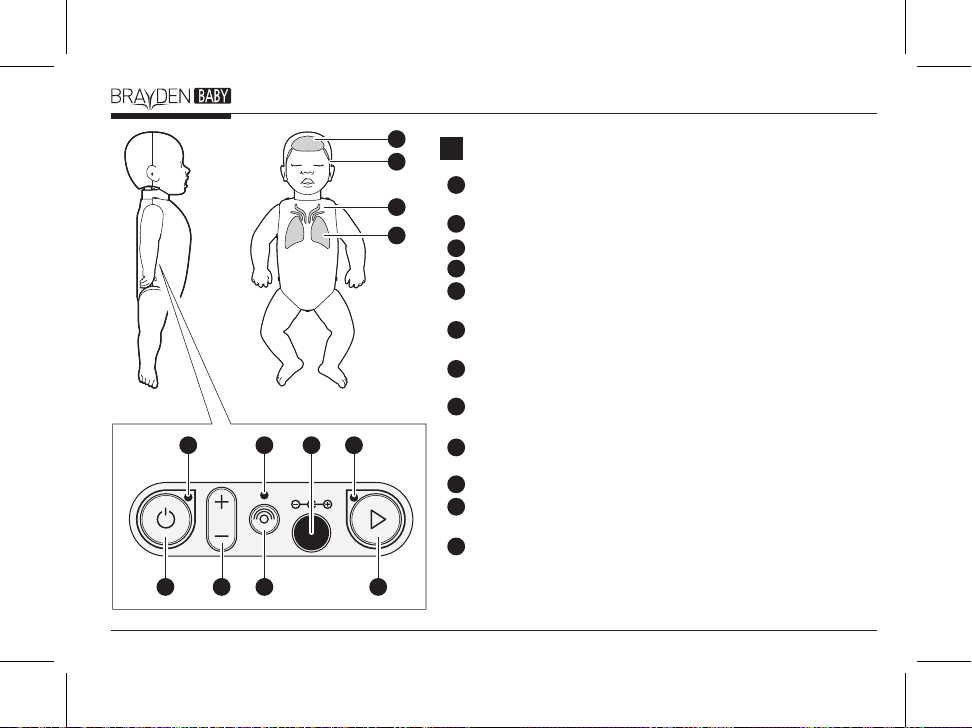
1각�부분�명칭A
정상순환�표시등 가슴�압박�깊이, 속도, 이완�그리고�압박�위치가�모두
적정할�경우�정상순환�표시등이�점등됩니다.
압박속도�표시등 가슴�압박�속도를�표시합니다.
압박깊이�표시등 가슴�압박�깊이를�표시합니다.
인공호흡�표시등 인공호흡량을�표시합니다.
전원버튼 전원버튼을�약 1초�이상�누르면, 제품의�전원을�켜거나�끌�수
있습니다.
볼륨버튼 볼륨의�크기를�설정할�수�있습니다.
(브레이든�베이비�프로�전용)
블루투스�연결�해제�버튼 블루투스�연결을�끊습니다.
(브레이든�베이비�프로�전용)
시나리오�모드�버튼 시나리오�모드를�실행할�수�있습니다.
(브레이든�베이비�프로�전용)
전원�상태�표시등 배터리가�정상일�경우�녹색으로�점등되며, 부족�시
적색으로�깜박입니다.
블루투스�연결�상태�표시등 블루투스에�연결되면�청색으로�점등합니다.
시나리오�모드�표시등 청색으로�점등되었을�경우, 현재�제품이�시나리오
모드로�동작하고�있음을�나타냅니다. (브레이든�베이비�프로�전용)
AC 어댑터�연결부 액세서리로�제공하는 AC어댑터를�사용할�수
있습니다.
12
11
10
9
8
7
6
5
4
3
2
1
8
c. 가슴�압박�깊이, 속도, 이완�그리고�압박�위치가�모두�적정할
경우 정상순환�표시등이�점등됩니다.
(참고)
- 마네킹의�전원을�켜는�순간 1회에�한하여�약 2초간�자가�점검을
실시합니다. 자가�점검�중에는�마네킹을�누르지�마십시오.
(참고) 브레이든�베이비�프로�전용
- 앱을�연결하여�교육할�경우, 가슴압박�및�인공호흡에�따른
마네킹의�각�표시등이�점등되지�않습니다.
마네킹�각�표시등의�작동방법C
1. 인공�호흡
a. 적정호흡을�실시하면 인공호흡�표시등이 1회�점멸하고,
과호흡�시�깜박거립니다.
2. 가슴�압박
a. 압박�깊이에�따라 압박깊이�표시등이�표시되며, 과압박을
하면 압박깊이�표시등 전체가�깜박거립니다.
b. 압박�속도에�따라�가슴에서�머리로 압박속도�표시등이
흘러가며, 빠르면 압박속도�표시등 전체가�깜박거립니다.
모바일�앱�설치�및�연결하기B
1. iPad의 App Store에서 BRAYDEN 마네킹�전용�앱을�검색하여
설치합니다.
2. 마네킹�전원을�켜고, 앱을�실행시킵니다.
3. 앱에서 연결 버튼을�누르고, 연결을�원하는�항목을�선택합니다.
4. 연결 버튼을�누르면�마네킹과�앱이�연결되며�마네킹의
블루투스�연결�상태�표시등이�청색으로�점등됩니다.
(참고) 최초�연결�이후�마네킹과�앱은�자동으로�연결됩니다.
9
한국어

마네킹�유지�및�보수D
1. 인공호흡 2중�필터는 <퀵가이드 3-3>을�참고하시어�자주
교체하시길�권장합니다. 단, 페이스쉴드나�포켓마스크�등의
구급소생마스크를�사용하지�않고�직접�호흡했을�경우에는
바로�교체하시길�권장합니다.
2. 얼굴�스킨�교체�시에는 <퀵가이드 3-2>를�참고하시어�얼굴
스킨과�코, 입�주변의�실리콘�부분이�잘�맞도록�장착해야
합니다. 부정확한�장착은�인공�호흡�시에�공기가�새는�원인이
될�수�있습니다. 또한�턱을�닫은�상태에서�얼굴�스킨을�체결
하십시오. 이것은 턱�밀어올리기 기능에�영향을�줄�수�있습니다.
3. 마네킹은�앱을�통하여 펌웨어를�업데이트�할�수�있습니다.
마네킹과�앱�연결�시, 앱에서�펌웨어�업데이트가�필요하다는
메세지가�발생하면�펌웨어�업데이트�실시를�권장합니다. 제품�사양F
1. 크기 : 22.4cm x 55cm x 11.5cm (WxHxD)
2. 무게 : 1.72 kg (배터리�제외)
3. 동작온도 : 0°C ~ 40°C (32°F ~ 104°F)
4. 보관온도 : -20°C ~ 60°C (-4°F ~ 140°F)
5. 습도 : 5% ~ 95% 상대습도 (결로현상이�없을때)
6. 전원 : 배터리 AA타입 1.5V (4개)
AC어댑터 (입력 AC100‒260V, 출력 DC 9V 1A, 별도�판매)
배터리�주의사항E
1. 사용한�배터리는�어린아이의�손에�닿지�않는�장소에�보관하고
분리수거를�하십시오.
2. 배터리를�혼용하지�마십시오.
3. 배터리�교환�시에는 4개를�함께�교환하십시오.
4. 마네킹을�장시간�사용하지�않을�경우�배터리를�빼서
보관하십시오.
10
Autres manuels pour Brayden Baby
1
Ce manuel convient aux modèles suivants
1
Table des matières
Langues :
Manuels Équipement pédagogique populaires d'autres marques



fischertechnik
fischertechnik STEM Coding Pro Manuel utilisateur

Experia
Experia IRiS Light Wand Manuel utilisateur

Pitsco Education
Pitsco Education FLO Manuel utilisateur

Sphero
Sphero RVR RV01 Manuel utilisateur

Limbs & Things
Limbs & Things 60905 Manuel utilisateur

JP
JP TURN Connect T101 Manuel utilisateur

TruCorp
TruCorp AirSim Advance Manuel utilisateur

LeapFrog
LeapFrog Mr. Pencil's Scribble, Write & Read Manuel utilisateur

ScienTECH
ScienTECH 2261 Manuel utilisateur

Rompa
Rompa 20019 Manuel utilisateur

Duinotech
Duinotech XC4322 Manuel utilisateur

Enabling Devices
Enabling Devices Spinning Light Show Manuel utilisateur