Hearth & Home Technologies • Wi-Fi Capable ECM Upgrade Kit (WFM-RETROFIT) Installation Instructions • 2326-990 Rev. C • 7/20 2
FCC Warning
Note: This equipment has been tested and found to comply with
the limits for a Class B digital device, pursuant to Part 15 of the
FCC Rules. These limits are designed to provide reasonable
protection against harmful interference in a residential installation.
This equipment generates, uses, and can radiate radio
frequency energy and, if not installed and used in accordance
with the instructions, may cause harmful interference to radio
communications. However, there is no guarantee that interference
will not occur in a particular installation. If this equipment does
cause harmful interference to radio or television reception, which
can be determined by turning the equipment o and on, the user is
encouraged to try to correct the interference by one or more of the
following measures:
• Reorient or relocate the receiving antenna.
• Increase the separation between the equipment and receiver.
• Connect the equipment into an outlet on a circuit dierent from that
to which the receiver is connected.
• Consult the dealer or an experienced radio/TV technician for help.
Canadian DOC Notice
This digital apparatus does not exceed the (Class A/ Class B)
limits for radio noise emissions from digital apparatus set out in
the Radio Interference Regulations of the Canadian Department of
Communications.
Canadian IC Notice
This device complies with RSS-210 of Industry and Science
Canada. Operation is subject to the following two conditions: (1) this
device may not cause interference, and (2) this device must accept
any interference, including interference that may cause undesired
operation of the device.
Caution: The Federal Communications Commission warns that
changes or modications not expressly approved by the party re-
sponsible for compliance could void the user’s authority to operate
the equipment.
Please contact your Hearth & Home Technologies
dealer with any questions or concerns.
For the location of your nearest
Hearth & Home Technologies dealer,
please visit www.hearthnhome.com.
FCC Compliance Statement:
This device complies with part 15 of the FCC Rules. Operation is
subject to the following two conditions:
(1) This device may not cause harmful interference, and
(2) This device must accept any interference received, including in-
terference that may cause undesired operation of the device.
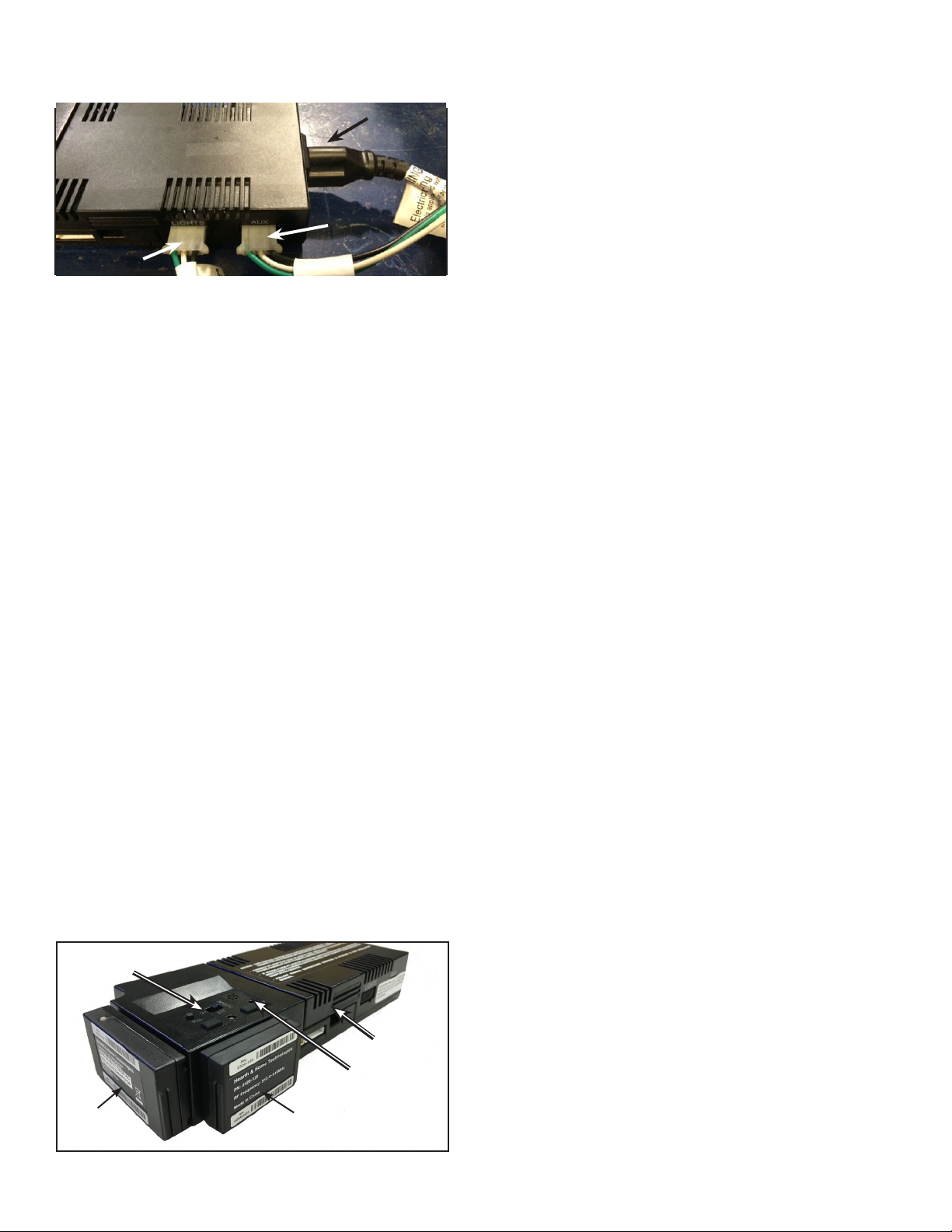
8. Install new IFT-ECM by attaching the wires and other
accessories including the IFT-ACM and IFT-RFM.
See Figure 5.
· Note the RFM is required to enable the Thermostat
function via the IFT-RC150 or IFT-RC400.
9. Locate the IFT-WFM port on the end of the IFT-ECM.
Remove and discard the rubber cover from the IFT-ECM
port.
13. Follow the pairing instructions for your remote and/or
accessories (e.g. IFT-RC400 and IFT-RC150).
Note: You must re-pair the ECM to detect any features
added to the IFT-ACM, including an IFT-RC400 and/or
IFT-RC150 .
Note: If you do not have an IFT-ACM and remote control,
you do not need to pair.
6. Once power has been turned o, proceed to remove from
the old ECM all wires and other accessories including the
ACM and the Radio Frequency Module (IFT-RFM).
Figure 4 IFT-ACM Accessory Connections
FANFAN
POWERPOWER
VENTVENT
LIGHTSLIGHTS
SLIDE TO ‘REMOTE’
POSITION
IFT-WFM
IFT-ECM
(Wi-Fi MODULE)
IFT-RFM
PAIRING HOLE
Figure 5 IFT Control System
IFT-ACM
7. Remove the rubber covers and verify the 50/30 and LP/
NG switches of the new Wi-Fi enabled ECM are in the
same position as the old ECM you noted in step 4. Make
sure you replace the rubber covers for the two switches.
5. Remove power from any purchased accessory: Fan,
lights, Auxiliary Control Module (IFT-ACM). See Figure 4.
10. Connect the IFT-WFM to the IFT-ECM by aligning the
pins and tabs and pushing the IFT-WFM into the IFT-
ECM until both tabs snap into position. Ensure the
two components are fastened securely to one another.
See Figure 5.
12. Move the selector switch on the IFT-ECM back to
‘Remote’ position. The IFT-ECM will beep and display
three green LED ashes. On the IFT-ECM, locate the
‘PILOT’ button then press and hold for ten seconds. The
IFT-ECM will emit one audible beep for four seconds.
Release the ‘PILOT’ button. The IFT-WFM green LED
will ash every two seconds, indicating it has an open
access point. You can conrm the open access point by
seeing the IntelliFire_XXXX network in the available Wi-
Fi networks on your smart device.
Note: The IFT-RFM is still required for use with a remote to
enable the thermostat function. The room temperature is
measured by a sensor in the IFT-RC150 and/or IFT-RC400
remote control. Without a paired remote, the TEMP function
in the app will not function correctly.
14. Once these steps are complete, your IFT-ECM/IFT-
WFM is ready for setup with the IntelliFire app using
the IntelliFire App Installation Instructions and User
Guide.
11. Restore power to the appliance.


