
Hawking HM92P Manuel utilisateur

0

FCC Warning
This equipment has been tested and found to comply with the regulations for a Class B digital device, pursuant to
Part 15 of the FCC Rules. These limits are designed to provide reasonable protection against harmful interference
when the equipment is operated in a commercial environment. This equipment generates, uses, and can radiate
radio frequency energy and, if not installed and used in accordance with this user’s guide, may cause harmful
interference to radio communications. Operation of this equipment in a residential area is likely to cause harmful
interference, in which case the user will be required to correct the interference at his/her own expense.
CE Mark Warning
This is a Class B product. In a domestic environment, this product may cause radio interference, in which case the
user may be required to take adequate measures.
Limited Warranty
Hawking Technology guarantees that every HP92M 56K V.92 PCI Modem is free from physical defects in material
and workmanship under normal use for one (1) year from the date of purchase. If the product proves defective
during this one-year warranty period, call Hawking Customer Service in order to obtain a Return Authorization
number. Warranty is for repair or replacement only. Hawking Technology does not issue any refunds. BE
SURE TO HAVE YOUR PROOF OF PURCHASE. RETURN REQUESTS CANNOT BE PROCESSED
WITHOUT PROOF OF PURCHASE. When returning a product, mark the Return Authorization number clearly
on the outside of the package and include your original proof of purchase.
IN NO EVENT SHALL HAWKING TECHNOLOGY’S LIABILTY EXCEED THE PRICE PAID FOR THE
PRODUCT FROM DIRECT, INDIRECT, SPECIAL, INCIDENTAL OR CONSEQUENTIAL DAMAGES
RESULTING FROM THE USE OF THE PRODUCT, ITS ACCOMPANYING SOFTWARE OR ITS
DOCUMENTATION. Hawking Technology makes no warranty or representation, expressed, implied or
statutory, with respect to its products or the contents or use of this documentation and all accompanying software,
and specifically disclaims its quality, performance, merchantability, or fitness for any particular purpose.
Hawking Technology reserves the right to revise or update its products, software, or documentation without
Copyright 2003 Hawking Technologies, Inc.
All brand names and trademarks are the registered property of their respective owners.
1

Overview…….…………………………………………………………………….3
System Requirements……………………………………………….…...3
Packing List…….…………………………….……………………….….3
Specifications……………………………………………………….………….….4
Hardware Installation….……………………………………….………………..5
Driver Installation…………………………………………………………..6 – 14
Windows 98SE….……………………………………………….……….6
Windows NT4.0….………………………………………………….……7
Windows ME…….………………………………………………….……8
Windows 2000….……………………………………………………...…9
Windows XP………………………………………………………….....10
Linux…………..……………………………………………………11 - 14
Modem Region Selection…………………………………….…………….……15
2

Get connected with the Hawking HM92P PCI Modem, a modem with V.92 technology that enables you to receive
phone calls while you are online. * At the same time, the HM92P will go into a hold mode when someone calls and
immediately resume connection afterward, without the hassle of redialing.* V.PCM Upload Technology can now
reach speeds of 48Kbps so you don’t have to wait for a long period of time when sending a file or playing online
games.* For downloads, the V.44 compression standard improves data throughput for faster downloads of Internet
data. With the Hawking HM92P Modem, dial-up connection has never been so fast and easy!
* Note: V.92 Technology requires ISP V.92 Modem Support - contact your ISP for their modem support
information. Also, the HM92P PCI Modem with the V.92 enhancement is backward compatible and will
negotiate the highest possible speed when connecting to an ISP.
System Requirements
♦
♦
♦
♦
♦
♦
♦
♦
Pentium 233MHz MMX Processor or faster
Microsoft Windows 95/98/ME/NT4.0/2000/XP or Linux.
PCI Slot
CD-ROM Drive
Packing List
PCI Modem
CD Driver
RJ-11 Phone Cable
Quick Installation Guide
3

Host Interface
PCI V2.2 and V2.1
Modem Standard
ITU-T V.92 (down-stream up to 56,000 bps), V.90, V.34, V.32, V. 34bis, V.32 bis, V.32, V.22bis, V.22, V.21, Bell 212A and Bell 103.
Transmission rate
Download: Up to 56 Kbps
Upload: Up to 48 Kbps
Error Correction Protocol
V.42 LAPM/MNP 2-4
Fax Compatibility
EIA 578 Class 1 and 2
ITU V.17, V.29, V.27ter, and V.21 channel 2
Dialing Features
Call progress monitor
On/Off hook control
DTMF tone and rotary pulse
Distinctive ring for DATA/FAX/TAM(Telephone Answer Machine )
Operating Features
Asynchronous full duplex
Manual /Automatic answer
Flow Control
Hardware CTS/RTS
Software XON/XOFF
Line Interface
RJ-11, 2 wires dial-up
Software Control Interface
TAPI, Multimedia API, Hayes AT command set standard
Call Progress Monitoring
Dial tone, busy tone and ring-back detection
System Requirements
Pentium 233 MHZ MMX Processor or faster
4

I
Modem Installation Steps:
1. Turn the computer power off and unplug it from the power supply.
2. Remove the computer cover.
3. Insert the HM92P modem card into a PCI slot on the motherboard.
4. Test for a dial-up connection
a. Plug one end of the telephone cable into the “LINE” jack at the bracket. Plug the other end of the
telephone cable into the wall phone jack.
b. Connect the telephone cable between the telephone set and the phone jack to the bracket outlet.
c. Lift the handset and listen for a dial tone to confirm a working cable connection.
5. Place the computer cover back on.
6. Turn the computer power on.
5
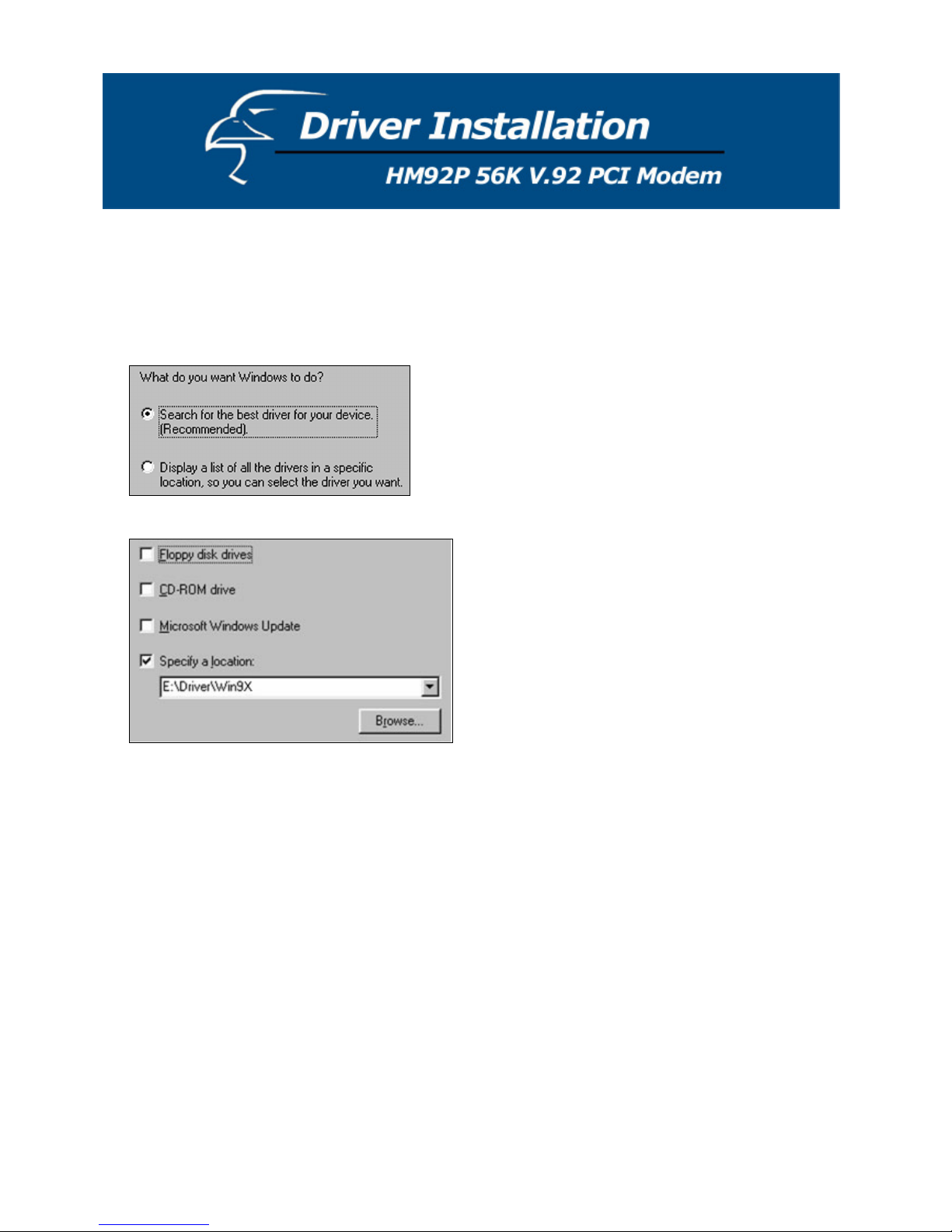
Driver Installation for Windows 98SE
1. Boot the system. The system will detect a new device and request you to install its driver. Click [Next].
2. In the new dialog box, you have two installation options. The default option is “Search for the best driver for
your device”. Select one of the options and click the [Next] button to continue.
3. Choose “Specify a location”.
4. Insert the driver CD into the CD-ROM device. Select the “Browse” option and choose the CD-ROM location
(Ex: E:\Driver\WIN9X)
5. Windows 98 will copy the file into your hard drive. Select the [Finish] button.
6

Driver Installation for Windows NT 4.0
1. Load the installation CD into the CD-ROM drive.
2. Please select the “Start” button in the main menu, then choose the “Run” button.
3. Type in “E:/Driver/NT4/Setup.exe” (Add Com-Port)
4. Choose the “Control Panel Modems Select Don’t detect my modem, I will select it from a list.”
5. Select a port.
6. Windows NT4.0 will copy the file into your hard disk. Select the [Finish] button.
7. Remote Access Setup
7

Driver Installation for Windows ME
1. Boot the system. The system will detect a new Device and request you to install its driver.
2. Choose “Specify the location of the driver”. Then select the [Next] button.
3. Choose “Specify a location”.
4. Insert the driver CD into the CD-ROM device.
Click “Browse” and choose a CD-ROM location (Ex: E:\Driver\WINME).
5. Windows ME will copy the file into your hard disk. Then, complete the process with the [Finish] button
8

Driver Installation for Windows 2000
1. Boot the system. The system will detect a new device and request you to install its driver. Select the [Next]
button.
2. In the new dialog box, you have two installation options. The default option is “Search for a suitable driver for
my device”. Select the [Next] button to continue.
3. Choose “Specify a location” and then select the [Next] button.
4. Insert the driver CD into the CD-ROM device. Click the “Browse” button and choose a CD-ROM location (Ex:
E:\Driver\WINXP_2K).
5. Windows 2000 will copy the file into your hard disk. Click the [Finish] button.
9
Autres manuels pour HM92P
1
Table des matières
Autres manuels Hawking Modem


Manuels Modem populaires d'autres marques

Davicom
Davicom DM562AP Manuel utilisateur

EpiValley
EpiValley TATA indicom SXC-1080 Manuel utilisateur

Zte
Zte WiMAX Manuel utilisateur

Intelimax
Intelimax MA-2060 Manuel utilisateur

SMC Networks
SMC Networks D3CM1604V Manuel d'utilisation et d'entretien

Telstra
Telstra Wi-Fi 4G Advanced Pro X Manuel utilisateur


US Robotics
US Robotics 3453C Manuel utilisateur

MaxTech
MaxTech Plug & Play Internal Voice/FAX/Data/SVD... Manuel utilisateur

Zte
Zte MF823 Manuel utilisateur

Four-Faith
Four-Faith F1403 Manuel utilisateur

Sierra Wireless
Sierra Wireless AIRLINK MP595W Manuel utilisateur

Gemtek
Gemtek WiMAX WIXFBR-103 Manuel utilisateur