
GMI D5200 Series Manuel utilisateur

D5000 - D5200 Series - Intrinsically Safe Isolators and Safety Relays ISM0121-2
D5000 - D5200 Series
INSTRUCTION MANUAL
D5000 - D5200 SERIES
DIN-RAIL, POWER BUS,
TERMINATIONBOARDMOUNTING
INTRINSICALLY SAFE ISOLATORS
AND SAFETY RELAYS

Technology for safety
2 D5000 - D5200 Series - Intrinsically Safe Isolators and Safety Relays
D5000 - D5200 Intrinsically Safe Isolators and Safety Relays
Mechanical features .........................................................................................................................................................................3
Mounting and removing modules from DIN-Rail ..............................................................................................................................4
Power Bus connector.......................................................................................................................................................................6
Mounting modules on Power Bus connector....................................................................................................................................8
Ordering information ........................................................................................................................................................................8
Removing and mounting Main Case Top Cover ..............................................................................................................................9
Transparent Cover .........................................................................................................................................................................10
Terminal Blocks Connection Data..................................................................................................................................................11
Installation and removing modules from Termination Board..........................................................................................................12
Mounting Termination Board..........................................................................................................................................................14
Mounting and removing Termination Board onto DIN-Rail ............................................................................................................14
Termination Boards Characteristic.................................................................................................................................................15
Approvals and Certifications ..........................................................................................................................................................16
Storage...........................................................................................................................................................................................16
Disposal .........................................................................................................................................................................................16
Maintenance and Repair................................................................................................................................................................16
Installation of electronic equipments in cabinet..............................................................................................................................17
Heat dissipation in cabinets ...........................................................................................................................................................18
Calculation of radiant surfaces in closed cabinets .........................................................................................................................19
Placement of Isolators in cabinet ...................................................................................................................................................20
Index

Technology for safety 3
D5000 - D5200 Series - Intrinsically Safe Isolators and Safety Relays
Mounting Dimensions (D5000) Dimensions (D5200)
T35 DIN-Rail according to EN50022
with or without Power Bus connector
or on Termination Board
Width 12.5 mm
Depth 123.0 mm
Height 120.0 mm
Width 22.5 mm
Depth 123.0 mm
Height 120.0 mm
Case material Blister packing size (D5000) Blister packing size (D5200)
PA66 - Polyamide (Nylon) 66
Width 24.0 mm
Depth 132.0 mm
Height 138.0 mm
Width 34.0 mm
Depth 132.0 mm
Height 138.0 mm
123 mm
Laser engraving on entire enclosure
to provide Intrinsic Safety parameters,
schematic diagrams, connections
and instructions
Terminal Blocks
tagging zone
Side D5000 - D5200
Enclosure Characteristics
High channel density results from
innovative circuit design using
advanced surface mount components.
Plug-in screw terminal blocks to secure
terminations up to 2.5 mm2.
Configuration components are easily
accessed by removing side cover.
High packing density
35 mm (Top Hat) DIN-Rail.
Ultra slim 2 channels 12 mm wide DIN-Rail
and Termination Board mounting modules.
Power and fault on bus connectors.
6 mm per channel means
50% space reduction.
Mechanical features
Front D5000
120 mm
12.5 mm
Hazardous Area/
Field Side
Terminal Blocks
indicator
LEDs for power,
status and fault
indication
Front D5200
120 mm
22.5 mm
LEDs for power,
status and fault
indication
Hazardous Area/
Field Side
Terminal Blocks
indicator

Technology for safety
4 D5000 - D5200 Series - Intrinsically Safe Isolators and Safety Relays
Mounting and removing modules from DIN-Rail
Mounting
Removing
To remove a barrier from the mounting rail, insert a blade screwdriver in the mounting foot and lever against the side of the barrier casing
(see Fig.3 and Fig.4).
To mount Series D5000-D5200 on 35 mm DIN-Rail,
hook one side of the mounting foot over the rail’s lip and press
the barrier down firmly until fixed (see Fig.1 and Fig.2).
Fig. 3
Screwdriver
T35 DIN-Rail
Fig. 1
Push
to
engage T35 DIN-Rail
Fig. 2
T35 DIN-Rail

Technology for safety 5
D5000 - D5200 Series - Intrinsically Safe Isolators and Safety Relays
Fig. 6 T35 DIN-Rail Dimensions (millimeters)
Fig. 4
T35 DIN-Rail
Pull the module upwards
and remove from DIN-Rail
Fig. 5 T35 DIN-Rail

Technology for safety
6 D5000 - D5200 Series - Intrinsically Safe Isolators and Safety Relays
Power Bus connector
Power Supply Voltage 24 Vdc can be applied to the module, by connecting directly the voltage to the plug-in Terminal Block of each module,
or via the Power Bus System. The system consists of standard DIN-Rail modules mounted on optional DIN-Rail Power Bus connectors.
The maximum allowed powering capacity is 8 A. It is always possible to remove modules, without disconnecting the bus connector
which remains attached to the DIN-Rail.
Cumulative Fault Alarm indication is provided on the Power Bus connection.
Power Bus system need the accessories shown below, in order to be operative:
Push
To
engage
T35 DIN-Rail T35 DIN-Rail
JDFT049: D5000 Power Bus Connector (12mm)
JDFT050: D5200 Power Bus Connector (22mm)
Push
To
engage
T35 DIN-Rail T35 DIN-Rail
Power Supply
and Fault
F Modbus RS485
for diagnostic
only
Power Supply
and Fault
F Modbus RS485
for diagnostic
only

Technology for safety 7
D5000 - D5200 Series - Intrinsically Safe Isolators and Safety Relays
Push
To
engage
DIN-Rail Stopper (MCHP196)
T35 DIN-Rail T35 DIN-Rail T35 DIN-Rail T35 DIN-Rail
Secure the stopper to the rail
by completely rotating both
screws clockwise.
Plug-in terminal block male,
horizontal out, for Power Bus
(MOR022)
Power
Supply
Mounting a plug-in terminal block male onto a
connector Power Bus
Plug-in terminal block female,
horizontal out, for Power Bus
(MOR017)
Power
Supply
Mounting a plug-in terminal block female into a
connector Power Bus
MCHP196: DIN-Rail Stopper
MOR022, MOR017: Plug-in terminal blocks
Technology for safety
8 D5000 - D5200 Series - Intrinsically Safe Isolators and Safety Relays
Push
to
engage
Power
Supply
Module
enclosure with
Power Bus
Connector
Push
to
engage
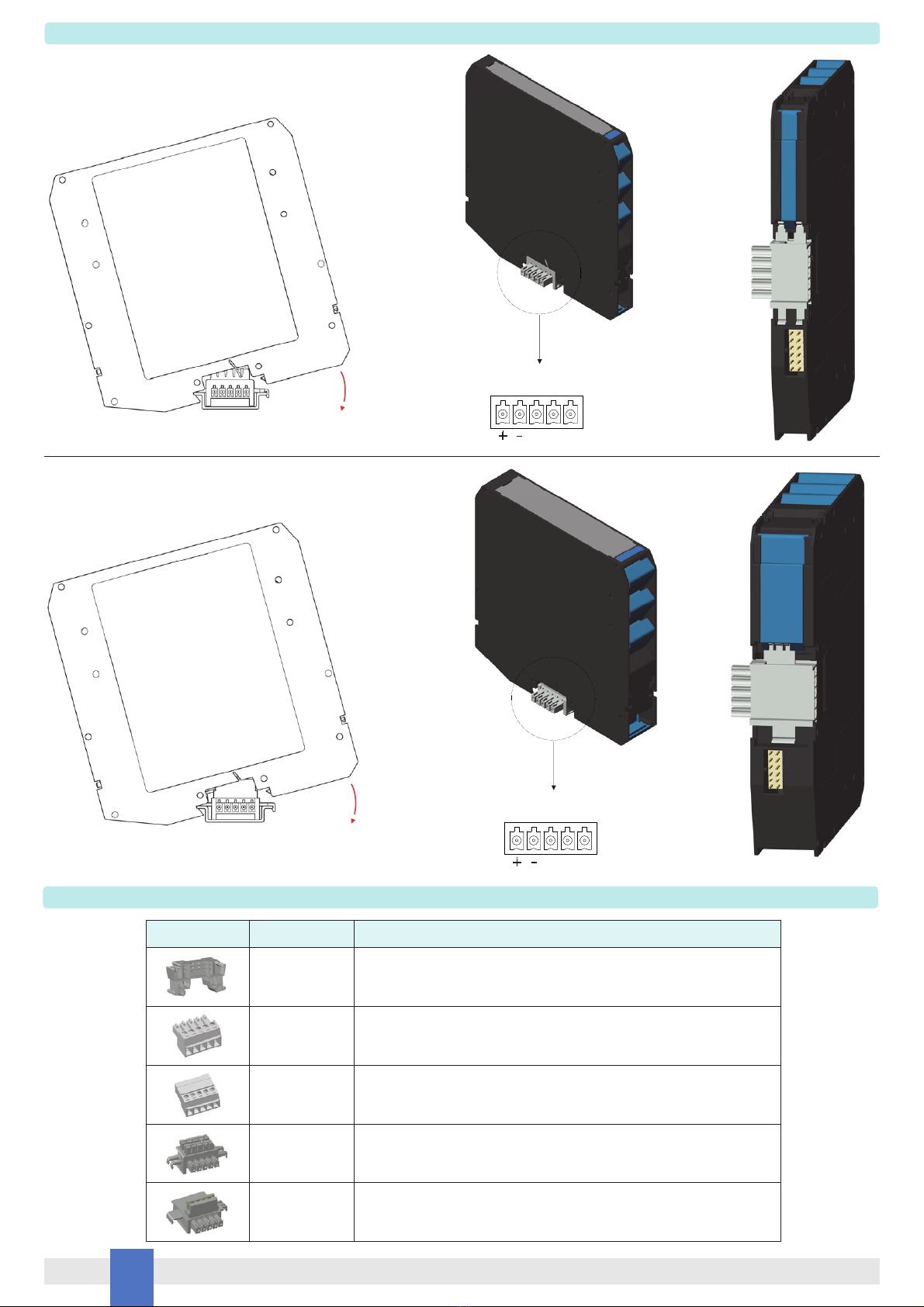
Image Code Description
MCHP196 DIN-Rail Stopper
MOR017 Plug-in terminal block female, horizontal out, for Power Bus
MOR022 Plug-in terminal block male, horizontal out, for Power Bus
JDFT049 Connector 5 pin Power Bus 12mm DIN-Rail
JDFT050 Connector 5 pin Power Bus 22mm DIN-Rail
D5000 Series
Mounting a module onto 12 mm Power Bus connector and T35 DIN-Rail
(JDFT049)
D5200 Series
Mounting a module onto 22 mm Power Bus connector and T35 DIN-Rail
(JDFT050)
Ordering information
Mounting modules on Power Bus connector
Module
enclosure with
Power Bus
Connector
Power
Supply

Technology for safety 9
D5000 - D5200 Series - Intrinsically Safe Isolators and Safety Relays
Removing and mounting Main Case Top Cover
1. Main case top cover can be
plugged out by applying a pressure
as shown in the picture using a screwdriver
Removing
Mounting
1. Main case top cover will slide on the
enclosure dedicated guides.
2. Completely slide main case top cover
to the enclosure guides.
3. Press firmly main case top cover
as shown by arrows in the picture.
2. Pull firmly main case top cover
as shown in the picture.

Technology for safety
10 D5000 - D5200 Series - Intrinsically Safe Isolators and Safety Relays
Transparent Cover
4. Push the transparent cover to
module for the complete closure.
Operating parameters connector,
LEDs for power, status and fault
indication are visible through the
transparent cover.
3. Close the transparent cover
as shown in the picture.
1. Open the transparent cover using a screwdriver
as shown by arrows in the picture.
2. Open the transparent cover up to 90 degrees.
For fully programmable modules, a dedicated connector
is accessible and operating parameters are
programmable by the GM Configurator PPC5092 via
SWC5090 Configurator software.
Ce manuel convient aux modèles suivants
11
Table des matières
Manuels Matériel informatique populaires d'autres marques

EMC2
EMC2 VNX Series Manuel du propriétaire

Panasonic
Panasonic DV0PM20105 Manuel utilisateur

Mitsubishi Electric
Mitsubishi Electric Q81BD-J61BT11 Manuel utilisateur

Gigabyte
Gigabyte B660M DS3H AX DDR4 Manuel utilisateur

Raidon
Raidon iT2300 Manuel utilisateur

National Instruments
National Instruments PXI-8186 Manuel utilisateur


