
Garmin BC 35 Manuel utilisateur

BC™ 35 WIRELESS BACKUP
CAMERA
Installation Instructions
Introduction
WARNING
See the Important Safety and Product Information guide in the product box for
product warnings and other important information.
Garmin® strongly recommends having an experienced installer with the proper
knowledge of electrical systems install the device. Incorrectly wiring the power
cable can result in damage to the vehicle or the battery and can cause bodily
injury.
When connecting the power cable, do not remove the in-line fuse holder. To
prevent the possibility of injury or product damage caused by fire or overheating,
the appropriate fuse must be in place as indicated in the product specifications.
In addition, connecting the power cable without the appropriate fuse in place will
void the product warranty.
CAUTION
Always wear safety goggles, ear protection, and a dust mask when drilling,
cutting, or sanding.
NOTICE
When drilling or cutting, always check what is on the opposite side of the surface.
These installation instructions do not apply to a specific vehicle type, and are
meant as a guide when installing this product on your vehicle. For questions
specific to your vehicle, you should contact the vehicle manufacturer.
Device Overview
Item Description
ÀTransmitter
ÁCamera
ÂCamera mounting bracket
Tools Needed
• Drill and 10.008 mm, or size X (0.397 in.) drill bit
Printed in Taiwan
December 2017
190-02351-90_01
Confidential
• #2 Phillips screwdriver
• Screws, bolts, or cable ties (to secure the transmitter)
•Solderless wire-splice connector or solder and heat-shrink tubing
• RV sealant (optional)
Installation
Camera Mounting Considerations
When selecting a location to mount the camera, observe these considerations.
• You should test a mounting location before you permanently mount the
camera.
• Installing the camera higher on the back of the vehicle provides a better
viewing angle.
• The included bracket can be clipped onto a license plate or other similar
surface, or it can be fastened to the back of the vehicle using the included
self-tapping, panhead screws.
Transmitter Location and Wiring Considerations
NOTICE
The transmitter is not intended to be held or worn on your body while it is in use.
When selecting a location to install the wireless transmitter, observe these
considerations.
• You should test a proposed installation location before you permanently
install the transmitter.
•Some vehicles do not provide constant minimum voltage to the reverse
lamps. You should use an automotive relay when connecting the transmitter
and camera to a power source that does not provide constant voltage.
• Although the transmitter can transmit the video signal approximately 45 ft
(13.5 m), the location of the transmitter can affect this range.
◦ The closer you install the transmitter to the device, the more reliable the
signal.
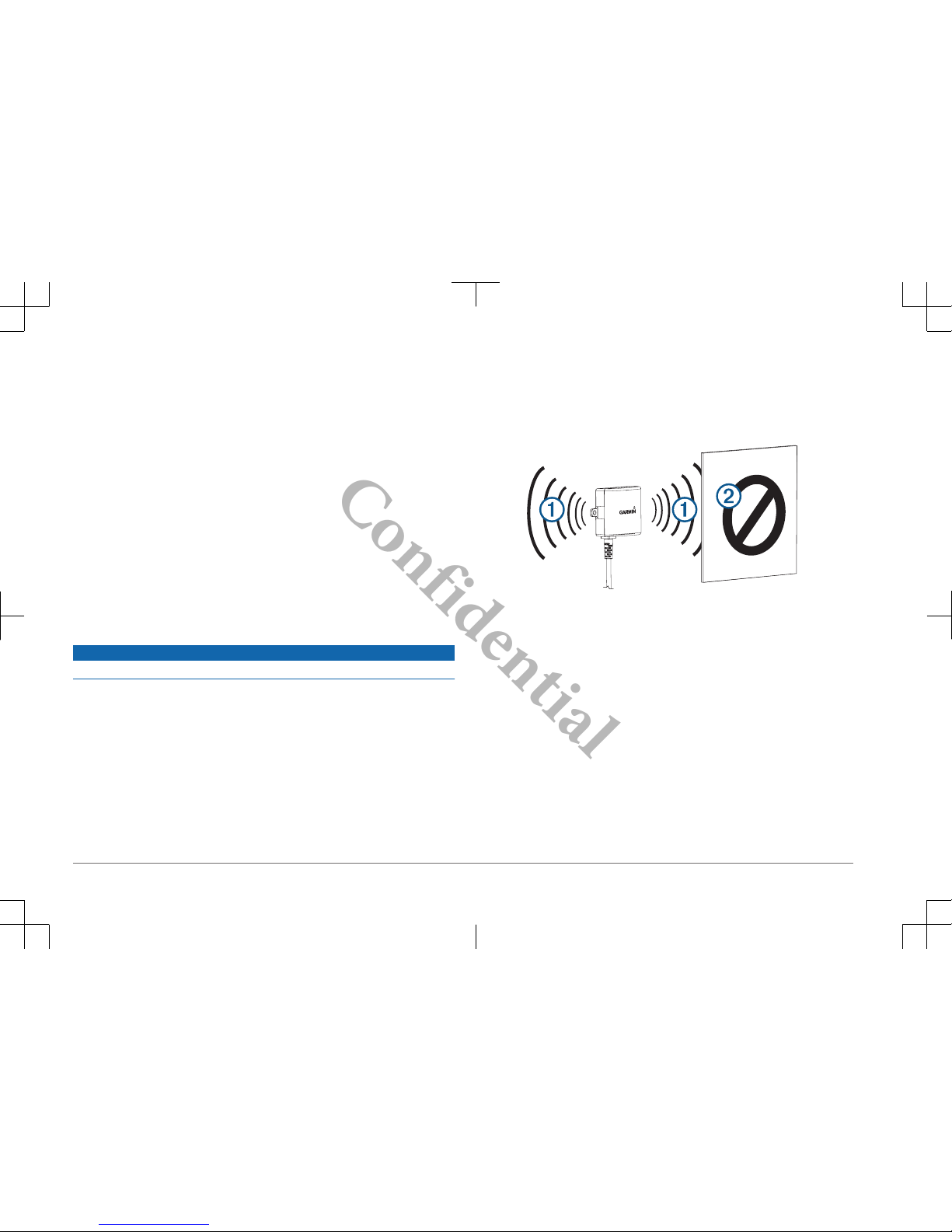
◦ The signal transmits from the flat front and back surfaces À of the
transmitter. The transmitter provides the best signal when either flat
surface points toward the receiver.
◦ Dense metal or appliances Á in the path of the transmitter greatly reduce
the transmission distance.
◦ The fewer solid objects that exist between the path of the transmitter and
the device, the more reliable the signal.
•The fuse holder located near the transmitter is not waterproof. Installing the
fuse holder in a location that is exposed to the elements is not recommended.
• The connector between the camera and the transmitter is not waterproof. If
you make this connection in a location exposed to the elements, you must
make sure that the connection is waterproof.
• If you are installing the camera on a boat trailer or other location that may be
exposed to water, you must waterproof all wiring connections and the fuse
holder in the transmitter cable.
Testing the Camera and Transmitter Location
1Temporarily secure the camera in the preferred mounting location.
2
Confidential
2Temporarily place the transmitter in the preferred installation location, and
connect it to power and to the camera.
TIP: If you do not want to splice into the wiring of your vehicle for this test,
you can connect the transmitter and camera to a 12 Vdc battery.
3Test the transmitter for correct operation by viewing the camera on the
compatible Garmin device.
NOTE: You may need to pair the camera to the Garmin device before you
can view the image and test the transmitter location (page 4).
If you do not see video on the Garmin device at the preferred installation
location, move the transmitter to another location and test it again.
4Repeat steps 2–3 until the transmitter operates correctly.
5Test the camera view by observing the video on the device.
6If the camera does not provide the optimal view for your vehicle, move it to
another location and test it again.
7Repeat steps 5–6 until the camera mounting location provides the optimal
view for your vehicle.
TIP: Make note of which direction is up when you are testing the camera view
to ensure correct permanent installation.
Mounting the Camera
Before you permanently mount the camera, you should test the mounting location
for the optimal view for your vehicle (page 2).
If you have already connected the camera to the bracket, you must first
disassemble it.
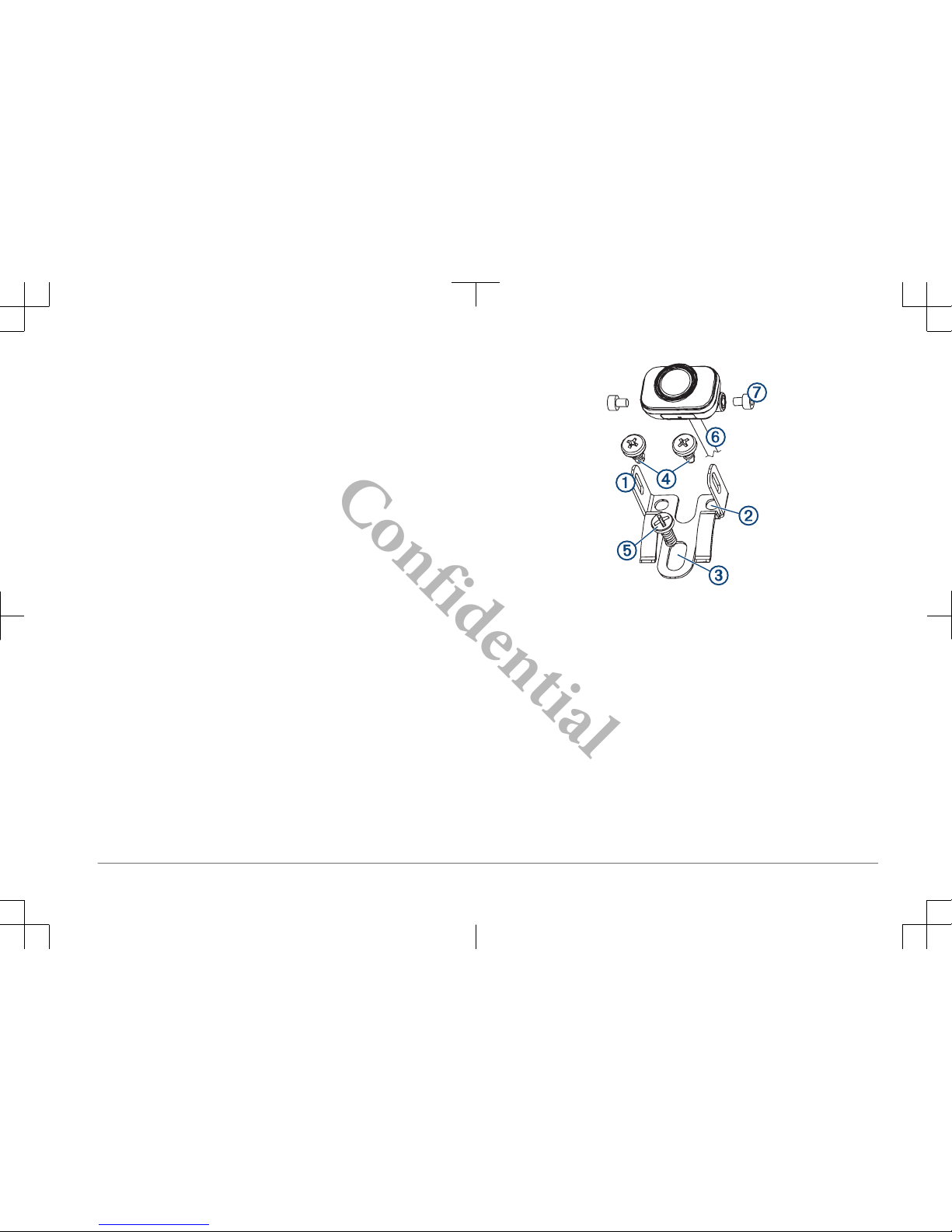
1Place the bracket À in the mounting location.
2Select an option:
• If you are mounting the bracket directly on the surface of your vehicle,
mark the locations of the two holes on the bracket Á.
• If you are installing the bracket on a license plate, remove one of the
license plate screws and clip the bracket in place so the hole on the
bracket  lines up with the hole on the license plate.
3Secure the bracket to the vehicle using either the included self-tapping
screws à or the license-plate screw you removed in step 2 Ä.
4Place the camera in the bracket, and determine the best place for the camera
cable Å to enter the vehicle.
5Using an appropriate drill bit, drill a hole for the camera cable to enter the
vehicle.
6Feed the camera cable through the hole and route it to the transmitter
location.
7Secure the camera in the bracket using the included hex bolts Æ.
3
Confidential

8Adjust the angle of the camera and tighten the hex bolts using the included
hex key.
9Apply RV sealant around the cable where it enters the vehicle (optional).
Installing the Transmitter
Before you permanently install the transmitter, you must test the installation
location for correct operation (page 2).
1Secure the transmitter to the installation location using hardware appropriate
for the location, such as screws, bolts, or cable ties.
The fuse holder located near the transmitter is not waterproof. Installing the
fuse holder in a location that is exposed to the elements is not recommended.
2Connect the camera and transmitter cables.
The connector between the camera and the transmitter is not waterproof. If
you make this connection in a location exposed to the elements, you must
make sure that the connection is waterproof.
3Connect the power cable À from the transmitter to a 12–24 VDC power
source, preferably a reverse lamp Á, using a solderless wire-splice
connector (not included).
NOTE: Connecting the transmitter to an always-on 12-24 VDC source (such
as a running lamp) instead of a reverse lamp requires you to manually switch
power to the transmitter. The transmitter may drain your vehicle battery if it is
left on.
4If you did not use a solderless wire-splice connector, solder and heat-shrink
the electrical connections to protect them from the elements.
Pairing the Camera with a Garmin Navigation Device
You must install AA batteries in the camera before you can pair it to a compatible
Garmin navigation device.
1Turn on the compatible Garmin navigation device, and bring it within 3 m
(10 ft.) of the camera.
2Select Apps > Backup Camera, and follow the on-screen instructions.
Multiple Cameras
You can pair up to four wireless cameras with a compatible Garmin device. For
example, you can pair one backup camera installed on the cab and a second
backup camera installed on a trailer. See the BC 35 Owner's Manual for
information about pairing multiple cameras.
Appendix
Getting the Owner's Manual
You can get the most recent owner's manual from the web.
1Go to garmin.com/manuals/BC35.
2View or download the full owner's manual in your preferred format.
Specifications
Camera and transmitter input voltage From 9 to 28 Vdc
Transmitter fuse 500 mA, fast-blow
Camera and transmitter current usage 150 mA at 12 Vdc
4
Confidential

Water rating Camera = IEC 60529 IPX7*
Transmitter = not waterproof
Operating temperature range From -20° to 70°C (from -4° to 158°F)
*The device withstands incidental exposure to water of up to 1 m for up to
30 min. For more information, go to www.garmin.com/waterrating.
© 2017 Garmin Ltd. or its subsidiaries
Garmin® and the Garmin logo are trademarks of Garmin Ltd. or its subsidiaries, registered
in the USA and other countries. BC™ is a trademark of Garmin Ltd. or its subsidiaries.
These trademarks may not be used without the express permission of Garmin.
5
Confidential

support.garmin.com
Confidential

Important Safety and Product Information 2
Informations importantes sur le produit et la
sécurité 4
guida Informazioni importanti sulla sicurezza
e sul prodotto 7
Wichtige Sicherheits- und
Produktinformationen 9
Información importante sobre el producto y tu
seguridad 12
Informações importantes de segurança e do
produto 15
Belangrijke veiligheids- en
productinformatie 17
Vigtige produkt- og
sikkerhedinformationer 19
Tärkeitä turvallisuus- ja tuotetietoja 21
Viktig sikkerhets- og produktinformasjon 22
Guiden Viktig säkerhets- och
produktinformation 24
Ważne informacje dotyczące bezpieczeństwa
i produktu 26
Confidential

IMPORTANT SAFETY AND PRODUCT INFORMATION
WARNING
Failure to heed the following warnings could result in an accident or collision
resulting in death or serious injury.
Distraction Warning
This device is intended to enhance the situational awareness when used
properly. If used improperly, you could become distracted by the display,
which could lead to an accident causing serious personal injury or death.
Only access the information displayed on the device with a glance. Always
maintain awareness of your surroundings and do not stare at the display or
become distracted by the display. Focusing on the display could cause you
to miss obstacles or hazards. Use the device at your own risk.
Product Environmental Programs
Information about the Garmin® product recycling program and WEEE, RoHS,
REACH, and other compliance programs can be found at www.garmin.com
/aboutGarmin/environment.
Declaration of Conformity
Hereby, Garmin declares that this product is in compliance with the Directive
2014/53/EU. The full text of the EU declaration of conformity is available at
the following internet address: www.garmin.com/compliance.
Innovation, Science and Economic Development Canada Compliance
This device complies with Innovation, Science and Economic Development
Canada license-exempt RSS standard(s). Operation is subject to the
following two conditions: (1) this device may not cause interference, and (2)
this device must accept any interference, including interference that may
cause undesired operation of the device.
FCC Compliance
This device complies with part 15 of the FCC Rules. Operation is subject to
the following two conditions: (1) this device may not cause harmful
interference, and (2) this device must accept any interference received,
including interference that may cause undesired operation.
This equipment has been tested and found to comply with the limits for a
Class B digital device, pursuant to part 15 of the FCC rules. These limits are
designed to provide reasonable protection against harmful interference in a
residential installation. This equipment generates, uses, and can radiate
radio frequency energy and may cause harmful interference to radio
communications if not installed and used in accordance with the instructions.
However, there is no guarantee that interference will not occur in a particular
installation. If this equipment does cause harmful interference to radio or
television reception, which can be determined by turning the equipment off
and on, the user is encouraged to try to correct the interference by one of the
following measures:
• Reorient or relocate the receiving antenna.
•Increase the separation between the equipment and the receiver.
• Connect the equipment into an outlet that is on a different circuit from the
GPS device.
• Consult the dealer or an experienced radio/TV technician for help.
This product does not contain any user-serviceable parts. Repairs should
only be made by an authorized Garmin service center. Unauthorized repairs
or modifications could result in permanent damage to the equipment, and
void your warranty and your authority to operate this device under Part 15
regulations.
Radio Frequency Radiation Exposure
This device is a mobile transmitter and receiver that uses an internal antenna
to send and receive low levels of radio frequency (RF) energy for data
communications. The device emits RF energy below the published limits
when operating in its maximum output power mode and when used with
Garmin authorized accessories. To comply with RF exposure compliance
requirements, the device should be installed and operated with a minimum of
20 cm (7.87 in.) between the device and your body. The device should not be
used in other configurations. This device must not be co-located or operated
in conjunction with any other transmitter or antenna.
Software License Agreement
BY USING THE DEVICE, YOU AGREE TO BE BOUND BY THE TERMS
AND CONDITIONS OF THE FOLLOWING SOFTWARE LICENSE
AGREEMENT. PLEASE READ THIS AGREEMENT CAREFULLY.
2
Confidential

Garmin Ltd. and its subsidiaries (“Garmin”) grant you a limited license to use
the software embedded in this device (the “Software”) in binary executable
form in the normal operation of the product. Title, ownership rights, and
intellectual property rights in and to the Software remain in Garmin and/or its
third-party providers.
You acknowledge that the Software is the property of Garmin and/or its third-
party providers and is protected under the United States of America copyright
laws and international copyright treaties. You further acknowledge that the
structure, organization, and code of the Software, for which source code is
not provided, are valuable trade secrets of Garmin and/or its third-party
providers and that the Software in source code form remains a valuable trade
secret of Garmin and/or its third-party providers. You agree not to decompile,
disassemble, modify, reverse assemble, reverse engineer, or reduce to
human readable form the Software or any part thereof or create any
derivative works based on the Software. You agree not to export or re-export
the Software to any country in violation of the export control laws of the
United States of America or the export control laws of any other applicable
country.
Limited Warranty
THIS LIMITED WARRANTY GIVES YOU SPECIFIC LEGAL RIGHTS, AND
YOU MAY HAVE OTHER LEGAL RIGHTS, WHICH VARY FROM STATE
TO STATE (OR BY COUNTRY OR PROVINCE). GARMIN DOES NOT
EXCLUDE, LIMIT OR SUSPEND OTHER LEGAL RIGHTS YOU MAY HAVE
UNDER THE LAWS OF YOUR STATE (OR COUNTRY OR PROVINCE).
FOR A FULL UNDERSTANDING OF YOUR RIGHTS YOU SHOULD
CONSULT THE LAWS OF YOUR STATE, COUNTRY OR PROVINCE.
Non-aviation products are warranted to be free from defects in materials or
workmanship for one year from the date of purchase. Within this period,
Garmin will, at its sole option, repair or replace any components that fail in
normal use. Such repairs or replacement will be made at no charge to the
customer for parts or labor, provided that the customer shall be responsible
for any transportation cost. This Limited Warranty does not apply to: (i)
cosmetic damage, such as scratches, nicks and dents; (ii) consumable parts,
such as batteries, unless product damage has occurred due to a defect in
materials or workmanship; (iii) damage caused by accident, abuse, misuse,
water, flood, fire, or other acts of nature or external causes; (iv) damage
caused by service performed by anyone who is not an authorized service
provider of Garmin; (v) damage to a product that has been modified or
altered without the written permission of Garmin, or (vi) damage to a product
that has been connected to power and/or data cables that are not supplied
by Garmin. In addition, Garmin reserves the right to refuse warranty claims
against products or services that are obtained and/or used in contravention
of the laws of any country. Garmin navigation products are intended to be
used only as a travel aid and must not be used for any purpose requiring
precise measurement of direction, distance, location or topography. Garmin
makes no warranty as to the accuracy or completeness of map data.
This Limited Warranty also does not apply to, and Garmin is not responsible
for, any degradation in the performance of any Garmin navigation product
resulting from its use in proximity to any handset or other device that utilizes
a terrestrial broadband network operating on frequencies that are close to the
frequencies used by any Global Navigation Satellite System (GNSS) such as
the Global Positioning Service (GPS). Use of such devices may impair
reception of GNSS signals.
TO THE MAXIMUM EXTENT PERMITTED BY APPLICABLE LAW, THE
WARRANTIES AND REMEDIES CONTAINED IN THIS LIMITED
WARRANTY ARE EXCLUSIVE AND IN LIEU OF, AND GARMIN
EXPRESSLY DISCLAIMS, ALL OTHER WARRANTIES AND REMEDIES,
WHETHER EXPRESS, IMPLIED, STATUTORY, OR OTHERWISE,
INCLUDING WITHOUT LIMITATION ANY IMPLIED WARRANTY OF
MERCHANTABILITY OR FITNESS FOR A PARTICULAR PURPOSE,
STATUTORY REMEDY OR OTHERWISE. THIS LIMITED WARRANTY
GIVES YOU SPECIFIC LEGAL RIGHTS, AND YOU MAY HAVE OTHER
LEGAL RIGHTS, WHICH VARY FROM STATE TO STATE AND FROM
COUNTRY TO COUNTRY. IF IMPLIED WARRANTIES CANNOT BE
DISCLAIMED UNDER THE LAWS OF YOUR STATE OR COUNTRY, THEN
SUCH WARRANTIES ARE LIMITED IN DURATION TO THE DURATION
OF THIS LIMITED WARRANTY. SOME STATES (AND COUNTRIES AND
PROVINCES) DO NOT ALLOW LIMITATIONS ON HOW LONG AN
IMPLIED WARRANTY LASTS, SO THE ABOVE LIMITATION MAY NOT
APPLY TO YOU.
3
Confidential

IN NO EVENT SHALL GARMIN BE LIABLE IN A CLAIM FOR BREACH OF
WARRANTY FOR ANY INCIDENTAL, SPECIAL, INDIRECT OR
CONSEQUENTIAL DAMAGES, WHETHER RESULTING FROM THE USE,
MISUSE OR INABILITY TO USE THIS PRODUCT OR FROM DEFECTS IN
THE PRODUCT. SOME STATES (AND COUNTRIES AND PROVINCES)
DO NOT ALLOW THE EXCLUSION OF INCIDENTAL OR
CONSEQUENTIAL DAMAGES, SO THE ABOVE LIMITATIONS MAY NOT
APPLY TO YOU.
If during the warranty period you submit a claim for warranty service in
accordance with this Limited Warranty, then Garmin will, at its option: (i)
repair the device using new parts or previously used parts that satisfy
Garmin's quality standards, (ii) replace the device with a new device or a
refurbished device that meets Garmin's quality standards, or (iii) exchange
the device for a full refund of your purchase price. SUCH REMEDY SHALL
BE YOUR SOLE AND EXCLUSIVE REMEDY FOR ANY BREACH OF
WARRANTY. Repaired or replaced devices have a 90 day warranty. If the
unit sent in is still under its original warranty, then the new warranty is 90
days or to the end of the original 1 year warranty, whichever is longer.
Before seeking warranty service, please access and review the online help
resources available on support.garmin.com. If your device is still not
functioning properly after making use of these resources, contact a Garmin
Authorized service facility in the original country of purchase or follow the
instructions on support.garmin.com to obtain warranty service. If you are in
the United States, you can also call 1-800-800-1020.
If you seek warranty service outside of the original country of purchase,
Garmin cannot guarantee that the parts and products needed to repair or
replace your product will be available due to differences in product offerings
and applicable standards, laws and regulations. In that case, Garmin may, in
its sole discretion and subject to applicable laws, repair or replace your
product with comparable Garmin products and parts, or require you to ship
your product to a Garmin Authorized service facility in the country of original
purchase or to a Garmin Authorized service facility in another country that
can service your product, in which case you will be responsible for complying
with all applicable import and export laws and regulations and for paying all
custom duties, V.A.T., shipping fees and other associated taxes and
charges. In some cases, Garmin and its dealers may be unable to service
your product in a country outside of the original country of purchase or return
a repaired or replaced product to you in that country due to applicable
standards, laws or regulations in that country.
Online Auction Purchases: Products purchased through online auctions
are not eligible for rebates or other special offers from Garmin warranty
coverage. Online auction confirmations are not accepted for warranty
verification. To obtain warranty service, an original or copy of the sales
receipt from the original retailer is required. Garmin will not replace missing
components from any package purchased through an online auction.
International Purchases: A separate warranty may be provided by
international distributors for devices purchased outside the United States
depending on the country. If applicable, this warranty is provided by the local
in-country distributor and this distributor provides local service for your
device. Distributor warranties are only valid in the area of intended
distribution.
Australian Purchases: Our goods come with guarantees that cannot be
excluded under the Australian Consumer Law. You are entitled to a
replacement or refund for a major failure and for compensation for any other
reasonably foreseeable loss or damage. You are also entitled to have the
goods repaired or replaced if the goods fail to be of acceptable quality and
the failure does not amount to a major failure. The benefits under our Limited
Warranty are in addition to other rights and remedies under applicable law in
relation to the products. Garmin Australasia, 30 Clay Place, Eastern Creek,
NSW 2766, Australia. Phone: 1800 235 822.
INFORMATIONS IMPORTANTES SUR LE PRODUIT ET LA
SÉCURITÉ
AVERTISSEMENT
Si vous ne respectez pas les avertissements suivants, vous risquez un
accident ou une collision pouvant entraîner des blessures graves, voire
mortelles.
4
Confidential
Autres manuels pour BC 35
2
Table des matières
Langues :
Autres manuels Garmin Accessoires automobiles

Garmin
Garmin HUD Manuel utilisateur

Garmin
Garmin Speak Manuel utilisateur

Garmin
Garmin BC 20 Manuel utilisateur

Garmin
Garmin 010-11654-07 Manuel utilisateur

Garmin
Garmin GRF 10 Manuel utilisateur

Garmin
Garmin CATALYST Manuel utilisateur

Garmin
Garmin RV-BBT600 Series Manuel utilisateur

Garmin
Garmin Speak Plus Manuel utilisateur

Garmin
Garmin ELOG Manuel utilisateur


