
FY A2000 Manuel utilisateur

3-Axis Gimbal for Mirrorless Camera
GuiLin FeiYu Technology Incorporated Company
V 1.0ENUser Manual

1
[19] Tilting lock screw
[20] Charging indicator
[21] Shutter cable socket
[22] Sliding arm
[23] Trigger button
[24] Camera support frame screw
[25] Camera support frame
[18] Cross arm
[2] Rolling axis
[3] Rolling lock screw
[4] Vertical arm
[13] Handle
[11] Socket connector
[7] Function button
[5] Indicator
[6] Joystick
[12] USB interface
[17] Thumb screw
[14] Quick plate
[15] Adjustment skateboard
[16] Adapter(Clamping plate)
[10] Panning axis
[9] Panning lock screw
[1] Tilting axis
1. Product Overview
[8] Shutter button
[1]
[2]
[3]
[18]
[19]
[24]
[16] [15]
[14] [17]
[23]
[12]
[20]
[9]
[10]
[11]
[8] [7]
[6] [5]
[13]
[4]
[22]
[21]
[17] [25]
2
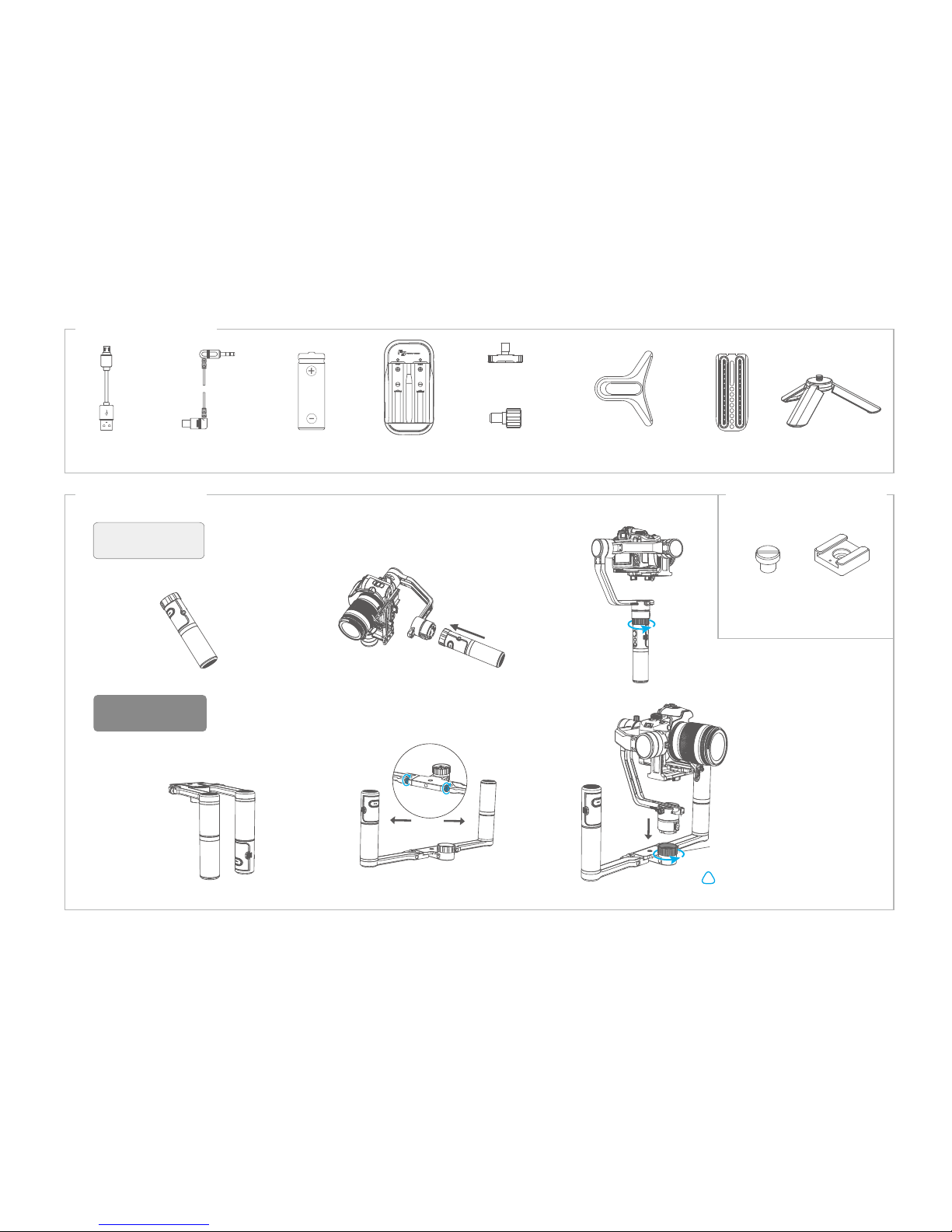
Basic accessories
After installation, please
tighten the retaining ring
!
Single-armed
installation
Dual Handheld
Installation
USB cable Battery X2
(Type: 18650)
SONY shutter line
(3.5 audio to multi)
Smart charger Quick plate
Thumb screw
Camera support
frame screw
Camera support
frame
Code shoe
α2000 Double-hand foldable set (Optional)
Retaining ring
1/4 screw
(Double-hand foldable set)
α2000 Single Handle
Advanced accessories
Installation way
Tripod

3
2
(1) Align the adjustment skateboard to the 1/4 screw
hole at the bottom of the camera and place to the
appropriate position,then tighten the screw.
1
2. Installation
Attention: Please complete the following instructions before power on the gimbal
Insert the batteries
Remove the handle, insert
2 pcs 18650 batteries and
tighten the handle.
Prior to use, please be sure to fill the batteries.
Installation of the camera
18650
18650
*The screw is screwed into the threaded
holes on the quick plate.

4
Balance Adjustment
After installing the camera, press and hold the anti-column, place the quick plate which the camera is
mounted on the clamping plate, and tighten the screws.
(2)
3
!
Anti-
column Thumb
screw
Turn on the gimbal after adjust the center of gravity balance of the three axis(see the section
"7.Balance Adjustment" for details)
Note: center of gravity imbalance can lead to stable performance degradation,
or even can not balance the camera.

5
In case of low battery, the indicator will light red and flash 3 times
every 5 seconds. Please charge gimbal or replace the battery.
Power on:Long press the function button and release it until green light is on and hear the tone.
Power off:
Long press the function button and release it until red light changes from quick flashing to
constant and hear the tone.
The current mode of the gimbal can be identified
by the indicator status.
Explanation of LED indicator status
LED status Mode / Status
Blue light flashes once
Blue light flashes twice
Panning mode
Panning and Tilting mode
Lock mode / Initialize the gimbalBlue light constant on
Blue light keeps flashing Initialization failure / Malfunction
Low battery Red light flashes three times
Red light keeps flashing Entering power off
4
5
!
Explanation of joystick control
Function
Button
Shutter
button
Up
Indicator
Left
Right
Down

6
Trigger button
Lock
Modes / Functions
Function button
Double tap
Double tap
Single tap
Function
Triple tap
Reset
Long press
Panning Mode (Default mode )
Panning and Tilting Mode
Lock Mode
Reset
The orientation of the camera is fixed.
Return to panning mode, tilting and rolling to return to initial level
Return to panning mode, tilting and rolling to return to initial level
Explanation
Function Explanation
Panning mode
Panning and Tilting mode Under panning and tilting mode, single tap to switch to panning mode
Rotate 180°in horizontal Make the camera lens rotate 180 °
Single tap to switch to panning mode (Default mode )
Tilting and rolling direction are fixed, and the camera lens moves according to the hand movement of the user.
Operating Instructions of Button
Working Modes
Other Functions
The rolling direction is fixed, and the camera lens moves according to the hand movement of the user.
6
In the panning mode or panning and pitch mode, press and hold lock
shortcuts to enter the lock mode, release to return before mode
Quadruple tap Quadruple tap to enter autototation mode
Autorotation Mode
Fifth tap Fifth tap to automatically enters initialization
Initialization

7
Autorotation Mode
1.Quadruple tap on function button, gimbal will access the autorotation mode .
2. Set the gimbal start rotation position: Pull the tilting axis or panning axis to the start position by hand,click the function button to record.
3. Pull the gimbal (which can be rotated more than one turn) according to the rotation path you want to set, and then click the function
button to record the end position again.The gimbal will go to the start position and start the automatic rotation.Gimbal autorotation function
with micrrorless camera delay photography function can be used to achieve a very special mobile delay photography.
1.Quadruple tap on function
button, gimbal will access the
autorotation mode setting.
Tilting
Tilting
Panning
Panning
2. Turn the panning axis or tilting
axis to the start position and hold for
half a second.Click on function
button, record the start position .
3 .Turn the panning axis
or tilting axis to the end
position and hold for half a
second.Lick on the function
button again,record the
end position .
Gimbal speed setting reference table
Annexed parameter table:
8 hours / turn
4 hours / turn
1 hour / turn (default)
30 minutes / turn
15 minutes / turn
2 minutes / turn
4 minutes / turn
8 minutes / turn
30 seconds / turn
24 seconds / turn
18 seconds / turn
12 seconds / turn
1 minute / turn
α2000 Rotate Speed
4.Gimbal will recover to
start position automatically.
Tilting axis and panning
axis turn to end position
at constant speed.The
gimbal is automatically
reset after the end.
Other operations:Click the function button to exit the autorotation mode during automatic rotation. The speed setting
is made by Feiyu ON App.
Note: Both the panning and tilting directions can be rotated.
1
3 4
2

8
Manual Lock
Hold the camera and change its angle in
tilting axis direction.
Keep this position for half second, the
current angle will be locked manually.
2
1
Manual lock ,pull to the specified angle to stay half a second can be lock the current angle.(The tilting axis and
panning axis in the lock mode can be manual lock and the tilting axis can be manual lock in the panning mode.)
Take the tilting axis as an example:

Charging
状态指示灯
状态指示灯
7
8
Photograph
9
The shutter button can take pictures via the shutter line.
Click the shutter button to focus, click again within 3s to take pictures.If there is no operation within 3s, the focus
state is cleared.
Indicator
Charging indicator
Micro USB
Input:5V/1A
(equipped by user)
Explanation of Charging indicator status
LED status Mode / Status
Blue light,
red light off
The blue and red light
are flashing
Stop charging
The voltage of two batteries balance ajustment
The blue and red light Charging
(If the two batteries voltage difference between the larger, the process takes a long time)
Table des matières
Autres manuels FY Accessoires pour appareils photo


