
Fluance RT80 Manuel d'utilisation et d'entretien

High Fidelity Series
Belt Drive Turntable System
RT80/RT81
Instructional Manual
Thank you for your purchase of this Fluance product. Please read this manual carefully before
using the product to ensure proper use. Keep this manual in a safe place for future reference.
fluance.com

Fluance has successfully revolutionized the
home audio industry. Fluance develops a
broad line of high-delity products based
on ve key aspects: Sound Quality, Solid
Construction, Performance, Style, and Value.
These distinctive points make Fluance the
most reliable and respected name among
our fans and ensure your music is heard the
way your favorite artist intended.
Today, Fluance expands on this vision and
takes its approach to a new level. With our
dedicated team, Fluance assures its products
meet the most stringent marks of quality
control - overseeing each step from design
to manufacturing - and has raised the indus-
try bar in customer experience and quality to
be second-to-none.

Table of Contents
What’s Included..................................................................................................................................................4
Components and Connections.................................................................................................................... 5
First Time Setup ................................................................................................................................................. 6
Step One:
Installing the Platter.................................................................................................................................. 6
Step Two:
Installing the Counterweight ................................................................................................................ 7
Step Three:
Installing the Headshell ........................................................................................................................... 7
Step Four:
Balancing the Tonearm........................................................................................................................... 8
Step Five:
Setting the Preamp Switch ................................................................................................................... 9
Step Six:
Connecting the Power............................................................................................................................. 9
Step Seven:
Connecting the RCA Cable ................................................................................................................. 10
Step Eight:
Playing a Record ...................................................................................................................................... 10
Auto Stop Function ..................................................................................................................................11
Maintenance ........................................................................................................................................................12
Cleaning the Unit.......................................................................................................................................12
Replacing the Stylus................................................................................................................................12
Cartridge Connections ...........................................................................................................................12
Replacing the Rubber Belt ...................................................................................................................12
Record Care.................................................................................................................................................13
Troubleshooting ................................................................................................................................................13
Turntable not Spinning...........................................................................................................................13
No Power ......................................................................................................................................................13
Wrong Speed..............................................................................................................................................13
Stylus Care ...................................................................................................................................................13
Skipping .........................................................................................................................................................14
Audio Feedback ........................................................................................................................................14
Cueing Lever Not Lowering Tonearm ............................................................................................14
Low Volume.................................................................................................................................................14
Need Additional Help?............................................................................................................................14
Specications......................................................................................................................................................15
Fluance Warranty .............................................................................................................................................17
Warranty Information .............................................................................................................................17
Important Safety Instructions.....................................................................................................................18
FCC & IC Information ......................................................................................................................................19

4
1. Dust Cover
2. Turntable
3. Headshell with Stylus
4.Platter with Rubber Belt
5. Turntable Mat
6. Counterweight
7. 45 Adapter
8. Power Adapter
9. RCA Audio Cable with Ground
What’s Included
1
2
3
5
8
4
6
9
7

5
Components and Connections
1. Platter
2. Rubber Belt
3. Motor Pulley
4. Spindle
5. Turntable Mat
6. Speed Selection
7. Power LED
8. Counterweight
9. Anti-Skating Control
10. Cueing Lever
11. Tonearm Lock
12. Tonearm
13. Headshell & Stylus
14. RCA Audio Outputs
15. Ground Terminal
16. Preamp Switch
17. Auto Stop Switch
18. Power Input
19. Hinge
20. Isolation Feet
1
4
2
8
9
10
11
12
13
19
20
5
6
7
14 16 18
15 17
3

6
First Time Setup
Step One:
Installing the Platter
1. Remove the protective packaging
and ensure the turntable is placed
on a sturdy and level surface. Place
the metal platter onto the spindle
located in the middle of the turntable.
2. Rotate the platter until the rubber belt
installation ribbon aligns with the motor
pulley. Remove the tape from the
installation ribbon.
3. Use the installation ribbon to lift the
rubber belt and place it around the
motor pulley. Remove the installation
ribbon and rotate the platter several
times to ensure the rubber belt
is secure and not twisted.
4.Place the turntable mat on top of
the platter.
Note: If using the Fluance rubber turntable
mat ensure the Fluance logo is facing up
when placing the mat.
Turntable Mat
Metal Platter Installation Ribbon
Motor Pulley
Spindle

7
First Time Setup
Step Two:
Installing the Counterweight
Step Three:
Installing the Headshell
1. Secure the tonearm using the
tonearm lock.
1. Remove the headshell from the
protective packaging and insert
into the end of the tonearm.
2. Slide the counterweight onto the end
of the tonearm with numbers facing
forward until it clicks on.
2. Tighten the locking nut until the
headshell is secure.
Tonearm Lock
Tonearm
Locking Nut
Headshell
Counterweight

8
First Time Setup
Step Four:
Balancing the Tonearm
Important!
Complete all steps for balancing the tonearm. Incorrect tonearm balancing can cause damage to the
stylus and to your records. For additional assistance go to:
www.uance.com/support to watch a tutorial video for this process.
5. With the cueing lever now lowered, turn the entire counterweight until the tonearm
is balanced and floating horizontally when headshell is released.
Tip: When balancing the tonearm make sure the cueing level is down.
1. Remove the stylus protector. 2. Unlock the tonearm and lift the cueing
lever.
Lock Cueing Lever
6. Set only the counterweight indicator ring to “0” on the center line while
keeping the tonearm balanced then lock the tonearm on the tonearm rest.
Counterweight
Indicator Ring
Center Line
3. Position the tonearm over the platter. 4.Hold the headshell and lower the
cueing lever completely. Protect the
stylus from touching the platter.
Cueing Lever

9
Step Four: Continued
Balancing the Tonearm
Step Five:
Setting the Preamp Switch
Step Six:
Connecting the Power
7. Rotate the entire counterweight
counterclockwise until the indicator
ring is set to “2” on the center line.
This will set the tracking force to the
recommended 2.0 Gram tracking force
of the included Audio Technica stylus.
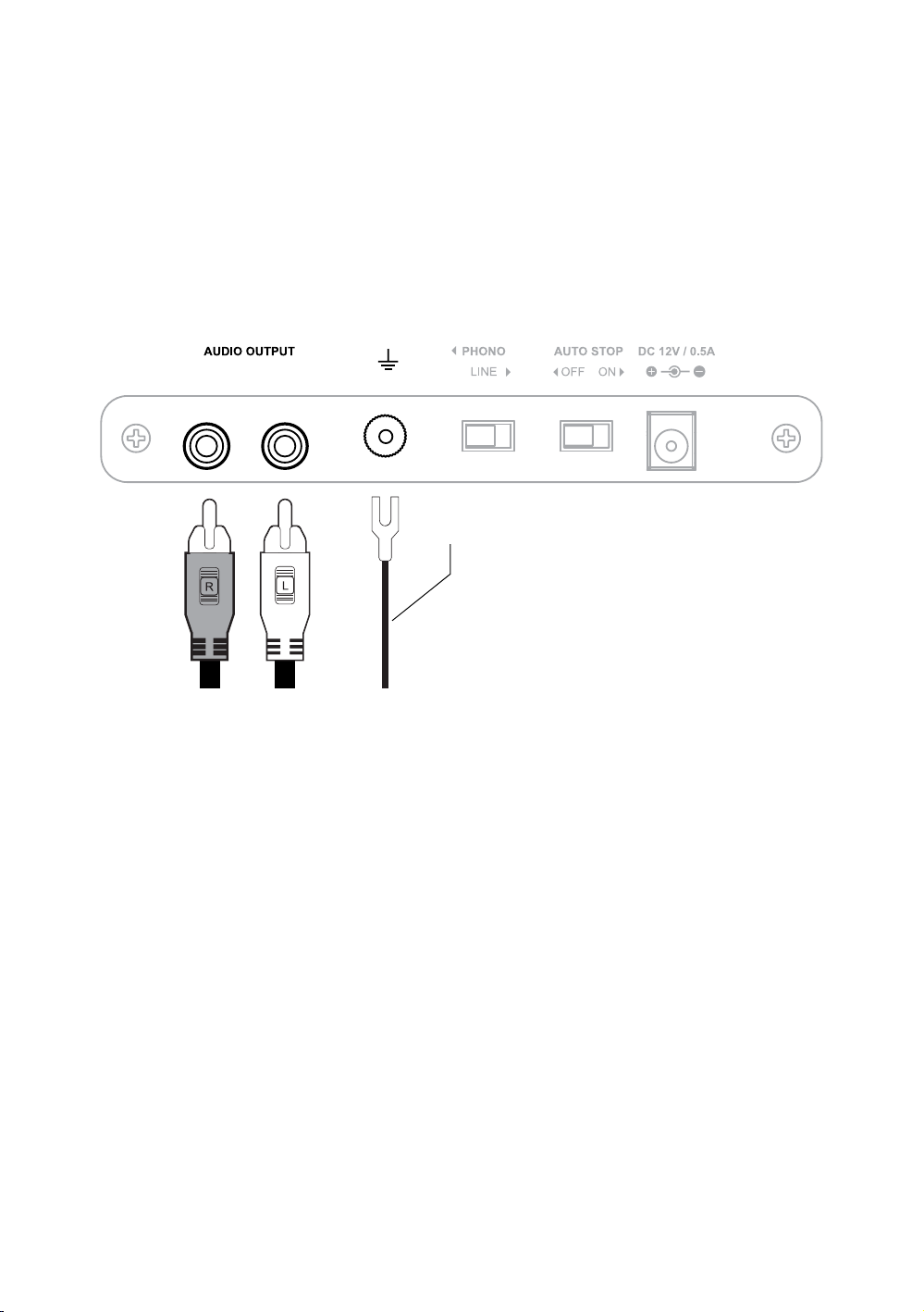
This turntable includes a built-in preamp. To enable the internal preamp set the
switch on the back of the unit to the LINE position.
Optional:
If you wish to use an external preamp you can disable the internal preamp by moving the switch to the PHONO position.
Ensure the power adapter is securely connected to a power outlet. Insert the
power cable into the power input on the back of the turntable.
8. Set the anti-skating control to “2”
to match the tracking force.
Tip: When setting the counterweight to 2 make sure you
are turning the entire weight and not just the counterweight
indicator ring.
10
First Time Setup
Step Seven:
Connecting the RCA Cable
Step Eight:
Playing a Record
The included RCA cable has a ground cable attached. When using the internal
preamp the ground cable is not required. Connect the RCA cables to the audio
outputs on the back of the turntable and then plug the other end into your stereo.
Optional: When using an external preamp the ground cable should be connected to the ground terminal on the back of the
turntable and also connected to the external preamp. Connect the RCA cables to the audio outputs on the back of the turntable
and then plug the other end into your preamp.
Tip: For best audio performance the dust cover should be removed during playback.
The turntable setup is now complete! Enjoy your Fluance turntable. Should you
require any further assistance please contact us at: www.uance.com/support
Note: When the turntable is not in use the speed selection knob should be set to OFF
to turn the turntable completely off.
Ground Cable (Optional)
1. Lift the dust cover
2. Place a record on the spindle
(use the 45 Adapter if necessary)
3. Turn the speed selection knob to
the correct RPM typically listed on
your record (Normal LP playback
speed is 33 RPM)
4. Unlock the tonearm lock
5. Lift the cueing lever
6. Move the tonearm to the desired
starting point
7. Lower the cueing lever
Autres manuels pour RT80
2
Ce manuel convient aux modèles suivants
1
Table des matières
Autres manuels Fluance Platine


