
EZCast Pro Dongle II Manuel utilisateur

EZCast Pro Dongle II
User Guide Ver.1

Overview
EZCast Pro Dongle II improves on the existing Pro Dongle technology with new
hardware and software support. The new 802.11ac 5G 2T2R Wi-Fi transceiver creates
faster and more stable Wi-Fi performance.
✓Brand New Hardware Design
GHz-level SoC with 1GB DDR3 memory to deliver a more powerful performance.
✓Enhanced Wi-Fi Capability
Supports 802.11ac 5GHz Wi-Fi with 2T2R MIMO high sensitivity antenna to
improve bandwidth to run resource intensive applications such as 4K video
streaming.
✓4K Compatibility
Screen mirror wirelessly to beautiful UHD TV and projectors to enhance your
presentation experience.
✓Multi-screen Broadcasting
Easy-to-use ProCast app designed to wirelessly screen mirror 1-to-many screens
from your laptop. We are proud to say this is the most advanced wireless
presentation application ever, no more lousy and costly wiring installations.
✓Efficient Meeting with EZCast Pro App
Take realtime notes with EZNote, stream documents and photos in wireless
presentations. Control meeting agendas with Host Control.
✓Cross Platform Support
Compatible with both airplay screen mirroring and miracast without switching
its configuration, ready for wireless screen mirroring from any smart device.

Contents
Overview........................................................................................................................2
1. EZCast Pro Dongle II with Native Mirror Function .................................................5
Android.......................................................................................................5
iOS ..............................................................................................................5
Windows ....................................................................................................5
macOS ........................................................................................................6
2. Multi-screen Broadcasting with ProCast................................................................7
3. Download EZCast Pro App....................................................................................10
Android.....................................................................................................10
iOS ............................................................................................................10
Windows ..................................................................................................10
Mac ..........................................................................................................10
Chrome OS ...............................................................................................10
4. EZCast Pro App Introduction................................................................................11
EZNote......................................................................................................11
EZKeep......................................................................................................11
EZChannel ................................................................................................11
Photo........................................................................................................11
Camera.....................................................................................................12
Music........................................................................................................12
Video ........................................................................................................12
Document (iOS only)................................................................................12
Web..........................................................................................................12
Cloud Storage.......................................................................................13
AirView.................................................................................................13
5. Setting ..................................................................................................................14
Scan 5G SSID and Connect.......................................................................14
Language..................................................................................................14
Device Name............................................................................................14
Resolution ................................................................................................14
EZAir Mode...............................................................................................15
AirView.....................................................................................................15
Castcode Control......................................................................................15
Max Connections .....................................................................................15
6. Advanced Setting .................................................................................................16
Link Status................................................................................................16

Conference Control..................................................................................16
Device Management................................................................................16
a. Language..............................................................................................16
b. Device Name........................................................................................16
c. Resolution ............................................................................................17
d. EZAir Mode...........................................................................................17
e. AirView.................................................................................................17
f. EZNote..................................................................................................17
g. Castcode Control..................................................................................17
h. Max Connections .................................................................................18
Network Management.............................................................................18
a. Scan 5G SSID and Connect...................................................................18
b. WiFi IP Setting......................................................................................18
c. WiFi Password......................................................................................18
d. WiFi Channel ........................................................................................18
Admin Setting...........................................................................................19
a. Admin Password...................................................................................19
b. WiFi Enterprise.....................................................................................19
c. Host Authority......................................................................................19
d. Internet Access Control........................................................................19
e. SNMP....................................................................................................20
f. My Screen ............................................................................................20
g. OTA URL................................................................................................20
h. Connection...........................................................................................20
i. Upgrade................................................................................................20
j. Reset to default....................................................................................21
Reboot......................................................................................................21
About........................................................................................................21
7. Split Screen Mode................................................................................................22
8. Mirror...................................................................................................................23
9. Privacy Setting......................................................................................................24

1.EZCast Pro Dongle II with Native Mirror Function
To provide native casting experience, EZCast Pro Dongle II supports
Miracast, AirPlay, thus enabling user to do video streaming without
installing any app.
Android
I. Click in your setting menu and select the SSID that matches with
your dongle. Please make sure your device supports Miracast protocol.
Also, Cast Logo may vary from different devices.
II. Once connected, user may see the mirror screen on the external display.
iOS
I. Connect your iOS device to EZCasat Pro Dongle II in the Wi-Fi list. Or
connect your iOS device and Dongle to the same WAP (Wireless Access
Point).
II. Click in your menu and select the SSID that matches your dongle.
III. Once connected, user may see the mirror screen on the external display.
Windows
I. Open your Windows Settings Menu, then enter the Display section.
II. User may find the SSID of the dongle. Once connected, user may see the mirror
screen on the external display. Based on different using scenarios, you may
select different methods, including Duplicate, Extend, etc.

macOS
I. Connect your iOS device to EZCasat Pro Dongle II in the Wi-Fi list. Or
connect your iOS device and Dongle to the same WAP (Wireless Access
Point).
II. Click in your menu and select the SSID that matches your dongle.
III. Once connected, user may see the mirror screen on the external display.

2.Multi-screen Broadcasting with ProCast
User may use one laptop as casting source and mirror to other external
displays. Please note that Mulit-screen broadcasting is only compatible
with Windows and Mac.
DO NOT open EZCast Pro App and ProCast at the same time.
Before using Multi-screen broadcasting, make sure all your dongles that
connected to external displays are using the same Wi-Fi.
Please note that with the rising number of connected devices, the lower
bandwidth will be.
For more details, please visit our website.
I. Download ProCast App from our website and install it.
II. Open ProCast App, and you’ll see the matching dongle SSID.
III. Click and your screen will be cast to the external displays.
Please make sure your laptop and the
external displays are under the Same
Network.

The following icons serves different purposes:
Mirror Disconnect
Silent mode Sound-on mode
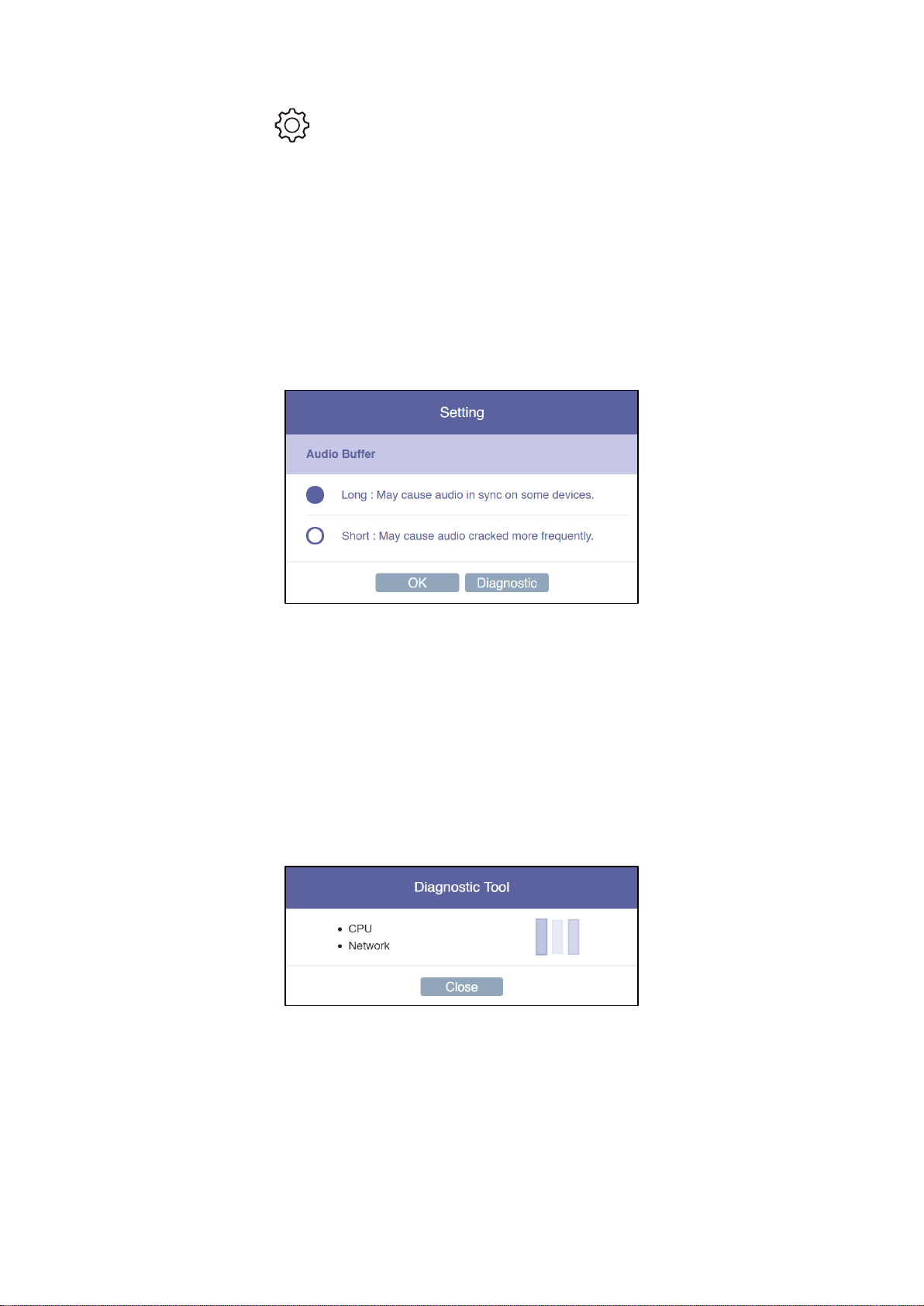
By clicking , we provide users with setting option and diagnostic
tool.
1. Audio Buffer
a. Long: With longer buffer, may provide better audio streaming
experience
b. Short: May cause audio cracked more frequently
2. Diagnostic Tool:
Based on user’s CPU and Network performance, the Diagnostic Tool will
calculate the ideal number of connected external displays.
Please note that the mirror performance may change under different
scenarios. For example, static presentation will perform better than 4K
video streaming.

3.Download EZCast Pro App
We have built different versions of EZCast Pro App for multiple OS
platforms. With EZCast Pro App, users may do custom configuration for
their dongles, including Wi-Fi, Split Screen, etc.
Please refer to the following information. As for the App function intro,
we’ll elaborate on more details at the latter sections.
Android
You may download EZCast Pro App for Android from Google Play or our website.
iOS
You may download EZCast Pro App for iOS directly from App Store.
Windows
You may download EZCast Pro App for Windows from our website.
Mac
You may download EZCast Pro App for Windows from our website.
Chrome OS
You may download EZCast Pro App for Windows from our website.
Table des matières
Autres manuels EZCast Matériel informatique


Manuels Matériel informatique populaires d'autres marques

EMC2
EMC2 VNX Series Manuel du propriétaire

Panasonic
Panasonic DV0PM20105 Manuel utilisateur

Mitsubishi Electric
Mitsubishi Electric Q81BD-J61BT11 Manuel utilisateur

Gigabyte
Gigabyte B660M DS3H AX DDR4 Manuel utilisateur

Raidon
Raidon iT2300 Manuel utilisateur

National Instruments
National Instruments PXI-8186 Manuel utilisateur


