Evco EVLJBOX HP Sequencer Manuel utilisateur

EVCO | 21.10.2020 | AZ | 1144EJBSI104
EVLJBOX HP
Sequencer
Application Manual:
Heat pump sequencer
|Ready-to-install solution
|LCD colour graphic display
|6 capacitive touch keys
|Electrical panel with full IP65
|Display of the main variables of each
heat pump
|Management of the main equipment functions
|Management of up to 5 heat pumps
|Automatic power modulation
|Maximum number of active units
set by parameter
Applications
Heat pump

EVCO | 21.10.2020 | AZ | 2144EJBSI104
EVLJBOX HP Sequencer - Application manual
IMPORTANT
Read this document carefully before installation and take all precautions before using the device.
Keep this document with the device for future reference.
Only use the device in the ways described in this document.
CONSIDER THE ENVIRONMENT
Please read this document carefully and save it.
DISPOSAL
The device must be disposed of according to local regulations governing the collection of electrical and electronic
equipment.

EVCO | 21.10.2020 | AZ | 3144EJBSI104
EVLJBOX HP Sequencer - Application manual
Index
|Introduction 5
|Purchasing codes 6
|Measurements 7
|Installation 8
|Electrical connections 9
|EVLJBOX HP Sequencer - User interface 9
|Description of connectors 9
|EVLJBOX HP Sequencer - Control module 10
|Description of connectors 10
|Electrical connection 12
|User interface 13
|Keypad 13
|List of pages 14
|Password 14
|Main page 15
|Status pages 17
|Main menu 18
|User menu 18
|Servicer menu 19
|Installer menu 19
|RTC menu 20
|Alarm menu 21
|Alarm history menu 21
|Save/reset menu 21
|Info menu 22
|List of parameters 23
|Description of parameters 23
|Structure of the menus 23
|Conguration parameters table 24
|Regulations 28
|Machine status 28
|Setting the RTC 28
|Main regulation 29
|Slave on/off sequence 31
|Slave status 31
|Mixing valves 31

EVCO | 21.10.2020 | AZ | 4144EJBSI104
EVLJBOX HP Sequencer - Application manual
|Diagnostics 34
|Manual and automatic alarms 34
|Manual alarms 34
|Automatic alarms 34
|Table of alarms 35
|Blocking alarms for the master 35
|Blocking alarms for the slaves 35
|Slave conguration alarm 37
|Slave communication alarm 37
|Evaporator high/low temperature alarm 38
|Condenser high/low temperature alarm 39
|Technical specications 40

EVCO | 21.10.2020 | AZ | 5144EJBSI104
EVLJBOX HP Sequencer - Application manual
Introduction
The EVLJBOX HP Sequencer is a control solution housed in an
electric panel that makes it possible to control in sequence up
to 5 heat pumps managed by programmable EVCO devices and
interconnected with RS-485 serial communications systems.
The number of operating units and their power level are adjusted
according to the cooling/heating requirements of the equipment,
but it is also possible to set parameters for the number of units
active at the same time.
The fully IP65-compliant panel houses a user interface with a LCD
graphic display with a resolution of 320x240 pixels and 16 colours,
from which it is possible to manage all the main functions of the
equipment (switch on/off, alter operating mode, etc.) and view the
main variables of each of the connected heat pumps.

EVCO | 21.10.2020 | AZ | 6144EJBSI104
EVLJBOX HP Sequencer - Application manual
Purchasing codes
The table below shows the main features of the EVLJBOX HP Sequencer model available and the relative purchasing code
Features Models
Power supply
115... 230 VAC •
Analogue digital inputs
Evaporator supply water temperature probe (PTC/NTC/PT1000) •
Evaporator return water temperature probe (PTC/NTC/PT1000) •
Condenser supply water temperature probe (PTC/NTC/PT1000) •
Condenser return water temperature probe (PTC/NTC/PT1000) •
Analogue outputs
Evaporator mixing valve (0-10 V/PWM) •
Condenser mixing valve (0-10 V/PWM) •
Digital outputs
Heating/cooling switching valve 1 5 A
Heating/cooling switching valve 2 5 A
User interface
320x240 px with LCD colour graphic display •
Dimensions
150x245 mm •
Installation
Wall mounted •
Connections
Fixed screw terminal blocks •
Type A female USB connector •
Communications ports
RS-485 MODBUS MASTER 1
USB 1
Further features
Clock •
For more information see the section “Technical specications”
Description of purchasing codes
Features Code
115... 230 VAC - LCD graphic display - Wall mounted - RS-485 MODBUS - USB - Clock

EVCO | 21.10.2020 | AZ | 7
004_EVLJBOX_Sequencer_Dimensioni_001_0.1_AZ
144EJBSI104
EVLJBOX HP Sequencer - Application manual
Measurements
150 mm 88.6 mm
245 mm

EVCO | 21.10.2020 | AZ | 8
008_EVLJBOX_Sequencer_Installazione_001_0.1_AZ
008_EVLJBOX_Sequencer_Installazione-02_001_0.1_AZ
008_EVLJBOX_Sequencer_Installazione-02_001_0.1_AZ
c-pro 3 OEM
144EJBSI104
EVLJBOX HP Sequencer - Application manual
Installation
INSTALLATION PRECAUTIONS
–Ensure that the working conditions are within the limits stated in the “Technical specications” section.
–Do not install the device close to heat sources, equipment with a strong magnetic eld, in places subject to direct
sunlight, rain, damp, excessive dust, mechanical vibrations or shocks.
–In compliance with safety regulations, the device must be installed properly to ensure adequate protection from
contact with electrical parts. All protective parts must be xed in such a way as to need the aid of a tool to remove
them.
–Users will need a rigid pipe tting; the maximum diameter of the xing hole must be 28.5 mm
–To ensure IP65-rated protection of the whole casing, x the container using only the holes already made
Wall mounting
1. Secure the back cover |7| to the wall using the 4 screws
|1|
and the holes already made |6|
2. Make sure the seal |8| is correctly inserted
3. Place the front cover |4| over the back cover
|7| and push the 2 assembling tongues |10|
down into the holes |2| on the right or left
of the front cover |4|
4. Fix the user interface |12| into place by pressing it
into its housing |5| from the front
5. Fix the control module |14| to the DIN rail |16|;
next secure the DIN rail |16| to the back cover
|7| in its housing |17| with two screws |15|
6. If the connection cables are fed in from above,
make a hole whose diameter is suitable for xing
a rigid pipe tting |13| on the top of the
back cover |7|; if the cables are fed in from the
bottom, make the hole on the bottom of the cover
7. Screw the rigid pipe tting |13| to the back
cover |7|
8. Connect the user interface |12| as shown in the
section “Electrical connections”, feeding the
connection cables through the rigid pipe tting |13|
9. Secure the front cover |4| to the back cover |7|
using the 4 screws |9| and the holes already made |3|
10. Fix the covering strips |11| over the top and bottom
parts of the front cover |4|
74
5
1
9 13
1514 16
17
17
10 11 12
2 6 8
3

EVCO | 21.10.2020 | AZ | 9
4
3
2
1
EVJBOX HP
Sequencer
12
ON
002_EPJgraph_Pannello_DescrizConnettori_001_0.1_AZ
144EJBSI104
EVLJBOX HP Sequencer - Application manual
Electrical connections
PRECAUTIONS FOR ELECTRICAL CONNECTIONS
–Use cables of an adequate section for the current running through them
–To reduce any electromagnetic interference, connect the power cables as far away as possible from the signal cables
and connect to a RS-485 MODBUS network using a twisted pair
–If using an electrical or pneumatic screwdriver, adjust the tightening torque
–If the device is moved from a cold to a warm place, humidity may cause condensation to form inside; wait for about an
hour before switching on the power
–Make sure that the supply voltage, electrical frequency and power are within the set limits
–Disconnect the power supply before carrying out any type of maintenance
–Do not use the device as a safety device
–For repairs and further information, contact the EVCO sales network; returned goods without the data label will not be
accepted
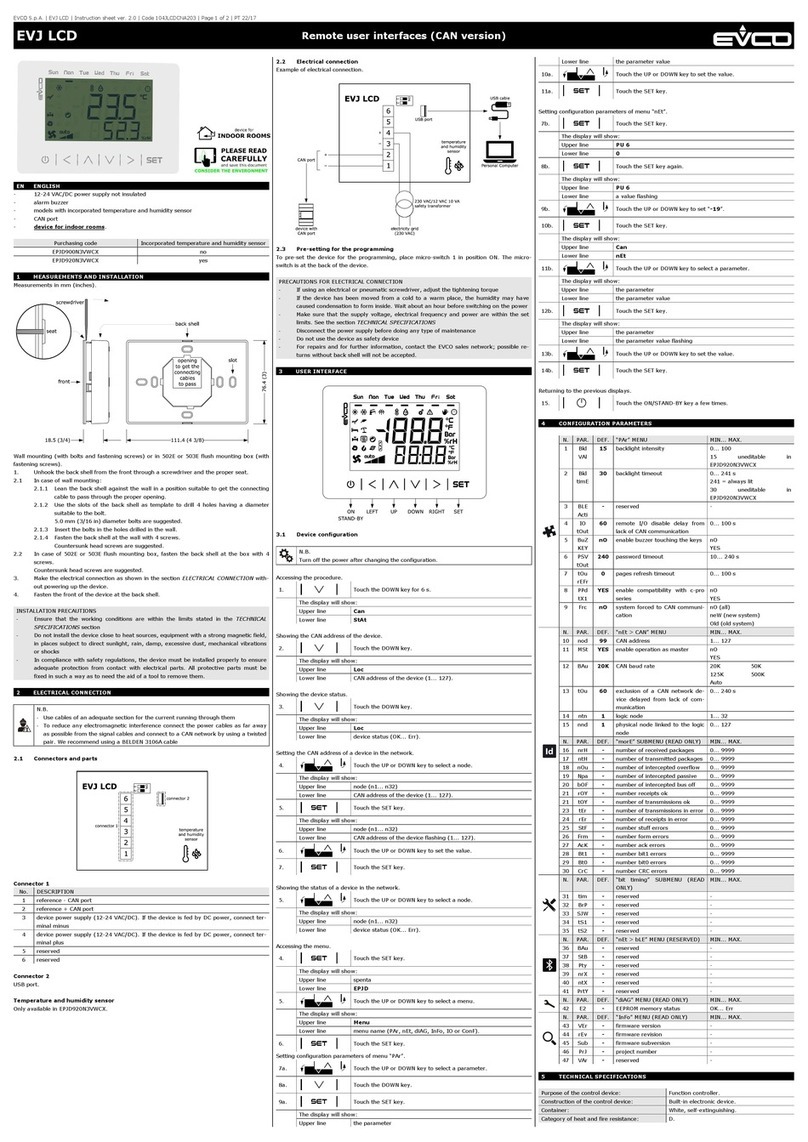
Connector 2
Micro-switch
Connector 1
User interface
Connector 1
Number Description
1- signal CAN port
2+ signal CAN port
3
Device power supply (24 VAC/12... 30 VDC): if the
device is powered by direct current, connect the
negative terminal
4
Device power supply (24 VAC/12... 30 VDC): if the
device is powered by direct current, connect the
positive terminal
Connector 2
Number Description
1For EVCO use only
Micro-switch
Number Description
2To terminate the CAN network
1For EVCO use only
EVLJBOX HP Sequencer - User interface
Description of connectors

EVCO | 21.10.2020 | AZ | 10
CO1
AO4AO3 AO2AO1 DI4DI3 IN7IN6 IN5IN4 IN3IN2 IN1GND 12VS 5VS IB
NO1 CO2NO2 CO3 NO3 CO4NO4 CO5 NO5 NO6CO6 NC6DIHV1DIHV1DIHV2DIHV2ACAC
GND CAN+ CAN-
A/+ B/-
002_EVLJBOX_Sequencer_Connettori_001_0.1_AZ
EVLJBOX HP Sequencer
21
ON
144EJBSI104
EVLJBOX HP Sequencer - Application manual
EVLJBOX HP Sequencer - Control module
Description of connectors
Connector 1
Number Description
CO1 K1 digital output common contact
NO1 K1 digital output normally open contact
(5 A res. at 250 VAC)
CO2 K2 digital output common contact
NO2 K2 digital output normally open contact
(5 A res. at 250 VAC)
CO3 K3 digital output common contact
NO3 K3 digital output normally open contact
(5 A res. at 250 VAC)
Connector 2
Number Description
CO4 K4 digital output common contact
NO4 K4 digital output normally open contact
(5 A res. at 250 VAC)
CO5 K5 digital output common contact
NO5 K5 digital output normally open contact
(5 A res. at 250 VAC)
Connector 3
Number Description
NO6 K6 digital output normally open contact
(16 A res. at 250 VAC)
CO6 K6 digital output common contact
NC6 K6 digital output normally closed contact
Connector 4
Number Description
DIHV1 DI1 high voltage digital input
DIHV1 DI1 high voltage digital input
DIHV2 DI2 high voltage digital input
DIHV2 DI2 high voltage digital input
Connector 8
Connector 1 Connector 2 Connector 4
Connector 3 Connector 5
Connector 6
Connector 7
Connector 5
Number Description
AC Device power supply (115... 230 VAC)
AC Device power supply (115... 230 VAC)
Connector 6
Number Description
IB INTRABUS port data
GND Reference (GND)
A/+ If installed, + signal
RS-485 MODBUS master/slave port
B/- If installed, - signal
RS-485 MODBUS master/slave port
CAN+ + signal CAN port
CAN- - signal CAN port
Control module
Table des matières
Autres manuels Evco Système de contrôle