
ENERGY SISTEM Max 4G Manuel utilisateur

1/21 energysistem.com
ENGLISH
Introduction 3 .....................................................................................................................................................................
Care and maintenance 3 ...................................................................................................................................................
Key Features 3 ....................................................................................................................................................................
Product content 4 ...............................................................................................................................................................
General overview 4 ............................................................................................................................................................
Power supply 5 ...................................................................................................................................................................
Switch on and off 5 ............................................................................................................................................................
Main gestures 5 ..................................................................................................................................................................
Basic gestures 5 .............................................................................................................................................................
Main screen 6 ......................................................................................................................................................................
Widgets 7 .......................................................................................................................................................................
SIM card setup 8 .............................................................................................................................................................
Bluetooth setup 9 ...........................................................................................................................................................
Wi-Fi setup 10 .................................................................................................................................................................
Internet browser 11 ........................................................................................................................................................
E-Mail client 12 ...............................................................................................................................................................
Music player 12 ..............................................................................................................................................................
Video Player 13 ..............................................................................................................................................................
Camera 14 ............................................................................................................................................................................
Gallery 15 .............................................................................................................................................................................
MicroSD / USB 17 ................................................................................................................................................................
Updating 18 .........................................................................................................................................................................
Troubleshooting 19 ............................................................................................................................................................
Safety precautions and SAR 19 ........................................................................................................................................
Safety precautions 19 .....................................................................................................................................................
Exposure information (SAR) 20 .......................................................................................................................................
Warranty 20 .........................................................................................................................................................................
Warranty procedure 20 .....................................................................................................................................................
Trademarks 20 ....................................................................................................................................................................
Declaration of conformity 20 ............................................................................................................................................

2/21 energysistem.com
3/21 energysistem.com
Introduction
Thank you for your trust in us and for buying the new Phone Max 4G. We hope you enjoy it.
Your new phone has an IPS HD 5" (1280x720 pixels) capacitive touch display with anti-fingerprint coating, Quad Core
ARM Cortex A53 1.0 GHz processor, Bluetooth 4.0, Wi-Fi, GPS, 4G/3G connectivity, front camera and rear camera with
flash.
Before you start using your smartphone we recommend you to read this manual and familiarize yourself with it. It only
takes a couple of minutes and it will help you to enjoy your device with maximum performance.
Care and maintenance
Do not expose your Phone Max 4G to impacts, dust, direct sunlight for a long period of time, humidity or high
temperatures.
Do not use abrasive or corrosive cleaners.
Keep the device clean and dust free using a soft, dry cloth.
Charge the battery when the display shows the low battery icon. Only charge with the adapter included in your
smartphone.
Do not disassemble the device. All reparation should be done exclusively Energy Sistem Technology, S.A.
qualified staff.
Key Features
Unlocked smartphone with optimized ANDROID™ 5.1 O.S.
4/21 energysistem.com
5" IPS touch display (HD 1280x720p).
Quad Core ARM Cortex A53 1.0 GHz processor and Mali T720MP1 GPU.
Super fast connectivity 4G/LTE category 4.
Wi-Fi 802.11 b/g/n connectivity.
GPS function.
Bluetooth 4.0.
Dual microSIM card slot.
1 GB RAM DDR3.
16 GB internal memory.
Expandable memory using microSDHC/XC (up to 128 GB)
Integrated 5 Mpx FOV 84,3º front camera.
Integrated 8 Mpx rear camera with autofocus and LED flash.
Integrated speaker.
Integrated omni directional microphone.
Motion sensor (accelerometer).
Display with auto brightness.
Proximity sensor.
Installed applications: web browser, email manager, applications to play music / videos / photos, FM radio, alarm
and calculator.
Allows you to install thousands of applications and games available for the Android™ operating system.
Frequency bands: GSM 850/900/1800/1900 MHz + WCDMA 900/2100 MHz + FDD-LTE 800/1800/2600 MHz.
Battery capacity: 2.500mAh.
Battery life: up to 265 hours on standby and 15 hours talk time.
SAR rating: 0,372 (W/Kg) at the head and 0,652 (W/Kg) at the body (10 mm distance).
Product content
Phone Max 4G.
Quick guide.
Screen protector.
USB 2.0 cable.
AC/DC 5V 1A (Europlug) 100-240V AC 50-60Hz power adapter.
Rechargeable lithium battery.
General overview
5/21 energysistem.com
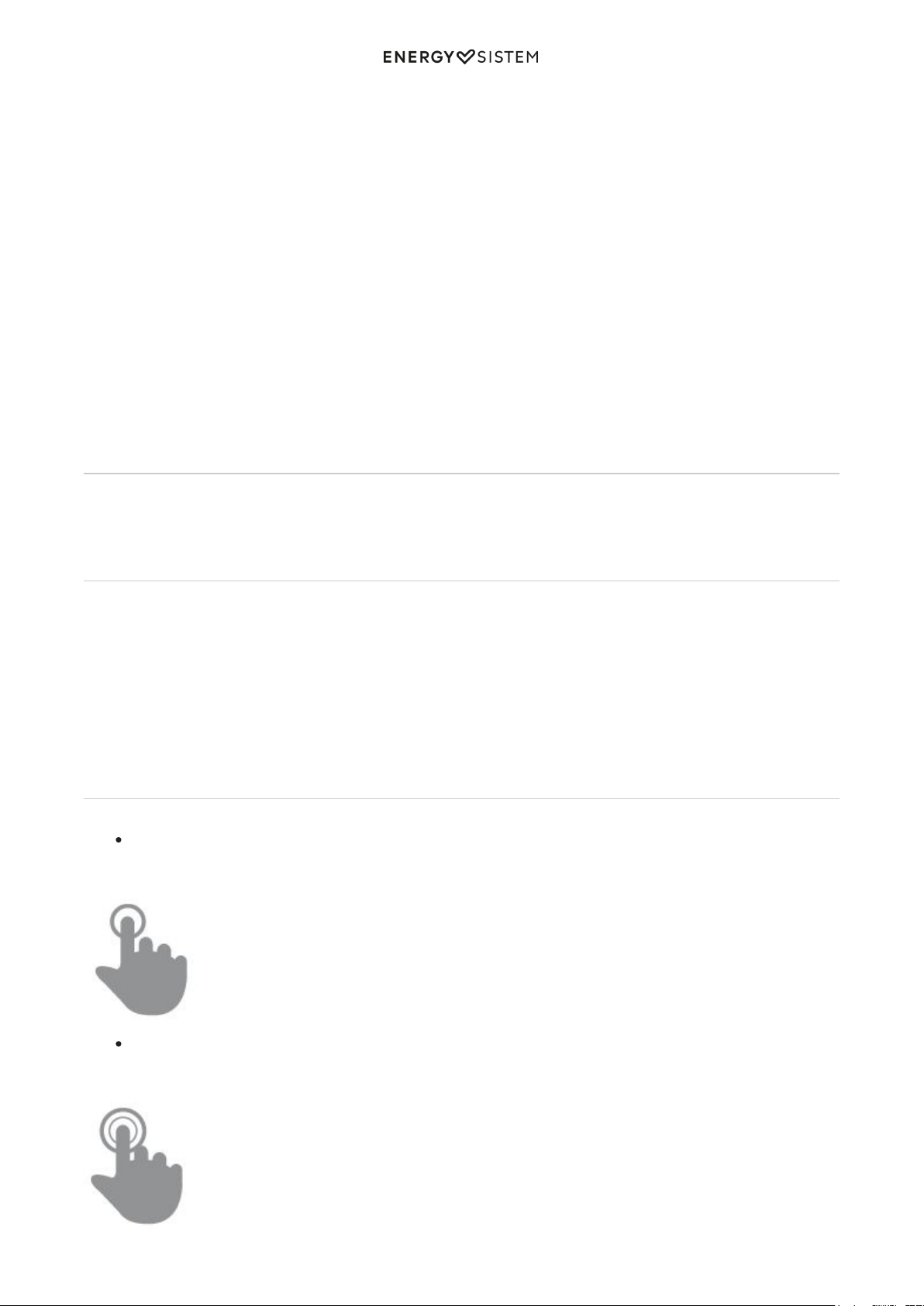
Power button1.
Volume button2.
Front camera3.
Proximity and luminosity sensors4.
Receiver5.
USB Input6.
Earphones output7.
Rear camera8.
Rear flash9.
Speaker10.
Microphone11.
Touch buttons: Recent Apps, Home, Back12.
MicroSIM card slot 213.
MicroSIM card slot 214.
MicroSD card slot15.
IMEI and serial numbers16.
Battery17.
Power supply
Your Phone Max 4G has a built-in rechargeable lithium ion battery. Recharge the battery by connecting the device to
the outlet only using the power adapter and the USB cable included with the product. The charging time ranges from
2-4 hours, depending on whether the device is off or running.
Switch on and off
Before turning on your Phone Max 4G, make sure that the microSIM cards and the battery (17) are inserted in their
slots. After that, press the power button (1) located on the left side of your device for one second. When the operating
system has loaded, unlock the device to start using it. Enter the PIN number of your microSIM cards and then drag the
padlock upwards using your finger.
In order to turn off the device, hold the power button (1) until you see the power off menu, then select OK.
Briefly press the power button (1) to lock/unlock the device thus, turning the screen on/off and activating the power
saving mode.
Main gestures
Basic gestures
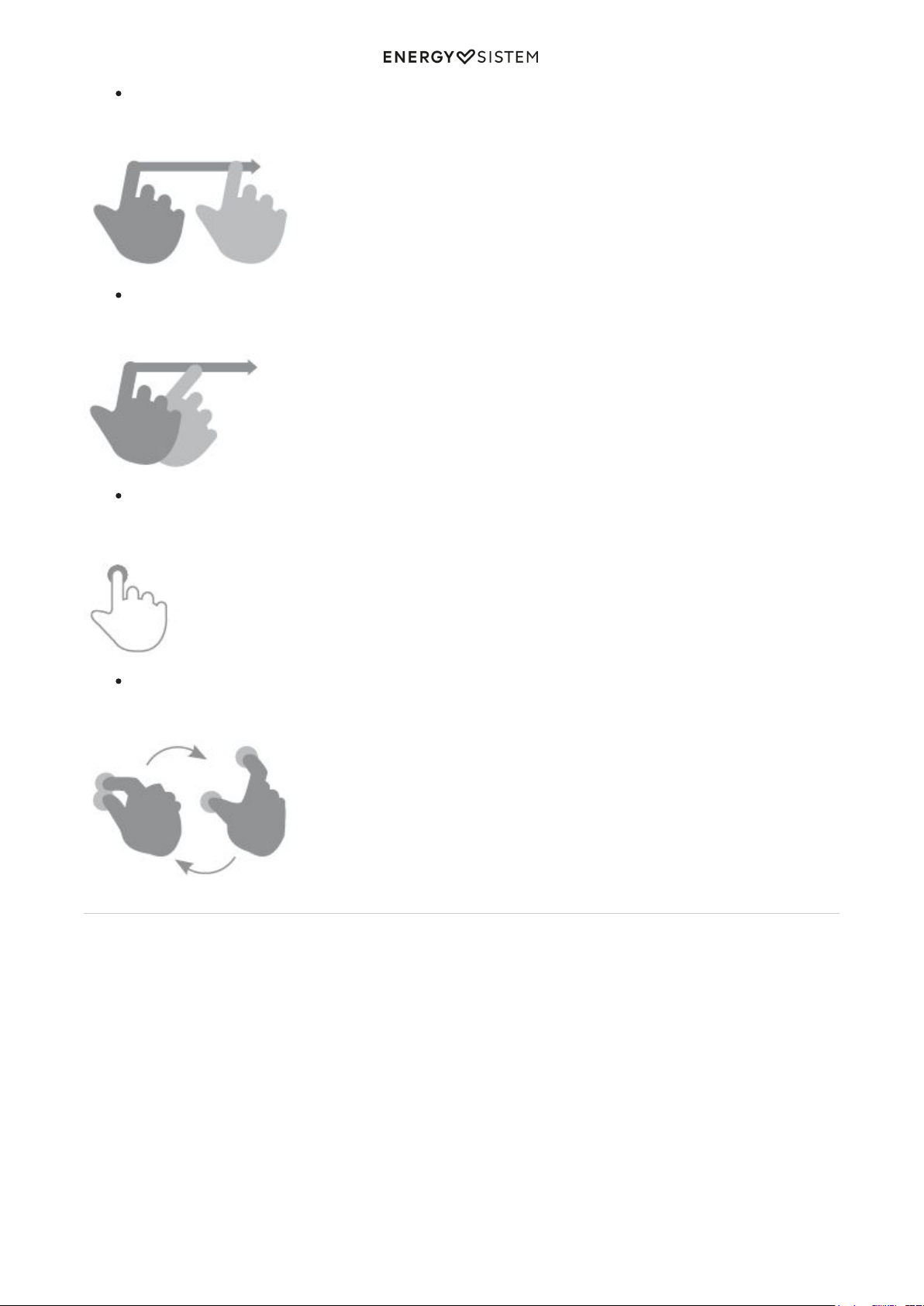
Tap
Touch the screen briefly
Double tap
Touch the screen twice quickly
6/21 energysistem.com
Drag
Move your finger over the screen without losing contact
Slide
Slide your finger quickly over the screen
Press
Touch the screen for an extended period of time
Zoom
Zoom in and out the screen image
Main screen
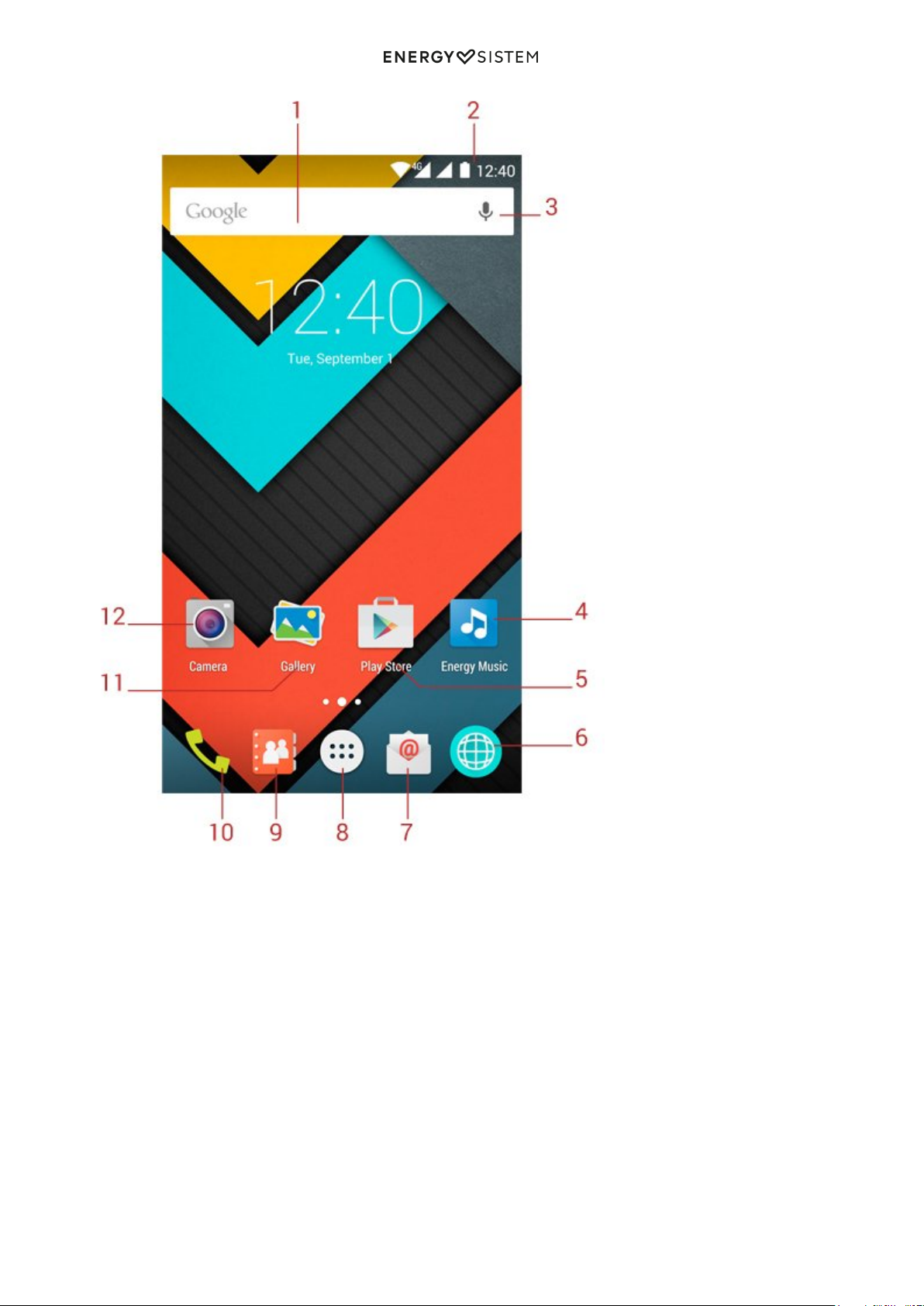
7/21 energysistem.com
Search: Direct access to Google's™ search engine.1.
Status Bar: Displays information about the signal status, battery and clock. If you slide your finger down from2.
this area, you will access a new basic settings menu version that manages the notifications and the settings
menu.
Voice Search: Access to Google's™ voice search and much more.3.
Music: Music player.4.
Play Store™: Download the best and most popular apps for your Android™ system.5.
Internet: Web browser.6.
Email: E-mail client.7.
Menu Access to the application and widget menu.8.
Contacts: Contact management.9.
Phone Make Calls and call log.10.
Gallery: Image gallery.11.
Camera: Access to the built-in camera.12.
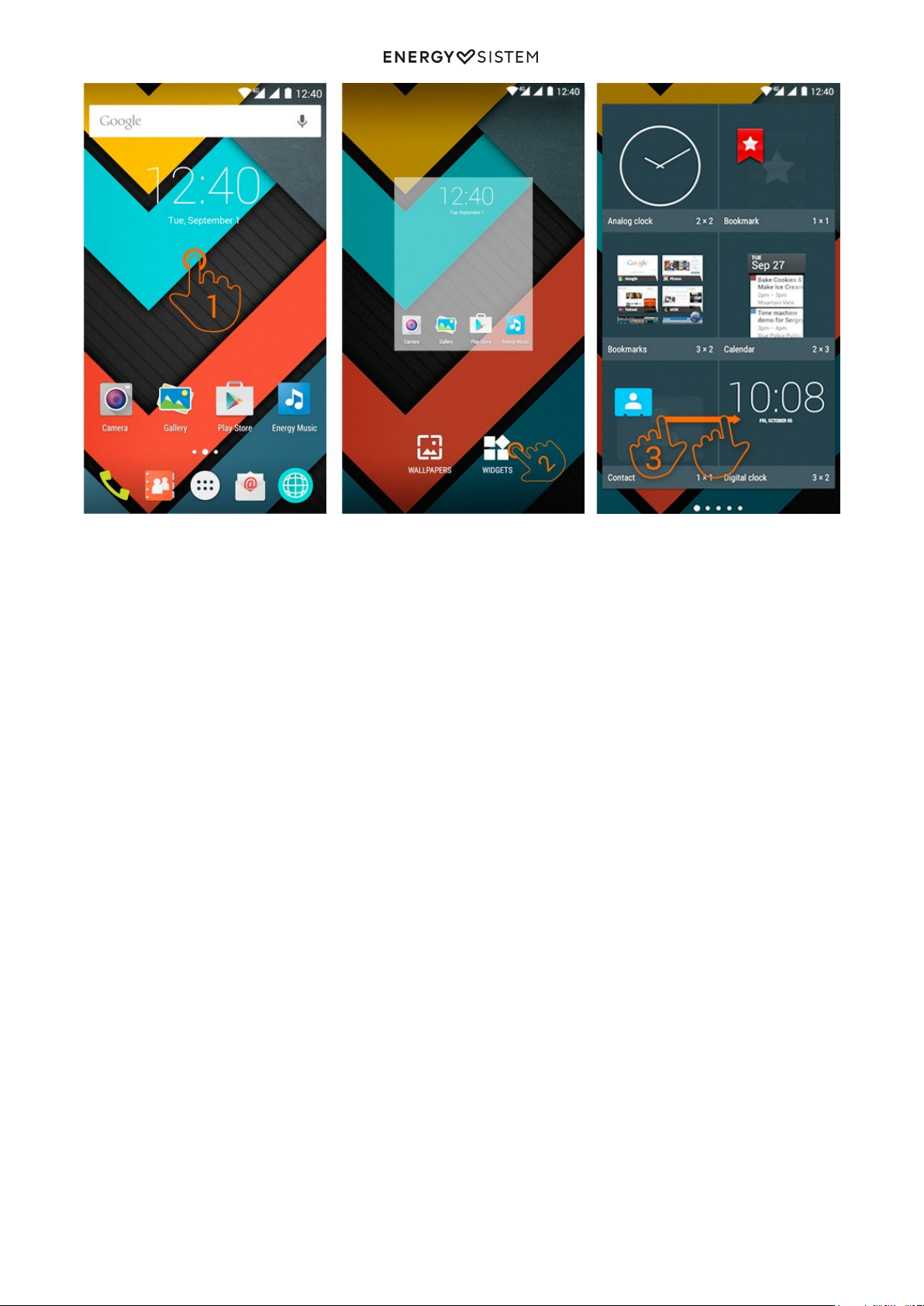
Widgets
8/21 energysistem.com
In order to add a Widget to one of your desktops, tap the center of the desktop (1), then select "WIDGETS" at the
bottom of the screen (2). You can slide your finger to the left or right (3) to see all your installed Widgets. Select the one
you want to add to your desktop by holding press on it and then releasing it on the desktop.
A Widget can be relocated or removed easily. To relocate a widget, tap and hold it for a few seconds. Once the widget is
highlighted, you can move it to another position within the desktop.
To remove the widget, tap and hold it for a few seconds and the X icon will appear on the top side of the screen, drag
the widget to the X icon and release it.
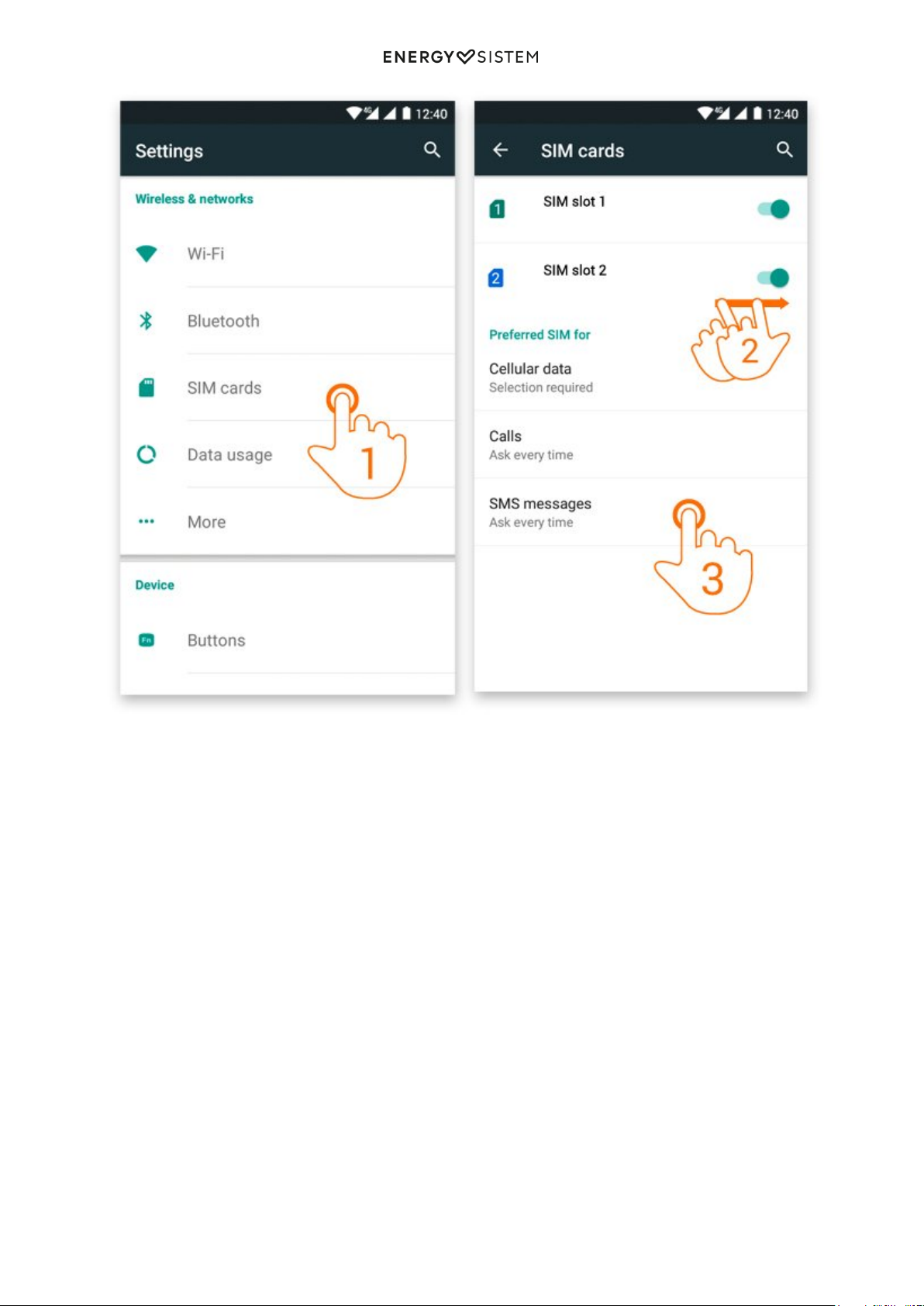
SIM card setup
9/21 energysistem.com
Your Phone allows you to use two microSIM cards. In Settings > SIM Management, you can manage them.
In this section you can set the default card to make or receive calls, send and receive text messages and data
connection. It also allows you to set your roaming network operator.
Bluetooth setup
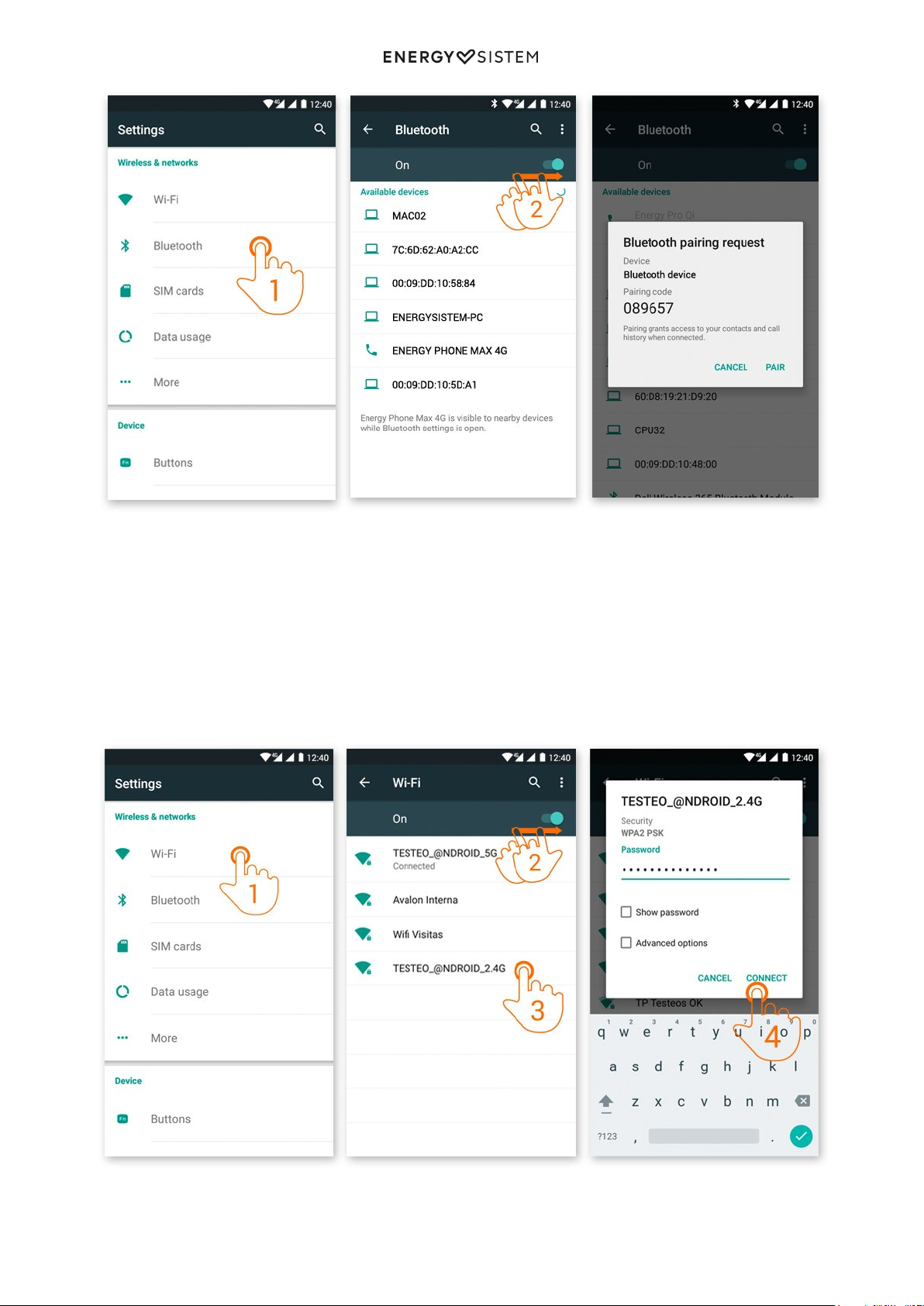
Your Phone Max 4G has Bluetooth 4.0. To connect your device to any bluetooth device like headphones, PC, speakers,
etc. Go to Settings > Bluetooth and turn the switch to the ON position. Then the search will start and once it has
finished, select one of the devices available to start the connection.
10/21 energysistem.com
Settings > Bluetooth.1.
Enable the Bluetooth option.2.
Select the device you want to connect to.3.
Accept the synchronization request.4.
Wi-Fi setup
Your Phone Max 4G has Wi-Fi 802.11 b/g/n connectivity. To connect your device to any wireless network go to Settings
> Wi-Fi and turn the switch to the ON position. The search will start, then select one of the networks available to start
the connection.
Settings > Wi-Fi1.
Table des matières
Autres manuels ENERGY SISTEM Téléphone portable

ENERGY SISTEM
ENERGY SISTEM Energy Phone Neo 2 Manuel utilisateur

ENERGY SISTEM
ENERGY SISTEM Energy Phone Max 3+ Manuel utilisateur

ENERGY SISTEM
ENERGY SISTEM Max 2+ Manuel utilisateur

ENERGY SISTEM
ENERGY SISTEM Pro 4G Manuel utilisateur

ENERGY SISTEM
ENERGY SISTEM ENERGY Phone Pro HD Manuel utilisateur

ENERGY SISTEM
ENERGY SISTEM Phone Colors Manuel utilisateur

ENERGY SISTEM
ENERGY SISTEM Neo Lite Manuel utilisateur

ENERGY SISTEM
ENERGY SISTEM Phone Pro Qi Manuel utilisateur

ENERGY SISTEM
ENERGY SISTEM Energy Phone Max 4G Manuel utilisateur

ENERGY SISTEM
ENERGY SISTEM Phone Max Manuel utilisateur


