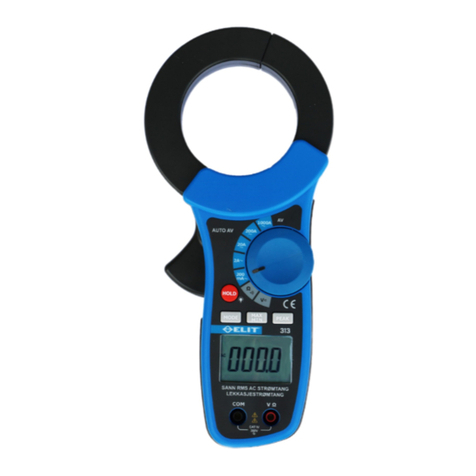
②Spotlight
Spotlight
Spotlight
Spotlight button
button
button
button
Turn the Spotlight on or off .
③ZERO
ZERO
ZERO
ZERO button
button
button
button
Removes offset and zeros the display
④Backlight
Backlight
Backlight
Backlight button
button
button
button
Turn on or off the back light of LCD .
⑤Power
Power
Power
Power switch
switch
switch
switch
Turns on or off the Meter.
⑥HOLD
HOLD
HOLD
HOLD button
button
button
button
Captures and holds the current reading
⑦LCD
LCD
LCD
LCD
D isplays the current value and p ercentage .
2.2.2
2.2.2
2.2.2
2.2.2 Specifications
Specifications
Specifications
Specifications
•Current Ranges: ± 4 0.00 mA
•Resolution: 0.01 mA
•Accuracy : ± 0.5 % of reading ±5digits
•Maximum Reading : ± 4 0.00 mA
• Error by Earth Magnetic Field : < ±0.20 mA
4
4
4
4
3.
3.
3.
3. OPERATION
OPERATION
OPERATION
OPERATION AND
AND
AND
AND M
M
M
M EASUREMENT
EASUREMENT
EASUREMENT
EASUREMENT
The following sections give more detail about the
Meter 's features.
3.1
3.1
3.1
3.1 OPERATION
OPERATION
OPERATION
OPERATION
3.1.1
3.1.1
3.1.1
3.1.1 Percentage
Percentage
Percentage
Percentage Span
Span
Span
Span
The Percentage Span feature displays the span
for 4 to 20 mA loops.
3.1.2
3.1.2
3.1.2
3.1.2 Zero
Zero
Zero
Zero Adjust
Adjust
Adjust
Adjust
Before taking each measurement ,p ress the
ZERO button to zero the display by removing DC
offset. Make sure the clamp jaws a re closed and
no cur rent is flow ing through them .
5
5
5
5
3.1.3
3.1.3
3.1.3
3.1.3 Backlight
Backlight
Backlight
Backlight
Press the backlight button to turn the backlight on
or off .
3.1.4
3.1.4
3.1.4
3.1.4 Measurement
Measurement
Measurement
Measurement Spotlight
Spotlight
Spotlight
Spotlight LED
LED
LED
LED
The Measurement Spot light LED helps to quickly
find mA signal wires. Press the Spotlight button to
turn the Spotlight on or off .
3.1.5
3.1.5
3.1.5
3.1.5 Display
Display
Display
Display HOLD
HOLD
HOLD
HOLD
Warning
Warning
Warning
Warning
To avoid electric shock, when Display HOLD is
activated, the display will not change when a
different current is applied.
Press the HOLD button to activates Display Hold
mode.
T he symbol “ DH ” are displayed and the Meter
freezes the display. To exit and return to normal
operation, p ress the HOLD button a second time .
6
6
6
6
Warning
Warning
Warning
Warning
The Clamp Meter is not for use on non-insulated
conductors.
Measurements can be taken with the clamp
approach into any position.
For accurate measurements :
• Always zero the Meter prior to taking
measurements
• Zero the Meter as close to the measurement
source position as possible .
• Make sure the clamp is free of contamination.
Note
Note
Note
Note
To reduce magnetic influences, zero the Meter in
the same position or jaw direction that is used for
the measurements
3.2
3.2
3.2
3.2 MEASUREMENT
MEASUREMENT
MEASUREMENT
MEASUREMENT
3.2.1 With the clamp disconnected from any
conductor ,press the power switch to turn the
7
7
7
7