Elan VHTO100 Manuel utilisateur

VHTO100
HOME THEATER
OVERRIDE MODULE
VHTO100
INSTALLATION & APPLICATIONS
MANUAL
HOME SYSTEMSTM


Table Of Contents
Introduction ................................................................................2
Specifications ............................................................................ 2
VHTO100 to PZ6 Connections ................................................3
VHTO100 to PZ600 Connections ........................................... 3
VHTO100 to Z•600 Connections (no PZ6 or PZ600) ............ 4
Using the Z•600’s Internal Power Supply ............................ 4
Using an External Power Supply w/PZ6 or PHD12 ............ 5
Using an External Power Supply (no PZ6 or PZ600)..................... 5
VHTO100 to PHD12 Connections .......................................... 6
VHTO100 to HD Connections (no PHD12) ............................ 6
VHTO100 to MAC24 Connections ..........................................7
Override Jumper Settings ....................................................... 8
Impedance Match Settings ..................................................... 8
Creating a PG/DB “Wide Coverage” Zone ........................... 9
Warranty ......................................................................Back Page
ELAN HOME SYSTEMS VHTO100 INSTALLATION MANUAL
© ELAN Home Systems 2005 • All rights reserved. Page 1

VHTO100 INSTALLATION MANUAL ELAN HOME SYSTEMS
Page 2 © ELAN Home Systems 2004 • All rights reserved.
Introduction
The VHTO100 is a high power speaker
switching module that allows ELAN Page
and Door Chime audio to be heard through
speakers in non-ELAN system areas such
as the Home Theater. A 12VDC signal-
transmitted by an ELAN Z•600
Communications Controller, ELAN HD
Series MCU or a MAC24/AV-L2 whenever
a Page or Door Chime is initiated-triggers
a pair of relays on the VHTO100, switching
the audio path from the local system
amplifier to the ELAN system amplifer.
In a Home Theater, ELAN Page and Door
Chime audio can be routed to the rear
channel speakers. This does not interupt
the entire movie presentation, (as the front
and center channel speakers will continue
to broadcast the movie audio) yet allows
the Page and Door Chime audio to be
easily heard. Another application might be
in a child's room with a stand-alone local
system and the parents wish to have
ELAN Page and Door Chime audio heard.
VHTO100
Front
SURROUND SOUND
PROCESSOR
(SSP) Rear Channel
Speaker Inputs
Rear Channel
Speaker Outputs
VC+/VC
Override
Connections
System Amplifier
Speaker Inputs
AMP OR SPEAKERS SSP
VHTO100
System Amplifier
Local Amplifier (SSP)
Rear Surround Speakers
Default Signal Path
Override Signal Path/
ELAN PG/DB
Rear Channel
Speaker Outputs
Specifications
Power Rating/System Amplifier Input ...............100Watts RMS
Power Rating/SSP Amplifier Input .....200W RMS into 8 Ohms
Power Rating/Rlay Switching ...........................................200W
Frequency Response .........................20 Hz to 20KHz, +/- 1dB
Total Harmonic Distortion ...................................................<1%
Override Volume Settings ..............................................10 Step
Override Control ............................................+12 VDC @ 90mA
Dynamic Range ......................................... 43dB over 10 steps
Impedance Settings ..................................................1X, 2X, 4X
Speaker Output, Minimum Load .................................. 4 Ohms
Maximum Attenuation ............................................ -56dB @ 8X
DC Resistance .............................................. Minimum 5 Ohms
Relay Contacts .................................. 5A RMS Max @ 250 VAC
Wiring Requirements:
SSP Input/Amp Input/Speaker Output:
Twisted pair audio cable, min. 18 AWG
Override Input (OR): Cat-5

VHTO100 to PZ600 Communications Controller
Precision Panel Connections-S12
Connect the Volume Control Override signal from a PZ600 directly to the VC+ and VC-
terminals of the VHTO100 as shown below. See the PZ600 Installation Manual for
additional information.
ELAN HOME SYSTEMS VHTO100 INSTALLATION MANUAL
© ELAN Home Systems 2005 • All rights reserved. Page 3
VHTO100 to PZ6 Z•Series Precision Panel Connections
Connect speaker cables from the ELAN system amp to the AMP terminals on the
VHTO100 and connect the rear channel speaker outputs from the local amplifier to
the SSP terminals on the VHTO100 as shown below. Connect the OR leads from any
of the PZ6’s VC+ and VC- terminals to VC+ and VC- on the VHTO100.
Note: Refer to the Current Draw tables on page 5 to determine if an external
power supply is required to power the number of VHTO100s and Volume
Controls w/ Override to be installed.
AMP OR SPEAKERS SSP
System Amplifier Local Amplifier (SSP)
Rear Channel
Speaker Outputs
Rear Surround Speakers
VCO
VC+
VC-
VC-
VC+
VC+
VC-
VC-
VC+
PZ6 VCO
Connector
AMP OR SPEAKERS SSP
System Amplifier Local Amplifier (SSP)
Rear Channel
Speaker Outputs
Rear Surround Speakers
VCO
VC+
VC-
VC-
VC+
VC+
VC-
VC-
VC+
PZ600 VCO
Connector

VHTO100 INSTALLATION MANUAL ELAN HOME SYSTEMS
Using the Z•600's Internal Power Supply
Use the current draw specifications below to determine the maximum number of
VHTO100s and/or Volume Controls w/Override that can be connected to the Z•600's
internal power supply.
VHTO100 to Z•600 Communications Controller
Connections (No PZ6 or PZ600)
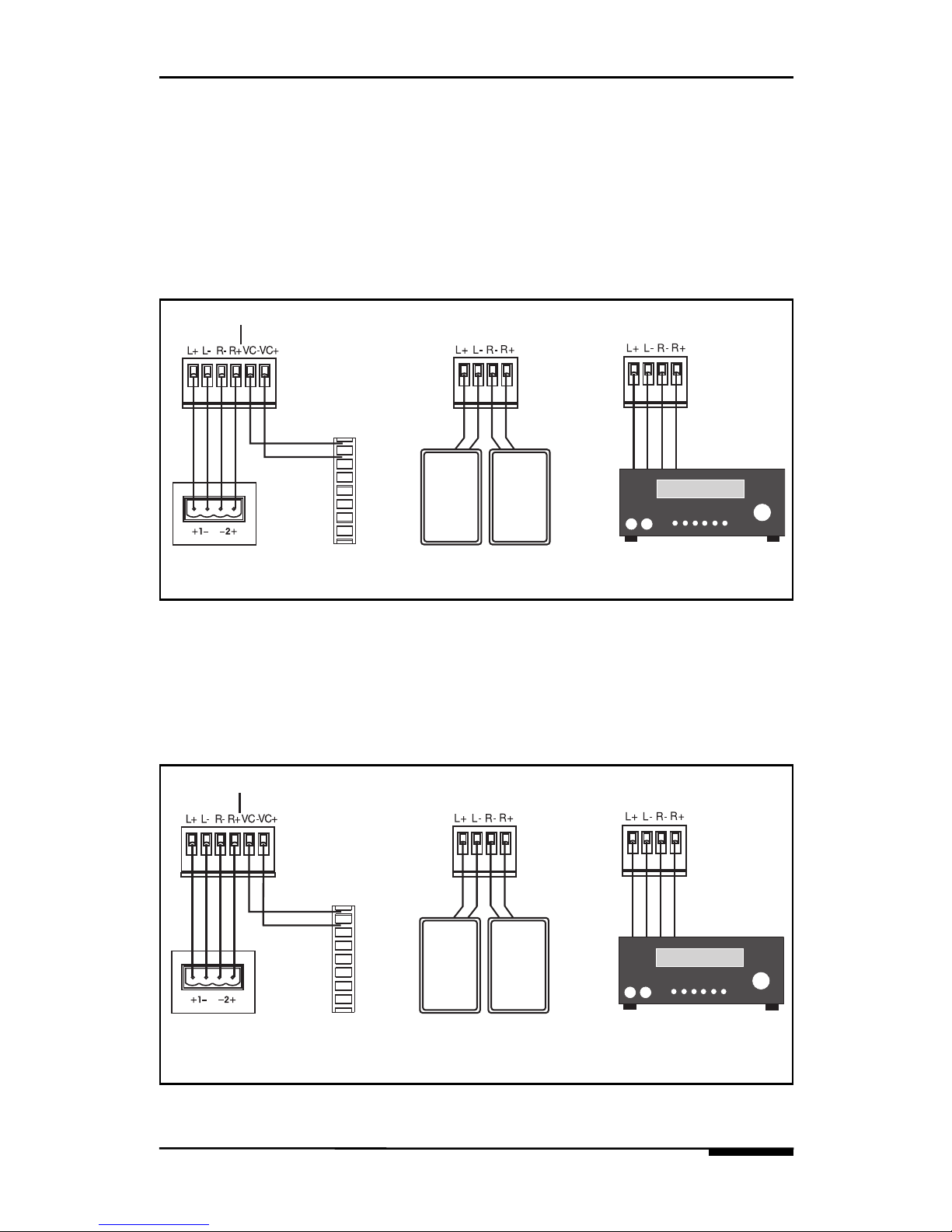
Connect speaker cables from the ELAN system amp to the AMP terminals on the
VHTO100 and connect the rear channel speaker outputs from the local amplifier to
the SSP terminals on the VHTO100 as shown below. Tie together the Wh/Orange and
Wh/Brown conductors from the Z•600’s Control Output Jack as shown. Connect the
Control Output Jack’s Green conductor to VC- of the VHTO100 and connect Brown to
VC+. See the Z•600 Installation Manual for specific details regarding Override con-
nections and functionality.
AMP OR SPEAKERS SSP
System Amplifier Local Amplifier (SSP)
Rear Channel
Speaker Outputs
Rear Surround Speakers
Blue
Wh/Blue
Orange
Wh/Orange
Green
Wh/Green
Brown
Wh/Brown
Z•600
CONTROL
OUTPUT
Z•600 INTERNAL POWER
SUPPLY MAXIMUM LOAD
VHTO100 CURRENT DRAW
ELAN VOLUME CONTROLS
W/ OVERRIDE CURRENT DRAW
250mA
90mA
45mA
Page 4 © ELAN Home Systems 2004 • All rights reserved.

ELAN HOME SYSTEMS VHTO100 INSTALLATION MANUAL
© ELAN Home Systems 2005 • All rights reserved. Page 5
Using an External Power Supply w/ PZ6 or PHD12
When exceeding current limits of the Z•600 (see p. 5) or when connecting the
VHTO100 to an HD system, it is necessary to connect a +12VDC power supply to
the front of a PZ6 or PHD12 Precision Panel to the location shown below. ELAN rec-
ommends the use of a PWR2 Power Supply for this purpose.
Note: The polarity of the VCO +12VDC jacks is reversed from that of many power
supplies. Use only power supplies with proper polarity!
+-
+12VDC INPUTS
VCO
PZ6 Front +12VDC Inputs
+-
+12VDC INPUTS
VCO
PHD12 Front +12VDC Inputs
Z•025
Using an External Power Supply w/Z•600 (no PZ6)
Use a +12VDC power supply when current demands exceed limits shown previously.
Tie the Z•600 Control Output Jack’s Blue conductor together with Wh/Blue. This will
go to VC+ of the VHTO100. Tie Wh/Green to Brown and connect to the + on the
power supply. Connect the - of the power supply to VC- on the VHTO100.
AMP OR SPEAKERS SSP
System Amplifier Local Amplifier (SSP)
Rear Channel
Speaker Outputs
Rear Surround Speakers
Blue
Wh/Blue
Orange
Wh/Orange
Green
Wh/Green
Brown
Wh/Brown
Z•600
CONTROL
OUTPUT
+12VDC
Power
Supply
+
-
VC+VC-

VHTO100 INSTALLATION MANUAL ELAN HOME SYSTEMS
Page 6 © ELAN Home Systems 2005 • All rights reserved.
VHTO100 to HD System Connections (No PHD12)
This application requires an HDC2042 Automation Card to be installed in the MCU
chassis. See the HD Installation Manual for detailed information about relay connec-
tions and programming.
AMP OR SPEAKERS SSP
System Amplifier Local Amplifier (SSP)
Rear Channel
Speaker Outputs
Rear Surround Speakers
+12VDC
Power
Supply
+
-
VC+ VC-
SERIAL
PORT
SENSE
INPUTS
RELAY
OUTPUTS
30V
AC/DC
5A MAX Relay N.O.
Relay COM
HDC2042
Automation
Card
AMP OR SPEAKERS SSP
System Amplifier Local Amplifier (SSP)
Rear Channel
Speaker Outputs
Rear Surround Speakers
R1 N.O.
R1 COM
R2 N.O.
R2 COM
R3 N.O.
R3 COM
R4 N.O.
R4 COM
1
2
3
4
5
6
7
8
-
+
-
+
-
+
-
+
1
2
3
4
PHD12
RELAY 1-4
VCO RELAY
+12V
VCO 1-4
VHTO100 to PHD12 Precision Panel Connections
This application requires an HDC2042 Automation Card to be installed in the MCU
chassis. See the HD Series Installation Manual for detailed information about relay
connections and programming.

ELAN HOME SYSTEMS VHTO100 INSTALLATION MANUAL
© ELAN Home Systems 2005 • All rights reserved. Page 7
VHTO100 to MAC24 Connections
Connect speaker cables from the MAC24 to the AMP terminals on the VHTO100 and
connect the rear channel speaker outputs from the local amplifier to the SSP terminals
on the VHTO100 as shown below. Connect the OR leads from the MAC24’s O+ and O-
terminals to VC+ and VC- on the VHTO100.
AMP OR SPEAKERS SSP
Local Amplifier (SSP)
Rear Channel
Speaker Outputs
Rear Surround Speakers
VC-VC+

VHTO100 INSTALLATION MANUAL ELAN HOME SYSTEMS
Page 8 © ELAN Home Systems 2005 • All rights reserved.
Override Jumper Settings
The following adjustments are made by removing the four screws on the top of the
VHTO100 and pulling up the PC board/transformer assembly. There are no wires that
need to be disconnected. The volume of ELAN Page and Door Chime audio can be
adjusted by repositioning the Override Volume Jumpers (2). There are ten settings to
choose from: 1 is the lowest, 10 is the highest (Factory Default: 5).
Impedance Match Settings
The VHTO has an impedance rating of 8 Ohms. The Impedance Match jumpers on the
VHTO allow you to connect it in parallel with other loads on the same amp channelsof
the ELAN System amplifier. It also allows you to connect multiple VHTOs to the same
amp channels. Impedance Match Jumper Settings: 1X, 2X, 4X (Factory Default: 4X).
MAX
MIN
OVERRIDE VOLUME
1
2
3
4
5
6
7
8
9
10
1X
2X
4X
IMP MATCH
MAX
MIN
OVERRIDE VOLUME
1
2
3
4
5
6
7
8
9
10
1X
2X
4X
IMP MATCH
Override
Volume
Jumper
Impedance
Match
Jumper
Override
Volume
Jumper
Impedance
Match
Jumper
System
Amplifier
VHTO100
2X Imp.
Match
8 Ohm
Speakers
System
Amplifier
VHTO100
4X Imp.
Match
4X Imp.
Match
VHTO100
8 Ohm
Speakers
8 Ohm
Speakers
4X Imp.
Match
4X Imp.
Match
Table des matières
Autres manuels Elan Unité de contrôle
Manuels Unité de contrôle populaires d'autres marques

Festo
Festo Compact Performance CP-FB6-E Manuel de la liste des pièces

Elo TouchSystems
Elo TouchSystems DMS-SA19P-EXTME Manuel utilisateur

JS Automation
JS Automation MPC3034A Manuel utilisateur

JAUDT
JAUDT SW GII 6406 Series Guide rapide

Spektrum
Spektrum Air Module System Manuel utilisateur

BOC Edwards
BOC Edwards Q Series Manuel utilisateur