
ehang GHOSTDRONE 2.0 Manuel utilisateur

OPERATING MANUAL
GHOSTDRONE 2.0 VR

01
EHang, Inc. reserves the right to interpret this Operating Manual.
www.ehang.com
Business Hour: Monday – Friday 9:00 A.M – 5:00 P.M (PST)
Customer Service Phone: +1 650-533-8554 / 888-800-7056
English
GHOSTDRONE 2.0 Operating Manual
includes packing list, assembly, parts
and specification information.
Congratulations on purchasing your new GHOSTDRONE 2.0!
or contact our customer service hotline: 888-800-7056.
www.ehang.com
www.twitter.com/ehang
www.facebook.com/theghostdrone
www.instagram.com/ehang.official/
Thank you, and enjoy your GHOSTDRONE!

02
TABLE OF CONTENTS
GHOSTDRONE 2.0 VR
Assembly
Propellers -----------------------------------------------06
Propeller Guards ---------------------------------------08
Introduction
GHOSTDRONE ----------------------------------------05
VR Goggles----------------------------------------------05
App Download
App Download -----------------------------------------25
Supported Device Requirements -------------------25
Specifications ------------------------------------------22
Specifications
Warning
Warning --------------------------------------------------03
FAQ
FAQ ----------------------------------------------------- 26
Accessories
Smart Flight Battery -----------------------------------09
3D Gimbal for Spherical Camera -------------------14
Spherical Camera -------------------------------------14
VR Goggles ---------------------------------------------15
Copter Indicator Lights Instructions -----------------21

03
Before flying, please consult flight documentation from the International Civil Aviation
Organization (ICAO) and Federal Aviation Administration (FAA) regarding unmanned
aircraft operation. The user is responsible for his or her actions and any ensuing con-
sequences. Users are hereby advised that they are liable for the use of the GHOST-
DRONE and any and all liability is solely theirs. Please fly responsibly.
WARNINGS
1. If you are flying your GHOSTDRONE 2.0 for the first time, please fly it in an open area
in order to experience its various functions safely.
2. DO NOT fly in restricted air zones.
3. DO NOT fly near obstacles, people, power lines, trees, above waters or any other
environments which are not safe for flying.
4. The copter may not fly properly near tall buildings and metal structures due to GPS
interferences.
5. DO NOT fly in or around congested electromagnetic (EM) environments. The copter
must be kept at least 200 m (656 ft.) away from strong EM source to operate properly.
EM interference can cause a loss of communication with the copter and result in
damage to properties or hurting other people.
6. Do not fly the copter in adverse weather conditions, including extreme temperatures,
heavy snow, strong wind, storm or fog.
7. It is recommended to always retain line-of-sight with the copter during flight. Losing
sight of the copter may result in accidents.
8. GHOSTDRONE is not suitable for use by children under 14 years of age. Adult super-
vision is required if the copter is operated by children.
9. Please make sure your mobile device, VR goggles, and the copter have sufficient
battery before flying.
10. Stand clear of the copter (at least 5m or 16 ft.) with its head facing away from you
when ready to fly.
11.Compass must be re-calibrated if the icon in the App points at a significantly
different direction then the copter’s actual orientation. If the difference persists after
calibration, please choose a new environment for flying.

04
12. To avoid injury, DO NOT approach or touch the propellers or motors while they are
spinning.
13. Keep the VR goggles within 3 meters from you during flight. DO NOT put the VR
goggles on the floor or in the pocket. If the the VR goggles is not near you, you may lose
connection with the copter.
14. Please keep an eye on the copter’s battery shown on the App interface. We strongly
suggest to land the drone when the battery is low.
15. Please tap Hover button in case of any emergencies. The copter will stop moving
and hover at its current position. If it fails to hover, please secure your personal safety
first.
16. For your safety, Avatar Mode will be unlocked after you have flown in Touch-to-go
Mode for 3 times. It is important for you to familiarize yourself with the Avatar manual
mode to ensure flight safety. In Avatar manual mode, the copter flies only using
gyroscope and accelerometer, other sensors are not used in this mode. This mode is
safe but users need to control every movement of the copter. If you are flying Avatar
manual mode for the first time, to ensure precise manual operation, please fly the copter
in open area and only use this mode when the copter is 30 meters above the ground.

05
INTRODUCTION
Front Indicator Light
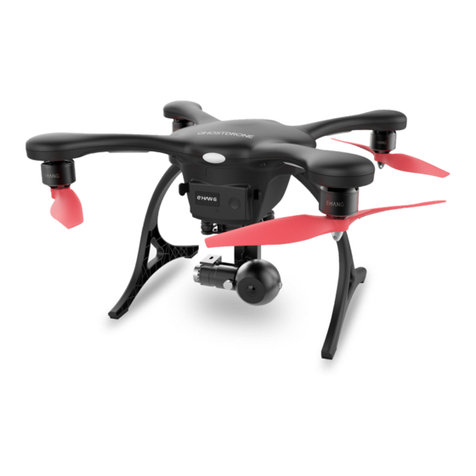
With dual-sensor flight controller and high efficiency dynamic system, GHOSTDRONE 2.0
provides a safer and more stable fly experience. Its newly equipped smart batteries can
display real-time battery status so you can always keep track of your drone’s battery life. And
the GHOSTDRONE 2.0 Aerial version contains the 3D gimbal we developed, which ensures
the Spherical Camera to be always steady and stable and capable of recording all the exciting
moments in your life.
Spherical Camera
Landing Gear
Copter Body
Propeller
Mushroom Antenna
for GHOSDRONE
3D Gimbal for
Spherical Camera
Motor
Smart Flight Battery
Copter Indicator Lights
■Connect Device
■VR goggles
1
23
4
89
7
6
5
10
11
12
1. 2.4G Antenna
2. ON/OFF
3. Channel Search
4. Copter/ Front Camera
5.
Vision Signal
6.Data Signal
8. Menu
9. Up
10. Down
11. 5.8G Mushroom Antenna
12.
Lens
7.
Power Indicator
■GHOSTDRONE

06
ASSEMBLY
Propellers
Legends
LOCK: Tighten the propeller in this direction.
UNLOCK: Remove the propeller in this direction.
GHOSTDRONE 2.0 uses 2-bladed 8.5-inch self-tightening propellers. Propeller nuts have two
colors, silver and black. Each indicates different rotating directions.
Install the
propellers
Copter Install the
propeller guards
Completed
Assembly
(Optional)

07
3. Attach the black nut propellers to the R motors in the same way.
Disassembling
Keep the motor deadlocked in place with one hand and remove the propeller according to the unlock
instructions.
1. Check that the propellers and motors are installed correctly and firmly before each flight.
2. It is necessary to check that all propellers are in good condition before take-off.
3. DO NOT use any aged, deformed or damaged propellers.
4. To avoid injury, DO NOT approach or touch the propellers or motors while they are spinning.
5. For a better flight experience, please use EHang proprietary propellers.
6.For a better and safer flight experience, please use original EHang propellers. EHang does
not offer warranty for propellers. If you need to replace your propellers, please go to our
website www.ehang.com
Warning
Installation
1. Put the copter upside down on soft surface to avoid scratches.
2. Match the silver nut propellers with the L motors (with silver motor shaft), and tighten the propellers
according to the LOCK instructions.

08
Installation: Place the guards over the copter. Use the screwdriver to tighten the 3 screws.
Disassemble: Unscrew the three holding screws and remove the guard.
Propeller Guards
Completed Assembly
Propeller guards must be installed when flying indoors. EHang will not be liable for any
accidents caused by not installing the propeller guards. However, guards are not recommend-
ed to be installed when flying in outdoor environments, the extra load and wind resistance of
installing the guards might have negative impact on flying experiences.
Warning

09
Note: When the battery is powered off, press the power button to check the battery life. (Main
interface will display for 3 seconds while the LED Indicator light stays off during the whole process.)
Battery Diagram
Power Button
Indicator Light
LCD Screen
Powering On
Main Interface
Remaining Battery Life
Battery Remaining
Capacity
Remaining
Total Voltage 16.66
4516
mAh
98%
Press the power button shortly, then quickly press and hold the button again. Don’t release it until
the last letter “G” of logo “EHANG” fully appeared on the screen. The LED indicator light turns on once
the battery is turned on, referring to the diagram below.
ACCESSORIES
Improper use of battery may lead to fire, explosion or other dangers. Please
be familiar with the product before using.
Smart Flight Battery
The smart flight battery is specially designed for the GHOSTDRONE 2.0, with capacity of 4500 mAh,
voltage of 14.8 V, charge-discharge management functionality and a smart display screen. The
battery should only be charged by EHang power adapter.
Autres manuels pour GHOSTDRONE 2.0
5
Table des matières
Autres manuels ehang Drone
ehang
ehang GHOST Manuel utilisateur

ehang
ehang Falcon-B410 Manuel utilisateur

ehang
ehang GHOSTDRONE 2.0 Manuel utilisateur

ehang
ehang GHOSTDRONE 2.0 Manuel utilisateur

ehang
ehang Ghostdrone 2.0 Aerial Manuel utilisateur

ehang
ehang GHOST Drone Guide de configuration

ehang
ehang GHOSTDRONE 2.0 LTE Manuel utilisateur

ehang
ehang GHOSTDRONE 2.0 VR Manuel utilisateur


