Dual XR4110 Mode d'emploi

AM/FM/MP3/WMA Receiver with Auxiliary Input,
USB Port and SD Card Input
XR4110
INSTALLATION/OWNER'S MANUAL

2
Preparation
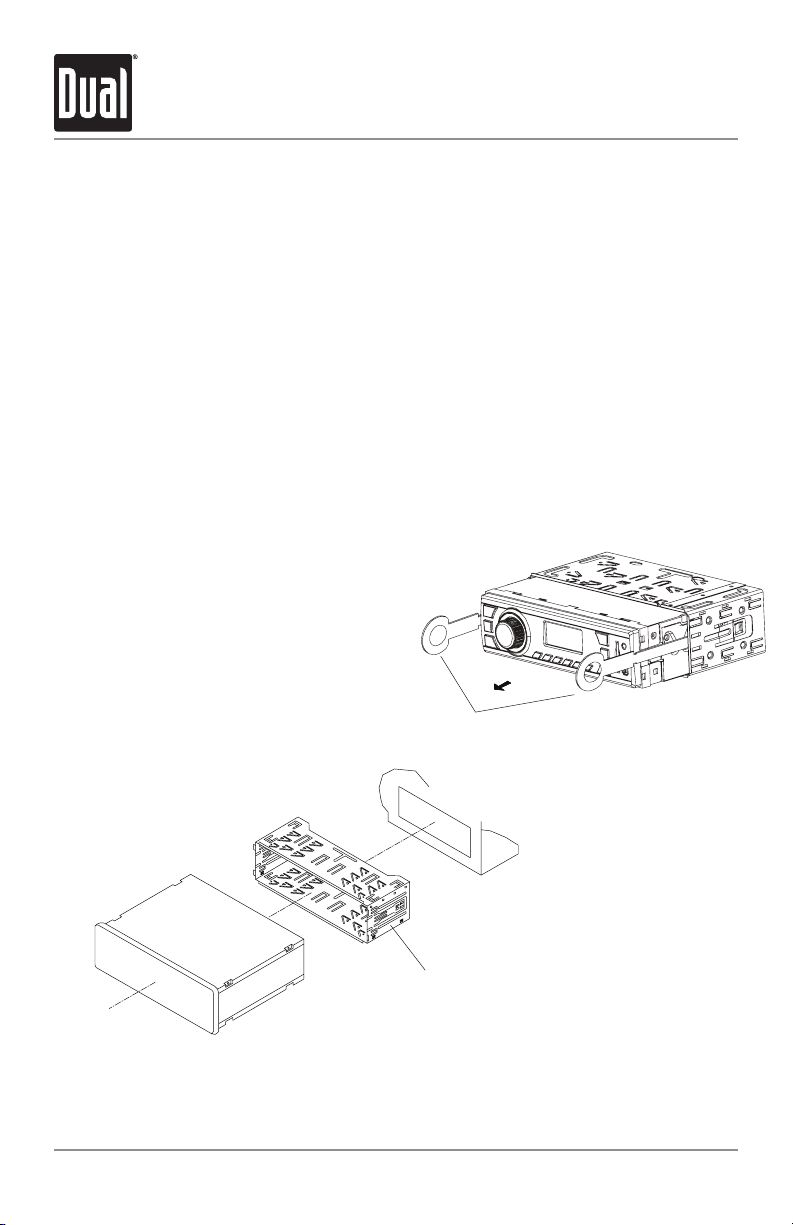
KEYS
MOUNTING SLEEVE
TYPICAL MOUNTING METHOD
XR4110 INSTALLATION
Please read entire manual before installation.
Before You Start
•Disconnectnegativebatteryterminal.Consultaqualifiedtechnicianforinstructions.
•Avoidinstallingtheunitwhereitwouldbesubjecttohightemperatures,suchasfrom
directsunlight,orwhereitwouldbesubjecttodust,dirtorexcessivevibration.
Getting Started
•Insertthesuppliedkeysintotheslotsasshown,andslidetheunitoutofthemounting
sleeve.
•Installmountingsleeveintoopening,bendingtabstosecure.
•Connectwiringharnessandantenna.Consultaqualifiedtechnicianifyouareunsure.
•Certainvehiclesmayrequireaninstallationkitand/orwiringharnessadapter(sold
separately).
•Testforcorrectoperationandslideintothemountingsleevetosecure.
•Snaptrimringintoplace.

3
5 AMP
AGC Fuse
Rear Preamp Output
Connect to amplifier RCA input
Antenna Connector
Wiring Diagram
FUSE
Whenreplacingthefuse,
makesurenewfuseisthe
correcttypeandamperage.
Usinganincorrectfuse
coulddamagetheradio.
TheXR4110usesone5amp
AGC fuse located in-line.
* Caution-Donotattachanyspeakerleadstogroundasseveredamagewilloccur.
XR4110 INSTALLATION

4
Control Locations
Power / Source
Mute / Loud
Volume
Tune/TrackUp
Band / Auto Station Store
SD Card Slot
Auxiliary Input
USB Port
1
2
3
4
5
6
7
8
Tune/TrackDown
Preset 6
Preset5/FolderUp
Preset4/FolderDown
Preset 3 / Play / Pause
Preset 2 / Random
Preset1/Repeat
Audio / EQ
9
10
11
12
13
14
15
12 4
14 13
XR4110 OPERATION
5 6
8
15
7
9
12 11 10
16
3
16

5
General Operation
Press to turn the unit on. Press and hold for more
than two seconds to turn the unit off.
Press SOURCE to select between AM/FM, auxiliary input,
USB or SD Card modes. Modes of operation are indicated in
the display. SD and USB modes will not appear unless an
SD Card or USB device is connected.
Press and hold LOUD for more than 2 seconds to activate
anddeactivatetheloudnessfeature.Activatingthisfeature
willenhancethebassandtreblefrequencieswhenlistening
to music at low volumes.
Inserta3.5mmconnectorinthefrontpanelAUXport.
Connecttheotherendofthe3.5mmconnectortothe
headphone output of an audio device, MP3 player, etc.
Adjustvolumeusingthe volume knob(00-42).
Press AUDIOtoselectbetweenBass,Treble,Balanceand
Fader.
Press AUDIO until BASS appears
Rotate the volume knobleft/righttoadjust
(-7minimum/7maximum)
Press AUDIO until TRE appears
Rotate the volume knobleft/righttoadjust
(-7minimum/7maximum)
Press AUDIO until B 00 appears
Rotate the volume knobleft/righttoadjust
BL 15(left)toBR 15(right)
Press AUDIO until F 00 appears
Rotate the volume knobleft/righttoadjust
FR 15(rear)toFF 15(front)
Press EQ for more than two seconds to activate the first
preset EQ, then press and hold EQagaintoselectbetween
POP,CLASSIC,ROCKandUSER.Manualadjustmentstothe
bassandtreblesettingsaresavedasUSER.
Power On/Off
Source
Loud
Auxiliary Input
Volume
Select Audio
Bass
Treble
Balance
Fader
Preset EQ Curves
XR4110 OPERATION
BASS TREBLE BALANCE
FADER

6
Tuner Operation
Press TUNE
nn
or TUNE
ll
for more than 2 seconds to
seekthenextstrongstation.
Press TUNE
nn
or TUNE
ll
momentarilytochangeone
radiostationatatime.Pressandholdtoadvancequickly.
Press BANDtoselectbetweenFM1,FM2,FM3andAM1,AM2
bands. Six presets can be saved in each band.
Upto18FMstationsand12AMstationscanbestored.
Tostoreastation,selectthedesiredbandandstation.
Press and hold the desired preset button for more than 2
seconds. When stored, the preset number will appear in the
display.Thestationcanberecalledanytimebypressingthe
correspondingpresetbutton.
Press AST for more than 2 seconds to automatically store the
sixstrongeststationsinthecurrentband.
Afterthesixstrongeststationsareset,ascanofeachstored
presetwillbegin.PressAST or TRACK
ll
to cancel.
Seek Tuning
Manual Tuning
Band
Storing and Recalling
Station Presets
Automatically Store
Stations
XR4110 OPERATION

7
XR4110 OPERATION
USB/SD Card Operation
PlayMP3/WMAfilesfrommanymassstoragedevicesby
connectingthemtotheXR4110'sUSBport.
ToplayMP3/WMAfilesfromanSDcard,insertanSDcard
intotheXR4110'sSDcardslotwiththelabelfacingleft.Itwill
clickintoplacewhenproperlyinserted.Toremovethecard,
pressinuntilitclicks,thenpulltoremove.
WhenaUSBorSDcarddeviceisfirstconnected,playback
willbeginautomatically.Dependingonthenumberoffiles
andfolders,thedevicemaytakeseveralsecondstobegin
playback.IfnovalidMP3/WMAfilesaredetected,"USB"or
"SD"willcontinuallybedisplayed.
Press TRACK
ll
toskiptothebeginningofthenexttrack.
Press TRACK
nn
toreturntothebeginningofthecurrent
track.PressingTRACK
nn
againskipstothebeginningof
theprevioustrack.
Note:Tracknumbersarespecifictothecurrentfolderand
willrestartat1foreachfolder.
Press and hold TRACK
ll
or TRACK
nn
to fast forward
orreverseatrack.
Press
l
/
II
totemporarilystopUSBplayback.
Press
l
/
II
againtoresumeplayback.
Press to select the previous folder.
Press to select the next folder.
Note: Any files that are located on the root directory of the
USB/SDcarddevicewillbeaccessedasfolder1(F01).
Press RPTtocontinuouslyrepeatthecurrenttrack.Press
RPT againtocancel.
Press RDMtoplayallthetracksinthecurrentfolderin
random order. Press RDMagaintocancel.
Connecting a USB Device
(sold separately)
Inserting an SD Card
(sold separately)
Playing Music
Track Select
Fast Forward and Reverse
Pause
Folder Access
Repeat
Random

8
USB/SD Card Operation
XR4110 OPERATION
Thefollowingtypesoffilesarecompatible:
•MP3data
•WMAdata
Thefollowingtypesoffilesarenotcompatible:
•WMAfilesthatareprotectedbyDRM(DigitalRights
Management).
•WMAlosslessformat
•MP3PROformat
•MP3playlists
•WAVformat
MP3/WMAplaybacksequenceisbasedonorderthefiles
arecopiedtotheUSB/SDcarddeviceandbeginsinthe
root folder. Any empty folders or folders that do not include
MP3/WMAfilesareskipped.Dependingonyoursoftware,
theplaybackordermayvary.Filesintherootdirectoryare
locatedinFolder1.
•Maximumnumberoffiles:65535
•Maximumnumberoffolders:65535
•Maximumnumberoffilesineachfolder:65535
•Maximumnumberoffolderlevels(subfolders):7
Note: If the number of files/folders exceeds the maximum
outlinedabove,theadditionalfiles/folderswillbeignored.
USBandSDcarddevicecapacitylimit:<16gigabytes.
Anydevicesgreaterthan16gigabyesarenotcompatible.
Due to the differences of USB and SD card devices, some
devices may not be compatible. Devices must be ‘mass
storageclass’andformattedtotheFATorFAT32filesystem
in order to ensure compatibility.
8kHz~48kHz
8kHz~48kHz
32kbps~320kbpsconstant
Variable bit rates
32kbps~384kbpsconstant
Variable bit rates
Note: Some files may not play or be displayed correctly,
dependingonsamplingratesandbitrates.
Media Compatibility
Playback Order
Playback Capacity
Device Compatibility
Sampling Frequency Rates
MP3
WMA
Transfer Bit Rates
MP3
WMA

9
Troubleshooting
XR4110 OPERATION
Specifications
Tuningrange:87.5MHz-107.9MHz
Usablesensitivity:10dBf
50dBquietingsensitivity:25dBu
Stereoseparation@1kHz:40dB
Frequencyresponse:30Hz-18kHz
Tuningrange:530kHz-1710kHz
Usablesensitivity:35dBu
Frequencyresponse:80Hz-2kHz
Speakeroutputimpedance:4~8ohms
Lineoutputvoltage:1.5VoltsRMS
Fuse:5ampAGC
Dimensions:7"x2"x4.2"(178x50x107mm)
Designandspecificationssubjecttochangewithoutnotice.
FMTuner
AMTuner
General
CEA-2006 Power Standard Specifications
(reference:14.4VDC+/-0.2V,20Hz~20kHz)
PowerOutput:5WattsRMSx4channelsat4ohmsand<1%THD+N
Signaltonoiseratio:60dBA(reference:1wattinto4ohms)
Problem Cause Action
Unit will not turn on
(no power)
Yellowwirenotconnectedorincorrectvoltage
Redwirenotconnectedorincorrectvoltage
Checkconnectionsforproper
voltage(11~16VDC)
Blackwirenotconnected Checkconnectiontoground
Fuse blown Replace fuse
Unit has power
(but no sound)
Speakerwiresnotconnected Checkconnectionsatspeakers
Oneormorespeakerwirestouchingeach
otherortouchingchassisground
Insulateallbarespeakerwiresfrom
eachotherandchassisground
Unit blows fuses
Yelloworredwiretouchingchassisground Checkforpinchedwire
Speakerwirestouchingchassisground Checkforpinchedwire
Incorrectfuserating Usefusewithcorrectrating
"ER" appears
on display USB or SD card compatibility issue
Device capacity must be less than
16GB.
File system is incompatible - it must
beFATorFAT32.

10
Limited One Year Warranty
Thiswarrantygivesyouspecificlegalrights.
Youmayalsohaveotherrightswhichvaryfrom
state to state.
Dual Electronics Corp. warrants this product to
theoriginalpurchasertobefreefromdefectsin
materialandworkmanshipforaperiodofone
yearfromthedateoftheoriginalpurchase.
DualElectronicsCorp.agrees,atouroption,
duringthewarrantyperiod,torepairanydefect
inmaterialorworkmanshiportofurnishan
equalnew,renewedorcomparableproduct
(whicheverisdeemednecessary)inexchange
withoutcharges,subjecttoverificationofthe
defect or malfunction and proof of the date of
purchase.Subsequentreplacementproducts
arewarrantedforthebalanceoftheoriginal
warranty period.
Who is covered? Thiswarrantyisextendedto
theoriginalretailpurchaserforproducts
purchased and used in the U.S.A.
What is covered? Thiswarrantycoversall
defectsinmaterialandworkmanshipinthis
product.Thefollowingarenotcovered:
installation/removalcosts,damageresulting
fromaccident,misuse,abuse,neglect,product
modification, improper installation, incorrect
linevoltage,unauthorizedrepairorfailureto
follow instructions supplied with the product,
ordamageoccurringduringreturnshipmentof
the product.
What to do?
1.Beforeyoucallforservice,checkthe
troubleshootingguideinyourowner’s
manual.Aslightadjustmentofanycustom
controls may save you a service call.
2.Ifyourequireserviceduringthewarranty
period,youmustcarefullypacktheproduct
(preferablyintheoriginalpackage)andship
it by prepaid transportation with a copy of the
originalreceiptfromtheretailertoan
authorizedservicecenter.
3.Pleasedescribeyourprobleminwritingand
includeyourname,areturnUPSshipping
address(P.O.Boxnotacceptable),anda
daytime phone number with your shipment.
4.Formoreinformationandforthelocationof
thenearestauthorizedservicecenterplease
contactusbyoneofthefollowingmethods:
•Callustoll-freeat1-866-382-5476
•E-mailusat[email protected]
ExclusionofCertainDamages:Thiswarranty
is exclusive and in lieu of any and all other
warranties,expressedorimplied,including
without limitation the implied warranties of
merchantability and fitness for a particular
purposeandanyobligation,liability,right,
claim or remedy in contract or tort, whether
ornotarisingfromthecompany’snegligence,
actualorimputed.Nopersonorrepresentative
isauthorizedtoassumeforthecompanyany
other liability in connection with the sale of
this product. In no event shall the company be
liableforindirect,incidentalorconsequential
damages.
XR4110 WARRANTY
Autres manuels pour XR4110
1
Table des matières
Autres manuels Dual Système stéréo de voiture

Dual
Dual XDMA6855 Mode d'emploi

Dual
Dual XDM6810 Mode d'emploi

Dual
Dual XC4100 Mode d'emploi

Dual
Dual XHD6430 Mode d'emploi

Dual
Dual XDM6350 Mode d'emploi

Dual
Dual XDMA6630 Mode d'emploi

Dual
Dual XHDR6435 Mode d'emploi

Dual
Dual XHD6420 Manuel utilisateur

Dual
Dual XDM7510 Mode d'emploi

Dual
Dual XDM6351 Mode d'emploi

Dual
Dual IPLUG XD642W Mode d'emploi

Dual
Dual DA10004D Instructions d'installation

Dual
Dual XDMA7650 Mode d'emploi

Dual
Dual iPlug XDMR7710 Mode d'emploi

Dual
Dual XDMA6700 Mode d'emploi

Dual
Dual XDM7610 Mode d'emploi

Dual
Dual XDMA6630 Mode d'emploi

Dual
Dual XML8150 Mode d'emploi

Dual
Dual Sirus XM 2013 Manuel utilisateur

Dual
Dual XDM6825 Mode d'emploi