
Dual XDMA6540 Mode d'emploi

INSTALLATION/OWNER'S MANUAL
AM/FM/CD Receiver
XDMA6540
TM

2
XDMA6540 INSTALLATION
TYPICAL FRONT-LOAD DIN MOUNTING METHOD
Please read entire manual before installation.
Before You Start
•Disconnectnegativebatteryterminal.Consultaqualifiedtechnicianforinstructions.
•Avoidinstallingtheunitwhereitwouldbesubjecttohightemperatures,suchasfrom
directsunlight,orwhereitwouldbesubjecttodust,dirtorexcessivevibration.
Preparation
Removal Keys
Head Unit
Mounting Sleeve
Dashboard or Installation Kit
Getting Started
•Removetrimringfromunit.
•Insertthesuppliedkeysintotheslots
asshown,andslidetheunitoutof
themountingsleeve.
•Installmountingsleeveintoopening,
bendingtabstosecure.
•Connectwiringharnessand
antenna.Consultaqualified
technicianifyouareunsure.
•Certainvehiclesmayrequirean
installationkitand/orwiring
harnessadapter(soldseparately).
•Testforcorrectoperationandslide
intomountingsleevetosecure.
•Snaptrimringintoplace.

3
XDMA6540 INSTALLATION
SiriusXM Vehicle Tuner Connection
(tuner sold separately)
Steering Wheel Interface Input
(PAC SWI-PS sold separately)
REAR
RCA Preamp Outputs
External Amplifer Connections
FRONT
SUB
BLACK
Bluetooth Microphone
(must be connected for Bluetooth functionality)
Bluetooth Microphone Input
Connect the included
Bluetooth microphone.
YELLOW - Rear RCA Input
Connect a portable device
BLACK - Antenna Input
Connect the vehicle antenna
BLUE - 10-pin Female Mini-DIN
HDM90 HD Radio™ Tuner Connection (sold separately)
Wiring Diagram
FUSE
Whenreplacingthefuse,
makesurenewfuseisthe
correcttypeandamperage.
Usinganincorrectfusecould
damagetheradio.
TheXDMA6540usesone
10ampATMfuselocated
besidethewiringconnector.

4
XDMA6540 OPERATION
Control Locations - Receiver
123456 7 8
2122
Preset4/Play/Pause
Preset3/Intro
Preset2/Random
Preset1/Repeat
Display
ModeDown
Volumeknob/Select/Tag
Menu
Band/Escape
BluetoothEndCall
Color
Release
BluetoothTalk
Tune/TrackDown
Mute/Power
Tune/TrackUp
ModeUp
CDEject
USBPort
AuxiliaryInput
Preset6/FolderUp
Preset5/FolderDown
1 12
2 13
314
4 15
5 16
617
7 18
8 19
9
10
11
20
21
22
16 15 14 13 12 11 10171920 18 9
5
XDMA6540 OPERATION
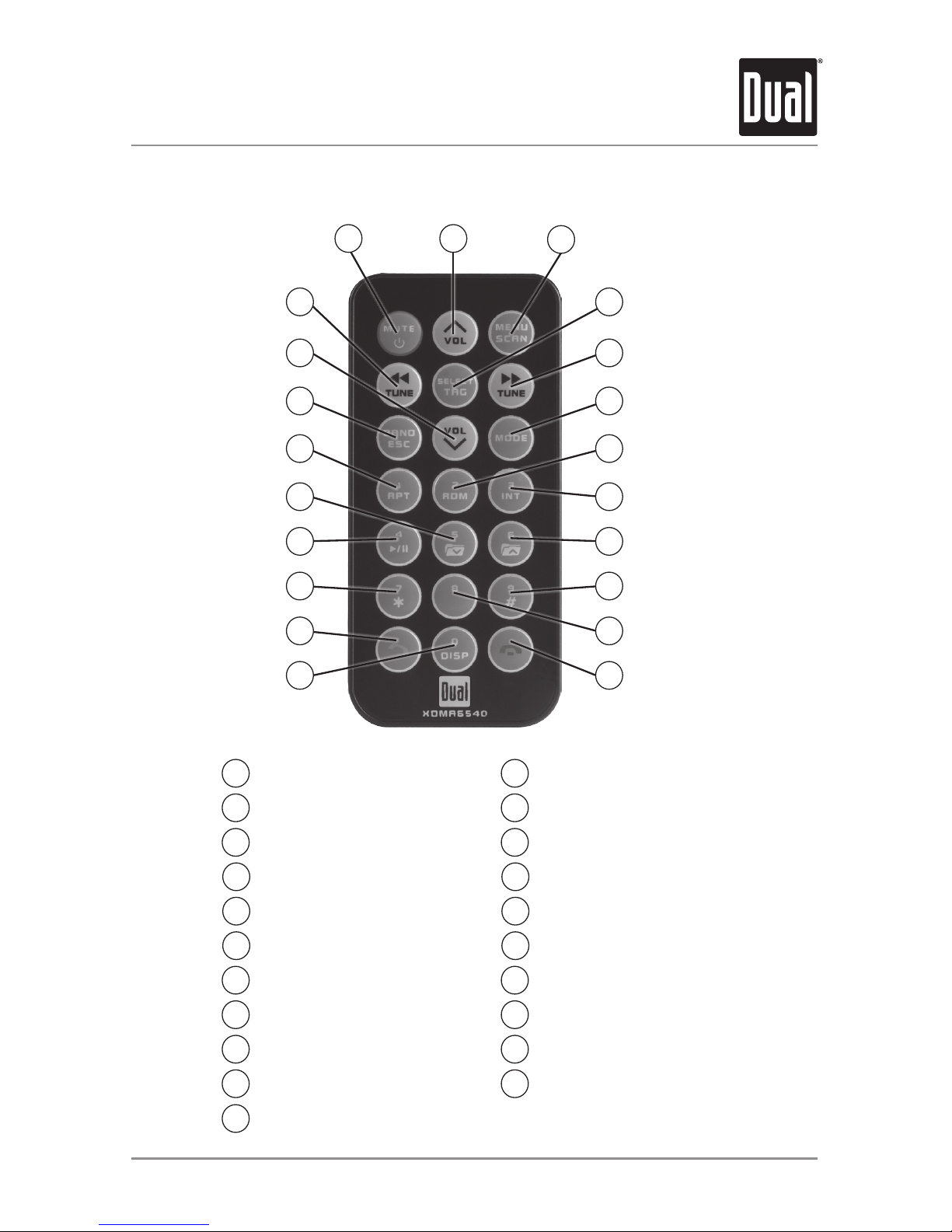
Control Locations - Remote
BluetoothEndCall
Key0/Display
BluetoothTalk
Key7/Key*
Preset4/Play/Pause
Preset5/FolderDown
Preset1/Repeat
Band/Escape
VolumeDown
Tune/TrackDown
Mute/Power
VolumeUp
Menu/Scan
Select/Tag
Tune/TrackUp
Mode
Preset2/Random
Preset3/Intro
Preset6/FolderUp
Key9/Key#
Key8
13
1 12
2 13
314
4 15
5 16
617
7 18
8 19
9
10
11
20
21
2
10
11
12
9
8
7
6
5
4
15
14
13
16
17
18
19
20
21

6
XDMA6540 OPERATION
Power On/Off
Faceplate Removal
Semi-permanent
Faceplate Installation
Changing Modes
Available Modes
General Operation
Press oranyotherbuttontoturnuniton.Pressand
hold to turn unit off.
Press RELEASEandpullawayfromtheleftsideto
remove.Tore-install,insertrightsideoffaceplate
firstthenpushleftsidetosecure.
Removetrimringandinstallsupplied#1x7/32”
Phillipsheadscrewthroughleftsideofmounting
frameintofaceplate.
Press MODE DOWNtocycledownorpressMODE UP
tocycleupthroughthebelowoperatingmodes.A
modeindicatorlocatedtotheleftoftheLCDwillpoint
tothecurrentmodeofoperation.
AM/FMTunerMode
CDPlayerMode
AuxiliaryInput(front/rear)Modes
USBandOperationofiPod®/iPhone®Modes
SDCardMode
BluetoothMode
SiriusXMSatelliteRadioMode
SiriusXMmodewillnotappearunlesstheSiriusXM
ConnectVehicleTuner(soldseparately)isconnected.
OperationofiPodmodewillnotappearunlessaniPod
device(soldseparately)hasbeenconnected.
CD,USBandSDmodeswillnotappearunlessaCD,
USBdeviceorSDcard(soldseparately)havebeen
connected.
HDRadio™modewillreplaceAM/FMtuner
modewhentheDualHDM90HDRadiotuner(sold
separately)isconnected.

7
XDMA6540 OPERATION
Volume
Mute
Display
Select / Tag
Steering Wheel
Interface Input
Auxiliary Inputs
Reset
Setting the Clock
12/24-Hour Clock
General Operation
Adjustvolumeusingvolumeknob(00-46).
Press MUTEtosilencetheaudio.“MUTE”willflashin
thedisplay.PressMUTEagaintocancel.
Press DISPtotogglebetweenitemssuchasID3tag
songinformation,file/folderinformationortheclock.
PushthevolumeknobinwardtoactivatetheSELECT
function.Pushandholdthevolumeknobinwardto
activatetheTAGfunction.
Thesteeringwheelinterfaceinputlocatedontheback
oftheheadunitallowsconnectiontothePAC (Pacific
Accessory Corporation) SWI-PSinterfacemodule
(soldseparately).Visitwww.pac-audio.comfordetails.
Toconfiguresteeringwheelcontrols,followthe
instructionsprovidedwiththePAC SWI-PSinterface
module.Afterinstallingtheinterfacemodule,insert
themodule's3.5mmjackintotheportlabeled
"REMOTEIN"onthebackoftheheadunit.
TheXDMA6540featurestwoauxilaryinputs.Insert
a3.5mmconnectorinthefrontpanelAUXport,or
connectRCA-typecablesintotherearAUXport.Press
MODE UP/DOWNtoselectAuxFrontorAuxRear
modes.
PresstheRESETbutton,locatedbehindthefront
panel,toresettheunitbacktothefactorysettingsif
abnormaloperationoccurs.
Withtheuniton,pressandholdDISPuntiltheclock
beginstoflash,thenrelease.PressTUNE
nn
toadjustthehoursandTUNE
ll
toadjustthe
minutes. Press DISPmomentarilytosavetheselected
time.
Note:TheclockcanalsobesetintheGENERAL
menu.Seepage11fordetails.
Theclockwilldisplay12-hourAM/PMtimeinUSA
frequencyspacingmode(PM10:00).InEuropean
frequencyspacingmode,theclockwilldisplay
24-hourtime(22:00).
Note:24-hourtimeandEuropeanfrequencyspacing
arenotavailableiftheHDM90HDRadio™tunerare
connected.

8
XDMA6540 OPERATION
Setup Menu
Press MENUtoaccessthesetupmenu,thenturnthevolumeknobtocyclethroughmenucategories:
Audio, Color, Display, Tuner, iPod, Bluetooth, SiriusXM and General.
• Whendesiredcategoryappearsinthedisplay,pressSELECT,thenrotatethevolume knobleft/
righttocyclethroughtheoptionsineachcategory.
• Whendesiredoptionappearsinthedisplay,pressSELECT,thenrotatethevolume knobleft/
righttoadjustoractivatedesiredfunction.Note:Somefunctionsaretoggledbypressing
SELECTandmaynotrequireturningthevolumeknob.
• Press ESCtoreturntothepreviousmenu,orexitthemenuwhilethemainmenuisdisplayed.
Audio Menu
Function Options Action
Bass Level Adjustthebassfrequencyouputfrom-6to+6.
Treble Level Adjustthetreblefrequencyoutputfrom-6to+6.
Balance Left-Right Shiftthespeakeroutputfromtheleft(-12)totheright(+12).
Fader Front-Rear Shiftthespeakeroutputfromthefront(-12)totherear(+12).
Equalizer PresetEQs SelectbetweenFlat,Pop,Jazz,Classic,Beat,Rock,User.
•AnyBassorTrebleadjustmentsaresavedasthe"User"EQ.
Subwoofer Level Adjustthelevelofthesubwooferoutputfrom0(off)to+12.
Loudness Off/On SettheloudsettingtoOnorOff.
• Enhancesthebassandtreblefrequenciesatlowvolumes.
Source Level -6to+6 Adjuststheoutputlevelforeachmodeindividuallyfrom-6to+6.
Color Menu
Menu Function Options
Auto Change Setstheunittorotatebetweenallilluminationcolorsautomatically.Settingapresetoruser
colorwillcanceltheautomaticcolorchange.
Set Color
AdjustthecolorofthebuttonandLCDilluminationbetween31presetcolors.
• Off:setsthecolortowhite.(default)
• Day/Night:setsthecolortochangetodifferentcolorsduringthedayornight.Thedayand
nightcolorsmustbesetintheDay/Nightcolormenubelow.
• User:setsthecolortothecustomcolor.Thecustomcolormustbesetinthemenubelow.
• 1-31:choosefromanyofthe31presetcolors.
Set Custom
Color
IndividuallyselectthelevelofRed,GreenandBluefrom1-32.Anycombinationofthese
colorscanbeselected.Important Note:SettingeachRed,GreenandBluelevelsto1willturn
offsetturnofftheilluminationfortheLCDandbuttons.Ifthiscolorisset,pressCOLOR to
changetoacolor.
Set Day/Night
Color
Setsinidvidualcolorsforthedayornight.(Theclockmustbesetforproperfunction).
• Day Color:setsthedaytimecolortoapresetorcustomcolor.
• Night Color:setsthenighttimecolortoapresetorcustomcolor.
• Time:adjuststhenighttimespan.Turnthevolumeknobtoadjust.(defaultis7pmto7am).

9
XDMA6540 OPERATION
Setup Menu
Display Menu
Tuner Menu
Menu Function Options
Scrolling
ChangesthescrollingstyleusedfordisplayedinformationontheLCDbetween:
• Off:informationwillnotscroll.
• Once:informationwillscrollonetimepersong.
• 15 seconds:informationwillscrollonceper15seconds.
• Page:informationwillcycleinsteadofscrolling.(default)
• On:informationwillconstantlyscroll.
Dimmer
AdjuststheilluminationlevelforthebuttonsandLCDbetween:
• High:brightestilluminationlevel.(default)
• Medium:middleilluminationlevel.
• Low:dimmestilluminationlevel.
• NA:illuminationlevelislockedandcannotbechangedwhenday/nightcolorisenabled.
LCD Type
SetstheLCDilluminationtype
• Positive:Colorbackgroundwithblacktext.
• Negative:Blackbackgroundwithcolortext.
• Automatic:Switchestopositiveduringthedaytime,andnegativeduringthenight.(default)
Menu Function Options
Auto Station Store Press SELECTtobeginstoringstrongradiostationstothe1-6presetbuttonsinthecurrent
band.
Local Allowonlystrongradiostationstobereceived,blockingstationswithweaksignal.
Frequency Sp. ChangesthetunertoreceiveUSA(default)orEuropeanradiofrequencies.
Tune/Seek
Priority
Switchesthefunctionoftheseek/tuneupanddownbuttons:
• Seek:Quickpresswillseektothenextstrongchannel.Pressandholdtoactivatemanual
tuning.
• Tune:Quickpresswillmanuallytunetothenextstation.Pressandholdtoseektothe
nextstrongchannel.(default)
HD Radio™ Tuner Menu
WhentheoptionalHDM90HDRadiotuner(soldseparately)isconnected,thefollowing
additionalmenuoptionswillappearintheTunermenu.
Menu Function Options
HD Seek
LimitstheseekandautostationstorefunctionstoonlyaccessHDRadiochannels.
• On:SeekandAutoStationStorewillonlyaccessdigitalHDRadiochannels.
• Off:Allanaloganddigitalchannelswillbeaccessed.(default)
Delete All Tags Press SELECTtoeraseallTagsthataresavedinmemory.(DoesnotaffectTagsthathave
beentransferredtoaniPoddevice.)
Tuner Mode
Enables/disablesthedigitalHDRadiochannelreception.
• Analog:Limitsthereceptiontostandardanalogchannelsonly.
• Digital:Allowsbothdigitalandanalogchannelstobereceived.(default)

10
XDMA6540 OPERATION
Bluetooth™ Menu
iPod Menu
Menu Function Options
Bluetooth Enables/disablesBluetoothfunctionality.
Auto Answer
Answersallincomingcallsautomaticallywithoutrequiringabuttonpress.
• On:Automaticallyacceptsallincomingcallsafter2-3ringswithoutpressingtheTALK
button.
• Off:IncomingcallscanbeacceptedbypressingtheTALKbutton,orrefusedbypressing
theENDbutton.(default)
Auto Connect
ConnectsthemostrecentlypairedBluetoothdeviceautomatically.
• On:ConnectsautomaticallywhentheXDMA6540ispoweredonandtheBluetoothdevice
isinrange.(default)
• Off:WillnotconnecttoanyBluetoothdeviceunlessyoumanuallyselectthedevicefrom
the"paireddevices"menu.
Speaker Output DirectstheBluetoothaudiotoonlythefrontspeakers(default)ortoallfourspeakers.
Menu Function Options
iPod Control
SwitchesthecontrolbetweentheheadunitandtheiPod/iPhonedevice.
• Full:EnablestotalcontroloftheiPoddevicefromtheXDMA6540.(default)
• Manual:ReleasesthecontroloftheiPoddevice.Musicsearchesandtrackselections
mustbedonefromthedevice.TheiPoddevicewillcontinuetocharge.
SiriusXM Tuner Menu
WhentheoptionalSiriusXMSatelliteRadiotuner(soldseparately)isconnected,the
followingadditionalmenuoptionswillappearintheSetupMenu.
Menu Function Options
Parental Control
(defaultcode:0000)
Press SELECTtoentertheParentalControlmenu.Thismenuislockedbya4digitcode,
andapromptwillappeartoenterthecode.UnlesschangedusingtheEditCodemenu(see
below),thedefaultcodeis"0000".Enterthiscodeusingoneofthesetwomethods:
• Enter"0000"usingtheremotecontrol,bypressingthenumbersdirectly.PressSELECT
toconfirm.
• Turnthevolume knobtoselectthefirstdigit,thenpressSELECT.Continuewiththe
remainingdigitsuntilthecodeisentered.
Oncethecodeisentered,choosefromthebelowmenuoptions:
Edit Code:Choosethisoptiontoprogramanew4-digitcode.Enterthenewcodeusingthe
inputmethoddescribedabove.
Channel Lock:Onceselected,thechannellistwillappear.Turnthevolume knobtocycle
throughthelistofchannels.PressSELECTtolockthedesiredchannel;alockedchannel
willnotbeavailableinthechannellineup.Alockiconwillappearnexttothechannel
namewhenthechannelislocked.PressingSELECTonalockedchannelwillunlockit.
Clear All:Choosethisoptiontoresetthelockedchannelsbacktothefactorydefault.All
currentlysubscribedchannelswillbeunlocked.
Delete All Tags Press SELECTtoeraseallTagsthataresavedinmemory.(DoesnotaffectTagsthathave
beentransferredtoaniPoddevice.)
Setup Menu
Autres manuels pour XDMA6540
1
Table des matières
Autres manuels Dual Récepteur de voiture

Dual
Dual DV712 Mode d'emploi

Dual
Dual XML8150 Mode d'emploi

Dual
Dual XD6150 Mode d'emploi

Dual
Dual DV1014BH Mode d'emploi

Dual
Dual DSA1035 Manuel utilisateur

Dual
Dual XR4120 Mode d'emploi

Dual
Dual XDVD8130 Mode d'emploi

Dual
Dual XDVDN8190N Mode d'emploi

Dual
Dual XDM6350 Mode d'emploi

Dual
Dual iplug MXDMA65 Mode d'emploi

Dual
Dual XDVD1170 Mode d'emploi

Dual
Dual XDM16BT Mode d'emploi

Dual
Dual DXDM228BT Mode d'emploi

Dual
Dual XDVD1170 Manuel utilisateur

Dual
Dual XDVD3201 Mode d'emploi

Dual
Dual XDMR7700 Mode d'emploi

Dual
Dual XD230M Mode d'emploi

Dual
Dual XDM16BT Mode d'emploi

Dual
Dual MXD420 Mode d'emploi

Dual
Dual DV714BH Mode d'emploi


