
dji mavic Manuel utilisateur

MAVIC
V1.0 2016.09
Battery Charging Hub
User Guide
使用说明
使用說明
ユーザーガイド
사용자 가이드
Bedienungsanleitung
Guía del usuario
Guide de l'utilisateur
Guida dell'utente
Gebruiksaanwijzing
Manual do utilizador
Руководство пользователя


4
EN
Disclaimer
Thank you for purchasing the MAVICTM Battery Charging Hub (hereinafter
referred to as “Product”). Read this disclaimer carefully before using this Product.
By using this Product, you hereby agree to this disclaimer and signify that you
have read it fully. Please use this Product in strict accordance with the manual
and be sure to pay attention to the Warnings. SZ DJI TECHNOLOGY CO., LTD.
and its afliated companies assume no liability for damage(s) or injuries incurred
directly or indirectly from improper use of this Product. Misuse includes, but is
not limited to, using unapproved chargers, charging unapproved batteries, short-
circuiting, overheating, introducing foreign materials into the Product, or touching
the terminals with skin or metal. Refer to the Safety Guidelines and Disclaimer,
Intelligent Flight Battery Safety Guidelines, and User Manual for applicable
information not herein contained.
DJITM is a trademark of SZ DJI TECHNOLOGY CO., LTD. (abbreviated as “DJI”)
and its afliated companies. Names of products, brands, etc., appearing in
this manual are trademarks or registered trademarks of their respective owner
companies. This Product and manual are copyrighted by DJI with all rights
reserved. No part of this Product or manual shall be reproduced in any form
without the prior written consent or authorization of DJI.
This disclaimer is produced in various languages. In the event of divergence
among different versions, the Simplied Chinese version shall prevail when the
Product in question is purchased in China, and English version shall prevail
when the Product in question is purchased in any other region.
Warnings
1. The Charging Hub is only compatible with the designated Battery Charger.

5
EN
Do not attempt to use the Charging Hub with any other battery charger.
2. The Charging Hub is only compatible with FB1-3830mAh-11.4V Intelligent Flight
Batteries. Do not attempt to use the Charging Hub with other battery models.
3. Place the Charging Hub on a at and stable surface when in use. Ensure the
device is properly insulated to prevent re hazards.
4. DO NOT attempt to touch the metal terminals on the Charging Hub.
5. Clean the metal terminals with a clean, dry cloth if there is any noticeable buildup.
Introduction
The Mavic Battery Charging Hub is designed for use with the Mavic Intelligent
Flight Battery. When used with the Mavic Battery Charger, it can charge up to
four Intelligent Flight Batteries. The Intelligent Flight Batteries will be charged
in sequence according to their power levels, from high to low. The Charging
Hub (Advanced) optimizes charging to improve efciency. It is also Phantom 4
charger compatible, further reducing the charging time.
Overview
[4]
[2]
[3]
[1]
[1] Status LED Indicator
[2] Battery Port
[3] Firmware Update Port (Micro USB Slot)
[4] Power Port

6
EN
Using the Charging Hub
Follow the instructions below to use the Charging Hub:
1. Connecting to a Power Source
Connect the Mavic Battery Charger to a power outlet (100-240V, 50-60Hz),
then connect the Charging Hub to the Mavic Battery Charger.
Charging HubCharger
Power Outlet
The Charging Hub (Advanced, model: M1CH-P) can also be connected
to the Phantom 4 Charger.
2. Connecting Batteries
Insert the Intelligent Flight Battery into the battery port to begin charging. The
Intelligent Flight Battery with the highest power level will be charged rst,
then batteries will be charged in sequence according to their power levels.
The Charging Hub (Advanced) charges batteries in stages, making charging
multiple batteries faster.
Refer to "Status LED Indicator Description” section for more information about
the Status LED indicator's blinking patterns. Unplug the batteries when they
are fully charged.
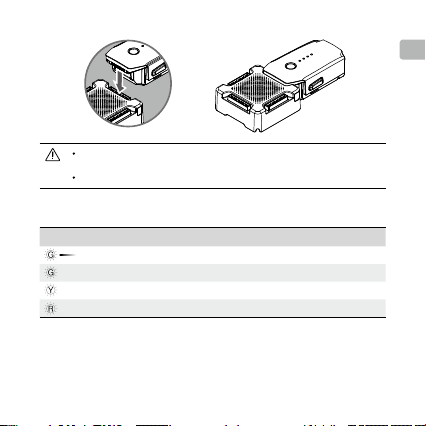
7
EN
Be aware of the Charging Hub model. DO NOT connect the Charging
Hub (Model: M1CH-S) to the Phantom 4 Charger.
DO NOT cover the Charging Hub during charging.
Status LED Indicator Descriptions
Status LED Indicator Descriptions
Slow Pulsing Green Charging
—
Solid Green All batteries are fully charged
—
Solid Yellow Waiting to charge
—
Solid Red Power supply or battery error. Check components
Updating the Firmware
DJI will release rmware updates when available. Refer to ofcial DJI website
and follow the instructions below to update the rmware.

8
EN
3. Run the rmware update program. Press the update button and wait for the
process to nish.
4. The Charging Hub will automatically restart when the update has been
successfully completed.
5. Repeat this process if the rmware update fails for any reason.
Specications
Model M1CH-S; M1CH-P (Advanced)
Compatible Battery
Charger
Mavic Charger (F1C50)
Mavic Car Charger (C3S78)
Phantom 4 Charger (PH4C100, Advanced only)
Phantom 4 Car Charger (C4S90-4, Advanced
only)
Compatible Battery Model FB1-3830mAh-11.4V
1. Download the latest rmware update program from the ofcial DJI website.
(http://www.dji.com/mavic/info#downloads)
2. Turn on the Charging Hub, then connect it to a computer using a Micro USB
cable.

9
EN
The content in this document is subject to change.
Download the latest version from
http://www.dji.com/mavic
MAVICTM is a trademark of DJI.
Copyright ©2016 DJI All Rights Reserved.
Operating Temperature 41° to 104° F (5° to 40° C)
Operating Voltage
13.05 V (Connected with the Mavic Charger / Car
Charger)
17.4 V (Connected with the Phantom 4 Charger /
Car Charger)
Charge Time*
(Four Batteries)
Mavic Charging Hub: M1CH-S
5 hr 10 min (Mavic Charger)
4 hr (Mavic Car Charger)
Mavic Charging Hub (Advanced): M1CH-P
4 hr 10 min (Mavic Charger)
3 hr 15 min (Mavic Car Charger)
2 hr 30 min (Phantom 4 Charger / Car Charger)
Weight 82 g; 101 g (Advanced)
* Charge times are tested in a lab environment at room temperature and should be used for
reference only.

10
CHS
免责声明
感谢您购买 MAVICTM 电池管家(以下简称“电池管家”)。在使用电池管家之
前,请仔细阅读本声明,一旦使用,即被视为对本声明全部内容的认可和接受。
请严格遵守本说明使用该产品,并务必重视注意事项。因用户不当使用(包括
但不限于:使用非 DJI 官方提供的充电器,为非指定型号的电池充电,使产品
短路、发热、进入异物,用手或金属触碰端子等)造成的任何损失,深圳市大
疆创新科技有限公司及其关联公司将不承担任何责任。其他未尽事项请参考《免
责声明和安全操作指引》、《智能飞行电池安全使用指引》和《用户手册》。
DJITM 是深圳市大疆创新科技有限公司及其关联公司的商标。本文出现的产品名
称、品牌等,均为其所属公司的商标或注册商标。本产品及手册为深圳市大疆
创新科技有限公司版权所有。未经许可,不得以任何形式复制翻印。
关于不同语言版本的免责声明可能存在的语义差异,中国以简体中文版为准,
其他地区以英文版为准。
注意事项
1. 电池管家仅适用于扩展充电接口,请配合使用指定充电器为电池管家供电。
2. 电池管家仅适用于 FB1-3830mAh-11.4V 智能飞行电池充电。请勿使用电池
管家为其他型号电池充电。
3. 使用时请将电池管家平稳放置,并注意绝缘及防火。
4. 请勿用手或其他物体触碰金属端子。

11
CHS
5. 若金属端子附着异物,请用干布擦拭干净。
简 介
电池管家配合 Mavic 标配充电器使用,可将充电接口扩展为多个,最多可连
接四块 Mavic 智能飞行电池,并按照剩余电量由高至低的顺序,依次进行充
电。其中高级版电池管家可智能优化充电模式,提高充电效率;并且可以适配
Phantom 4 充电器进行快充,进一步缩短充电时间。
部件名称
[1] 状态指示灯
[2] 电池接口
[3] 固件升级接口(Micro USB 接口)
[4] 电源接口
[4]
[2]
[3]
[1]
Autres manuels pour mavic
12
Table des matières
Langues :
Autres manuels dji Changer


