
dji OM OL100 Manuel utilisateur

2021.09v1.0
Fill Light Phone Clamp
User Guide
使用说明
使用說明
ユーザーガイド
사용자 가이드
Bedienungsanleitung
Guía del usuario
Guide de l'utilisateur
Guida dell'utente
Gebruiksaanwijzing
Manual do utilizador
Guia do usuário
Руководство пользователя


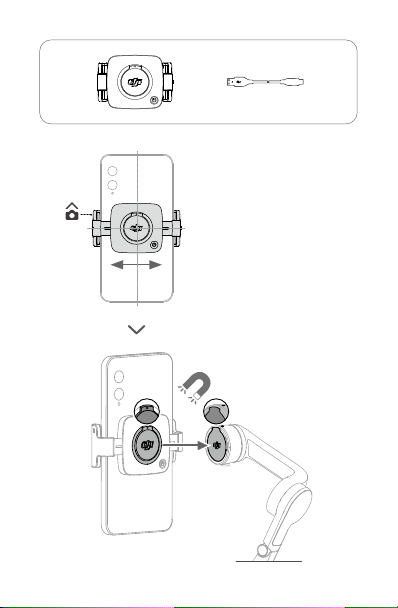
2
× 1 × 1

3

4
EN
Disclaimer
Congratulations on purchasing your new DJI OSMOTM product. Carefully read this entire
document and all safe and lawful practices provided by DJI OSMO before use. Failure to
read and follow instructions and warnings may result in serious injury to yourself or others,
damage to your DJI OSMO product, or damage to other objects in the vicinity. By using
this product, you hereby signify that you have read this document carefully and that you
understand and agree to abide by all terms and conditions of this document and all relevant
documents of this product. You agree to only use this product for proper purposes. You
agree that you are solely responsible for your own conduct while using this product and for
any consequences thereof. DJI OSMO accepts no liability for damage, injury, or any legal
responsibility incurred directly or indirectly from the use of this product.
OSMO and DJI OMTM are trademarks of SZ DJI OSMO TECHNOLOGY CO., LTD. (abbreviated
as “DJI OSMO”) and its afliated companies. Names of products, brands, etc., appearing in
this document are trademarks or registered trademarks of their respective owner companies.
This product and document are copyrighted by DJI OSMO with all rights reserved. No part
of this product or document shall be reproduced in any form without the prior written consent
or authorization of DJI.
This document and all other collateral documents are subject to change at the sole discretion
of DJI OSMO. This content is subject to change without prior notice. For up-to-date product
information, visit http://www.dji.com and click on the product page for this product.
Warning
1. The DJI OM Fill Light Phone Clamp consists of magnets. Keep it away from magcards,
IC cards, pacemakers, hard disks, RAM chips, and other devices to avoid interference.
2. Make sure to align the marks on the phone clamp and gimbal when attaching. Otherwise,
the phone may fall off.
3. The phone clamp is magnetically attached to the gimbal. DO NOT move the gimbal
too fast or make any sudden movements.
4. The near-field communication and wireless charging functions of the phone may
be affected when the phone clamp is attached. These functions will no longer be
affected once the phone clamp has been removed from the phone.
5. The phone clamp will turn off automatically when the temperature gets too high or low.
6. The color temperature button only works when the ll light is on.
Introduction
Capture the perfect sele with the DJI OM Fill Light Phone Clamp. The phone clamp boasts
a magnetic design and built-in battery and can be connected to DJI OM 5, DJI OM 4 SE,
and DJI OM 4.
Usage
1. Press the power button to select brightness level (low, medium, high, or off).
2. When the ll light is on, press the color temperature button to select the lighting mode
(cool, warm, or neutral).
3. The phone clamp has a built-in battery. Connect a USB adapter to the USB-C charging
port using a charging cable. The indicator indicates the battery level and charging status.
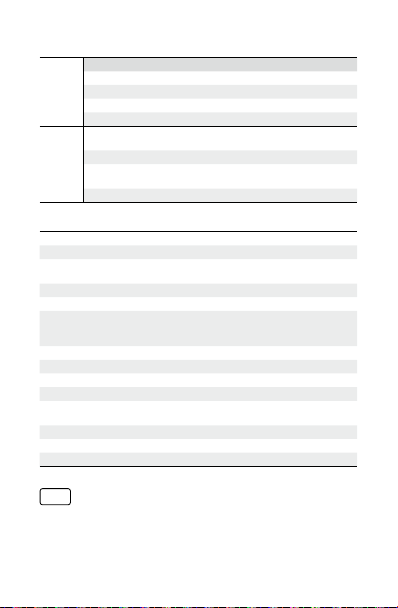
5
Indicator Status Description
Battery
Level
Blinking Pattern Description
Solid green Battery level ≥ 50%
Solid yellow 20% ≤ battery level <50%
Solid red 0% < battery level < 20%
Off Battery level is 0% or the temperature is too high/low
Charging
Status
Blinks green, yellow,
and red alternately Charging
Solid green Battery fully charged (when ll light is on)
Solid green for 6
seconds and turns off Battery fully charged (when ll light is off)
Solid red or off Charging error due to high/low temperature
Specications
Name DJI OM Fill Light Phone Clamp
Model OL100
Dimensions 74.13x53x26.55 mm
105.91x53x26.55 mm (Extended)
Weight 73 g
Illuminance 20/30/40 lux @0.5 m
Color Temperature
Cool light (5000±200 K)
Warm light (2700±200 K)
Neutral light (3500±200 K)
Battery Type Li-ion
Battery Capacity 296 mAh
Power Consumption 0.38 W (min illuminance); 0.79 W (max illuminance)
Operating time 3 hours (min illuminance); 1.5 hours (max illuminance)
Charging Time 35 minutes (Measured with a 10W charger with an
environment temperature of 25° C)
Operating Temperature 0° to 40° C (32° to 104° F)
Charging Temperature 5° to 40° C (41° to 104° F)
Supported Battery Charger DC 5 V/1 A or higher
CHS
免责声明
感谢您购买大疆灵眸 TM (DJI OSMOTM) 产品。使用本产品之前,请仔细阅读并遵循本文及大疆
灵眸(DJI OSMO)提供的所有安全与合规操作指引,否则可能会给您和周围的人带来伤害,

6
损坏本产品或其它周围物品。一旦使用本产品,即视为您已经仔细阅读本文档,理解、认可
和接受本文档及本产品所有相关文档的全部条款和内容。您承诺仅出于正当目的使用本产品。
您承诺对使用本产品以及可能带来的后果负全部责任。大疆灵眸(DJI OSMO)对于直接或
间接使用本产品而造成的损坏、伤害以及任何法律责任不予负责。
OSMO 以及 DJI OMTM 是深圳市大疆灵眸科技有限公司及其关联公司的商标。本文出现的产
品名称、品牌等,均为其所属公司的商标或注册商标。本产品及手册为大疆灵眸版权所有。
未经许可,不得以任何形式复制翻印。
本文档及本产品所有相关的文档最终解释权归大疆灵眸(DJI OSMO)所有。如有更新,恕
不另行通知。请访问 www.dji.com 官方网站以获取最新的产品信息。
注意事项
1. DJI OM 补光手机夹含有磁铁,为了避免产生磁化影响,请远离磁卡、IC 卡、心脏起搏
器、硬盘、RAM 芯片等易受干扰设备。
2. 将磁吸手机夹吸附于云台时,确保对位准确,否则可能导致吸附不稳。
3. DJI OM 补光手机夹采用磁吸方式,吸附能力有限。使用时请避免大幅晃动等激烈动作,
以免手机摔落。
4. 磁吸手机夹安装在手机上将会影响 NFC、无线充电功能,拆下手机夹即可恢复正常。
5. 当温度过高或过低时,补光手机夹会自动关机。
6. 色温键仅在补光开启状态下可用。
简 介
DJI OM 补光手机夹内置电池,具备补光功能,便于自拍。通过磁吸方式连接手机后,可搭配
DJI OM 5, DJI OM 4 SE 以及 DJI OM 4 使用。
使 用
1. 电源按键也为亮度按键,短按可依次选择低 /中/高三档不同亮度,再次短按关闭补光。
2. 在补光开启状态下,短按色温按键,可依次选择冷光 /暖光 /混合光三种不同色温模式。
3. 补光手机夹内置电池,可通过底部 USB-C 接口充电。指示灯可指示电量及充电状态。
指示灯状态描述
闪灯方式 描述
电量显示
绿色常亮 电量 ≥ 50%
黄色常亮 20%≤ 电量 <50%
红色常亮 0%< 电量 < 20%
熄灭 电量为 0%,或者温度过高或过低
充电显示
三色交替闪烁 充电中
绿色常亮 补光开启状态下,电池充满
绿色常亮 6秒后熄灭 补光关闭状态下,电池充满
红色常亮或熄灭 温度过高或过低造成充电异常

7
规格参数
名称 DJI OM 补光手机夹
型号 OL100
尺寸 74.13 x 53 x 26.55 mm
105.91 x 53 x 26.55 mm(展开)
重量 73 g
照度 20/30/40 lux @0.5 m
色温
冷光(5000±200 K)
暖光(2700±200 K)
混合光(3500±200 K)
电池类型 锂离子电池
电池容量 296 mAh
功耗 0.38 W(最小照度);0.79 W(最大照度)
工作时间 3小时(最小照度);1.5 小时(最大照度)
充电时间 35 分钟(25 ℃环境下使用 10 W 充电器测得)
工作环境温度 0 ℃至 40 ℃
充电环境温度 5 ℃至 40 ℃
适用充电器 DC 5 V/1 A 充电器及以上规格
CHT
免責聲明
感謝您購買大疆靈眸 TM (DJI OSMOTM) 產品。使用本產品之前,請仔細閱讀並遵循本文及大
疆靈眸(DJI OSMO)提供的所有安全與合規操作指引,否則可能會為您和周圍的人帶來傷
害,損壞本產品或其它周圍物品。一旦使用本產品,即視為您已經仔細閱讀本文件,理解、
認可和接受本文件及本產品所有相關文件的全部條款和內容。您承諾僅出於正當目的使用
本產品。您承諾對使用本產品以及可能帶來的後果負全部責任。大疆靈眸(DJI OSMO)對
於直接或間接使用本產品而造成的損壞、傷害及任何法律責任概不負責。
OSMO 以及 DJI OMTM 是深圳市大疆靈眸科技有限公司及其關聯公司的商標。本文出現的
產品名稱、品牌等,均為其所屬公司的商標或註冊商標。本產品及手冊為大疆靈眸版權所有。
未經許可,不得以任何形式複製翻印。
本文件及本產品所有相關文件的最終解釋權歸大疆靈眸(DJI OSMO)所有。如有更新,恕
不另行通知。請前往 www.dji.com 官方網站以取得最新的產品資訊。
注意事項
1. DJI OM 補光手機夾含有磁鐵,為避免產生磁化影響,請遠離磁卡、IC 卡、心律調節器、
硬碟、RAM 晶片等易受干擾的設備。
2. 將磁吸手機夾吸附於雲台時,須確保對準位置,否則可能導致吸附不穩。

8
3. DJI OM 補光手機夾採用磁吸方式,吸附能力有限。使用時請避免大幅晃動等激烈動作,
以免手機摔落。
4. 磁吸手機夾安裝在手機上將會影響 NFC、無線充電功能,拆下手機夾即可恢復正常。
5. 當溫度過高或過低時,補光手機夾會自動關機。
6. 色溫鍵僅可在補光開啟狀態下使用。
簡 介
DJI OM 補光手機夾內建電池,具備補光功能,便於自拍。透過磁吸方式連接手機後,可搭
配 DJI OM 5、DJI OM 4 SE 以及 DJI OM 4 使用。
使 用
1. 電源按鍵亦為亮度按鍵,短按可依次選擇低 /中/高三種不同亮度,再次短按可關閉補光。
2. 在補光開啟狀態下,短按色溫按鍵,可依次選擇冷光 /暖光 /混合光三種不同色溫模式。
3. 補光手機夾內建電池,可透過底部 USB-C 連接埠充電。指示燈可指示電量及充電狀態。
指示燈狀態描述
閃燈方式 描述
電量顯示
綠色恆亮 電量 ≥ 50%
黃色恆亮 20% ≤ 電量 <50%
紅色恆亮 0% < 電量 < 20%
燈號熄滅 電量為 0%,或者溫度過高或過低
充電顯示
三色交替閃爍 充電中
綠色恆亮 補光開啟狀態下,電池充飽
綠色恆亮 6 秒後熄滅 補光關閉狀態下,電池充飽
紅色恆亮或燈號熄滅 溫度過高或過低造成充電異常
規格參數
名稱 DJI OM 補光手機夾
型號 OL100
尺寸 74.13 x 53 x 26.55 mm
105.91 x 53 x 26.55 mm(展開)
重量 73 g
照度 20/30/40 lux @0.5 m
色溫
冷光 (5000±200 K)
暖光 (2700±200 K)
混合光 (3500±200 K)
電池類型 鋰離子電池
電池容量 296 mAh
Table des matières
Langues :
Autres manuels dji Accessoires pour téléphones portables


