
DIGITNOW! M126 Manuel utilisateur

Film Scanner
To ensure your better use our products, please read this
manual carefully and keep it for reference!

EN
User’s Guide
To ensure your better use our products, please read this
manual carefully and keep it for reference!
Table of Contents
1. Foreword.............................................................................................. 1
2. Precautions and Maintenance.......................................................... 1
3. Packing List...................................................................................... ... 2
4. Product Schematic............................................................................. 3
5. How to use negative clip....................................................................4
6. How to use the positive clip...............................................................5
7. Operation Guide..................................................................................6
8. Product Specifications..................................................................... 11
9. Statement.......................................................................................... 12

EN
1
Thank you for your purchase! Please read this instruction manual carefully before using this
product. Be sure to keep this manual in a safe place for your easy reference in the future.
• Do not attempt to disassemble or modify any part of the machine.
• If the product has been dropped or damaged, please do not touch the inside of the scanner to
avoid injury.
•If the product emits smoke, odor or there is any other abnormality during use, please stop using
it immediately.
•Do not use organic solvents such as alcohol, benzine, or thinner to clean the equipment.
• Do not use it in humid and dusty areas.
•Do not insert too many computer peripheral products powered by USB port, so as to avoid
overloading, otherwise the product will not run smoothly.
• Please use a film that conforms to the standard size.
• Cleaning: In order to scan the best effect picture, please make sure it’s clean before use.
•Non-use period: When the product is not used for a long time, please remove the power supply.
•The machine supports a maximum of 64GB SD card, but it is recommended to use an SD card
with a capacity of 16GB or less, because a SD card with too much capacity may extend the boot
time, and may cause a card jam as the machine reads the inserted SD card and calculates the
maximum number of accessible photos immediately. If a card jam or crash occurs, please remove
the SD card, and then unplug the power supply and turn it on again.
※In order to protect the machine and save energy, if there is no operation over 10 minutes under
the power-on state, the product will automatically shut down. Press on the power button again to
start working.
1.Foreword
2.Precautions and Maintenance

EN
2
3.Packing List
• Scanner
• Negative Adapter
• Slide Adapter
• 110 clip
• Super8 clip
• Video cable
• AC / DC power adapter
• USB cable
• Cleaning brush
• User’s Manual
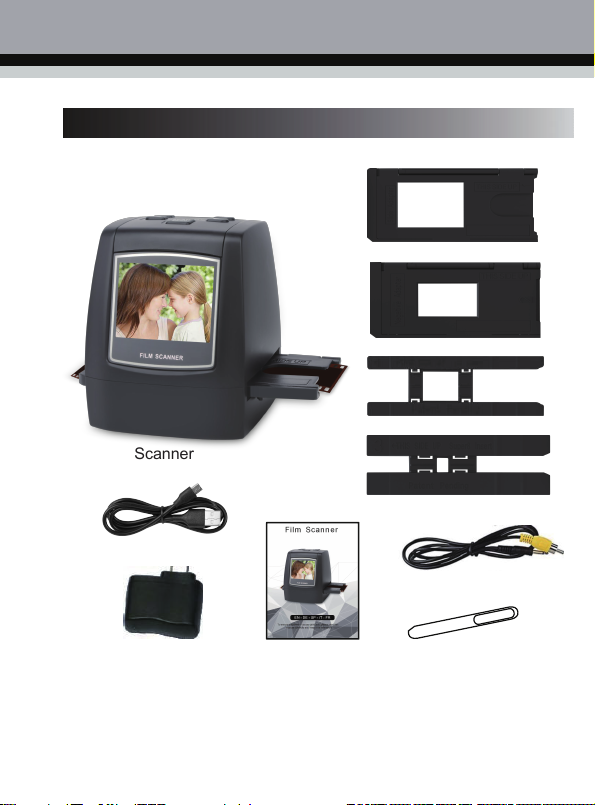
EN
3
Scanner
USB cable
Slide Adapter
Negative Adapter
110 clip
Super8 clip
Video cable
Power Adapter User’s Manual Cleaning brush
• To clean the backlight, please insert the cleaning brush from the side of the product.
4.Product Schematic

EN
4
5.How to use negative clip
a. Hold the negatives against the light, and
place the negatives facing you correctly.
b. Put the 135 film into the Negative
Adapter, close the Negative Adapter.
c. Insert the Negative Adapter clip into the
scanner for scanning.

EN
5
6.How to use the positive clip
a. Hold the positive clip to the light, and place
the positive clip facing you correctly.
b. Remove the positive film holder, with the
silk-screened side facing up,
Open the positive clip, put it into the
installed positive clip, close the film
holder, and press the buckle tightly.
c. Insert the positive clip into the scanner
for scanning.
• Take care not to scratch or touch the image area when handling the positive clips (preferably
wearing gloves). If cleaning the positive clip, it is recommended to wipe the dust with a
compressed cotton cloth!

EN
6
7.Operation Guide
1. Introduction to Main Menu Settings
① ② ③ ④ ⑤ ⑥ ⑦
①Language Mode ⑤Film mode
②USB Mode ⑥Format
③Photo mode ⑦Resolution
④Playback mode
2. Image Capture
2.1 Before scanning photos, please confirm whether the backlight of the product is clean. When
cleaning the backlight, please extend the cleaning brush from the right side of theproduct.

EN
7
2.2 After confirming that the backlight is clean, press the "OK " key in the main menu scan mode
to enter the scan mode. In the scan mode,Short press the "Scan/Menu" button to capture,
long press the "Scan/Menu" button for two seconds back to the menu homepage.
If any image requires for Mirror or Flip before capture, press LEFT/RIGHT button for Mirror/Flip
function, the live view will be adjusted accordingly(This step is to correct user misplaced the
film/photo either upside down or flip). Mirror and Flip function can only be used while in the live
view mode.
Scan/Menu
Scan/Menu
OK

EN
8
3. Negative film mode selection
After entering the film mode, the user can select the corresponding film to scan by entering the
film type, select the corresponding film type with the left and right buttons, and then press "OK"
to confirm.
OK
①② ③
①Negatives: Select negatives when the negatives loaded in the film holder.
②Positive: Select the positive when the positive is loaded in the film holder.
③Black and white film: select black and white film when the negative is loaded into the clip.
4. Photo Preview
In the main menu mode, press the ◄or ►key to select the photo preview mode, press
the "OK" key to enter the photo preview mode, the scanned photo will be played
automatically, and then press the "OK" key to enter the manual selection of preview
photos, press ◄or ►You can manually select and view photos, then press "OK" to
enter, exit, delete, back to the main menu options, press ◄or ►to select the
corresponding option and press "OK" to confirm.
OK
Table des matières
Autres manuels DIGITNOW! Scanner


