
DIGITNOW! M125 Manuel utilisateur

DigiScan
Portable Digital Image Scanner
User Manual

Features
Portable, high-resolution scanner for negative
filmes and slide films
High brilliance of colour (white balance &
exposure compensation are automatically)
5 megapixle CMOS sensor
2.4" TFT display
SD / SDHC card slot up to 32GB
USB 2.0 interface (high speed)
Usable as stand alone device
Connect directly to the computer and read the
photos saved on the SD card(Support for
Windows and MAC)
Small, light-weight, handy and easy to use
Package contents:
◆Film scanner
◆USB cable
◆Video cable
◆Negative Film holder
◆Positive slide holder
◆Rapid slide feeder
◆DC 5V adapter
◆User’s Manual
◆Brush
1 - EN

1. Description of Parts
Positive Slide Holder
135-Negative Film Holder
Rapid Slide Feeder
2 - EN
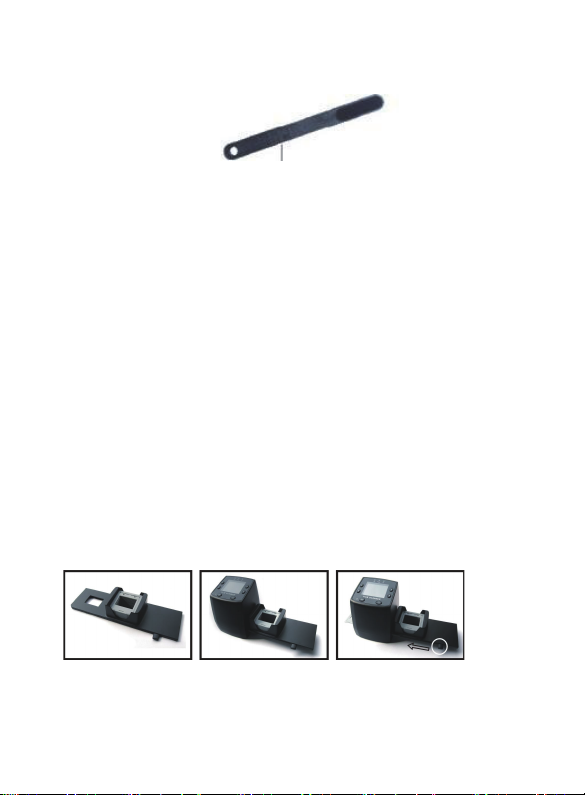
Cleaning Brush
Note:Place the film scanner on the side and insert
the end of the brush into the door on the right side
and clean the backlight panel placed in the film
scanner.
2. Using the included Holders
With the lever all the way to the right, stack your
slides in the rapid slide feeder.
Place the rapid slide feeder into the FILM
HOLDER SLOT.
Push the lever towards the left, then pull the lever
back to the right again to load a slide from the
feeder into SLIDES 2. Repeat this step for
subsequent slides (which will push the used slides
out the other side).
3 - EN

Loading Slides
Hold up the slide toward the light. Face the
trademark slide of the slide away from you. Look
through the slide and it should appear normally (not
a mirror image). Now turn the slide so the image is
upside down while looking at the same side.
Open the slide holder at the marked spot on the top.
With the slide holder laid open place the slide into
recessed area in the holder, the slide should fit
perfectly.
Close the slide holder and press the edges so that
it locks in place. Hold it in the position as showing
and insert the Slide Holder into the slot on the right
side of the scanner.
Note: Handle slides and negatives with care. Dust,
scratches or finger prints will show up on your
saved images.
4 - EN

Loading Negatives
Hold up the negative toward the light. As you look
through the negative, you should be able to read
the small negative numbers normally (not a mirror
image). Now turn the negative so the image is
upside down while looking at the same side.
Open the negative holder at the marked spot on the
top. With the negative holder laid open place the
negative into holder so the notches line up with the
notches on the holder.
Close the negative holder and press the edges so
that it locks in place. Hold it in the position as
shown in the film scanner. Insert the negative
holder into the slot on the right side of the film
scanner as shown.
5 - EN

Proper Operation Sequence
(1) Slide or load film/negative film to board holder.
(2) Insert board holder to scanner.
(3) Connect scanner USB cable to PC.
(4) Press power button to turn on scanner.
(5) Press scanning button to start scanning.
(6) Operation according to indication of manual on
screen.
(7) After finishing working, take storage card out.
(8) Picture also can be read from PC through USB
connection
Operation Guide:
1. Key introduction
1Playback
2Mirror Image/Rotation
3Up
4Down
5Power on/off/ menu
6Capture/ok
6 - EN

2. Power on/off
Power on:
Connect the product to power outlet via USB
power adapter and USB cable or to PC via
USB cable. Then Insert the SD card inside
the product, short press “ ”MENU key .
When “Power” indicator lights up and the "SD"
indicator lights up, it processes into Capture
mode.
Power off:
Long press “ ” MENU key for around 3
seconds, the "Power" indicator will light off, and
the product will power off.
7 - EN

3.Capture Picture
1.After processing above instructions
(Page3/4/5),connect the product to
Power outlet via USB power adapter & USB cable or
to PC via USB cable. Then Insert the SD card inside
the product, short press “ ” MENU key .
When “Power” indicator lights up and the “SD”
indicator lights up, it processes into Capture mode.
8 - EN
2. Press “ ” MENU key,select positive film/
negative film / B & W film according to film types
you have put into the film holders. (detailed
instruction is on Page10)
3. According to display on the screen,press “
”key to mirror image to adjust the angle of
films(detailed instruction is on Page8);
Press“ ”/ “ ” key to adjust the brightness of
films.
4. press “ ” key and wait for 2 seconds,the
images will automatically save into the SD card.
5. Press“ ” key to enter into playback mode,
press“ ”key again to exit the playback mode.
(Note:“5M(10M)” on the top left corner of the
screen indicates Resolution, the number at the top
right corner indicates that how many images can
the SD card save.)
9 - EN
Table des matières
Autres manuels DIGITNOW! Scanner


