
Delta RowCool HCH1CH0 Manuel utilisateur

Delta InfraSuite Precision Cooling
The power behind competitiveness
www.deltapowersolutions.com
RowCool
Chilled Water Type (HCH1CD0/HCH1CH0/HCH1CS0)
User Manual

II
InfraSuite RowCool Precision Cooling –
Chilled Water
Save This Manual
This manual contains important instructions and warnings that you should follow
during the installation, operation, storage and maintenance of this product. Failure to
heed these instructions and warnings will void the warranty.
Copyright © 2018 by Delta Electronics Inc. All Rights Reserved. All rights of this User Manual (“Manual”),
LQFOXGLQJEXWQRWOLPLWHGWRWKHFRQWHQWVLQIRUPDWLRQDQG¿JXUHVDUHVROHO\RZQHGDQGUHVHUYHGE\'HOWD
Electronics Inc. (“Delta”). The Manual can only be applied to the operation or the use of this product.
$Q\GLVSRVLWLRQGXSOLFDWLRQGLVVHPLQDWLRQUHSURGXFWLRQPRGL¿FDWLRQWUDQVODWLRQH[WUDFWLRQRUXVDJH
of this Manual in whole or in part is prohibited without the prior written permission of Delta. Given that
Delta will continuously improve and develop the product, changes may be made to the information
in this Manual at any time without obligation to notify any person of such revision or changes. Delta
will by all means update and maintain the correctness of this Manual. Delta disclaims any kinds or
IRUPVRIZDUUDQW\JXDUDQWHHRUXQGHUWDNLQJHLWKHUH[SUHVVO\RULPSOLFLWO\LQFOXGLQJEXWQRWOLPLWHGWR
WKHFRPSOHWHQHVVIDXOWOHVVQHVVDFFXUDF\QRQLQIULQJHPHQWPHUFKDQWDELOLW\RU¿WQHVVIRUDSDUWLFXODU
purpose of the Manual.

Table of Contents
III
Table of Contents
Chapter 1: Guide for Safe Operation -------------------------------------------------1
1.1 Safety Instructions ------------------------------------------------------------------ 1
1.2 Installation Instructions ------------------------------------------------------------- 1
1.3 Instructions for Use ----------------------------------------------------------------- 1
Chapter 2: Introduction -------------------------------------------------------------------2
2.1 Product Introduction ---------------------------------------------------------------- 2
2.2 Functions and Features ------------------------------------------------------------ 2
2.3 Packing List --------------------------------------------------------------------------- 4
2.4 Optional Accessories --------------------------------------------------------------- 5
2.5 Appearance --------------------------------------------------------------------------- 5
&RPSRQHQWV,GHQWL¿FDWLRQ -------------------------------------------------------- 6
2.7 Piping System ------------------------------------------------------------------------ 9
2.8 Control panel ------------------------------------------------------------------------10
Chapter 3: Installation ------------------------------------------------------------------- 11
3.1 Installation Site ----------------------------------------------------------------------11
3.2 Clearance zone ---------------------------------------------------------------------12
3.3 Handling ------------------------------------------------------------------------------12
3.4 Positioning ---------------------------------------------------------------------------14
3.5 Open the Front Door and Remove the Side Panels -----------------------15
3.6 Hole Drilling --------------------------------------------------------------------------16
([WHUQDO3LSLQJ ----------------------------------------------------------------------17
3.8 Power Connection ------------------------------------------------------------------18
3.8.1 Power ---------------------------------------------------------------------18
&RQWUROER[ ---------------------------------------------------------------------------21
Chapter 4: Initial Startup ---------------------------------------------------------------- 24
4.1 Pre Start-up Inspection -----------------------------------------------------------24
4.2 Power Supply ------------------------------------------------------------------------25
$LU([KDXVW ---------------------------------------------------------------------------25
4.4 Water Leakage Detector ----------------------------------------------------------26
4.5 Water Balance -----------------------------------------------------------------------26

IV
InfraSuite RowCool Precision Cooling –
Chilled Water
Chapter 5: Operation --------------------------------------------------------------------- 28
5.1 Control Panel Operation ----------------------------------------------------------28
5.2 Status Screen and Main Menu --------------------------------------------------29
5.3 Account Authority and Login -----------------------------------------------------30
5.4 Operation mode ---------------------------------------------------------------------30
5.5 Shutdown -----------------------------------------------------------------------------31
5.6 Setting of Cooling Unit ------------------------------------------------------------32
5.6.1 Local Setting -------------------------------------------------------------32
5.6.2 Set Point ------------------------------------------------------------------34
5.6.3 Controller Setting -------------------------------------------------------34
5.6.4 Setting of automatic control mode ---------------------------------36
5.6.5 Alarm Setting ------------------------------------------------------------36
5.6.6 Inquiry of system status ----------------------------------------------38
5.6.7 Inquiry/elimination of event log -------------------------------------39
5.6.8 Inquiry/reset of running hours ---------------------------------------39
5.6.9 Change of system type -----------------------------------------------40
5.6.10 Restore to Factory Setting -------------------------------------------41
Chapter 6: Maintenance and Cleaning --------------------------------------------- 42
6.1 Firmware Upgrade -----------------------------------------------------------------42
6.2 Storage --------------------------------------------------------------------------------42
Chapter 7: Troubleshooting ----------------------------------------------------------- 43
$SSHQGL[7HFKQLFDO6SHFL¿FDWLRQV ---------------------------------------------- 50
Appendix 2: Periodic Inspection/Maintenance List ---------------------------- 52
Appendix 3: Warranty -------------------------------------------------------------------- 54

1
Chapter 1 Guide for Safe Operation
Chapter 1: Guide for Safe Operation
1.1 Safety Instructions
y Please carefully read all chapters of the Manual before any installation, operation, and
maintenance. To avoid personal injury and equipment damage, please be sure to operate
the product in accordance with the instructions in this Manual and the markings on the
cabinet.
y When moving the equipment, the unit should only be moved by at least two people so as
to guarantee safety.
y In handling or removal of the equipment, please pay attention to its height and center of
gravity. When using a transportation tool for handling, it must be raised from the bottom to
avoid toppling.
y The unit contains moving components. Be careful to keep it away from your arms, legs,
hair, clothes or jewelry so as to avoid any danger.
1.2 Installation Instructions
y The unit can be connected with a single or dual power source. Make sure the input power
is disconnected before making a connection. If necessary, use a volt-ohm-milliammeter to
FRQ¿UPWKLV
y,W LV VXJJHVWHG WKDW WKH LQVWDOODWLRQ DUHD VKRXOG QRW KDYH ÀDPPDEOH REMHFWV DQG WKH
HTXLSPHQWVKRXOGEHLQVWDOOHGRQDVWDEOHÀRRU
y This unit is only intended for indoor use. The indoor environment must be separated from
the outside air so as to avoid temperature and humidity interference. Consult the national
or local regulations for separating the installation environment.
y$OOVSHFL¿FDWLRQVRIGLDPHWHUVDQGOHQJWKVRIHOHFWULFDOZLUHVPXVWEHLQFRPSOLDQFHZLWK
ORFDORUQDWLRQDOODZVDQGUHJXODWLRQV7KHJURXQGLQJZLUHVRIWKHXQLWPXVWEHHႇHFWLYHO\
connected with the grounding system.
1.3 Instructions for Use
y The inner high voltage of the unit may be fatal! The inner components may have hidden
GDQJHUVDQGRQO\TXDOL¿HGVHUYLFHSHUVRQQHOFDQRSHUDWHWKHXQLW,PSURSHURSHUDWLRQPD\
lead to serious injury or death or equipment damage. Be sure to follow all the instructions and
warnings contained in the Manual.
y When replacing the side panels or front or back doors, make sure there is no foreign matter
in the cabinet.

2
InfraSuite RowCool Precision Cooling –
Chilled Water
Chapter 2: Introduction
2.1 Product Introduction
The Delta InfraSuite RowCool Precision Cooling Unit (Chilled Water Type) adopts a parallel
FDELQHWGHVLJQDQGFDQEHVHWLQDQDUHDDGMDFHQWWRDKHDWORDG,WVKLJKFRROLQJHႈFLHQF\
FDQFUHDWHDQHႇHFWRIGURSSLQJWHPSHUDWXUH7KHPRGXODUL]HGGHVLJQIDFLOLWDWHVH[SDQVLRQRU
PRYHPHQWDQGFDQEHÀH[LEO\LQWHJUDWHGLQWR\RXUGDWDFHQWHUHQYLURQPHQW:LWKHQODUJHPHQW
RI\RXUGDWDFHQWHUVLQFUHDVHGFRROLQJQHHGVFDQEHPHWE\HDV\UHFRQ¿JXUDWLRQRUDGGLWLRQ
of the equipment.
When installed in a data center, the untreated air will be sucked in from the rear of the cooling
unit and the air, after treatment, will be released from the front of the unit to achieve the aim of
cooling.
<RXFDQPDQDJH\RXUFRROLQJXQLWYLDDXVHUIULHQGO\LQWHUIDFH7KHFRROLQJHႈFLHQF\FDQEH
actively controlled by its built-in MCU and it will remind you of any abnormality via the alarm
system so as to guarantee normal operation.
2.2 Functions and Features
y Intelligent temperature and humidity control
Accurate detection and management of the data center’s temperature and humidity by the
built-in MCU.
y User-friendly control interface
Easy setting and monitoring and access to system status.
y A-B dual power source input
A-B dual power source design for enhancing system reliability.
y Automatic spring-resetting of two-way ball valve
,QDEQRUPDOSRZHULQWHUUXSWLRQWKHLQQHUÀRZUDWHDFWXDWRUZLOODXWRPDWLFDOO\FORVHWKHWZR
ZD\EDOOYDOYHLQDVKRUWWLPHWRVWRSFKLOOHGZDWHUIURPFRQWLQXRXVO\ÀRZLQJLQWRWKHFRLO
and generating condensed water, which may lead to water leakage.
y Alarm system
'HWHFWLRQRIDEQRUPDOLW\DQGUHPLQGLQJWKHXVHUYLDDEX]]HURUDQH[WHUQDOGU\FRQWUDFW
device.

3
Chapter 2 Introduction
y Detection of heat load temperature
Accurate monitor of the heat load temperature and humidity by remote sensors.
y Leakage detection
2SWLRQDO PD[LPXP P ZDWHU OHDNDJH GHWHFWRU P LV SURYLGHG DV GHIDXOW ZKLFK ZLOO
immediately inform the user of any water leakage so as to protect the safety of the
equipment.
y Output and input dry contacts
7ZRRXWSXWDQGWZRLQSXWGU\FRQWDFWVIRU¿UHDODUPVPRNHDODUPV\VWHPDODUPHWF
y Heat insulation side panels
Isolate the interference of outside temperature.
y Lockable front and rear doors and side panels
Prevent any unauthorized operation.
y Casters
For convenient movement or relocation.
y Compatible SNMP card (optional)
Monitoring management through SNMP protocol.

4
InfraSuite RowCool Precision Cooling –
Chilled Water
2.3 Packing List
╆⊼⽬㩆
䳢䵘㨈
x 2
x 3
x 2
x 1 x 1
x 1
x 2
Thepowerbehind competitiveness
www.deltapowersolutions.com
⏗总 Infrasuite䲥⮭䩡媦
㩆㪪䲥⮭䩡媦䳢⇾
↗㰛❲+&+&'+&+&++&+&6
ὦ䔏㈲ⅱ
x 2
x 1
x 2
x 1
x 1
1
2
3
4
5
6
8
9
7
10
11
12
No. Description Quantity
1Delta InfraSuite RowCool Precision Cooling Unit 1
2User manual 1
3Key (shared by front & rear doors and side panels) 2
4Cable tie 3
5Remote temperature sensor (4 meters) 2
64-pin terminal block 2
73-pin terminal block 1
8Cable gland 2
9Cover plate for communication wiring duct 1
10
Cover plate for power supply 2
11
Iron hose clamp ring 1
12
1RQZRYHQ¿OWHU 1
&DXWLRQ8VHRQO\IRUGXVWSURRIDSSOLFDWLRQVDWWULDORSHUDWLRQE\HQJLQHHULQJSHUVRQQHO'RQRW
continue to use in normal operation.

5
Chapter 2 Introduction
2.4 Optional Accessories
For purchase of the following optional accessories, please contact service personnel.
y SNMP card: Use the Delta SNMP card to achieve the best compatibility.
y Remote temperature and humidity sensors
y Stainless steel hose: GLDPHWHU´OHQJWK0GXDOVLGH37WRRWKZKLFKFDQUHGXFH
LQVWDOODWLRQGLႈFXOW\
2.5 Appearance
(Figure 2-1: HCH1CD0) (Figure 2-2: HCH1CH0) (Figure 2-3: HCH1CS0)
2000
mm 2400
mm 2400
1090
mm
600
mm
1090
mm
600
mm
1090
mm
600
mm
mm
6
InfraSuite RowCool Precision Cooling –
Chilled Water
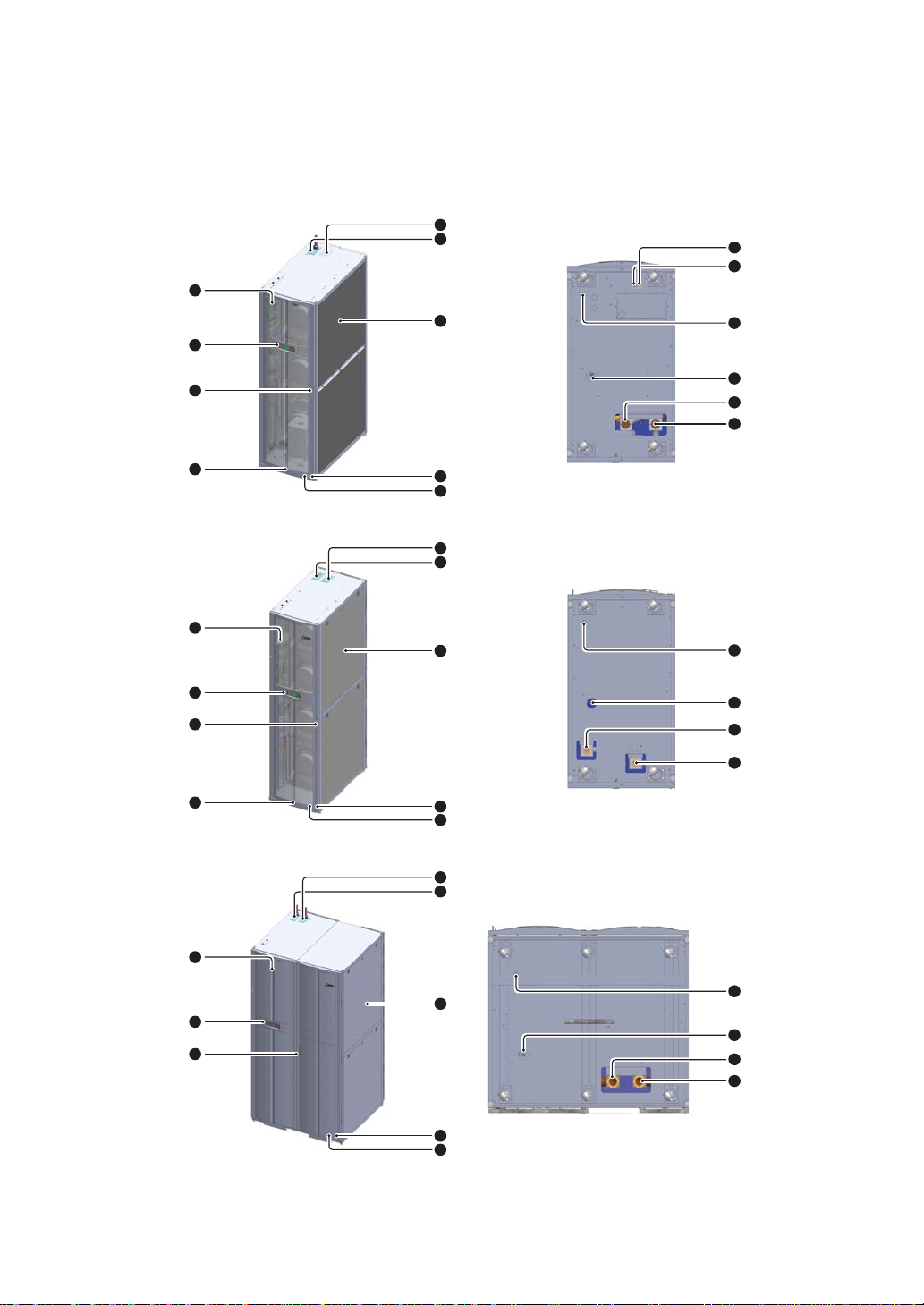
&RPSRQHQWV,GHQWL¿FDWLRQ
y External
1
2
3
4
5
6
7
8
9
13
12
9
8
11
10
1
2
3
4
5
6
7
8
9
13
12
10
11
1
2
3
5
6
7
8
9
13
12
10
11
(Figure 2-4: HCH1CD0 front view)
(Figure 2-6: HCH1CH0 front view)
(Figure 2-8: HCH1CS0 front view)
(Figure 2-5: HCH1CD0 bottom view)
(Figure 2-7: HCH1CH0 bottom view)
(Figure 2-9: HCH1CS0 bottom view)
(Front/cold aisle)
(Front/cold aisle)
(Front/cold aisle)
(Rear/hot aisle)
(Rear/hot aisle)
(Rear/hot aisle)
Ce manuel convient aux modèles suivants
2
Table des matières
Autres manuels Delta Refroidisseur


