
Data-Tronix DT-HDVD-IPSTR-CB Manuel utilisateur

User Manual
DT-HDVD-IPSTR-CB
IP Control Box
Version:V1.0.0

Important Safety Instructions
Warning: Toreduce the risk of fire, electric shock or product damage,
please follow the guidelines below:
5. Do not place sources ofopen
flames, such as lighted candles,
on the unit.
10. Refer all servicingto
qualified service
personnel.
3. Toprevent risk of electric
shock or fire hazard due to
overheating, do not obstruct
the unit’s ventilation openings
with newspapers, tablecloths,
curtains, and similaritems.
8. Protect the power cord
from being walked on or
pinched particularly at
plugs.
4. Do not install near anyheat
sources such as radiators, heat
registers, stoves, or other
apparatus (includingamplifiers)
that produce heat.
9. Only use attachments/
accessories specified by
themanufacturer.
2. Do not install or place thisunit
in a bookcase, built-in cabinet or
in another confinedspace.
Ensure the unit is wellventilated.
7. Unplug thisapparatus
during lightning storms or
when unused for long
periods of time.
1. Do not expose thisapparatus
to rain, moisture, dripping or
splashing and that no objects
filled with liquids, such asvases,
shall be placed on theapparatus.
6. Clean thisapparatus
only with dry cloth.

1
Table of Contents
Introduction....................................................................................................3
Overview...................................................................................................3
Features ...................................................................................................4
Package Contents ....................................................................................5
Specifications ...........................................................................................6
Panel ........................................................................................................8
Front Panel........................................................................................8
Rear Panel.........................................................................................9
Hardware Installation .................................................................................. 11
Accessing the Device..................................................................................13
Before Accessing the Device..................................................................13
Using LAN2 (C) Port........................................................................13
Using RS-232 Port...........................................................................15
Accessing the Device viaWeb................................................................17
Using the Administrator Account......................................................17
Using the Common User Account....................................................18
Accessing the Device via Telnet.................................................................... 19
Web Configuration Page.............................................................................20
Scenes Page..........................................................................................20
Setting Scenes ................................................................................21
Telnet API Command.......................................................................22
Logs.................................................................................................23
TX/RX Settings Page..............................................................................24
Configuring the IP Settings of TX/RX...............................................25
Encoder Setup.................................................................................26
Changing TX/RX's Alias...................................................................26
Restoring TX/RX to their Default Settings........................................27
Rebooting TX/RX.............................................................................27

2
System Settings Page ............................................................................28
IP Setup...........................................................................................28
IP Setup (TX and RX Communication)............................................28
IP Setup (Telnet Client and Browser Communication).....................30
Debug Logs.....................................................................................31
Web Matrix Switching......................................................................31
Importing Configuration File from PC Configurator........................31
Web Matrix Page ..............................................................................32
Operating Matrix Switching via Web........................................................34
Managing Administrator and Common User Account......................35
Changing the Administrator Password...............................................35
Creating a Common User Account ....................................................36
Device Maintenance........................................................................37
Restoring IP Control Box to its Default Settings..............................37
Rebooting IP Control Box ................................................................38
Shutting Down IP Control Box.........................................................38
Viewing API and System Version ....................................................38
FAQ........................................................................................................................... 40
Product Service ...........................................................................................42
Maintenance...........................................................................................42
Provided Service ....................................................................................42
Mail-In Service........................................................................................42
Warranty.................................................................................................43
Warranty Limits and Exclusions..............................................................43
3
Introduction
Overview
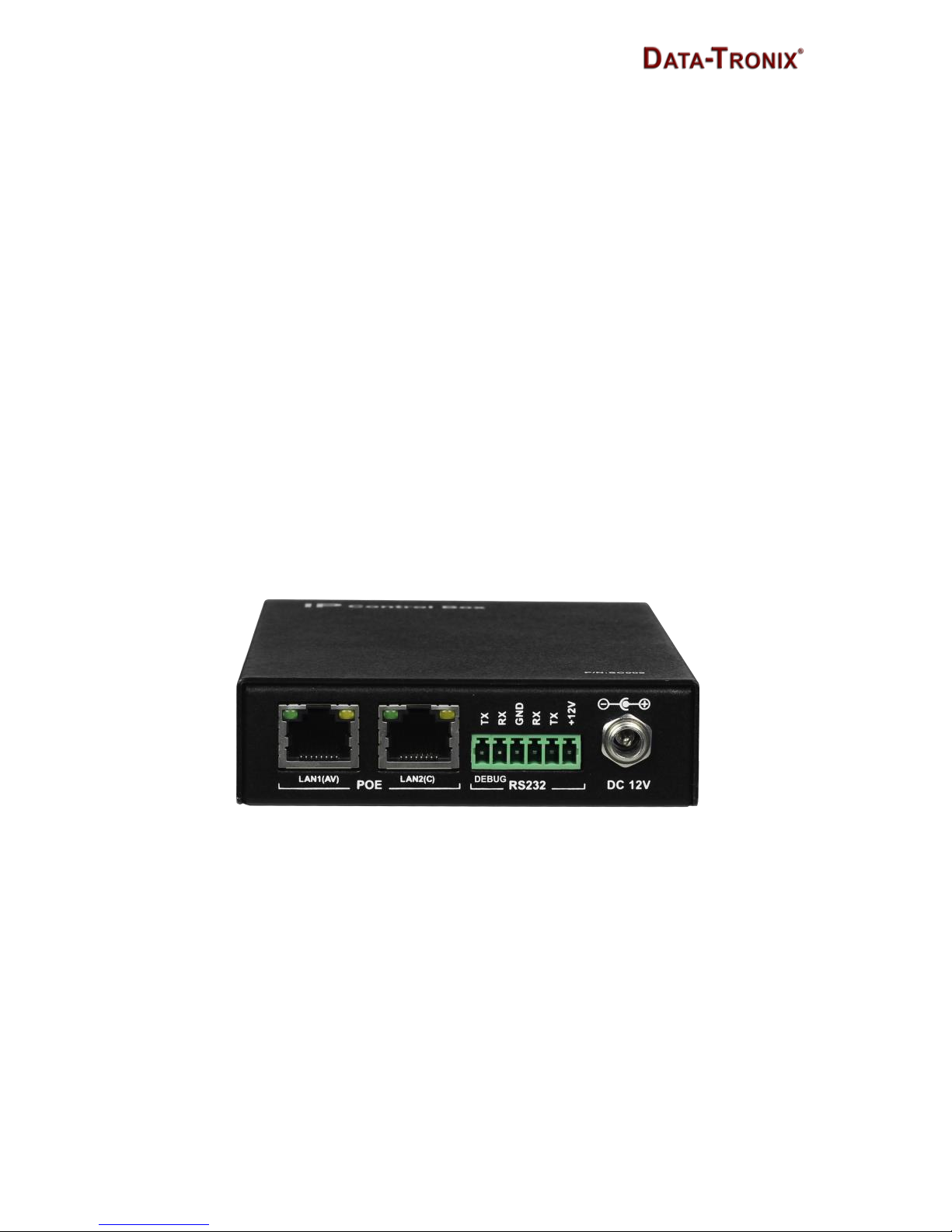
DT-HDVD-IPSTR-CB is an IPcontrol boxthat is used as anA/V control device
for managing, configuring and controlling H.264 encoders and decoders on
the local area network. It features two Ethernet ports and two RS232 ports,
offering integration-friendly control features——LAN (Telnet & Web GUI), a
third party controller (API) providing simple, flexible control and management
options. The DT-HDVD-IPSTR-CB can automatically search for and display
H.264 encoders and decoders. It is compatible with the configuration file from
a PC configurator and uses the imported configuration file to perform
operations on encoders and decoders such as matrix switching, video wall
and multi-view.

4
Features
IP control via LAN (Telnet & Web GUI) and a third party controller(API)
Features two Ethernet ports and two RS-232ports
Detects H.264 encoders and decodersautomatically
Supports matrix switching between H.264 encoders anddecoders
Compatible with the configuration file from a PC configurator to
quickly perform matrix operations on encoders anddecoders
Web based configuration
Extend the transmission distance to at least 100meters
Bonjour automatic discovery of networkdevices

5
Package Contents
1 x DT-HDVD-IPSTR-CB
1 x 12VDC 1A PowerSupply
1 x Detachable Plug
1 x Phoenix Connector (Male, 3.5 mm, 6 pins)
2 x Mounting Ears with screws
5 x Label Cards (49 mm x 15 mm)

6
Specifications
Technical
I/O Connections
1 x LAN1 (AV) (10/100 Mbps)
1 x LAN2 (C) (10/100 Mbps)
2 x RS-232
LED
LED indication for Power and Status
Button
1 x Reset Button
Power Supply
12VDC 1 A, 5.5 mm
Power Consumption
1.6 W (Max.)
Control Method
LAN (Web GUI & Telnet), RS-232 (PC and a
third party controller)
Supported Encoders
and Decoders
Encoder:
DT-HDVD-IPSTR-ENC
Decoder:
DT-HDVD-IPSTR-RX
Operating Temperature
32°F ~ 113°F (0°C ~+45°C)
10% ~ 90%, non-condensing
Storage Temperature
-4°F ~ 140°F (-20°C ~ +70°C)
10% ~ 90%, non-condensing
ESD Protection
Human Body Model:
±8kV (air-gap discharge)
±4kV (contact discharge)
Surge Protection
Voltage: ±1000V
(Tested ten times respectively for the positive
and negative voltages)

7
General
Product Dimension
(W x H x D)
5.46'' x 1.02'' x 3.67''
138.7 mm x 26 mm x 93.2 mm
Box Dimension
(W x H x D)
250 mm x 80 mm x 170 mm
10'' x 3.15'' x 6.7''
Net Weight
0.40 kg / 0.9 lbs (without accessories)
Certification
CE, FCC, RoHS compliant

8
Panel
Front Panel
1 2 3
4
No.
Name
Description
1
Label Card
Location
Use the supplied label card here to display device
information such as IPaddress.
2
STATUS
Lit blue when device is working properly.
Off when device is powered off or isbooting.
3
POWER
Lit red when device is powered on.
4
RESET
When DT-HDVD-IPSTR-CB is powered on, use a
pointed stylus to hold down the RESET button for
five or more seconds, and then release it. DT-
HDVD-IPSTR-CB will reboot and restore to its
default settings.
Note: When the default settings are restored, your
custom data is lost. Therefore, exercise caution when
using the RESET button.
Table des matières
Manuels Unité de contrôle populaires d'autres marques

Festo
Festo Compact Performance CP-FB6-E Manuel de la liste des pièces

Elo TouchSystems
Elo TouchSystems DMS-SA19P-EXTME Manuel utilisateur

JS Automation
JS Automation MPC3034A Manuel utilisateur

JAUDT
JAUDT SW GII 6406 Series Guide rapide

Spektrum
Spektrum Air Module System Manuel utilisateur

BOC Edwards
BOC Edwards Q Series Manuel utilisateur


