Cortelco CONF410-PAK Guide de configuration

“KEEPING YOU CONNECTED FOR OVER 100
YEARS”
Owner’s Instruction
Manual
CONF410-PAK

Thank you for purchasing the CONF410 Conference Telephone. Your new
Conference telephone is designed for small/medium conference rooms.
CONF410 Features:
Conference Call
On/Off Button with LED
Flash Button
Mute Button with LED
Redial Button
Volume Up/Down Buttons
Pulse/Tone Button
Pulse/Tone Switch
Ringer Hi/Lo/Off Switch
Optional External Microphone
Full Duplex
We want you to know all about your new Conference Telephone, how to install
it, the features it provides, and the services you can expect from its use.
PLEASE READ BEFORE INSTALLING AND
USING YOUR NEW CONFERENCE TELEPHONE
CONF410-PAK

Important Safety Instructions ......................................................................... 1
Installation ...................................................................................................... 3
Checklist of Parts .......................................................................................................... 3
To Ensure Best Performance ......................................................................................... 3
Setting Up ......................................................................................................................3
Positioning the Conference Phone ................................................................................ 4
Pulse/Tone Switch ......................................................................................................... 4
Ringer Hi/Lo/Off ........................................................................................................... 4
Standard Telephone ....................................................................................................... 5
External Microphone ..................................................................................................... 5
Telephone Part Identification ........................................................................................ 6
Telephone Features ......................................................................................... 7
To Place A Call .............................................................................................................. 7
To End A Call ................................................................................................................ 7
To Answer A Call ........................................................................................................... 7
To Adjust Volume .......................................................................................................... 7
To Mute A Conversation ............................................................................................... 7
To Use Flash .................................................................................................................. 8
To Use Redial ................................................................................................................ 8
To Use Pulse/Tone Button ............................................................................................. 8
Telephone Service Problems .......................................................................... 9
Maintenance Information ............................................................................. 10
Telephone Repair .......................................................................................... 11
FCC Information .......................................................................................... 12
Limited Warranty .......................................................................................... 14
TABLE OF CONTENTS


IMPORTANT SAFETY INSTRUCTIONS
Always follow basic safety precautions when using your telephone equipment to
reduce the risk of fire, electrical shock, and injury.
1. Read and understand all instructions in the Owner’s Instruction Manual.
Read all warnings and follow all instructions marked on the product.
2. Unplug this product from the wall outlet before cleaning. Use a damp cloth
for cleaning. Do not use liquid or aerosol cleaners.
3. Do not use the telephone near water. For example, do not use near a bathtub,
wash bowl, kitchen sink, laundry tub, swimming pool, or in a wet basement.
4. Do not place this product on an unstable cart or stand. The product may fall
causing serious damage to the product.
5. Use only the type power source indicated on the label. If you are not sure of
the type power supply to your home, consult your dealer or local power
company.
6. Do not place any objects on the telephone line cord. Do not locate the
telephone where the line cord will be walked on.
7. Do not block or cover ventilation slots and openings in the bottom of the
telephone. The openings should never be blocked by placing the telephone on
a bed, sofa, rug, or other similar surfaces. The telephone should never be placed
near or over a radiator or heat register. The telephone should never be placed in
a built-in installation unless proper ventilation is provided.
8. Never spill liquid on the telephone or push objects of any kind through
ventilation slots. Liquid or objects may touch dangerous voltage points or short
out parts that could result in a risk of fire or electrical shock.
1

9. Do not disassemble this product. Opening or removing covers may expose you
to dangerous voltages or other risks. Incorrect reassembly can cause electrical
shock when the product is subsequently used.
10. Do not overload outlets and extension cords. Some telephones require AC
power from an outlet. Overloading the outlets can result in the risk of fire or
electric shock.
11. Avoid using a telephone during a local thunderstorm. There may be a remote
risk of electrical shock from lightning.
12. Do not use a telephone to report a gas leak in the vicinity of the leak.
13. Unplug the telephone from the wall outlet and refer servicing to qualified
service personnel under the following conditions:
• When the line cord is frayed or plugs damaged.
• If liquid has been spilled into the telephone.
• If the telephone has been exposed to rain or water.
• If the telephone does not operate properly by following the operating
instructions. (Adjust only those controls covered by the operating
instructions. Improper adjustment of other controls may result in
damage and will often require extensive work by a qualified
technician to restore the product to normal operation.)
• If the telephone has been dropped or the housing damaged.
• If the telephone exhibits distinct change in performance.
SAVE THESE INSTRUCTIONS
2

Checklist of Parts
• Conference Unit
• AC Adapter
• Telephone Line Cord
To Ensure Best Performance
√ Locate the unit in a quite environment, with soft furnishings, such as
sound absorbing walls and ceilings.
√ Place the unit at the center of a table or desk.
√ Keep papers and other objects away from the unit.
√ Seat all participants no more than 3 meters from the unit or 2 meters
from the optional extension microphone.
√ Do not place on carpet or other similar surfaces.
√ Speak at normal conversation levels.
√ Make sure that the unit is at least 1 meter away from other electrical
products to avoid interference.
√ Direct your voice toward the microphone.
√ Do not move the unit during a call.
√ Avoid noisy environmental background during conversations.
Setting Up
1. Connect the telephone line cord into the telephone jack on the conference
telephone and into the telephone jack on the wall.
2. Plug the AC power adapter into the power jack of the conference telephone
and nearby electrical outlet. (A beep will be heard from the conference tele-
phone when the AC adapter is plugged in.)
3
Note: If any of the parts are missing,
please contact your dealer.
INSTALLATION
• User’s Guide
• Optional External Microphone and Microphone Line Cord

Positioning the Conference Telephone
For best performance, place the conference telephone in the center of the table.
Seat all participants no more than 3 meters from the unit or 2 meters from the
optional external microphone. Make sure that the unit is at least 1 meter away
from other electrical products to avoid interference.
Pulse/Tone Switch
If your telephone line accepts touch-tone dialing, set the PULSE/TONE switch
to the Tone position.
If your telephone line requires rotary (pulse) dialing, set the PULSE/TONE
switch to the Pulse position.
If you are unsure which system you have, set the switch to the TONE position.
Lift the handset. When you get a dial tone, dial a telephone number. If the
dial tone continues, move the switch to PULSE, and then dial the telephone
number again.
Ringer Hi/Lo/Off
Be sure the RINGER switch is set to the HI or LO position to receive calls.
Set the Ringer switch to the OFF position when you do not want to be inter-
rupted by the phone ringing. Remember to set the ringer switch back to HI or
LO when you want to receive calls again.
4
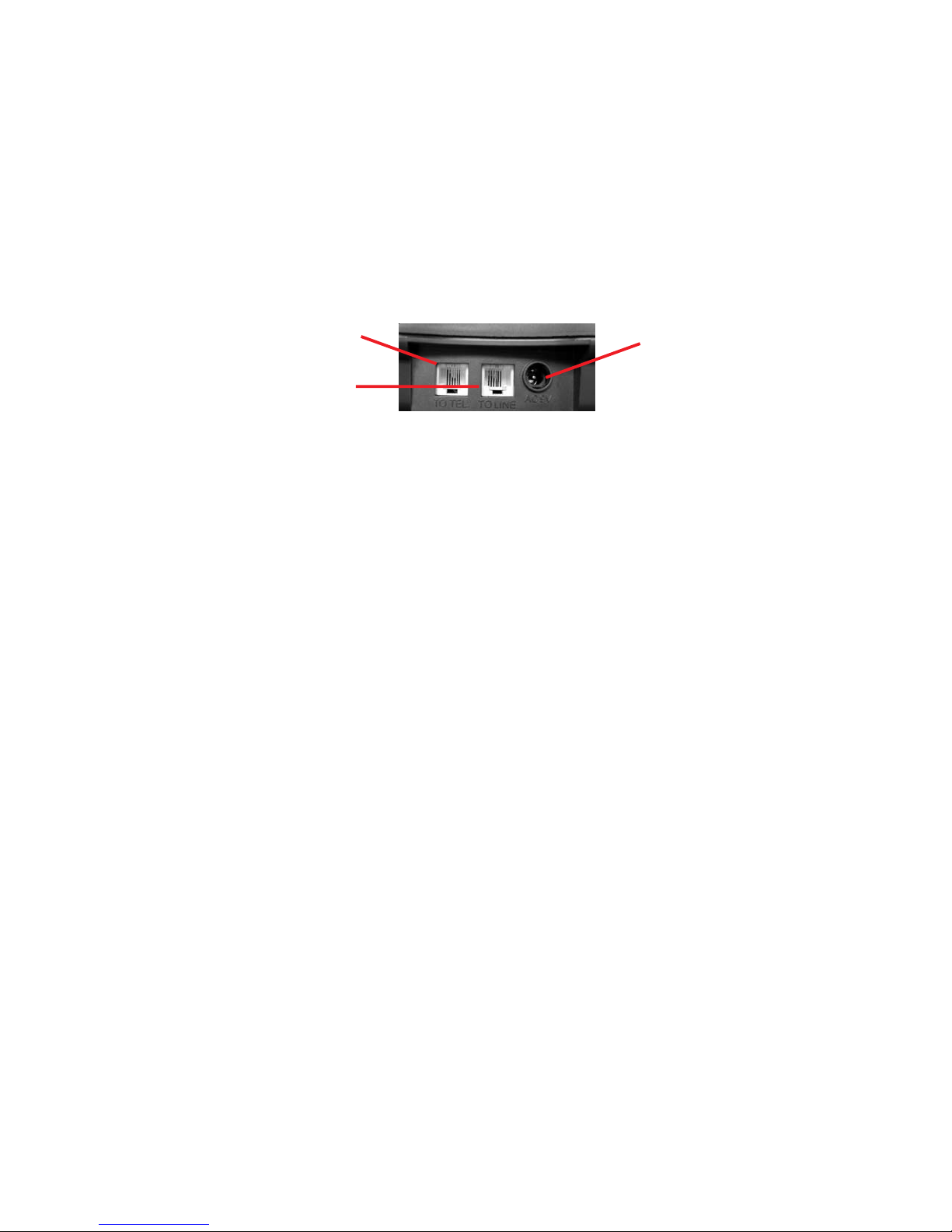
AC 9V
To Tel
To Line

2. External Microphone
An external microphone can be purchased separately to increase conversation
coverage. (A maximum of one external microphone can be connected.) The
external microphone is active when the Conference unit is ON.
• Plug the microphone line cord into the external microphone jack on the
Conference unit.
• Seat all participants no more than 2 meters from the optional external
microphone.
5
Setting Up Optional Equipment
1. Standard Telephone
• To hold private conversations, connect a standard analog telephone into
the “TO TEL” jack on the conference phone via a line cord.
• To transfer a call from the Conference unit to an external telephone - Pick
up the handset while the Conference unit is ON. Turn off the Con-
ference unit by pressing the ON/OFF button, and the call will be trans-
ferred to the handset.
• To transfer a call from a telephone to the Conference unit - While the
private call is in progress, turn on the Conference unit. The call will then
be trans- ferred, and the LED on the conference unit will light. Hang up
the handset.
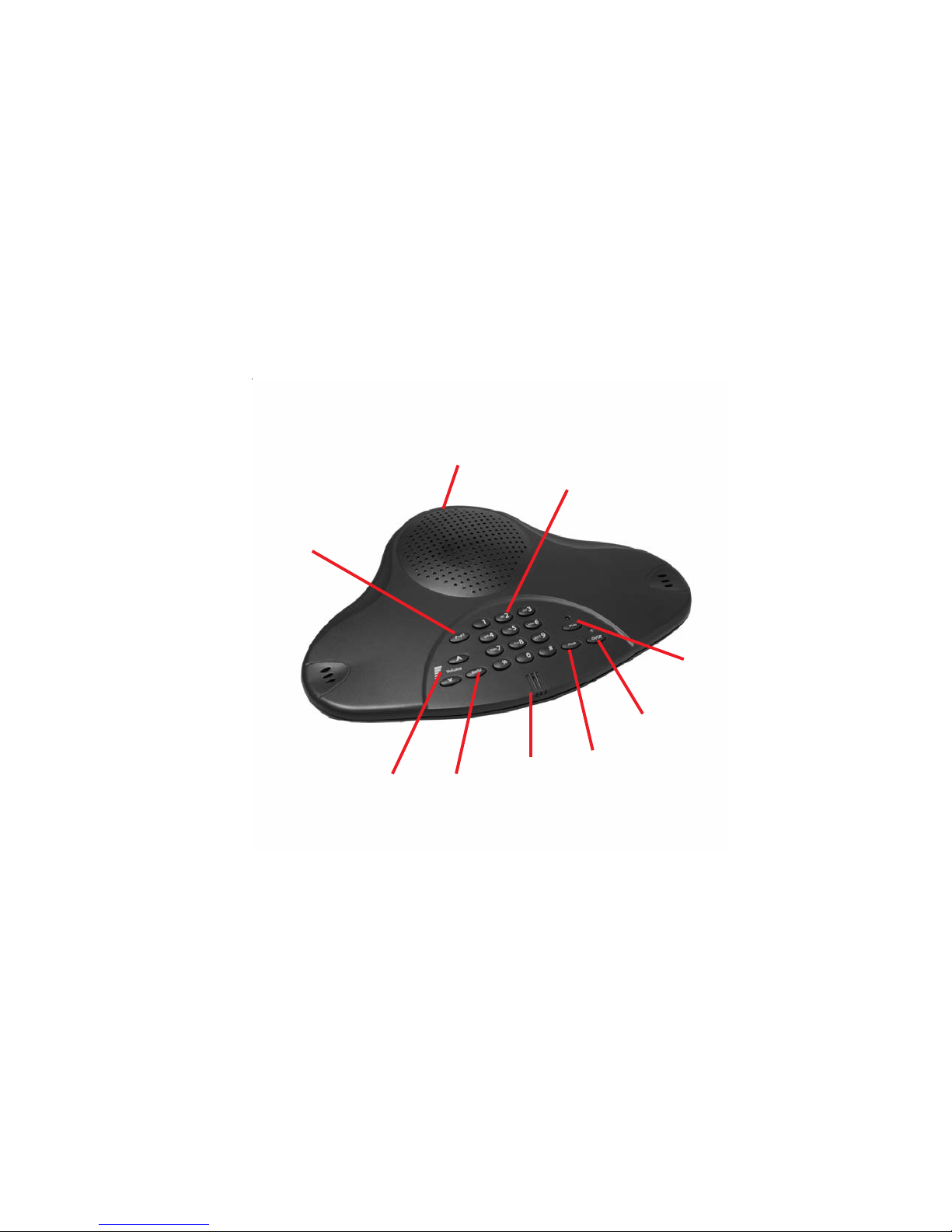
Pulse/Tone Switch
Ringer Hi/Lo/Off
External
Microphone

Speaker
Keypad
P-T Button
Volume
Buttons
Redial
Mute
On/Off
Button
Flash
Microphone
TELEPHONE PART IDENTIFICATION
6

TELEPHONE FEATURES
To Place A Call
Press the On/Off button and you will hear a dial tone. The On/Off LED will
light. Dial the telephone number using the keypad.
To End A Call
Press the On/Off button. The On/Off LED will no longer be lighted.
To Answer A Call
When the Conference Telephone rings, press the On/Off button to answer the
call, and the LED indicator will light up to signal the unit is ON.
To Adjust Volume
To adjust volume level, use the up and down arrow keys until the desired level
is reached.
• Speaker Volume should be adjusted while the call is in progress.
When you reach the maximum or minimum volume positions the unit will
beep three times.
To Mute A Conversation
To turn off the microphone(s) during a conversation, press the MUTE button
and the LED indicator will flash to signal that the user cannot be heard at the
other end of the line. To turn on the microphones, press the MUTE button
again.
7
Table des matières
Autres manuels Cortelco Téléphone de conférence