
CHINON 35FA super Manuel utilisateur

Chinon
35FA Super / 35FA II
Auto Focus camera
Instruction and Illustrated manua
This camera manual library is for reference and historical purposes, all rights reserved.
This page may not be sold or distributed without the expressed permission of the producer
I have no connection with Chinon Co., Japan
On-line camera manual library
If you find this manual useful, how about a donation of $3 to: M. Butkus, 29 Lake Ave.,
High Bridge, NJ 08829-1701 and send me your e-mail address so I can thank you. Most
other places would charge you $7.50 for a electronic copy or $18.00 for a hard to read Xerox
copy.
This will allow me to continue to buy new manuals and pay their shipping costs. It'll make
you feel better, won't it?
If you use Pay Pal, use the link below. Use the above address for a check, M.O. or cash.
Back to my main camera manual page
INTRODUCTION
Welcome to the world of Chinon photography!
Your CHINON 35FA Super & 35FA 11 are one of the most advanced compact 35mm cameras
available today. Employing the latest state-of-the art electronics, the CHINON 35FA Super &
35FA 11 incorporate many outstanding features such as: infrared automatic focusing, automatic
loading, automatic film advance, automatic rewind and built-in flash. Other convenient features
include: automatic rewind stop upon completion of rewinding, continuous exposure, 10 sec. self
timer, and ASA 1000 film setting. In order to take full advantage of the many features of your
CHINON 35FA Super & 35FA 11, please read this instruction manual carefully to totally
familiarize yourself with the camera before actually starting to take pictures. We wish you years
of satisfying and carefree photography.www.4.butkus.org
www.orphancameras.com

NOMENCLATURE
1. Hand strap
2. Shutter release button
3. Self-Timer indicator
4. Self-Timer start switch
5. Viewfinder
6. Lens cover
7. Flash
8. Auto-Focus window
9. Lens
www.orphancameras.com

10. Exposure metering window
11. ISO/ASA setting lever (35FA Super),
ISO/ASA setting ring (35FA II)
12. ISO/ASA scale
13. Back cover
14. Cartridge window
15. Film pressure plate
16. Flash switch
17. Flash ready indicator
18. Frame counter
19. Viewfinder eyepiece
20. Film advance indicator
21. Under exposure warning/Battery check LED
22 Film chamber
www.orphancameras.com

23 Back cover release button
24. Battery compartment cover
25. Rewind spindle
26. Tripod socket
27. Manual rewind switch
28. Film guide
29. Sprocket
30. Take-up spool
SPECIFICATIONS
TYPE: 35 mm EE compact Infrared Auto-Focus camera with auto film load, auto wind, auto
rewind and built-in flash system.
PICTURE FORMAT: 24 x 36 mm.
www.orphancameras.com

LENS: 35FA Super: 35mm F2.8, 4 elements in 3 groups. 35FA 11: 35mm F3.5, 3 elements in 3
groups.
VIEWFINDER: Bright frame with AF frame, parallax marks, focus indicator (35FA Super
only), under exposure warning/battery check indicator, and film advance indicator.
SHUTTER: Programmed electronic shutter (35FA Super/ EV 8-17: ASA100, 35FA 1i; EV 8.6 -
17: ASA100)
with automatic lock system at low voltage.www.4.butkus.org
EXPOSURE METER: SPD Automatic exposure system
ISO/ASA RANGE: 35FA Super: 50 to 400 in 1/3 EV increment plus 1000. 35FA 11:100, 200,
400 and 1000.
FOCUSING: Infrared automatic focusing system with possible prefocus and AF resuming;
cancelable.
FOCUSING RANGE: 35FA Super: 1 M (3.3 ft) to infinity 35FA 11: 1.2 M (3.9 ft) to infinity.
MINIMUM AF DISTANCE WARNING: Built-in with flashing minimum AF distance mark
(35FA Super only).
FILM LOADING: 35FA Super: automatically loads film and advance to the start position when
the shutter release button is depressed after the camera back is closed. 35FA 11: Auto loading
system by built-in motor.
FILM WIND: Automatic power winder for single frame advance and continuous exposure.
FILM REWIND: Automatic power rewinding when at end of roll of film.
INSTALLING THE BATTERIES
1. Slide the battery compartment cover in the direction of the arrow mark with your finger
to open the battery compartment cover (Fig. 1).
2. Place two 1.5V "AA" size alkaline batteries (LR-6) into the battery compartment
correctly so as to correspond with the positive (+) and negative (-) marks shown inside
(Fig. 2).
www.orphancameras.com

NOTE: If you do not use your camera for a long period of time, remove the batteries, and store in
a dry location. This will prevent the possibility of battery leakage and damage to your camera. Do
not use Ni-Cad batteries. Be sure to replace both batteries at the same time when the batteries are
too weak to operate the camera.
HOW TO OPEN THE LENS COVER
1. Hold the flash unit and slide it all the way to open the lens cover (Fig. 3).
2. Slide it back in the opposite direction to close the lens cover (Fig. 4).
NOTE: All electrical circuitry is off when the lens cover is in the closed position. Even in the
closed position, the power will not be off unless the winding or rewinding function is completed.
The shutter will not be released unless the lens cover is fully opened.
BATTERY TESTING
1. Cover the exposure metering window with your hand and press the shutter release
button halfway. (Fig. 5).
2. Make sure the under-exposure warning LED (red) blinks (Fig. 6). If the red LED fails to
illuminate, the batteries are too weak and need to be replaced.
NOTE: As temperature decreases, especially below SAC, battery performance declines. Keep
batteries warmed under these conditions.
www.orphancameras.com

ISO/ASA SETTING
Make sure the correct ISO/ASA film speed is set on the camera to correspond with the ISO/ASA
film speed indicated on the film box. Turn the ISO/ASA setting lever (setting ring) to select the
desired ISO/ASA speed (Fig. 7, 8 and 9).
AUTOMATIC FILM LOADING
Always load and unload your camera in subdued light, and never in direct sunlight.
1. Depress the knob located on the back cover downward to open the back cover (Fig. 10).
www.orphancameras.com

2. Place the film cartridge into the chamber with the protruding end toward the top of the
camera and push it in gently so that it sits firmly in the chamber (Fig. 11 ).
3. Place the trimmed end of the film on the take-up spool along with the arrow mark.
When loading film, make sure that film lies flat between the film guides. And engage the
perforation of the film with the teeth of the sprocket (Fig. 12). Then close the back cover.
4. 35FA Super and 35FA 11 have a convenient cartridge window to confirm what type of
film you are using (Fig. 13).
www.orphancameras.com
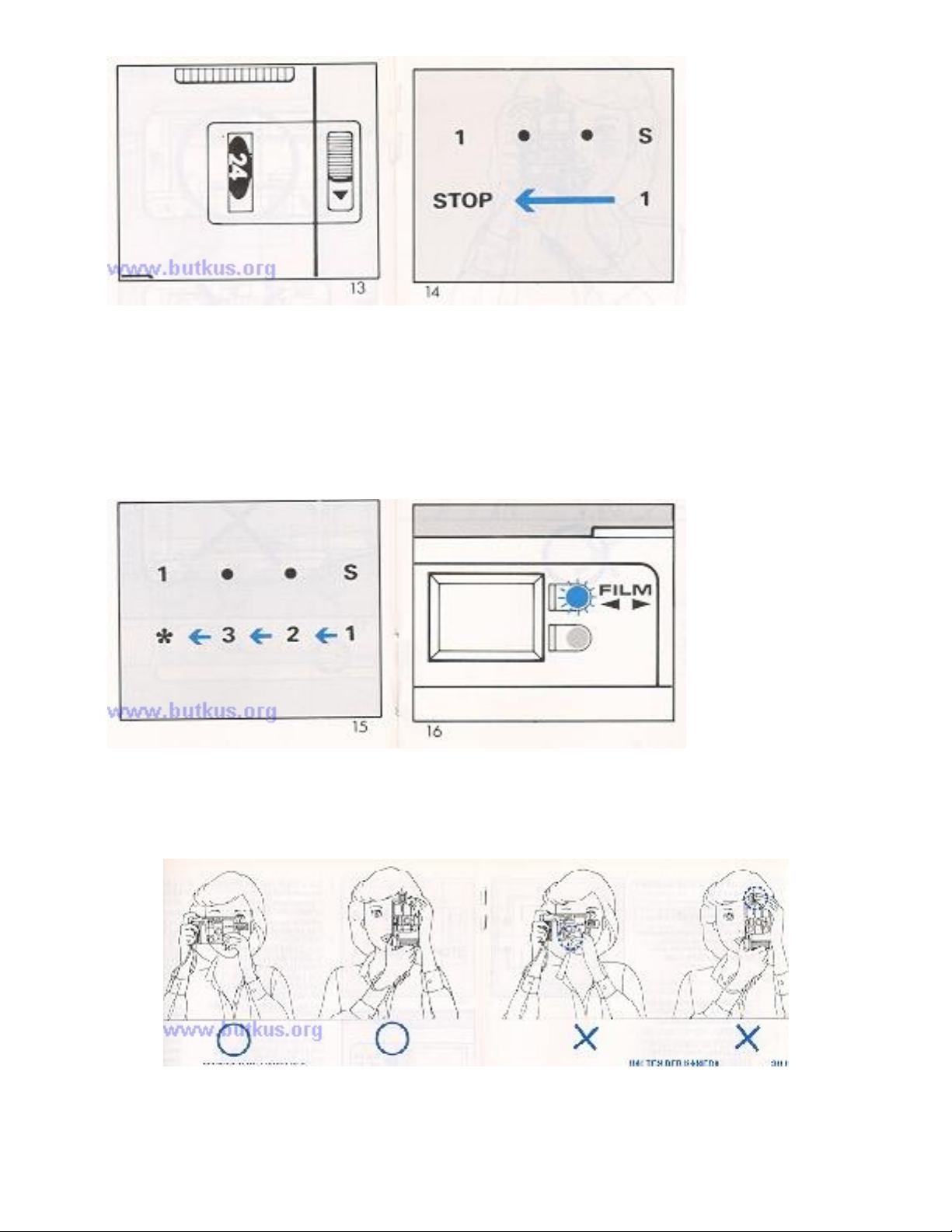
5. 35FA Super: Open the lens cover, then depress and release the shutter button. The film
will automatically advance to figure "1 " position (Fig. 14). Now the film is correctly
loaded, ready for the first picture. 35FA II: Open the lens cover, then depress and release
the shutter button two or three times until the figure "1" appears in the frame counter for
the first picture (Fig. 15).www.4.butkus.org
NOTE: The Film Advance Indicator blinks when the film is advancing properly (Fig. 16). If it
does not blink, reload the film.
Proper ways and improper ways to hold you camera.
www.orphancameras.com

AUTO-FOCUS SHOOTING
1. Bright Line Frame
2. Film Advance Indicator
3. Parallax Marks
4. Auto-Focus Frame
5. Under Exposure Warning/ Battery Check LED
6. Symbol Marks (35FA Super only)
1. Look through the viewfinder and compose the picture so that the main subject is placed
in the
auto focus frame (4) (Fig. 17).
2. Gently press the shutter release button halfway. With the 35FA Super, the approximate
distance from the camera to the subject is indicated on the symbol mark scale (6) in the
viewfinder.
www.orphancameras.com
Autres manuels pour 35FA super
2
Ce manuel convient aux modèles suivants
1
Table des matières
Autres manuels CHINON Appareil photo numérique


