Celestron Elements TrekGuide lite 48007 Manuel utilisateur

INSTRUCTION MANUAL
MODEL #48007
Temperature measuring range: -20° to +60° C and -4° to +140° F
Power supply: Battery: CR2032 lithium x 2 pcs
Dimensions: L x H x W: 54 x 103 x 15 mm or 2.1” x 4.1” x 0.6”
Weight: 70 g or 2.5 oz
ENGLISH I1
Digital Compass
Thermometer
FEATURES
• DigitalCompassfunctionprovidesdegrees,northpointing
arrow and cardinal point readings. Compass Range: - 0°
to359°,1-16pointers(graphical)
• Declinationangleadjustableforregionswithmagnetic
variation
• Time,DualTime,DateandDayoftheweek
• Alarmwithsnooze
• Temperaturewithbuilt-inthermometerreading
with unit °C or °F
• Backlight
• Waterresistant
• Batteries:2CR2032Lithium
(included)
• Lanyardincludedforeasycarrying
SPECIFICATIONS

2 IENGLISH
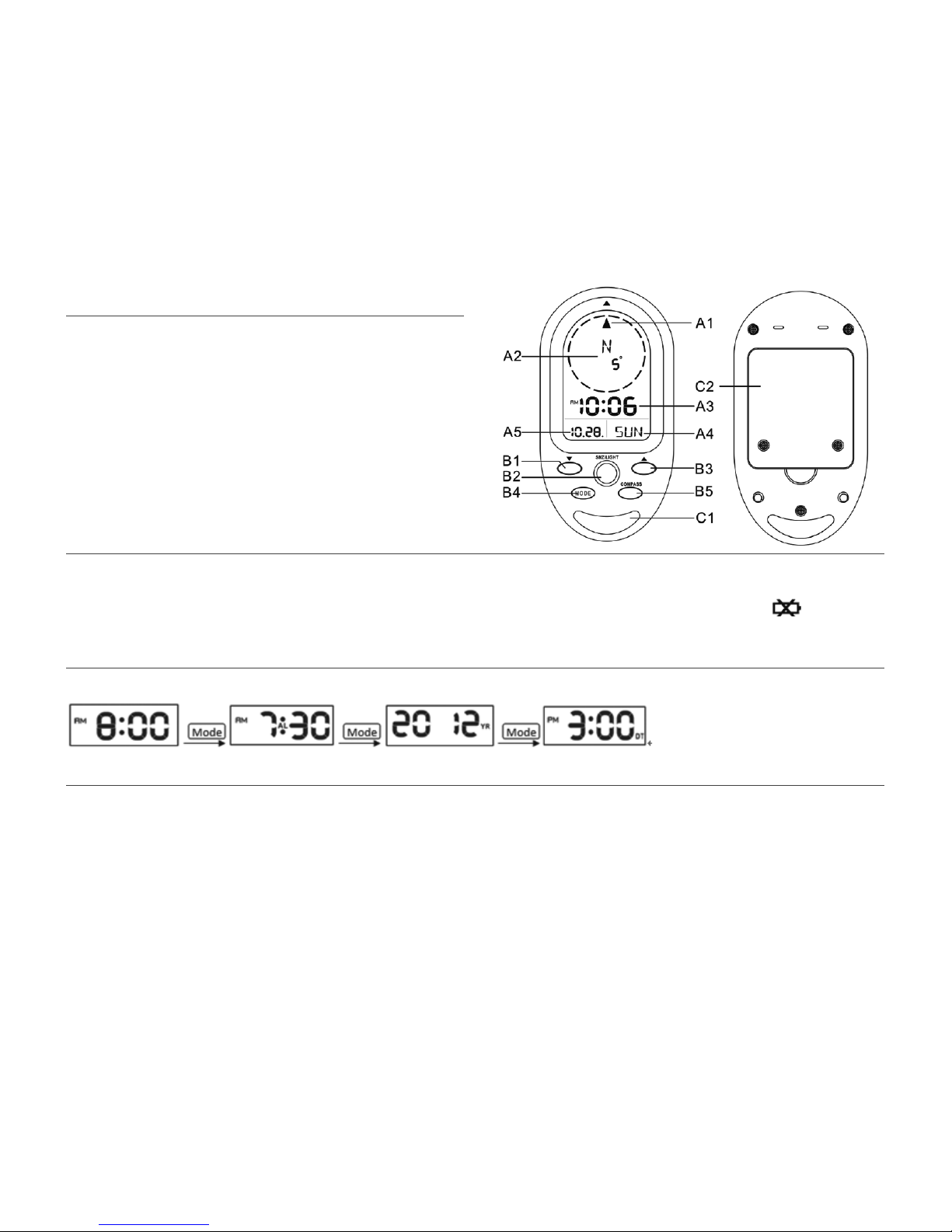
Parts A- LCD
A1: Direction Arrow
A2: Direction OR Temperature
A3: Time
A4:DayofWeek
A5: Date
Parts B- Buttons
B1: “▼”button
B2:“SNOOZE/LIGHT”button
B3: “▲”button
B4:“MODE”button
B5:“COMPASS”button
Parts C- Structure
C1:HoleforNeckStrap
C2: Battery Compartment
MAIN APPEARANCE
SET UP
SET THE TIME AND DATE
Power
• Useasmallscrewdrivertoremovethe2screwsonthebattery
cover.InsertCR2032lithiumbatteries(2qnty)withthe
positivesideofthebatteryupward.Replacethebatterydoor
and tighten the screws.
• Whenthebatteryislow( )willappearonscreenandthe
batteriesshouldbereplaced.
• PressMODEbuttontoswitchbetweenClock,AlarmClock,YearandDualTime.
TIME MODE
Time Setting
• Pressandhold“MODE”buttonfor3secondstoentersettings.
Press “▼”or “▲”tochangesetting,andpress“MODE”button
toconrmandmovetonextsetting.
• Settingsequenceisasfollows:Hour,Minute,Second,Year,
Month,Day,Day-of-weeklanguage(German,English,Russian,
Danish,Dutch,Italian,SpanishorFrench)
• Ifnobuttonispressedfor15seconds,thedisplaywillreturn
topreviousmode.
• Press“MODE”buttontoexittheTimeSettingMode.
NOTE: When out of settings mode, press the “▲” button to select 12 or 24 hour mode

ENGLISH I3
Alarm Setting
• Press“MODE”buttontonavigatetoAlarmTimeDisplay(“AL”
icondisplaysontheLCD).Hold“MODE”buttonfor3seconds
toenteralarmclocksettingmode.Press“▼” or “▲” to change
setting,andpress“MODE”buttontoconrmandmovetonext
setting.
• Thesettingsequenceis:Hour,MinuteandAlarmON
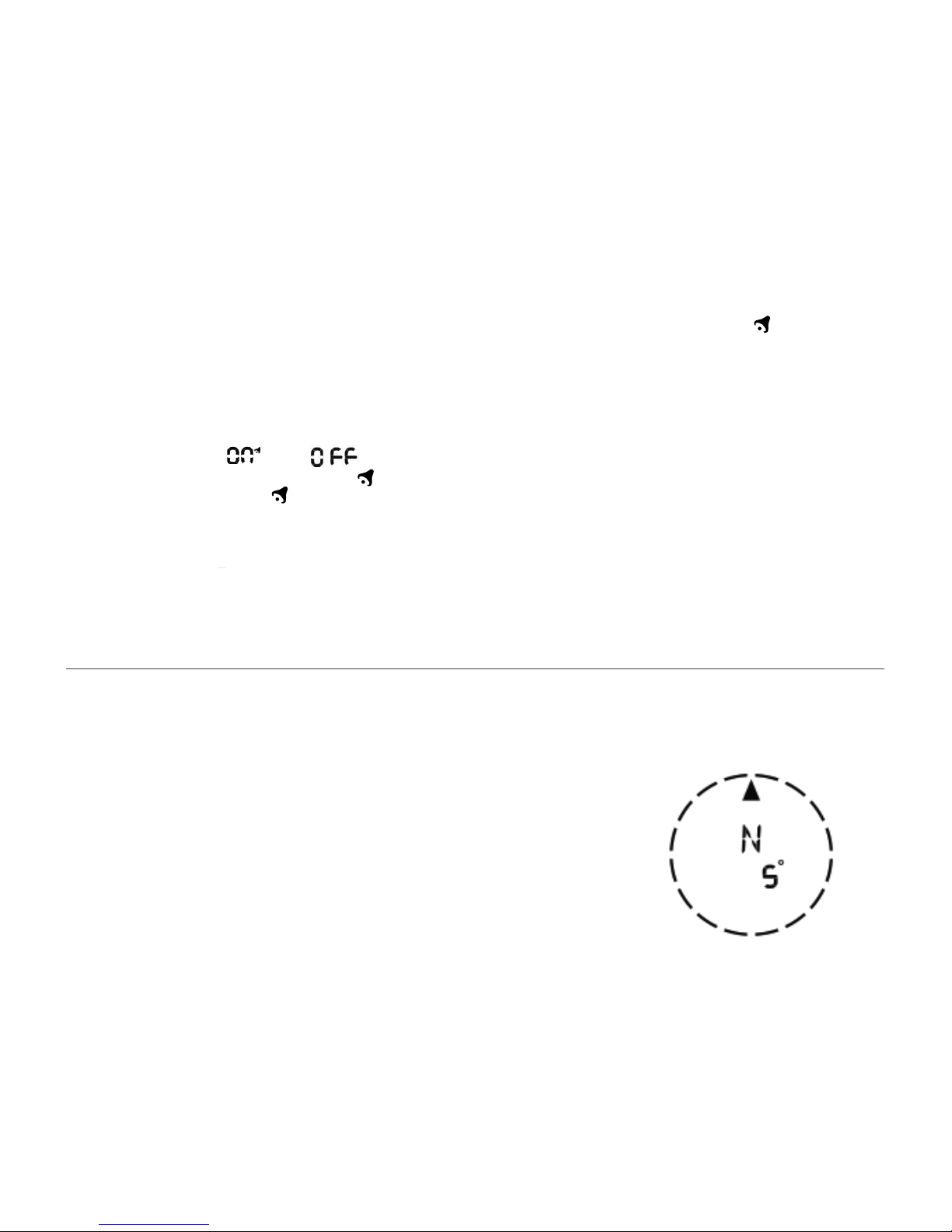
()/OFF( ).
• Whenthealarmison,thesymbol“ ” appears and when it is
offthesymbol“ ” disappears.
• Whenalarmgoesoff“ ”willash.Pressanybutton(except
SNOOZE/LIGHTbutton)tostopthealarm.Ifnobuttonis
pressedthealarmwillautomaticallystopafter2minutes.
• Whenalarmisgoingoff,press“SNOOZE/LIGHT”buttonto
activatethesnoozealarm,(Zzziconwillashonscreen).The
alarmwillsnoozefor5minutes.Thesnoozefunctioncanbe
used only 7 times.
Dual Time Setting
• Press“MODE”buttonuntil“DT”isshownonthescreen. • Hold“MODE”buttonfor3secondstoenterDualTimesetting.
The “Hour” digits flash. Press “▲”or “▼“buttontoadjustthe
“hour”,press“MODE”buttontoconrmandquitthesetting.
COMPASS
ThecompassshowsthebearingindegreesdueNorthtogether
with 16 cardinal points.
• PresstheCompassbuttonandtheunitwillenterthe
Compassmode.Makesuretoholdtheunithorizontally,
parallel to the ground. Point the arrow that is printed on the
Compasshousinginthedirectionyouwishtotravel.This
directionwillbedisplayedalongwiththeanglein°(degrees).
The LCD arrow {▲} will always point North.
• Ifnokeyispressedfor30seconds,theunitwillautomatically
shutoffthecompassandreturntothetemperaturemode.
Note: The compass must be kept in a level position when in use. Taking a measurement
while the unit is not horizontal (in relation to the horizon) can result in a large
measurement error.
Always take bearings in the open air, because it is easily affected by disturbing sources
of magnetism.
For detailed calibration steps, see complete manual online at www.celestron.com

4 IENGLISH
TEMPERATURE
BACKLIGHT
• Whencompassmodeisoff,theLCDwilldisplaythe
temperatureinunitsof°Cor°F.Thetemperaturerange
willbefrom-20°Cto60°C.
• Press“▼”buttontochangethereadingfrom°Cto°F.
• WhenTemperatureislowerthan-20°C,thedisplaywillshow
LL.L°C.Whentemperatureishigherthan60°C,LCDdisplay
will show HH.H°C.
• PresstheSNOOZE/LIGHTbuttontoturnthe
backlightonfor5seconds.
Your instrument has a two year limited warranty. Please see the Celestron website for detailed information on all Celestron
products at www.celestron.com.
www.celestron.com
Torrance,CA90503U.S.A.•Telephone:800.421.9649
©2013Celestron•Allrightsreserved.•PrintedinChina•11-13
FCC Note: This equipment has been tested and found to comply with the limits for a Class B digital device, pursuant to part 15 of the FCC Rules. These limits are designed to provide reasonable protection against
harmful interference in a residential installation. This equipment generates, uses, and can radiate radio frequency energy and, if not installed and used in accordance with the instructions, may cause harmful
interference to radio communications. However, there is no guarantee that interference will not occur in a particular installation. If this equipment does cause harmful interference to radio or television reception,
which can be determined by turning the equipment off and on, the user is encouraged to try to correct the interference by one or more of the following measures:
• Reorientorrelocatethereceivingantenna.
• Increasetheseparationbetweentheequipmentandreceiver.
• Connecttheequipmentintoanoutletonacircuitdifferentfromthattowhichthereceiverisconnected.
• Consultthedealeroranexperiencedradio/TVtechnicianforhelp.
Product design and specifications are subject to change without prior notification.
This product is designed and intended for use by those 14 years of age and older.

MANUEL D’UTILISATION
MODÈLE #48007
La plage de mesure de température : -20° à +60° C et -4° à +140° F
Source d’alimentation : Piles: CR2032 lithium x 2 pcs
Dimensions : L x H x l: 54 x 103 x 15 mm ou 2.1” x 4.1” x 0.6”
Poids : 70 g ou 2.5 oz
CARACTERISTIQUES
• LafonctionduNavigateurNumériquefournitledegré,la
flèche de direction du Nord et la lecture des points cardinaux.
Plagedunavigateur:-0°à359°,1-16repères(graphique)
• L’anglededéclinaisonestréglablepourlesrégionsayantune
variationmagnétique
• Heure,doubleheure,dateetjourdelasemaine
• Alarmedisposantdelafonctionarrêtmomentané
• Lalecturedesunitésdetempératureduthermomètreintégré
sont en °C ou °F
• Rétroéclairage
• Résistanceàl’eau
• Piles:2pilesCR2032enLithium(incluses)
• Unelanièreestfourniepouruntransportfacile
SPÉCIFICATIONS
FRANÇAIS I5
Boussole numérique
Thermomètre

6 IFRANÇAIS
Parties 1- ACL
A1: Flèche de direction
A2: Direction OU Température
A3: Heure
A4: Jour de la semaine
A5: Date
Parties B- Boutons
B1:bouton«▼»
B2:bouton«SNOOZE/
LIGHT »
B3:bouton«▲»
B4:bouton«MODE»
B5:bouton«COMPASS»
Parties C- Structure
C1: Trou de sangle pour cou
C2: Compartiment à piles
APPARENCE PRINCIPALE
MONTAGE
REGLER L’HEURE ET LA DATE
Source d’alimentation
• Utiliserunpetittournevispourretirerles2visducouvercledu
compartimentàpiles.InsérerlespilesCR2032enlithium(2
quantités)aveclecôtépositifdela
pileorientéeverslehaut.Remettrelecouvercleenplaceet
serrerlesvis.
• Lorsquelespilessontfaibles,l’icône( )s’afcheàl’écran,
dans ce cas remplacez-les.
• AppuyezsurleboutonMODEpouralternerentrel’horloge,réveil,annéeetheuredouble.
MODE HEURE
Réglage d’heure
• Appuyerettenirlabouton«MODE»pendant3secondes
pourentrerleréglage.Appuyezsur«▼»ou«▲» pour
modierleréglage,etappuyersurlebouton«MODE»pour
conrmeretpasserauréglagesuivant.
• Laséquencederéglageseprésentecommesuit:heure,
minute,seconde,année,mois,jour,jourdelasemainedela
langue(allemand,anglais,russe,danois,néerlandais,italien,
espagnoloufrançais)
• Sivousn’appuyezsuraucunboutonpendant15secondes,
l’afchageretourneaumodeprécédent.
• Appuyerlebouton«MODE»pourquitterleModederéglage
d’heure.
REMARQUE: Lorsque vous sortir du mode réglages, appuyez sur le “▲” pour
sélectionner le format 12 ou 24 heures

FRANÇAIS I7
Réglage de l’alarme
• Appuyersurlebouton«MODE»pournaviguersurl’Afchage
d’heured’alarme(l’icône«AL»s’afchesurl’écranACL).
Tenirlebouton«MODE»pendant3secondespouraccéder
aumodederéglagederéveil.Appuyezsur«▼»ou«▲» pour
modierleréglage,etappuyersurlebouton«MODE»pour
conrmeretpasserauréglagesuivant.
• Laséquencederéglageseprésentecommesuit:Heure,
MinuteetAlarmeON( )/OFF( ).
• Lorsquel’alarmeestenmarche,lesymbole« »s’afcheet
lorsqu’ilestéteintlesymbole« » disparaît.
• Lorsquel’alarmeestactivéelesymbole« » clignote.
Appuyerunbouton(saufleboutonSNOOZE/LIGHT)pour
arrêterl’alarme.Sivousn’appuyezaucunboutonl’alarme
s’arrêteautomatiquementaprès2minutes.
• Lorsquel’alarmes’arrête,appuyerlebouton«SNOOZE/
LIGHT»pouractiverl’alarmed’arrêtmomentané,(l’icône
Zzzclignoteraàl’écran).L’alarmes’arrêtemomentanément
pendant5minutes.Lafonctiond’arrêtmomentanénepeut
êtreutiliséeque7fois.
Réglage d’Heure Double
• Appuyersurlebouton«MODE»jusqu’àceque«DT
»s’afcheàl’écran.
• Tenirlebouton«MODE»pendant3secondespour
accéderauréglaged’Heuredouble.Leschiffres
«Heure»clignotent.Appuyersurlebouton«▲» ou
«▼»pourréglerl’«heure»,appuyerlebouton
«MODE»pourconrmeretquitterleréglage.
NAVIGATEUR
Lenavigateurindiquelerelèvementendegrés,lebonNorden
plus des 16 points cardinaux.
• AppuyersurleBoutonCompassetl’unitéentreraenmode
Compass.Assurez-vousquevousaveztenul’appareilde
façonhorizontale,parallèlementausol.Dirigezlaèchequi
estimpriméesurleboîtierduNavigateurendirectiondevotre
voyage.Cettedirectionseraafchéedeconcertavecl’angle
en°(degrés).LaècheACL{▲}indiqueratoujoursleNord.
• Sivousn’appuyezaucunetouchependant30secondes,l’unité
éteintlenavigateurautomatiquementetretourneenmode
température.
Remarque: Le navigateur doit être conservé en position plane lorsqu’il est en usage. Si
vous prenez des mesures alors que l’unité n’est pas en position horizontale (par rapport
à l’horizon) cela peut entraîner de graves erreurs de mesures.
Prenez toujours les relèvements en plein air, car ils peuvent facilement être affectés par
des sources de perturbation du magnétisme.
Pour connaître la procédure d’étalonnage détaillées, consultez le manuel
en ligne complet sur www.celestron.com

• AppuyersurleboutonSNOOZE/LIGHTpouractiverlerétroéclairagependant5secondes.
8 IFRANÇAIS
TEMPERATURE
RETROECLAIRAGE
• Lorsquelemodenavigateurestenarrêt,l’écranACLafchela
température en unité de °C ou °F. La plage de température est
de -20°C à 60°C.
• Appuyersurlebouton«▼» pour changer la lecture de °C à °F.
• Lorsquelatempératureestinférieureà-20°C,l’afchage
indiqueLL.L°C.Lorsquelatempératureestsupérieureà60°C,
l’afchageACLindiqueHH.H°C.
Votre instrument est couvert par une garantie limitée de deux ans. Veuillez consulter le site Internet Celestron pour en savoir
plus sur tous les produits Celestron au www.celectron.com.
www.celestron.com
Torrance,CA90503É.-U..•Tel:800.421.9649
©2013Celestron•Tousdroitsréservés.•ImpriméenChine•11-13
RemarqueFCC:CetéquipementaététestéettrouvéconformeauxlimitespourundispositifnumériquedeclasseB,conformémentàlaPartie15desrèglementsdelaFCC.Ceslimitesvisentàprotéger
convenablement les particuliers contre les interférences nuisibles dans une installation résidentielle. Cet équipement génère et peut émettre des fréquences radio et, s’il n’est pas installé et utilisé conformément
auxinstructionsdumanuel,peutcauserdesinterférencesnuisiblesauxcommunicationsradio.Toutefois,iln’existeaucunegarantiecontredesinterférencesseproduisantdanslecadred’uneinstallation
particulière. Si l’équipement engendre des interférences nuisant à la réception radio ou télévisuelle (ce qui peut être déterminé en le mettant hors tension, puis en le remettant sous tension), vous êtes encouragé à
tenter d’y remédier en ayant recours à l’une des mesures suivantes:
• Réorienteroudéplacerl’antenneréceptrice.
• Augmenterlaséparationentrel’équipementetlerécepteur.
• Branchezl’appareilàlaprisesecteurd’uncircuitdifférentdeceluisurlequellerécepteurestbranché.
• Demandezl’assistancedevotrerevendeuroucelled’untechnicienradio/TV.
La conception des produits et les spécifications sont sujettes à modification sans notification préalable.
Ce produit est conçu et destiné pour les personnes de 14 ans et plus.

MANUAL DE INSTRUCCIONES
MODELO #48007
Alcance de medición de temperatura : -20° a +60° C y -4° a +140° F
Alimentación : Batería: CR2032 litio x 2 ud
Dimensiones : L x A x P: 54 x 103 x 15 mm o 2.1” x 4.1” x 0.6”
Peso : 70 g o 2.5 oz
CARACTERÍSTICAS
• Lafuncióndebrújuladigitalproporcionagrados,indicación
del norte y lecturas de puntos cardinales. Alcance de la
brújula:-0ºa359º,1-16indicadores(grácos)
• Ángulodedeclinaciónajustableparazonasconvariación
magnética
• Hora,horadual,fechaydíadelasemana
• Alarmacondescanso
• Temperaturaconlecturadetermómetrointegradoen
unidadesºCoºF
• Iluminación
• Resistentealagua
• Baterías:2CR2032delitio(incluidas)
• Correaincluidaparaunsencillotransporte
ESPECIFICACIONES
ESPAÑOL I9
Brújula digital
Termómetro

10 IESPAÑOL
Parte A- LCD
A1: Flecha de dirección
A2: Dirección O Temperatura
A3: Hora
A4: Día de la semana
A5: Fecha
Parte B- Botones
B1:botón“▼”
B2:botón“DESCANSO/LUZ”
B3:botón“▲”
B4:botón“MODO”
B5:botón“BRÚJULA”
Parte C- Estructura
C1:Agujeroparacorrea
C2:Compartimientodebaterías
ASPECTO
INSTALACIÓN
CONFIGURAR FECHA Y HORA
Alimentación
• Useundestornilladorpequeñoparasacarlos2tornillosdela
tapadebaterías.IntroduzcalasbateríasCR2032delitio(2
ud.)conelladopositivodelabateríahaciaarriba.
Vuelvaacolocarlatapadelasbateríasyaprietelostornillos.
• Cuandolasbateríasesténbajasaparecerá( )enpantalla
ydeberácambiarlasbaterías
• PulseelbotónMODEparaalternarentrereloj,despertador,AñoyHoraDual.
TIME MODE
Configuración de hora
• Presioneymantengaelbotón“MODO”durante3segundos
para acceder a la configuración. Pulse “▼”o “▲”paracambiar
laconguraciónypulseelbotón“MODO”paraconrmary
pasar a la siguiente configuración.
• Lasecuenciadeconguracióneslasiguiente:horas,minutos,
segundos,año,mes,día,díadelaSemanadelaLengua
(Alemán,Inglés,ruso,danés,holandés,italiano,español
ofrancés)
• Sinosepulsaningúnbotónen15segundos,lapantalla
volveráalmodoanterior.
• Pulseelbotón“MODO”parasalirdelmododeconguración
de hora.
NOTA: Al salir del modo de configuración, pulse la tecla “▲” para seleccionar el modo
de 12 o 24 horas
Table des matières
Langues :
Autres manuels Celestron Boussole
Manuels Boussole populaires d'autres marques

Bushnell
Bushnell Digital Navigation 70-0002 Manuel utilisateur

Dakota Digital
Dakota Digital Odyssey ODY-17-1 Manuel utilisateur

Brunton
Brunton 16B Braille Manuel utilisateur

Freestyle
Freestyle TOUCH COMPASS Manuel utilisateur

True North
True North Revolution Manuel utilisateur

TECHTRAIL
TECHTRAIL Trailhead Manuel utilisateur