
Casambi Lithernet Guide de l'utilisateur

Lithernet - Casambi Gateway v1.71
System Manual
Stand: 13.04.2021

2
Inhaltsangabe
1. Hardware ...............................................................................................................................................5
1.1. LED-Display ..................................................................................................................................6
1.2. Hardware Revision .......................................................................................................................7
1.3. Watchdog ......................................................................................................................................8
1.4. Conformity ....................................................................................................................................9
1.5. Bluetooth Module .......................................................................................................................10
1.6. Device Labeling ..........................................................................................................................12
2. Areas of application .............................................................................................................................13
2.1. Gateway to the Eutrac Netcomposer .........................................................................................14
2.2. Gateway to the Helvar Router System (HelvarNet) ...................................................................15
2.3. Gateway to a system via UDP / TCP commands ......................................................................17
2.4. Bridge between individual Casambi systems .............................................................................18
2.5. Coupling to an existing BMS / visualization ...............................................................................20
2.6. ArtNet Gateway ..........................................................................................................................22
2.7. BacNet/IP Gateway ....................................................................................................................23
3. Settings in the gateway .......................................................................................................................24
3.1. General Setting ..........................................................................................................................25
3.1.1. Network ..............................................................................................................................26
3.1.1.1. IP settings .................................................................................................................27
3.1.1.2. NTP-Client ................................................................................................................28
3.1.1.3. Restart Gateway .......................................................................................................29
3.1.2. User and Time ...................................................................................................................30
3.1.2.1. User Management ....................................................................................................31
3.1.2.2. Date and Time ..........................................................................................................32
3.1.3. Configuration .....................................................................................................................33
3.1.3.1. Control System Wizard ............................................................................................34
3.1.3.1.1. Netcomposer System ......................................................................................36
3.1.3.1.2. Art-Net .............................................................................................................37
3.1.3.1.3. Free commands over UDP .............................................................................38
3.1.3.1.4. HelvarNet (TCP) ..............................................................................................39
3.1.3.1.5. Free commands over TCP ..............................................................................40
3.1.3.1.6. UDP Casambi Command ................................................................................41
3.1.3.1.7. UDP Casambi Bridge ......................................................................................42
3.1.3.1.8. BacNet/IP .........................................................................................................43
3.1.3.2. LED Settings ............................................................................................................44
3.1.3.3. Update Firmware ......................................................................................................45
3.1.3.4. Import / Export ..........................................................................................................46
3.1.3.5. System Memory .......................................................................................................47
3.2. To Casambi ................................................................................................................................48
3.2.1. Commands ........................................................................................................................49
3.2.1.1. Select storage space ................................................................................................50
3.2.1.2. Trigger .......................................................................................................................51
3.2.1.2.1. Netcomposer Command Builder .....................................................................52
3.2.1.2.1.1. Device Level ...........................................................................................53
3.2.1.2.1.2. Scene ....................................................................................................54
3.2.1.2.1.3. Group with Scene ...................................................................................55
3.2.1.2.1.4. Group with Level ....................................................................................56
3.2.1.2.1.5. Sequence ................................................................................................57
3.2.1.2.2. HelvarNet Command Builder ...........................................................................58
3.2.1.2.2.1. Recall Scene (Group) .............................................................................59

3
3.2.1.2.2.2. Recall Scene (Device) ............................................................................60
3.2.1.2.2.3. Direct Level (Group) ...............................................................................61
3.2.1.2.2.4. Direct Level (Device) ..............................................................................62
3.2.1.3. Action ........................................................................................................................63
3.2.1.3.1. Ping ..................................................................................................................64
3.2.1.3.2. Set Level .........................................................................................................65
3.2.1.3.3. Push Button Pressed ......................................................................................66
3.2.1.3.4. Push Button Released ....................................................................................67
3.2.1.3.5. Set Presence ...................................................................................................68
3.2.1.3.6. Set Scene Level ..............................................................................................69
3.2.1.3.7. Set Group Level ..............................................................................................70
3.2.1.3.8. Set Push Button Level ....................................................................................71
3.2.1.3.9. Set Lux Sensor ................................................................................................72
3.2.2. Sensors ..............................................................................................................................73
3.2.2.1. HelvarNet ..................................................................................................................74
3.2.2.2. Netcomposer ............................................................................................................75
3.2.2.3. BacNet/IP ..................................................................................................................76
3.2.2.3.1. Lightsensor ......................................................................................................78
3.2.2.3.2. Presence ..........................................................................................................79
3.3. From Casambi ............................................................................................................................80
3.3.1. Select storage space .........................................................................................................82
3.3.2. Trigger ................................................................................................................................83
3.3.3. Action .................................................................................................................................85
3.3.3.1. Netcomposer Command Builder ..............................................................................86
3.3.3.2. HelvarNet Command Builder ...................................................................................87
3.3.3.3. Bridge Mode Command Builder ...............................................................................88
3.4. Console .......................................................................................................................................89
3.4.1. Console ..............................................................................................................................92
3.4.2. Parameter ..........................................................................................................................93
4. Settings in the Casambi app ...............................................................................................................94
4.1. Behavior as a lamp ....................................................................................................................95
4.2. Settings as a lamp .....................................................................................................................96
4.3. Settings as a button ...................................................................................................................98
4.4. Settings as a PIR sensor ...........................................................................................................99
4.5. Settings as lux sensor ..............................................................................................................100
5. Command structure in UDP Casambi Command mode ...................................................................101
5.1. General structure of the commands ........................................................................................102
5.2. Commands from the Casambi system .....................................................................................103
5.2.1. 0x28 - Receive time from the Casambi network .............................................................104
5.2.2. 0x0D - Scene called ........................................................................................................105
5.2.3. 0x39 - Node Status .........................................................................................................106
5.2.4. 0x3A - Notify Node removed ..........................................................................................107
5.3. Commands to the Casambi system .........................................................................................108
5.3.1. 0x10 - Push Button Pressed ...........................................................................................109
5.3.2. 0x11 - Push Button Released .........................................................................................110
5.3.3. 0x1E - Set the level of a scene ......................................................................................111
5.3.4. 0x1F - Set the level of a group .......................................................................................112
5.3.5. 0x20 - Set level of all devices .........................................................................................113
5.3.6. 0x21 - Set the level of the target of a button ..................................................................114
5.3.7. 0x28 - Request time from the Casambi network ............................................................115
5.3.8. 0x28 - Set time in the Casambi network ........................................................................116
5.3.9. 0x2B - Set presence sensor ...........................................................................................117

4
5.3.10. 0x2C - Set light sensor .................................................................................................118
5.3.11. 0x39 - Node Status .......................................................................................................119
5.4. Demo programs ........................................................................................................................120
6. Command structure in BacNet / IP mode .........................................................................................121
6.1. To Casambi ..............................................................................................................................123
6.2. From Casambi ..........................................................................................................................124
6.3. Sensor Value To Casambi ........................................................................................................125
7. Changelog Firmware .........................................................................................................................126
7.1. Firmwareversion 1.00 ...............................................................................................................127
7.2. Firmwareversion 1.10 ...............................................................................................................128
7.3. Firmwareversion 1.15 ...............................................................................................................129
7.4. Firmwareversion 1.16 ...............................................................................................................130
7.5. Firmwareversion 1.25 ...............................................................................................................131
7.6. Firmwareversion 1.50 ...............................................................................................................132
7.7. Firmwareversion 1.51 ...............................................................................................................133
7.8. Firmwareversion 1.55 ...............................................................................................................134
7.9. Firmwareversion 1.5.7 ..............................................................................................................135
7.10. Firmwareversion 1.65 .............................................................................................................136
7.11. Firmwareversion 1.69 .............................................................................................................137
7.12. Firmwareversion 1.70 beta .....................................................................................................138
7.13. Firmwareversion 1.71 .............................................................................................................139
8. End ....................................................................................................................................................140

5
1. Hardware
The device has only one connection for network (RJ45). The supply takes place via POE.
The gateway uses one address in the Casambi network.
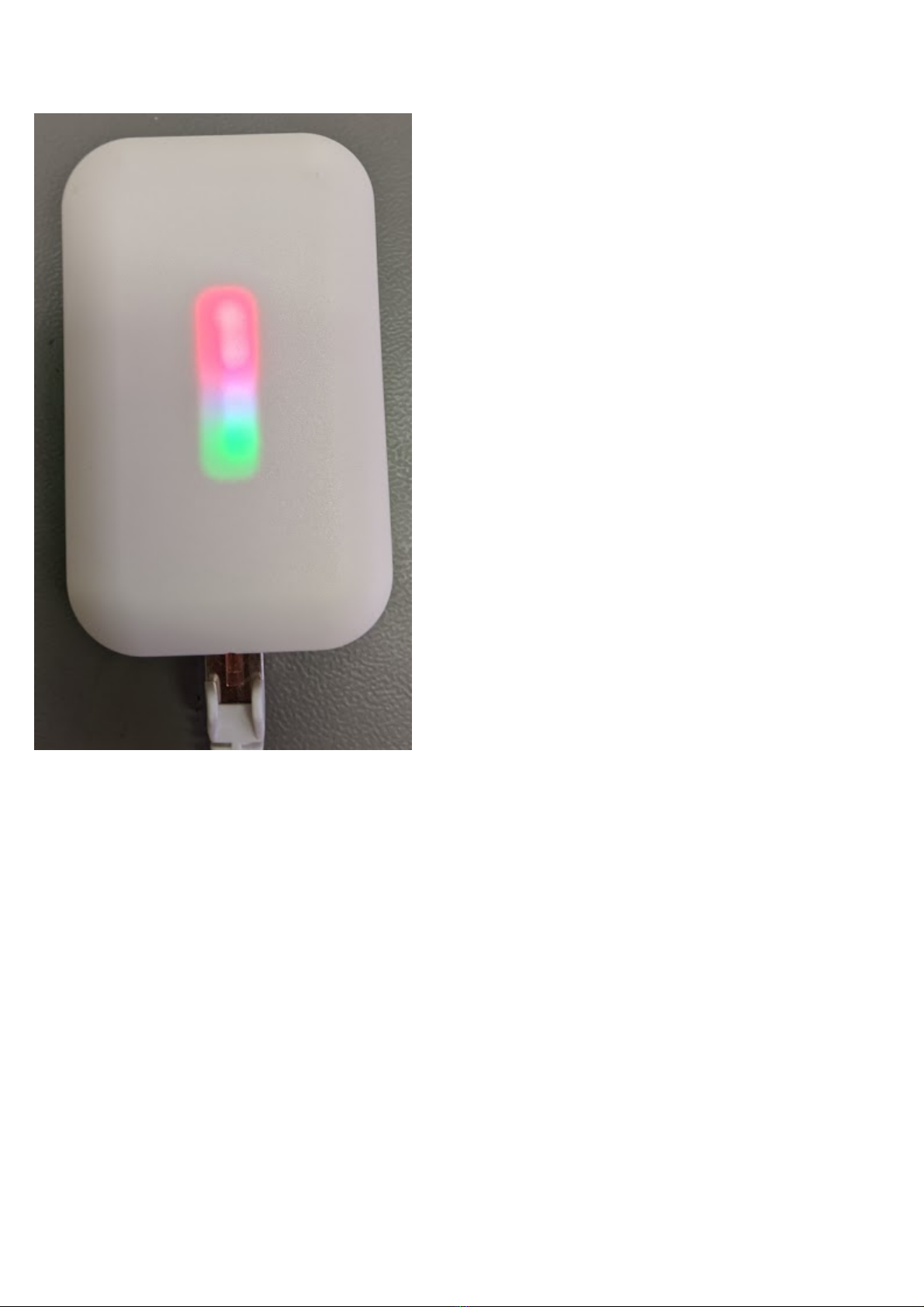
On the front there are 4 LEDs for status display.
6
1.1. LED-Display
The module has 4 LEDs on the front. From bottom to top:
1) Operating LED - flashes green regularly (1 second)
2) Network status - lights up yellow when network is plugged in
3) UDP LED - Lights up red when there is no UDP connection, green when one is established
4) TCP / IP LED - Lights up red when there is no TCP / IP connection, green when one has been opened
The LEDs can also be switched off in the software.
When the device is set to identify mode via the surface, the LEDs 2-4 start to flash in ascending and descending
order for 10 seconds.
The LEDs with the numbers 3 and 4 can take up to 60s to display the status after a restart.

7
1.2. Hardware Revision
Hardware Revision 1:
Development Device for early testing of the functions
Hardware Revision 2:
Final layout with final housing.

8
1.3. Watchdog
A watchdog runs in the gateway with a set time of 90s so that the device can be restarted automatically if
necessary.

9
1.4. Conformity
EC declaration of conformity
Lichtmanufaktur Berlin GmbH hereby declares that the radio system type "Lithernet - Casambi Gateway"
complies with Directive 2014/53 / EU.
The full text of the EU declaration of conformity is available at the following Internet address: https://
archiv.intelligent-lighting.de/index.php/s/XoR27GRkiMWLyeD

10
1.5. Bluetooth Module
Attention!
All information on this page relates only to the radio module used. Not the entire product.
The CBM-002A module from Casambi Oy is used as the Bluetooth module
The declaration of conformity for the radio module can be found at the following Internet address: https://
casambi.com/static/datasheets/CBM-002-DoC.pdf
-------------------------------------------------------------------------------------------------------------------------------------------------------------------
This device complies with part 15 of the FCC Rules. Operation is subject to the following two conditions:
(1) This device may not cause harmful interference, and
(2) this device must accept any interference received,
including interference that may cause undesired operation.
Contains FCC ID: 2ALA3-CBM002A
-------------------------------------------------------------------------------------------------------------------------------------------------------------------
This device complies with Industry Canada’s licenseexempt RSSs. Operation is subject to the following two
conditions:
(1) This device may not cause interference; and
(2) This device must accept any interference, including
interference that may cause undesired operation of the
device.
Le présent appareil est conforme aux CNR d’Industrie
Canada applicables aux appareils radio exempts de licence. L’exploitation est autorisée aux deux conditions
suivantes:
(1) l’appareil ne doit pas produire de brouillage;
(2) l’utilisateur de l’appareil doit accepter tout brouillage
radioélectrique subi, même si le brouillage est susceptible d’en compromettre le fonctionnement.
Contains IC: 22496-CBM002A
-------------------------------------------------------------------------------------------------------------------------------------------------------------------
Table des matières
Autres manuels Casambi Porte

Manuels Porte populaires d'autres marques

LST
LST M500RFE-AS Manuel utilisateur

Kinnex
Kinnex Media Gateway Manuel utilisateur

2N Telekomunikace
2N Telekomunikace 2N StarGate Manuel utilisateur

Mitsubishi Heavy Industries
Mitsubishi Heavy Industries Superlink SC-WBGW256 Manuel utilisateur

ZyXEL Communications
ZyXEL Communications ZYWALL2 ET 2WE Manuel utilisateur

Telsey
Telsey CPVA 500 - SIP Manuel utilisateur


