
Aussie Speedstream 6520 Manuel utilisateur

1
ADSL/2+
Getting the Most out of your
Aussie Broadband ADSL Service
Speedstream 6520
Included:
•Getting Connected
•Configuring your ADSL modem
•Common Setup Connection Difficulties
•Filters and hy they are needed
•Internet Speeds Explained
•DSL Troubleshooting Tips and more…

2

3
Table of Contents
The Welcome Letter ...........................................................................4
Filters – Why are they Needed?..........................................................4
Getting Connected… ...........................................................................4
Configuring your A SL modem ...........................................................6
A SL & Your Telephone Service........................................................10
Common Setup Connection ifficulties.............................................11
Internet Speed: Some Basics.............................................................11
Internet Speed: How to Carry out A Speed Test................................12
Internet Speed: What Affects It?.......................................................12
Positioning your modem..................................................................13
Setting up your Wireless Network ....................................................13
Connecting to your Wireless Network ..............................................17
SL Troubleshooting Tips..................................................................20
Before Contacting the Helpdesk, Please Carry Out the following......24
Contact Aussie Broadband................................................................24

4
The welcome letter
If you have not already, you will receive a Welcome Letter from Aussie Broadband. This includes
details such as your username, passwords and email addresses. We recommend that you keep this
letter in a safe place near your computer, as it holds important information that you may need in
the future.
Filters – why are they nee e ?
Connecting line filters to your A SL service may be one of the most tedious parts of the setup but it
is also one of the most important! An A SL filter is a small plastic box with a short lead that plugs
into your phone socket and has two outputs, one for your A SL modem and the other for a
telephone.
ue to the fact that your Aussie Broadband A SL service and normal Voice Telephone Service
operate on the same copper cable, an A SL Filter is required to keep these systems apart to stop
the signals from interfering with each other. Aussie Broadband recommends the Australian
manufactured C10 Communications Pty Ltd filters, which can be obtained by contacting us.
You will need to install one line filter for each device that is connected to a telephone socket
Aussie Broadband recommends that a centrally located filter/splitter is installed if you have:
•More than 3 telephone devices connected to the one telephone line (i.e. all on the same
telephone number).
•Answering machines.
•Fax machines.
•A home alarm system.
•Any other device that could potentially cause interference on the line.
The Central filter/splitter will isolate the premises cabling from your A SL modem. A Centrally
located splitter must be installed by a suitably qualified installation technician.
Getting Connecte
Your existing A SL modem needs to be configured for your new A SL service.
To connect your modem:
1. Make sure that all the devices that you are working with are powered down. This includes
your computer and the modem. If you have a modem connected that is not the one originally
specified during your application, please disconnect it.
NOTE:
Line Filters must be installe onto all telephone wall sockets before you procee with this Process.
For More Information on Line Filters, see the “Filters – Why are they needed?” section above.

5
2. Connect one end of the phone cable to the SL port on the back of the modem.
3. Connect the other end of the phone cable into the telephone wall socket where the A SL
Service has been connected.
4. Connect one end of the provided Ethernet cable to your computer’s Ethernet adapter.
Connect the other end of the Ethernet cable to one of the Ethernet ports on the back of the
modem.
5. Connect the power adapter to the modem’s power port and plug the other end into an
electrical outlet.
6. Switch on the modem. The Power and Ethernet lights on your modem should now be on.
7. Power on your computer.
Congratulations!
You have successfully connecte up your Spee stream ADSL Gateway.

6
Configuring your ADSL mo em
1. Open your preferred browser (EG: Internet Explorer, Safari, or Mozilla Firefox).
2. Put your cursor in the address bar.
3. Type 10.0.0.138 then press Enter or Go.
4. You will be taken to a login screen. By default the username is a min and the password is
a min (CaSe SeNsItIvE). Then press Login.
5. You will be taken to the modem configuration home page.
NOTE:
The images below are shown using Internet Explorer. Your browser may appear slightly ifferent.

7
6. Click ISP Connection.
7. Click A vance Settings.
8. Click Configure the ATM Virtual Circuit.

8
9. Click Delete for all items in the list until it is empty.
10. Click A a new VC. Use the following settings.
VPI 8
VCI 35
Encapsulation Type LLC
Traffic Class Unspecified Bit Rate
11. Click Finish.
9
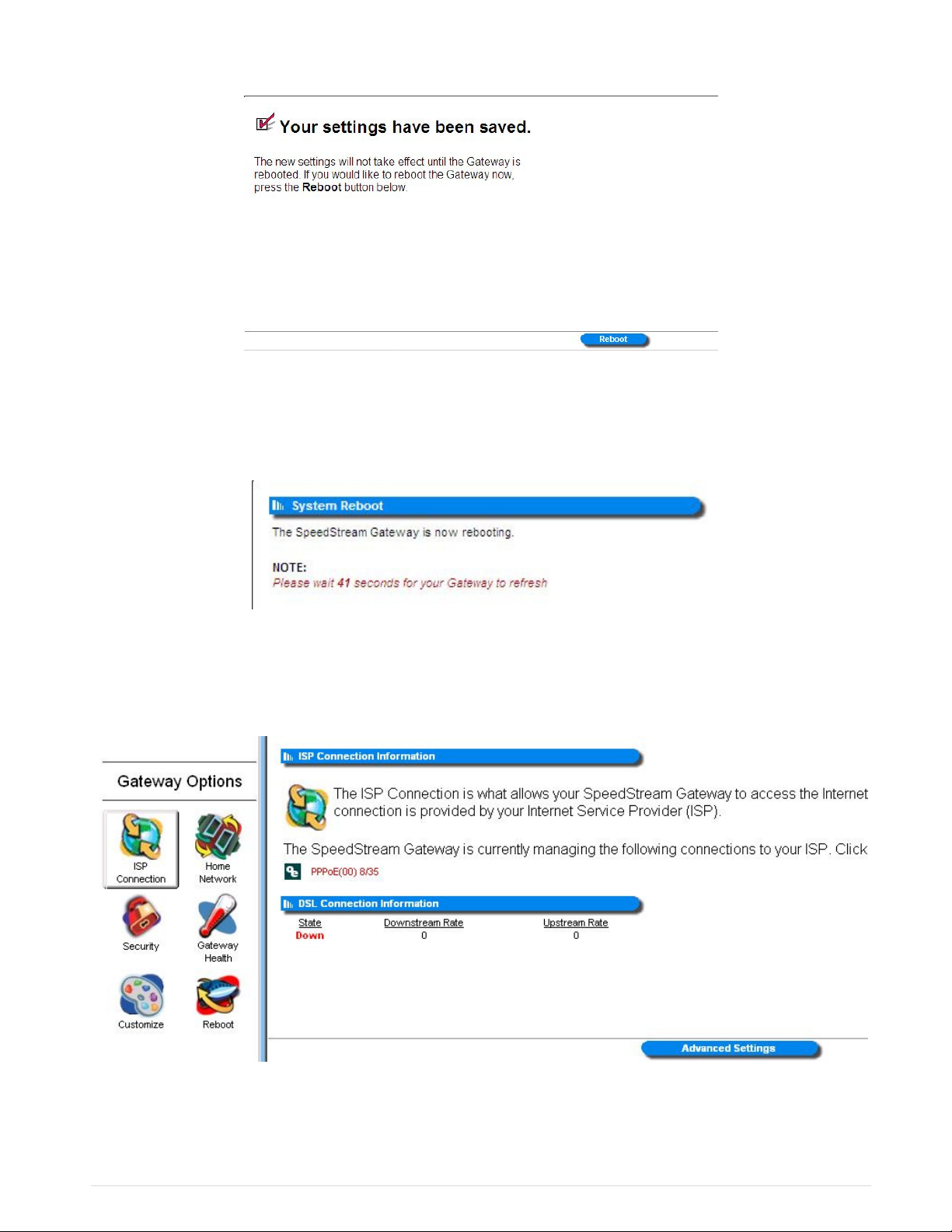
12. Place a tick in the tick box next to the new Virtual Circuit entry. Then click Reboot
13. Then confirm by clicking Reboot again.
14. Click ISP Connection. Note that there is now an icon with PPPoE(00) 8/35 next to it.

10
15. Click on PPPoE(00) 8/35 and insert the following information (Note: This information is found
on your Welcome Letter). Then click Save Settings.
Name AussieBroadband
Username Yourphonenumber@adsl.aussiebroadband.com.au
Passwor CaSe SeNsItIvE
Time-out Mo e Auto-Connect on isconnect
16. Click Reboot on the left menu, and confirm.
17. Congratulations! You have now successfully setup your A SL modem.
ADSL & Your Telephone Service
Even though your telephone voice service and your A SL may be provided by different companies,
they are still closely tied together. This is because the A SL Service and Voice Service share the
same telephone line.
Before you make any changes to your voice service al ays ask if the change ill interfere
ith your ADSL service.
Changes to your voice service that could potentially interrupt your A SL connection include:
•Non Payment of Bill – If the telephone company interrupts your voice service because of non-
payment or other billing issues, your A SL service will be disconnected.
•isconnecting your Telephone Service – If you cancel your phone line, your A SL Service will
be disconnected.
If there are temporary telephone service outages due to storms or other unusual occurrences, In the
majority of cases, the A SL service will be restored at the same time as your voice service.
If your ADSL service gets disconnected to reconnect it may take a couple of weeks depending on
the situation. Aussie Broadband may also charge a reconnection fee.
NOTE:
It can take up to 5 minutes after settings are save for your mo em to connect.
Table des matières
Autres manuels Aussie Modem

Manuels Modem populaires d'autres marques

Davicom
Davicom DM562AP Manuel utilisateur

EpiValley
EpiValley TATA indicom SXC-1080 Manuel utilisateur

Zte
Zte WiMAX Manuel utilisateur

Intelimax
Intelimax MA-2060 Manuel utilisateur

SMC Networks
SMC Networks D3CM1604V Manuel d'utilisation et d'entretien

Telstra
Telstra Wi-Fi 4G Advanced Pro X Manuel utilisateur


US Robotics
US Robotics 3453C Manuel utilisateur

MaxTech
MaxTech Plug & Play Internal Voice/FAX/Data/SVD... Manuel utilisateur

Zte
Zte MF823 Manuel utilisateur

Four-Faith
Four-Faith F1403 Manuel utilisateur

Sierra Wireless
Sierra Wireless AIRLINK MP595W Manuel utilisateur

Gemtek
Gemtek WiMAX WIXFBR-103 Manuel utilisateur