
ausdom AH01 Manuel utilisateur
User Manual
Wireless Earphones
MODEL: AH01
EN-1
2. Package Contents
Thank you for purchasing the AUSDOM AH01 Wireless Active
Noise Cancelling Earphone. Active noise cancelling technolo-
gy detects the noise around you and cancels it out while
traveling, working or going anywhere, helping you focus on
what you want to hear. The look of AH01 is fashionable and its
package is eco-friendly. Built-in rechargeable lithium battery
provides sufficient music playtime and standby time. It's
designed to sound better, filter out noise, and be more
comfortable and easy to carry.
AH01 can be used in wireless modes via Wireless V4.0 to
communicate with your Wireless-enabled device within
33ft/10m. Its powerful and rich bass speaker brings you
amazing and unprecedented audio enjoyment.
Note: Please read the user manual carefully before using,
and keep it properly for future reference.
1. Introduction
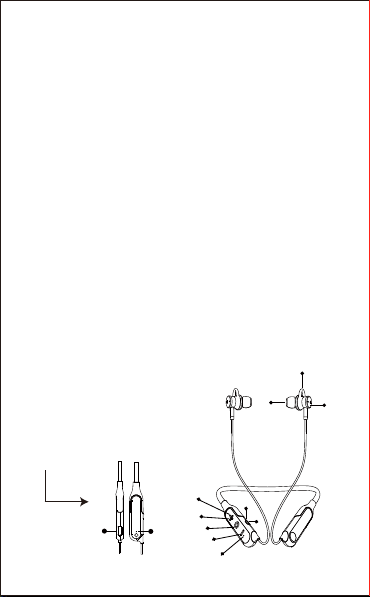
3. Product Overview
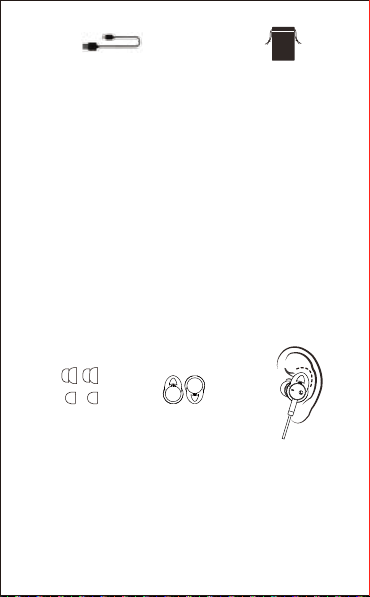
- 1 x Wireless Earphone
- 1 x Micro USB Charging Cable
- 1 x User Manual
- 1 x Travel Pouch
- 2 x Pairs of Ear Tips (S/ L)
- 1 x Pair of Earwings (L)
3
57
11
10 12
8
241
69
EN-2
1.Microphone
2.Power Button
3.Volume+/Next Track
4.Volume-/Previous Track
5.LED Indicator
6.Micro USB Interface for Charging
7.ANC LED Indicator
8.ANC Button
9.Charging LED
10.Ear Tips
11.Earwings
12.Magnetic Connection
Micro USB Charging Cable Travel Pouch
4.Neckband Style and Ear Manner
Style 1:
Enjoy music at home/office
Style 2:
For sports use
1 x Pair of Earwings
(L)
2 x Pairs of Ear Tips
(S/ L)
EN-3
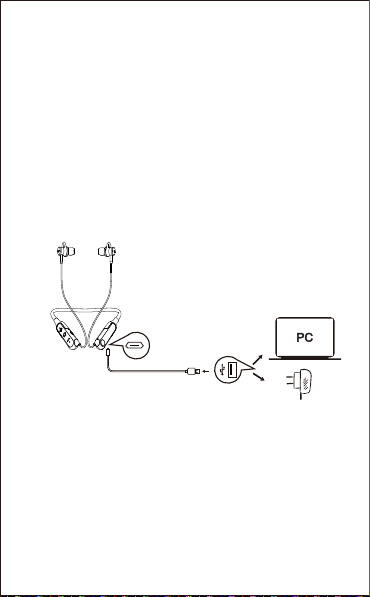
5. Charging the Earphone
6. Pairing with Bluetooth-enabled Devices
1). Make sure the earphone is off.
2). Do not place both devices more than 3ft/1m away from
each other.
3). Turn on the Bluetooth function of your devices.
4). Press and hold the power button on the earphone until it
powers on but don't let go just yet. Continue holding down on
Use the supplied micro USB charging cable to charge the
earphone. It takes about 3 hours for the first charge, and only
2.5 hours for a full charge after that. The earphone LED turns
to solid red during charging. When the battery is fully charged,
the LED turns off.
When the battery is low, the LED turns to solid red. At the
same time the earphone also provides a low battery warning
tone.
Note: It is strongly recommended fully charging for the first
use. Playtime varies according to volume level and audio
content .
USB charging adapter
Micro USB Charging Cable
Laptop for Power Supply

EN-4
7.Active Noise Canceling
AUSDOM AH01 contains a noise cancelling circuit; Noise
mainly in an airplane, buses or trains is effectively reduced.
1).The noise cancelling effect may not be pronounced in a
very quiet environment, or some noise may be heard.
2).The noise cancelling effect may vary depending on how
you wear the earphone.
3).The noise cancelling function works for noise in the low
frequency band primarily. Although noise is reduced, it is not
canceled out completely.
4).When you use the earphone in a train or a car, noise may
occur depending on street conditions.
the power button until you see the LED indicator flashes blue
and red alternately, which means your earphone is in "pairing
mode" waiting to be paired with your device. You will hear a
prompt.
5). Select the “AUSDOM AH01” to pair. Once successfully
paired, the LED turns to solid blue. You will hear a prompt.
Note: Before pairing the earphone with computer, please
make sure your computer or laptop has the built-in Wireless
feature. If not, you must purchase a Wireless dongle,
preferably version 2.1 or above. AUSDOM AH01 will pair with
the last paired device automatically when turning on. Because
of different systems, some computers or laptops may need to
be manually paired every time.
EN-5
8. Making & Answering a Call
9. Caution
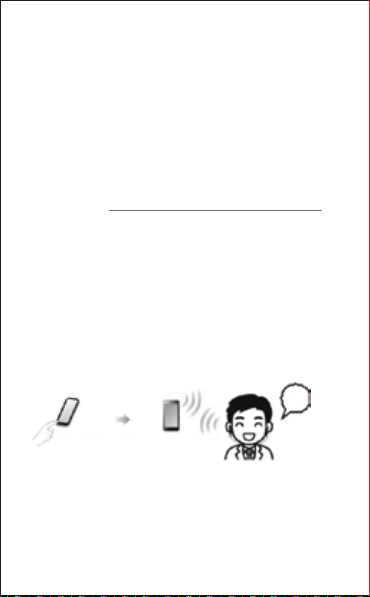
Wireless Connection
Hello
lncoming Call
Dial Phone Number
8-1 Making a call
1.Make sure the earphone is paired with the mobile phone.
Dial through the mobile phone and press the call button on the
phone.
2.To end a call, press the power button once or also end the
call directly by the phone.
8-2 Answering a call
Make sure the earphone is paired with your phone. Please
refer to chapter 6. Pairing with Bluetooth-enabled Devices.
1.Press the power button on your earphone to answer the call.
If there is the music playback, it will pause automatically, and it
will automatically play after you end the call.
2.To end a call, press the power button once or also end the
call directly by the phone.
Note: Android users are supposed to answer a call through
the earphone by default. If you'd like to answer a call through
the phone, please manually switch it.
- Store the earphone in a dry place when it powers off.
- If you don’t use the earphone for a long period, charging the
battery every 2 months for 1-2 hours.
EN-6
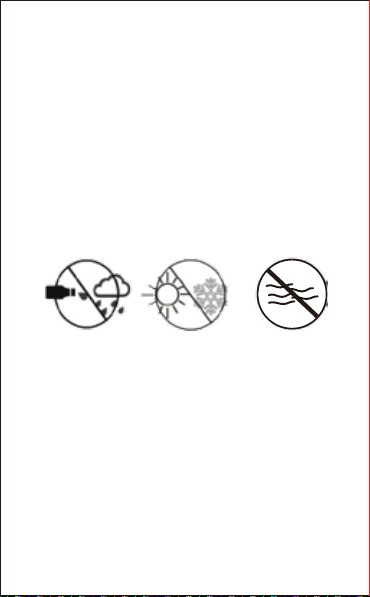
Avoid exposing to
liquids and rain Avoid exposing to
extreme temperature
Avoid soak in
the water
10. Protecting Your Hearing
The earphone is held close to your ears, so loud sounds pose
a potential hearing risk. It is highly recommended that setting
low volume level before putting on the earphone and avoiding
exposing yourself continuously to high volumes. If you need to
use the earphone for a long period, rest ten minutes for a half
hour using.
- Use a dry cloth for cleaning if needed.
- Avoid dropping the earphone from high places or on hard
surfaces.
- Avoid exposing the earphone to extreme temperature.
(Recommended Storage temperature is -40˚C-80˚C.)
- The earphone is NOT waterproof. Avoid exposing the
earphone to rain or getting liquids into any button port or other
openings.
- Please don’t twist or bend the earphone. This may cause
permanent deformation.
- The built-in battery can’t be disposed in the fire to avoid
explosion.
EN-7
11. Control Instructions
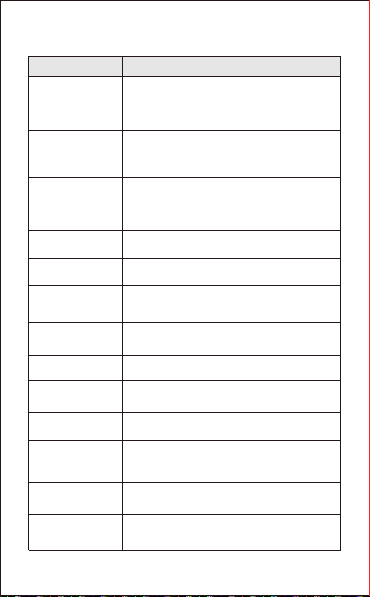
Function
Power on
Operation
Press and hold the power button for 3s,
and you will see the blue light flash and
hear “power on”.
Power off Press and hold the power button for 3
seconds, and you will hear “power off”.
Pairing Press and hold the power button for about
5 seconds till the red and blue light flash
alternatively, and you will hear “paring”.
Increase Volume Press the Volume Up (+) button
Pause/Restart
Music/Video Press the power button
Decrease Volume Press the Volume Down (-) button
Play Music/Video Press the power button
Skip to Previous
Track Press and hold the (-) button for 1-2s
Answer a Call When a call rings, press the power button
Skip to Next Track Press and hold the(+)button for 1-2s
End a Call
Noise
Cancelling On
When you want to end a call, press the power
button
Press the ANC button, blue light on.
Noise
Cancelling Off Press the ANC button, blue light off.

EN-8
12. Troubleshooting
Q: The earphone cannot be turned on.
A: The battery may be flat. Please recharge the battery and try
again. Refer to chapter 5. Charging the Earphone.
Q: Why doesn’t the earphone pair with the mobile phone?
A: Please check the followings.
- Check that the earphone is on a full charge.
- Make sure that the mobile phone's Wireless function is on.
You can clear all connection history on your phone.
- Make sure other paired device’s wireless function is turned off.
- Make sure the two devices are in the effective pairing range.
(33 feet/10 meters).
- Make sure that there is no obstacle between the earphone
and the mobile phone, such as electronic equipment and a
wall.
- Furthermore, make sure that the earphone is in pairing
mode, and pair it with phone again.
Q: There is some noise.
- A: Wireless is a radio technology, so it is sensitive to
obstacles between the earphone and the pairing device.
Please make sure that there is no obstacle between the two
devices and is within 33 feet/10 meters.
Q: I can't hear sound.
A: Please check the followings.
- Try increase the volume.
- Make sure that the Wireless function is on and whether the
two devices are connected and within 33 feet/10 meters.
Note: There will be an alert tone when the volume reaches
the maximum level.

EN-9
13. Warranty
The AH01 is covered by a 1-year manufacturer warranty. For
more information, visit: https://www.ausdom.com/Custome-
Care/Warranty.html
Q: My mobile phone or computer cannot find the earphone.
A: Please check that the earphone is in pairing mode. Refer to
chapter 6.Pairing with Bluetooth-enabled Devices.
Sometimes when the earphone is connected too many
Wireless devices, it cannot search and pair effectively. Or your
mobile phone and computer are already connected to many
other devices. Try removing some connections before
searching the earphone.
Table des matières
Langues :
Autres manuels ausdom Casque audio

ausdom
ausdom AGH15 Manuel utilisateur

ausdom
ausdom M09 Manuel utilisateur

ausdom
ausdom SM199 Manuel utilisateur

ausdom
ausdom X1 Pro Manuel utilisateur

ausdom
ausdom TW01 Manuel utilisateur

ausdom
ausdom H8 Manuel utilisateur

ausdom
ausdom ANC10 Manuel utilisateur

ausdom
ausdom ANC8 Manuel utilisateur

ausdom
ausdom S5 Manuel utilisateur

ausdom
ausdom K1 Manuel utilisateur


