AURATON Cetus Manuel utilisateur

26/10/21, 3:26 μ.μ.
AURATON Cetus - AURATON manuals
https://manuals.auraton.pl/manuals/auraton-cetus-pl/
1/27
AURATON Cetus
A daily, wired temperature controller
Description of AURATON Cetus
The first launch of AURATON Cetus
"Manual" mode setting
FrostGuard function
Hysteresis change
PWM operating mode
Remarks
Connection diagram of AURATON Cetus
Cleaning and maintenance
Technical data
Disposal of the device
To download

26/10/21, 3:26 μ.μ.
AURATON Cetus - AURATON manuals
https://manuals.auraton.pl/manuals/auraton-cetus-pl/
2/27
User manual ver. 20200926
The document contains information on the safety, installation and use of the AURATON
Cetus device.
A daily, wired temperature controller
AURATON Cetus is a daily, wired, temperature controller, designed to work with a gas
or electric heating device.
AT FrostGuard function.
Protection against freezing of the room.
&Possibility of temporarily lowering the programmed
temperature
For a maximum period of 12 hours.
WITH Vacation mode
Up to eight days independent of the programmed
temperature.
LCD
Backlit LCD display The
backlit display enables the device operation supervision
even in poorly lit rooms.
A daily, wired temperature controller
Description of AURATON Cetus
The first launch of AURATON Cetus
"Manual" mode setting
FrostGuard function
Hysteresis change
PWM operating mode
Remarks
Connection diagram of AURATON Cetus
Cleaning and maintenance
Technical data
Disposal of the device
To download

26/10/21, 3:26 μ.μ.
AURATON Cetus - AURATON manuals
https://manuals.auraton.pl/manuals/auraton-cetus-pl/
3/27
Description of AURATON Cetus
daily, wired temperature controller
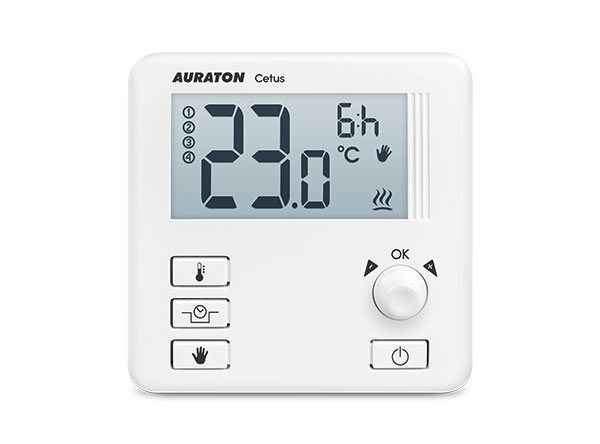
On the front part of the controller housing there is a backlit LCD display, four function
buttons and a temperature setting knob with a button ( .
A daily, wired temperature controller
Description of AURATON Cetus
The first launch of AURATON Cetus
"Manual" mode setting
FrostGuard function
Hysteresis change
PWM operating mode
Remarks
Connection diagram of AURATON Cetus
Cleaning and maintenance
Technical data
Disposal of the device
To download

26/10/21, 3:26 μ.μ.
AURATON Cetus - AURATON manuals
https://manuals.auraton.pl/manuals/auraton-cetus-pl/
4/27
1. LCD display
2. Setting knob with integrated push button (
3. On / off button regulator
4. Manual mode button
5. "Temporary temperature reduction" button
6. Temperature setting button
Display
A daily, wired temperature controller
Description of AURATON Cetus
The first launch of AURATON Cetus
"Manual" mode setting
FrostGuard function
Hysteresis change
PWM operating mode
Remarks
Connection diagram of AURATON Cetus
Cleaning and maintenance
Technical data
Disposal of the device
To download

26/10/21, 3:26 μ.μ.
AURATON Cetus - AURATON manuals
https://manuals.auraton.pl/manuals/auraton-cetus-pl/
5/27
1. Temperature - In the normal operation mode, AURATON Cetus displays the
temperature of the room in which it is installed.
2. Battery exhausted ( X )
The indicator is visible when the minimum permissible battery voltage is exceeded.
Replace the batteries as soon as possible.
NOTE: To maintain the programmed parameters, the time of the battery
replacement operation should not exceed 30 seconds.
3. Temporary temperature reduction duration indicator
Shows how long the temporary temperature reduction mode will remain active.
4. Temperature unit
Indicates that the temperature is displayed in degrees Celsius ( R ).
5. Manual mode indicator ( V )
Indicates that you are in manual (vacation) temperature setting.
6. Temporary temperature reduction mode programming indicator ( S )
Indicates the user scheduled "temporary temperature reduction" mode. It appears
when the mode is not currently implemented, but the "temporary temperature
reduction" function is active. (more information in the chapter "Setting the temporary
temperature reduction mode")
7. AURATON Cetus activation indicator ( a )
Pictogram informing about the operating status of the device. Visible when the
controlled device is turned on.
8. Temporary temperature decrease mode indicator ( T )
Appears while the temporary temperature decrease program is running.
A daily, wired temperature controller
Description of AURATON Cetus
The first launch of AURATON Cetus
"Manual" mode setting
FrostGuard function
Hysteresis change
PWM operating mode
Remarks
Connection diagram of AURATON Cetus
Cleaning and maintenance
Technical data
Disposal of the device
To download

26/10/21, 3:26 μ.μ.
AURATON Cetus - AURATON manuals
https://manuals.auraton.pl/manuals/auraton-cetus-pl/
6/27
9. Number of days in "vacation" mode ( 8 )
Indicates the number of days for which vacation mode is scheduled.
Choosing the right location for AURATON Cetus
A daily, wired temperature controller
Description of AURATON Cetus
The first launch of AURATON Cetus
"Manual" mode setting
FrostGuard function
Hysteresis change
PWM operating mode
Remarks
Connection diagram of AURATON Cetus
Cleaning and maintenance
Technical data
Disposal of the device
To download

26/10/21, 3:26 μ.μ.
AURATON Cetus - AURATON manuals
https://manuals.auraton.pl/manuals/auraton-cetus-pl/
7/27
The correct operation of AURATON Cetus is largely influenced by its location. Location
in a place with no air circulation or direct sunlight may result in incorrect temperature
control. AURATON Cetus should be installed on the internal wall of the building
(partition wall), in an environment of free air circulation. Avoid proximity to heat emitting
devices (TV, heater, refrigerator) or locations exposed to direct sunlight. Problems in
proper operation may be caused by the vicinity of the door, exposing AURATON Cetus
to possible vibrations.
Connecting cables to AURATON Cetus
To connect the wires, remove the cover as shown below:
The cable clamps are located on the back of the AURATON Cetus, under the plastic
cover.
A daily, wired temperature controller
Description of AURATON Cetus
The first launch of AURATON Cetus
"Manual" mode setting
FrostGuard function
Hysteresis change
PWM operating mode
Remarks
Connection diagram of AURATON Cetus
Cleaning and maintenance
Technical data
Disposal of the device
To download

26/10/21, 3:26 μ.μ.
AURATON Cetus - AURATON manuals
https://manuals.auraton.pl/manuals/auraton-cetus-pl/
8/27
1. cover
2. screw
3. wire clamps
A daily, wired temperature controller
Description of AURATON Cetus
The first launch of AURATON Cetus
"Manual" mode setting
FrostGuard function
Hysteresis change
PWM operating mode
Remarks
Connection diagram of AURATON Cetus
Cleaning and maintenance
Technical data
Disposal of the device
To download

26/10/21, 3:26 μ.μ.
AURATON Cetus - AURATON manuals
https://manuals.auraton.pl/manuals/auraton-cetus-pl/
9/27
It is a typical single-pole two-state relay. In most cases, the NC terminal is not used.
NOTE:
After connecting the wires, put the plastic cover back on.
Battery change
The battery socket is located inside the AURATON Cetus on the front of the housing. To
install the batteries, remove the controller housing as shown in the chapter "Connecting
the cables to the AURATON Cetus".
NOTE:
We recommend alkaline batteries to power AURATON regulators. Do not use
"rechargeable batteries" because the rated voltage is too low.
A daily, wired temperature controller
Description of AURATON Cetus
The first launch of AURATON Cetus
"Manual" mode setting
FrostGuard function
Hysteresis change
PWM operating mode
Remarks
Connection diagram of AURATON Cetus
Cleaning and maintenance
Technical data
Disposal of the device
To download

26/10/21, 3:26 μ.μ.
AURATON Cetus - AURATON manuals
https://manuals.auraton.pl/manuals/auraton-cetus-pl/
10/27
1. - 1.5V AAA battery socket
Insert two AAA 1.5V batteries into the battery socket, paying attention to the correct
polarity of the batteries.
A daily, wired temperature controller
Description of AURATON Cetus
The first launch of AURATON Cetus
"Manual" mode setting
FrostGuard function
Hysteresis change
PWM operating mode
Remarks
Connection diagram of AURATON Cetus
Cleaning and maintenance
Technical data
Disposal of the device
To download
Table des matières
Autres manuels AURATON Régulateurs de température


Manuels Régulateurs de température populaires d'autres marques

Swegon
Swegon LUNAd MB Manuel utilisateur

Lucky Reptile
Lucky Reptile Thermo Control II Manuel utilisateur

SENSORMETRIX
SENSORMETRIX Argon 100 Manuel utilisateur

Fuji Electric
Fuji Electric PXE4 Manuel utilisateur

Yuyao gongyi
Yuyao gongyi XMT-808 series Manuel utilisateur

Selec
Selec TC544C Manuel utilisateur