Apelson AMFTZ60SS Manuel utilisateur

USER
MANUAL
Customer Care
BUILT-IN ELECTRIC MULTIFUNCTION
TWIN ZONE OVEN
0344 800 1128
AMFTZ60SS

2
IMPORTANT INFORMATION
CONTENTS
Important Information
Before you start 2
Safety information 3
Environment information 4
Technical and legal information 4
Voltage and frequency of power supply 4
Your oven
Control panel and Electronic programmer 5
Your Oven 5
First use/Setting up your oven
Setting the clock 6
Cleaning the oven 6
Product functions including using the divider 6
Daily operation of your oven
Setting the temperature 9
Display icon 9
Setting end cooking 9
Setting delayed start cooking 9
Setting kitchen timer 10
Lock function 10
Care and Maintenance
How to keep your oven in good condition 13
How to remove the oven doors 14
Replacing the oven lamp 15
Installation 16
Trouble shooting 18
Guarantee 19
Customer service contact details 20
BEFORE YOU START
To avoid the risks that are always present when you use
an electrical appliance it is important that this appliance is
installed correctly and that you read the safety instructions
carefully to avoid misuse and hazards. Please keep this
instruction booklet for future reference and pass it on to
any future owners. After unpacking the appliance please
Decide on the appropriate location for your product.
Check the package and make sure you have all of the
parts below.
Your product contains glass please take care when tting
or handling to prevent personal injury or damage to the
product.
The specications plate displays all the necessary
identication information for ordering replacement parts.
If you sell the appliance, give it away, or leave it behind
when you move house, make sure you also pass on this
manual so that the new owner can become familiar with
the appliance and its safety warnings.
Off
O
Grill pan/drip tray x1
Oven shelf x2
Ø4mm x 25mm screws x4
Oven cavity divider x1
check that it is not damaged. If in doubt, do not use the
appliance but contact Customer Services on 0344 800 1128.
AMFTZ60SS
AMFTZ60SS Oven x1Grill pan handle x1

3
IMPORTANT INFORMATION
SAFETY INFORMATION
These instructions are for your safety. Please read through
them thoroughly prior to installation and retain them for
future reference.
All installation work must be carried out by a competent
person or qualied electrician.
This appliance must be installed correctly by a suitably
qualied person, strictly following the manufacturer’s
instructions.
This appliance complies with all current European safety
legislation, however, the Manufacturer must emphasise
that this compliance does not prevent the surfaces of the
appliance from heating up during use and remaining hot
during its operation.
Do not allow the electric cables to touch the hot parts of
the appliance.
Make sure that the power cord is not caught under or in
the appliance and avoid damage to the power cable.
Do not remove the plug in the presence of ammable gas.
Do not install the appliance outdoors in a damp place or in
an area which may be prone to water leaks such as under
or near a sink unit. In the event of a water leak allow the
machine to dry naturally.
Please dispose of the packing material carefully.
Do not use ammable sprays in close vicinity to the
appliance.
This appliance can be used by children aged from 8 years
and above and persons with reduced physical, sensory or
mental capabilities or lack of experience and knowledge if
they have been given supervision or instruction concerning
use of the appliance in a safe way and understand the
hazards involved. Children shall not play with the appliance.
Cleaning and user maintenance shall not be made by
children without supervision.
Regularly check the power plug and power cord for
damage. If the supply cord is damaged, it must be replaced
by the manufacturer, its service agent or similarly qualied
persons in order to avoid a danger or injury.
A steam cleaner is not to be used.
The appliance is not intended to be operated by means of
external timer or separated remote-control system.
The appliance is for domestic use only.
The Manufacturer declines all liability for personal or
material damage as a result of misuse or incorrect
installation of this appliance.
Danger of burns! During use the appliance becomes hot.
Care should be taken to avoid touching heating elements
inside the oven.
Warning! Accessible parts may become hot during use.
Children should be kept away.
Warning! If the door or door seals are damaged, the
oven must not be operated until it has been repaired by a
competent person.
Do not lean on the door or place any objects on the door
of the appliance. This can damage the door hinges.
The oven should be cleaned regularly and any food
deposits removed.
Warning! Ensure that the appliance is switched off before
replacing the lamp to avoid the possibility of electric shock.
The oven must be installed in accordance with installation
instructions and all dimensions must be followed.
Before connecting the appliance to the power supply,
check that the power supply voltage and current rating
corresponds with the power supply details shown on the
appliance rating label.
Never use a damaged appliance! Disconnect the appliance
from the electrical outlet and contact your retailer if it is
damaged.
Danger of electric shock! Do not attempt to repair the
appliance yourself. In case of malfunction, repairs are to
be conducted by qualied personnel only.
To avoid damaging the cord, do not squeeze, bend or
chafe it on sharp edges. Keep it away from hot surfaces
and open ames as well.
Lay out the cord in such a way that no unintentional
pulling or tripping over it is possible.
Keep the appliance and its cord out of reach of children.
Do not operate the appliance with wet hands or while
standing on a wet oor. Do not touch the power plug with
wet hands.
Connect the power plug to an easily reachable electrical
outlet so that in case of an emergency the appliance can
be unplugged immediately. Pull the power plug out of the
electrical outlet to completely switch off the appliance. Use
the power plug as the disconnection device.
Disconnect the power plug from the electrical outlet when
not in use and before cleaning.
Always turn the appliance off before disconnecting the
power plug.
This appliance is classied as protection class I and must
be connected to a protective ground (Earth).
Means for full disconnection must be incorporated in
the xed wiring in accordance with the wiring rules. To
achieve this install an appropriate circuit breaker (CB) and
residual current device (RCD). It should be installed in an
AMFTZ60SS

4
IMPORTANT INFORMATION
easily reachable place so that in case of emergency the
appliance can be disconnected from power immediately.
The xed wiring must be protected against heat surfaces.
Do not hang an objects to the handle of the oven door.
Do not cover the bottom of the oven with aluminium foil or
other objects. Caution: Risk of re!
Do not allow aluminium foil, plastic, paper or fabric contact
with heating elements.
Never leave the appliance unattended during use,
especially when cooking with ammable substances
(e.g. hot oil, fat, etc.).
Do not store or never use harsh chemicals, sprays,
ammable or non-food in or near the oven. Oven is
designed specically for heating or cooking food. The use
of corrosive chemicals in heating or cleaning will damage
the unit and may cause injury.
Should any food inside the oven catch re, keep the
door closed. Switch the oven off and disconnect the power
supply.
Always exercise caution when opening the door. Move
to side, open the door slowly to vent the hot air and/or
steam. Make sure your face is away from the opening and
make sure there are no children or pets near the oven.
Only use utensils that are suitable for use in this type
of oven.
ENVIRONMENTAL INFORMATION
Waste electrical products should not be disposed of
with household waste. Please recycle where facilities
exist. Check with your Local Authority or retailer for
recycling advice.
This symbol on the product or its packaging indicates
that this product cannot be treated as normal
household waste. This product must be handed
over to an electric and electronic equipment
collection point for recycling.
On ensuring that this product is disposed
of correctly, you will help to avoid possible negative
consequences for the environment and public health,
which could occur if this product is not handled correctly.
To receive more detailed information about recycling this
product, contact your local government, domestic waste
disposal services or the outlet where the product was
bought.
TECHNICAL AND LEGAL INFORMATION
TECHNICAL INFORMATION:
Power supply: 220-240V~, 50/60Hz
Power consumption: 3.9-4.7kW
Power supply cable: H05RR-F 3 x 2.5mm²
Bulb Type: E14
Wattage & Voltage: 25W/220-240V
Measurements:
Oven capacity (net): 67L
External dimensions (WxHxD): 594x566x594mm
Net weight: 42.7kg
LEGAL INFORMATION
The Manufacturer declines all liability for damage caused
to persons and objects due to incorrect or improper
installation of the appliance.
AMFTZ60SS

5
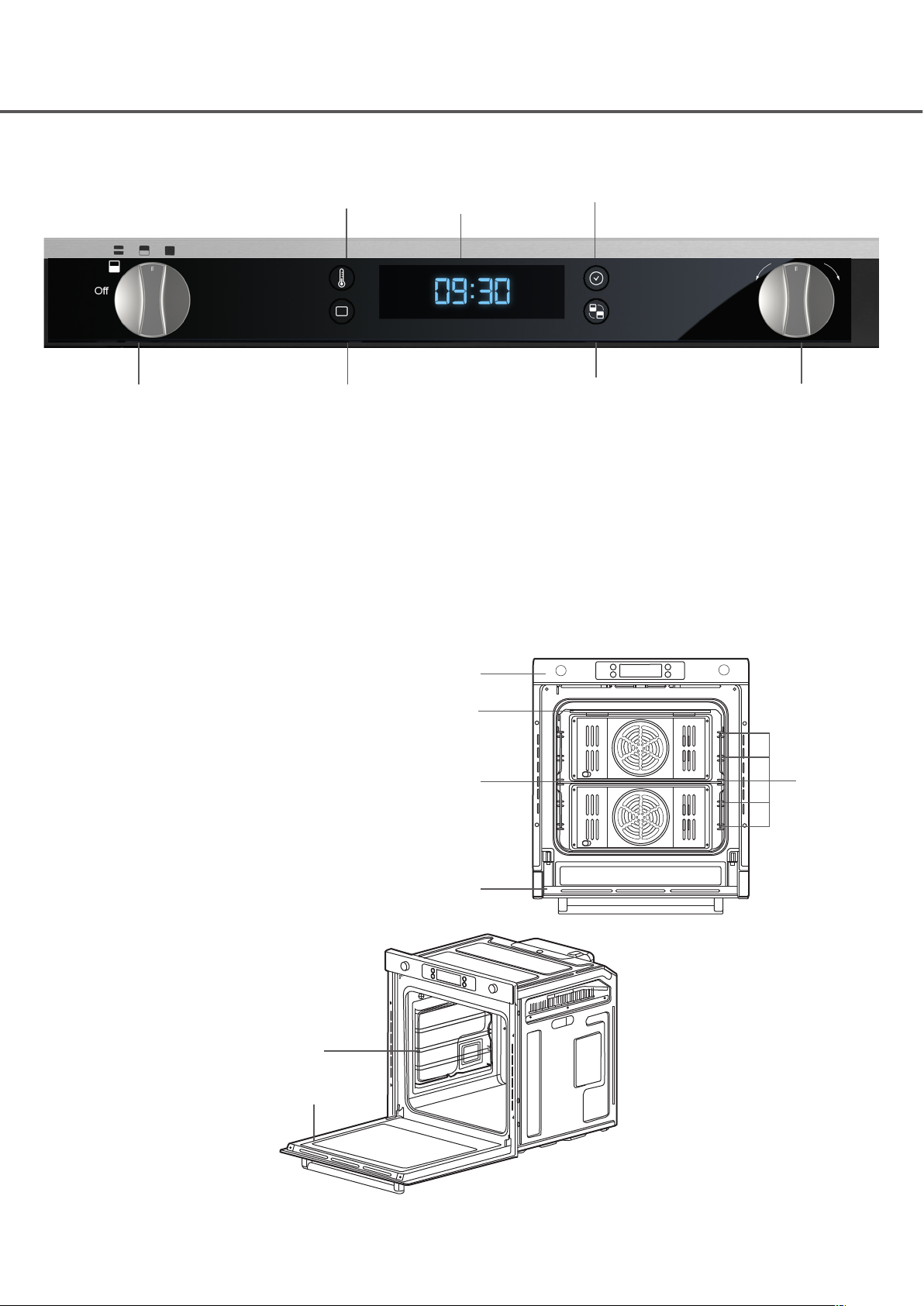
YOUR OVEN
A. ON/OFF and cooking zone selection dial
B. Temperature button
C. Function button
D. Display
E. Time button
F. Twin zone - active zone selection
G. Time/temp/function control dial
YOUR CONTROL PANEL
A
D
a. Control panel
b. Top heating/grill element
c. Oven cavity divider
d. Glass door
e. Shelf guide levels 1-5
f. Shelf guides
YOUR OVEN
B
C
E
FG
a
b
c
d
e
f
d
AMFTZ60SS

6
FIRST USE/SETTING UP YOUR OVEN
We recommend that you read the instructions in this owner’s manual carefully before use for the best performance and to
extend the life of your appliance, as it will provide you with all the instructions you require to ensure its safe installation,
use and maintenance. Always keep this owner’s manual close to hand since you may need to refer to it in the future.
Thank you.
SETTING THE CLOCK
When the appliance is switched on for the rst time, the
display on the control panel will light briey and 0:00 will
begin blinking in the display. The oven cannot be operated
until the clock is set.
To set the clock you need to rst set the hour “0:” then
the minutes “:00”. This is done by turning the Time/
Temp/Function (G) dial left or right to set the hours then
pressing the Time (E) button to select the minutes in the
same way.
CLEANING THE OVEN FOR THE FIRST TIME
Before using the oven for the rst time we recommend
that you operate the oven at the convection setting at
200°C for 1 hour before using. There will be a distinctive
odour from the oven, this is normal. Ensure your kitchen is
well ventilated during this period.
PRODUCT FUNCTIONS
USING THE DIVIDER
This oven comes equipped with an oven cavity divider
which divides the oven cavity into two separated cooking
zones enabling independent cooking. This function only
operates when the cavity divider is in the central position
(level 3).
This feature gives great exibility, enhancing energy
efciency and is convenient to use.
Divider Oven function Insert divider Usage information
Upper zone
True fan
Top heat +convectional
Large grill
Yes This zone saves energy and time when
cooking small amounts of food
Lower zone True fan
Bottom heat +convectional Yes This zone saves energy and time when
cooking small amounts of food
Single zone
True fan
Top heat +convectional
Conventional
Large grill
Small grill
Bottom heat = true fan
Defrosting
No
Twin zone Both upper and lower zone
function Yes You can cook two dishes at two different
temperatures at the same time
SETTING THE ZONE SELECTION
For upper, twin and lower zones, select the “OFF” position
before inserting the divider in the central position, level 3
of shelf guides. For single zone, remove the divider when
“OFF” position is selected. Then turn the Zone selection
dial (A) to single mode. Press the Function button (C) and
hold for about 3 seconds. Turn the Time/Temp/Function
(G) dial to select the desired oven function. If after 3
seconds there are no further adjustments, the oven will
begin automatically.
AMFTZ60SS

7
FIRST USE/SETTING UP YOUR OVEN
UPPER ZONE
The divider should be inserted.
True fan Top heat + true fan Large grill
LOWER ZONE
The divider should be inserted.
True fan Bottom heat + true fan
SINGLE ZONE
The divider should NOT be inserted.
True fan Top heat + true fan Large grill
Large grill Small grill Bottom heat + true fan
Defrosting
AMFTZ60SS

8
FIRST USE/SETTING UP YOUR OVEN
TWIN ZONE
The divider should be inserted in the central position
(level 3).
The upper and lower zones can operate at the same time
and It is possible to set which zone activates rst using the
programmer.
True fan in both Top heat + true fan in both Top & bottom heat + true fan i n b o t h
Bottom heat + true fan in both Small/large grill in top & bottom
heat + true fan in bottom
Small/large grill in top & true fan
in bottom
AMFTZ60SS

9
DAILY OPERATION OF YOUR OVEN
This twin zone oven can give you two separate cooking
zones giving you exibility and control . It is an extremely
versatile appliance that allows you to choose easily and
safely between different cooking modes.
SETTING THE TEMPERATURE
Select the required zone (see page 6).
LOWER, UPPER AND SINGLE ZONE TEMPERATURE
SETTING
Press the Temperature button (B) and hold for about 2
seconds and the temperature will ash in the display.
Turn the Time/Temp/Function dial (G) left or right to
adjust the temperature in increments of + or - 5°C to the
desired setting.
Single zone 40°C - 250°C
Upper zone 40°C - 250°C
Lower zone 40°C - 250°C
NOTE!
You can adjust the temperature during cooking in any of
the zones
TWIN ZONE TEMPERATURE SETTING
Press the Temperature button (B) and hold for about
2 seconds and the temperature will ash in the display
(upper or lower zone).
Turn the Time/Temp/Function dial (G) left or right to
adjust the temperature in increments of + or - 5°C to the
desired setting.
Press the Twin zone button (F) to change the zone and the
temperature will ash in the display (upper or lower zone).
Single zone 40°C - 250°C
Upper zone 40°C - 250°C
Lower zone 40°C - 250°C
DISPLAY ICONS
End
End time
icon
End
Locked icon
End End cooking
time
End
Kitchen
timer icon
SETTING END COOKING TIME
You can set an end cooking time once you have started
cooking. This will turn off the oven automatically after the
programmed time has elapsed. You will hear a audible
beep when it turns off.
LOWER, UPPER AND SINGLE ZONES
You have already started cooking now press the Time
button (E) for 2 seconds and the end time “ 0:00 ” and the
end time icon will ash.
Turn the Time/Temp/Function dial (G) to set the end time
required.
EXAMPLE:
0:35 (thirty ve minutes)
Wait 3 seconds and the display will alternate between
temperature and time remaining.
The oven will continue to cook until the selected time has
elapsed.
TWIN ZONE
You can set a different end cooking time for each zone
Use the Twin zone button (F) to select the zone required
and then carry out the same operation as above.
The select the other zone using the Twin zone button (F)
and carry out the same operation.
Wait 3 seconds and the display will alternate between
temperature and time remaining.
The oven will continue to cook until the selected time has
elapsed.
SETTING DELAYED START COOKING
You can set the oven to turn on automatically when you
are out at a prescribed time so you can have something
cooked when you return.
LOWER, UPPER AND SINGLE ZONES ONLY
Select the appropriate cooking zone and set your cooking
temperature.
Press and hold Time button (E) for 2 seconds and end
time “ 0:00 ” and the end time icon will ash.
Turn the Time/Temp/Function dial (G) to set the cooking
time required.
AMFTZ60SS

10
DAILY OPERATION OF YOUR OVEN
EXAMPLE:
2:30 (two hours, thirty minutes)
Press the Time button (E) again within 3 seconds to set
the end cooking time.
Turn the Time/Temp/Function dial (G) to set the end
cooking time required.
EXAMPLE:
19:00 (7.00PM)
Wait 3 seconds and the everything is set and the oven will
turned off until cooking time is reached
Using the example above at 16:30 the oven will start
cooking for 2:30 (two hours, thirty minutes). Cooking will
stop at the end time of 19:00 (7.00pm).
SETTING KITCHEN TIMER
This only works when a cooking function is not selected.
Press and hold Time button (E) for 2 seconds and end
time ‘ 0:00 ‘ and the kitchen timer icon will ash.
Turn the Time/Temp/Function dial (G) to set the time
required.
EXAMPLE:
0:15 (fteen minutes)
Wait 3 seconds and the timer will start. Once time has
elapsed a beep will sound.
LOCK FUNCTION
This locks the touch control buttons on the display.
Press the Time button (E) and Twin zone button (F) at the
same time and hold for 1 second and the Locked icon will
appear in the display .
Press the Time button (E) and Twin zone button (F) at the
same time and hold for 3 seconds again to unlock.
OVEN OPERATIONAL SAFETY
SAFETY SHUT-OFF
If a cooking time is not entered, the oven will shut itself
off after a prescribed period of time indicated below.
Shut-off times for various temperature settings
Under 105°C 16 hours
From 105°C to 200°C 8 hours
From 200°C to 250°C 4 hours
This oven features a thermal shut-off system and if the
oven heats to abnormally high temperatures, the system
will shut off the power supply to the heating elements for
a period of time until the oven reaches a safe temperature.
COOLING FAN
During cooking, it is normal for the vent to release hot air
from the front of the oven.
The cooling fan will also continue to operate after the oven
has been in use. It will turn off when the internal oven
temperature has dropped to 110°C or after 22 minutes.
PRACTICAL COOKING ADVICE
The oven offers a wide range of alternatives which allow
you to cook any type of food in the best possible way.
With time you will learn to make the best use of this
versatile cooking appliance and the following directions are
only a guideline which may be varied according to your
own personal experience.
AMFTZ60SS
Table des matières
Autres manuels Apelson Four

Apelson
Apelson UBEMF610 Manuel utilisateur

Apelson
Apelson AMFTC72SS Manuel utilisateur

Apelson
Apelson UBMF60SS Manuel utilisateur

Apelson
Apelson UBMFTZ60SS Manuel utilisateur

Apelson
Apelson ART28735 Manuel

Apelson
Apelson AMF60SS Manuel utilisateur

Apelson
Apelson UBGMM60SS Manuel utilisateur

Apelson
Apelson UBMFTC90SS Manuel utilisateur

Apelson
Apelson UBAPY60SS Manuel utilisateur

Apelson
Apelson CAEFL60BK Manuel utilisateur