Aopos Anypos600 Manuel utilisateur

Anypos600 PointofService
Anypos600
User Manual
AOPOS SYSTEMS, S.A.

Anypos600 PointofService
Copyright
This publication, including all photographs, illustrations and software, is protected under
international copyright laws, with all rights reserved. Neither this manual, nor any of the
material contained herein, may be reproduced or transmitted in any form without express
written authorization from AOPOS.
Disclaimer
The information in this document is subject to change without notice. The manufacturer makes
no representations or warranties with respect to the contents hereof and specifically disclaims
any implied warranties of merchantability or fitness for any particular purpose. The
manufacturer reserves the right to revise this publication and to make changes from time to
time in the content hereof without obligation of the manufacturer to notify any person of such
revision or changes.
Trademark Acknowledgments
AOPOS SYSTEMS, S.A. All rights reserved.
Other product names mentioned herein may be trademarks or registered trademarks of their
respective companies. AOPOS claims no interest in trademarks other than its own.

Anypos600 PointofService
Federal Communications Commission (FCC)
This equipment has been tested and found to comply with the limits for a Class A digital
device, pursuant to Part 15 of the FCC Rules. These limits are designed to provide reasonable
protection against harmful interference in a residential installation. This equipment generates,
uses, and can radiate radio frequency energy and, if not installed and used in accordance with
the instructions, may cause harmful interference to radio communications. However, there is
no guarantee that interference will not occur in a particular installation. If this equipment does
cause harmful interference to radio or television reception, which can be determined by turning
the equipment off and on, the user is encouraged to try to correct the interference by one or
more of the following measures:
• Reorient or relocate the receiving antenna.
• Increase the separation between the equipment and the receiver.
• Connect the equipment onto an outlet on a circuit different from that to which the receiver is
connected.
• Consult the dealer or an experienced radio/TV technician for help.
Shielded interconnect cables and a shielded AC power cable must be employed with this
equipment to ensure compliance with the pertinent RF emission limits governing this device.
Changes or modifications not expressly approved by the system's manufacturer could void the
user's authority to operate the equipment.

Anypos600 PointofService
Safety information
Before installing and using the Anypos, take note of the following precautions:
Read all instructions carefully.
Do not place the unit on an unstable surface, cart, or stand.
Do not block the slots and opening on the unit, which are provided for ventilation.
Do not push objects in the ventilation slots as they may touch high voltage components
and result in shock and damage to the components.
Only use the power source indicated on the marking label. If you are not sure, contact
your dealer or the Power Company.
The unit uses a three-wire ground cable, which is equipped with a third pin to ground the
unit and prevent electric shock. Do not defeat the purpose of this pin. If your outlet does
not support this kind of plug, contact your electrician to replace your obsolete outlet.
Do not place anything on the power cord. Place the power cord where it will not be in
the way of foot traffic.
Follow all warnings and cautions in this manual and on the unit case.
When replacing parts, ensure that your service technician uses parts specified by the
manufacturer.
Avoid using the system near water, in direct sunlight, or near a heating device.

Anypos600 PointofService
TABLE OF CONTENTS
Chapter 1 INTRODUCTION…..................................................................1
About the Product………………………………………………...………1
Specification………………………………………….…………………..1
Unpacking the Anypos……………..………………………………...3
Checking the packaging list………………………………………………3
Identifying Components………………………………………………….4
Removing the bottom cover…………………………………………..….6
Attaching the customer display…………………………………………..6
Attaching the second monitor……………………………………………7
Adjusting display angles………………………………………………….8
Connecting peripheral devices………………………………………..…..8
Powering the Anypos on and off……………………………………..9
Chapter 2 BIOS SETUP UTILITY……..................................................10
Entering the Setup Utility……………………………………………….10
BIOS navigation keys………………………………….………………..10
Using BIOS………………………………………………………...……10
Chapter 3 DRIVER INSTALLATION…................................................14
About Installation………………………………...……………………..14
Software Description………………………………………..…………..14
Driver Installation……………………………………………….………14
Chapter 4 SYSTEM TESTING…............................................................17
About Testing………………………………...…………………………17
CHECK…………………………………..……………………………..17
Setup the Touchscreen…………………………………………………..18
Chapter 5 TROUBLESHOOTING…......................................................22
The Power-On Self Test………………………………...………………22
General Problems………………………………………………………..23
Having the Anypos Serviced………………………………..…...….24
Chapter 6 SERVICE AND MAINTENANCE.........................................25

Anypos600 PointofService
CHAPTER 1
INTRODUCTION
Welcome
Thank you for purchasing our powerful Anypos!
With this manual is to help you operate and maintain the Anypos.
AbouttheProduct
Anypos is an innovational design from Point of Sale terminals and Kiosk with over decade of
market experience and product development capability, A full range of functions are designed,
developed and produced to meet the requirements of department store, supermarket,
hypermarket, convenient store, boutique shops, restaurants, theaters, railway, metro, school,
and government projects.
Specification
CPU Intel Celeron M CPU
Memory 512 MB DDR SDRAM ( up to 1GB)
Graphics On Board
HDD 2.5 inch, 60GB
Display Screen 15 inch TFT LCD,1024*768 pixels
Power Supply 180W Internal ATX or External DC adapter
Audio On Board , two-channel AC’97Codec
TouchScreen(Option) 5 wires resistive / surface wave(SAW) touchscreen
Modem(Option) PCI interface
Customer Display(Option) Vacuum Fluorescent Display (VFD) 2*20
10.4’’ or 15’’ TFT LCD Monitor
CDROM(Option) Slot Load COMBO
IC Card Reader(Option)Smart Card or RF Card
Barcode Scanner(Option)Embedded multi-lines laser scanner
( omnidirectional scanning)
MSR(Option)3 tracks,ISO7811/7812
WLAN(Option)ISO802.11b/g
Mobile communication
module(Option)Internal GPRS Module
1

Anypos600 PointofService
USB 4
Serial port 4 (with 5V/12V)
Parallel port 1
KB/MS port 1/1
LAN port 10/100 Base-T
VGA port 1
Audio jacks 1
Cash drawer port 1(share)
Back
Panel
I/O
Ports
Modem port(RJ11) 1(share)
Dimension (mm) 370(l) X 280(w) X 340(h) max
Weight (standard) 8.5 Kg
NOTE:
1. The specification may be different depending on configurations and types.
2. Please refer to the relational documents about the options.
2

Anypos600 PointofService
UnpackingtheAnypos
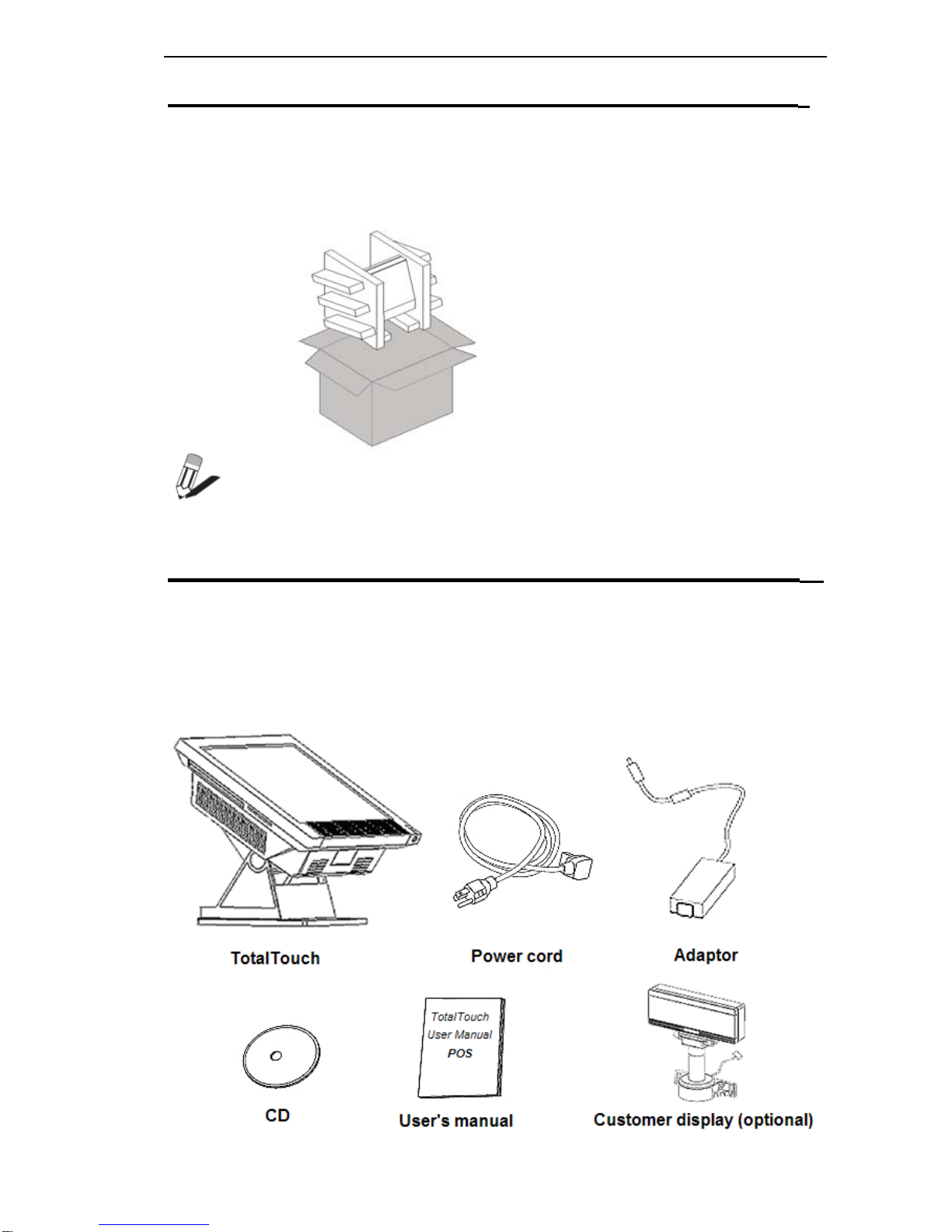
The Anypos and cable accessories are packed in a cardboard carton with foam padding for
protection during shipping.
Carefully unpack the Anypos as the picture below.
NOTE:
Please keep the packing materials if you need to ship the Anypos in the future.
Checkingthepackaginglist
Anypos can be fixed in Base Mounting or Wall Mounting. After you unpack the Anypos,
check that the following items are included. If any item is missing or appears damaged, contact
your dealer immediately.
Base Mounting
3

Anypos600 PointofService
IdentifyingComponents
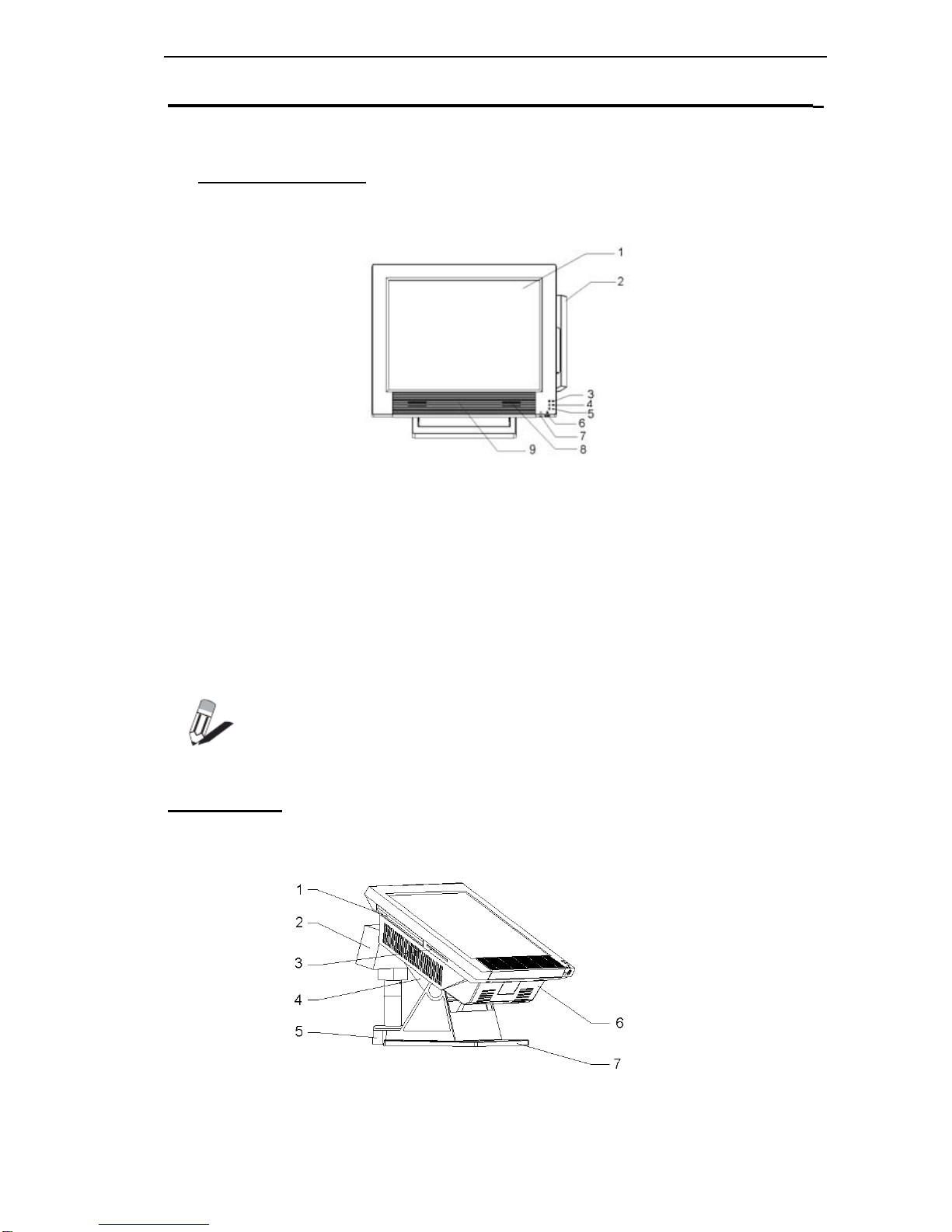
This section describes the parts and connectors on the Anypos.
Front-right view
DESCRIPTION
115-inch TFT LCD and touch screen
2Magnet Stripe Reader ( MSR )
3Power LED
4HDD LED
5IC Card LED
6Power button
7Front Line-Out jack
8Speaker
9RF card reader antenna
NOTE
:
When you use front Line-Out jack, no voise will be out from the speakers.
Right view
4

Anypos600 PointofService
DESCRIPTION
1COMBO CDROM
2Customer Display
3IC Card Reader
4Rear Cover
5Customer Display Base
6Bottom Cover
7Base
Bottom Panel Ports
(Anypos616)
DESCRIPTION
5
1 PS2
mouse port
2 Parallel port (LPT)
3 DC +12V Output +12V
4 Modem or cash drawer port (RJ11) DK
5 10/100 NIC port1&2
6 Customer Display port (COM4) CD
7 PS2 keyboard port
8 COM2
9 COM1
10 VGA port
11 COM3
12 USB 1&2&3&4
Line-out
13 Microphone
Table des matières
Autres manuels Aopos Terminal tactile
Manuels Terminal tactile populaires d'autres marques

Wincor Nixdorf
Wincor Nixdorf iPOS plus Advanced Manuel utilisateur

Ingenico
Ingenico AXIUM EX4000 Manuel utilisateur

Heisei Electronics
Heisei Electronics Q-POS 815 Manuel utilisateur

Amano
Amano MTX-15 Manuel utilisateur

FLOWBIRD
FLOWBIRD CWT Compact Touch Manuel utilisateur

Demco
Demco SP7 Manuel utilisateur