
Allway PL10 Feuille d'instructions
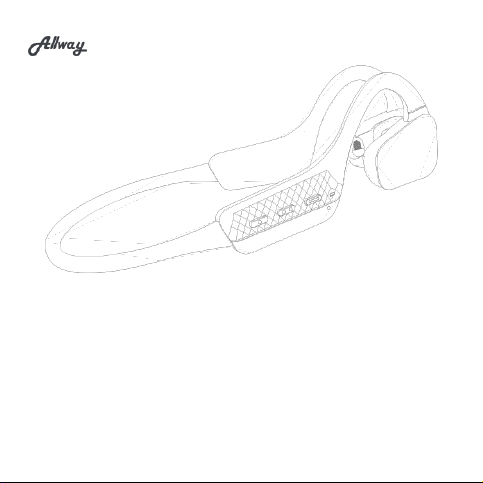
Open wireless earphone
PL10 Product Instructions
Please read this instructions carefully and keep them properly

①Packaging list:
1.PL10 x 1 2.Type-c Cable x 1 3.User manual x 1
②Configuration
Specifications are laboratory test data.
*Playback times are from laboratory tests using the SBC format at 60% volume level and are subject to
variation in equipment settings, environment, usage and many other factors
Product name:Open wireless earphone
Earphone Model:PL10
Product size:141.6*103.8*40.6mm
Distance: >10m
Bluetooth Version: BT5.3
Speaker Diameter: 16.2mm
Impedance: 16Ω
Frequency Response: 20HZ-20KHZ
Frequency Band: 2.402GHZ-2.480GHZ
Battery: 110mAH/3.7V
Charging time:1.5h
Usage time:8h
Standby time:30h
Input: 5V⎓0.5A
Type of charge: Type-C
Material:PC+ABC
Number of connections:2
Weight: 27g
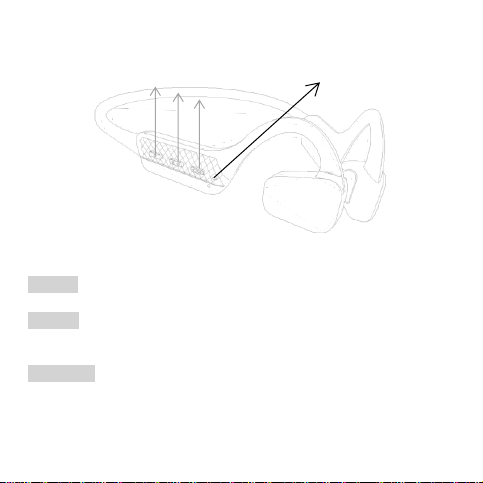
③Operation instruction
Instructions for use
Power on
Hold down the function button for 2s
Power off
Automatic switch-off when charging。
Hold down the function button for 5s。
Enter pairing
When there is no pairing, the headphone automatically enters pairing after power on.
After pairing, the device is automatically connected.
Enters pairing when disconnected from the device.
When the connection fails and times out, the headphone will automatically enter pairing.
VOL-
VOL+
Function Button
Led

When switched off, press and press the multi-function button for 5 seconds to put the
headphone into forced pairing.
Reset operation
When the multi-function key and the volume - key are pressed simultaneously
for 5 seconds, the factory settings are restored and the Bluetooth pairing
record is cleared.
Multi-device connection
PL10 supports multi-device connection, if you need to connect two devices at
the same time, just search and add "PL10" to the Bluetooth list of the other
device.
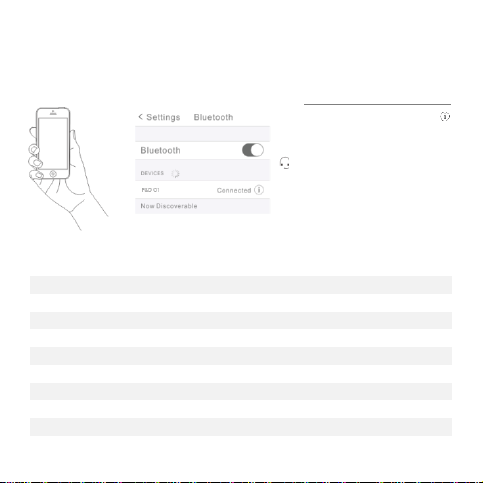
④Bluetooth Pairing
Step1 - Turn on Bluetooth for your device
Step2 - Select "PL10" to connect
⑤Operation Instructions
Play/Pause
Short press on the multi-function key
Next song
Press the volume + key for 2s
Previous song
Press the volume - key for 2s
Answer
Click on the multi-function key
Hang up
Click the multi-function key
Refuse to answer
Press the multi-function key for 2s
Vol+
Press the vol- + key
Vol-
Press the vol- key
Outdoor mode/Indoor mode
Press the multi-function key for 2s
Voice Control
Press the multi-function key twice
Select "PL10"
Device Pairing
When the device is
connected to the earbuds,
the phone shows the earbuds
battery level.

⑥Light Description
Functions
Led status
Power on
Blue light flashes 3 times
Power off
Red light flashes 3 times and then goes out
Pairing status
Red and blue lights flash alternately
Power level
Red light flashes once every 3s
Charging in progress
Red light is always on
Fully charged
Red light off, blue light on for 30s and then off
Restore factory settings
Red and blue lights on and off at the same time for 3s

Safety Information
1. Never disassemble the headphones. There are no user-serviceable parts
inside,
2. Do not expose the headphones to temperatures below 32 F(0 ℃) or to
temperatures above 113°F(45°C).
3.Do not use the headphones in a thunderstorm storm. This could prevent the
headphones from working properly, and also increase your chance of being
electrically shocked.
4. Do not use oil or any volatile liquid to clean this product.
5.Do not listen at high volumes for extended periods of time.
6. Do not use the headphones in traffic.
7.Do not use the headphones any time it would be dangerous to be unaware of
noises around you.
Allway (1) Year Limited Warranty
Allway warrants to the original retail purchaser that this product is to be free
from defective materials and workmanship for a period of one year from the date
of purchase, if it is properly used and maintained. If this product proves defective
in either material or workmanship, Allway, at its option, will (a) repair the product,
or (b) replace the product, at no charge for parts or labor. If the product model is
no longer available and cannot be repaired effectively or replaced with an
identical model, Allway at its sole option may replace the unit with a current

model of equal or greater value. In some cases, modification to the mounting
surface may be required where a new model is substituted. Allway assumes no
responsibility or liability for such modification. To obtain a repair or replacement
under the terms of this warranty, please return to dealer first, if possible, and the
dealer will direct you accordingly for repairs or replacement. You will be required
to submit a copy of the original receipt.
Return shipping for exchanges/repairs is the sole responsibility of the original
retail purchaser,
Limitations:
This limited warranty does not cover failure of the product resulting from
improper installation, misuse, abuse, accident, neglect, mishandling, or wear
from ordinary use or environmental deterioration.
This limited warranty does not cover cosmetic damage, including paint damage,
or consequential damage to other components or premises which may result
for any reason from the failure of the product.
This limited warranty is null and void for products not used in accordance with
Allway's instructions.

FCC NOTE:
This equipment has been tested and found to comply with the limits for a Class B digital device,
pursuant to part 15 of the FCC Rules. These limits are designed to provide reasonable
protection against harmful interference in a residential installation. This equipment generates
uses and can radiate radio frequency energy and, if not installed and used in accordance with
the instructions, may cause harmful interference to radio communications. However, there is
no guarantee that interference will not occur in a particular installation. If this equipment does
cause harmful interference to radio or television reception, which can be determined by
turning the equipment off and on, the user is encouraged to try to correct the interference by
one or more of the following measures:
- Reorient or relocate the receiving antenna.
- Increase the separation between the equipment and receiver.
-Connect the equipment into an outlet on a circuit different from that to which the receiver is
connected.
-Consult the dealer or an experienced radio/TV technician for help
Changes or modifications not expressly approved by the party responsible for
compliance could void the user's authority to operate the equipment.
This device complies with Part 15 of the FCC Rules. Operation is subject to the following two
conditions:
(1) this device may not cause harmful interference, and
(2) this device must accept any interference received, including interference that may cause
undesired operation.
开放式无线耳机
PL10 产品手册
请仔细阅读本说明书并妥善保管
Table des matières
Langues :
Autres manuels Allway Casque audio


