
Advanced Kiosks Multipurpose Kiosk Manuel de la liste des pièces

Important:
Read this whole manual
before assembling
Owners Manual for
Multipurpose Kiosk with
Wi-Fi, Camera, QR
Reader, NFC, and Printer.
AK-MP-OM-11/14/2019
Engage Interact Satisfy

11/14/2019
Multipurpose Kiosk Assembly and Operation Instructions
www.advancedkiosks.com
2
Table of Contents
INTRODUCTION .....................................................................................................................................................................3
PRODUCT DESCRIPTION...........................................................................................................................................................3
PRECAUTIONS..........................................................................................................................................................................3
OUR SUPPORT..........................................................................................................................................................................4
INSTALLATION.......................................................................................................................................................................5
MOUNTING THE KIOSK ............................................................................................................................................................5
Floor Mounting..................................................................................................................................................................5
Wall Mounting....................................................................................................................................................................6
SETUP AND OPERATION......................................................................................................................................................9
BASIC SETUP............................................................................................................................................................................9
Before Powering On the Kiosk...........................................................................................................................................9
Startup................................................................................................................................................................................9
Back Up Your Information...............................................................................................................................................11
Adjusting Speaker Volume ...............................................................................................................................................11
PERIPHERALS.........................................................................................................................................................................12
Thermal Receipt Printer...................................................................................................................................................12
Near Field Communication Reader .................................................................................................................................12
Integrated Camera ...........................................................................................................................................................13
SPECIFICATIONS .................................................................................................................................................................14
COMPUTER.............................................................................................................................................................................14
Mini-ITX Main board.......................................................................................................................................................14
Monitor.............................................................................................................................................................................14
Power Requirements ........................................................................................................................................................15
General Dimensional Information ...................................................................................................................................15
Equipment Manuals .........................................................................................................................................................16
SOLVING PROBLEMS..............................................................................................................................................................17
Troubleshooting Tips........................................................................................................................................................17
MAINTENANCE OF KIOSK ................................................................................................................................................18
CLEANING AND MAINTENANCE .............................................................................................................................................18
Touch Screen....................................................................................................................................................................18
Painted Enclosure Cleaning and Maintenance................................................................................................................18
WARRANTY ...........................................................................................................................................................................19
POLICY ..................................................................................................................................................................................19
Limited Warranty .............................................................................................................................................................19
Returned Item...................................................................................................................................................................19
Shipping ...........................................................................................................................................................................19

11/14/2019
Multipurpose Kiosk Assembly and Operation Instructions
www.advancedkiosks.com
3
Introduction
Product Description
The Multipurpose Kiosk’s features include a 32" touch screen monitor, Stereo Speakers, Wi-Fi, Camera,
QR Reader, NFC, Thermal Receipt Printer, and an all steel enclosure for sturdy and trouble-free use.
The Kiosk is powered by an Intel i5 Processor, 4 GB of Ram, and a 120 Gb SSD. The Multipurpose
Kiosk operates on Windows 10.
Precautions
•Do not assemble the kiosk until all the directions have been read and
understood.
•For Safety, bolt the kiosk to the ground if in a high-traffic area, or
mount to the wall.
•Do not plug in the power until all the directions have been read and the kiosk is fully assembled.
•Do not use kiosk with an extension cord that does not have grounding.
•The Multipurpose Kiosk has been designed for indoor use only. Outdoor use to the Multipurpose
kiosk may result in damage to the kiosk, or injury to persons.
•If you have any questions on how to install this kiosk please call us at 603-865-1000 x110, or

11/14/2019
Multipurpose Kiosk Assembly and Operation Instructions
www.advancedkiosks.com
4
Our Support
The Multipurpose Kiosk is a reasonably priced, high quality kiosk. We are happy to help you with any
problems after you have read the manuals to learn about this product. Advanced Kiosks will support you
in ownership as long as you own your kiosk, within reason. Selling or giving it to another company or
person will void any and all support and warranty. There are a few prerequisites:
•The person assembling and installing the kiosk must be familiar with setting up computers,
printers, monitors and must be able to read and follow directions.
•You have to read and follow the directions in this document as well as the directions for the
touch screen monitor and the computer. These documents are included with your equipment or
may be on the computer as a PDF. We strongly suggest you read these documents, so that you
can get the full value of this kiosk.
•The following are questions we can not answer:
oNetwork questions. This is not part of our equipment and we do not know your
network, so we can not help you here.
oVirus questions - this is also part of your network/software.
oElectrical wiring of your building or location.
For other questions, visit the knowledge base, or the support tab on our website:
https://advancedkiosks.com/knowledgebase/
https://advancedkiosks.com/about-advanced-kiosks/kiosk-support/
Taxes
All products from Advanced Kiosks are made and shipped from New Hampshire. New Hampshire has
no sales tax. If it is a required for anyone who is purchasing one of our products to pay taxes to another
state, this is the responsibility of the person or organization purchasing from us.
11/14/2019
Multipurpose Kiosk Assembly and Operation Instructions
www.advancedkiosks.com
5
Installation
Mounting the Kiosk
Floor Mounting
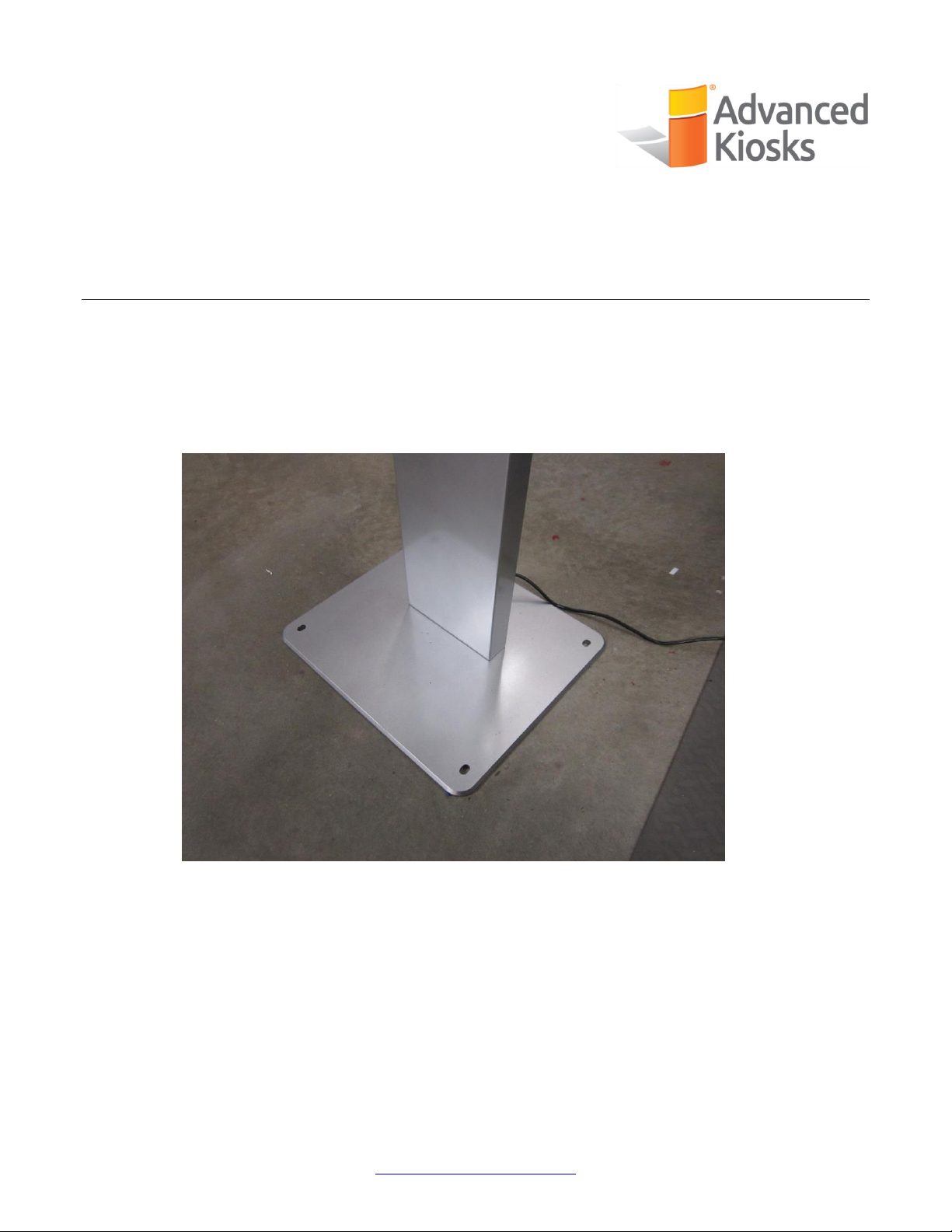
The Multipurpose Kiosk is designed to be free-standing with the attached base and stand. If you are in
high traffic areas though, the kiosk should be mounted to the floor through the 4 holes on the corners of
the base. The 4 holes should each use 3/8”or equivalent mounting hardware, depending on what you are
mounting the kiosk on top of.
Kiosk Base with Mounting Holes

11/14/2019
Multipurpose Kiosk Assembly and Operation Instructions
www.advancedkiosks.com
6
Mounting Screws
Wall Mounting
The kiosk can be mounted to the wall using the supplied mounting brackets. The steps will be laid out
below:
1. Use the 6 provided screws to attach the wall brackets to the back of the kiosk.
2. Attach the provided wall bracket to the wall using anchor holds. Use 1 Anchor hold in each hole
and be sure to use the correct size. The holes are about 3/8”in diameter.
We recommend mounting the top 2 holes at a height of 54 inches off the ground. The bottom 2
holes are 4 ¼” below those.
Anchor Hold Sizes in Different Wall Materials Provided Wall Mount on Table

11/14/2019
Multipurpose Kiosk Assembly and Operation Instructions
www.advancedkiosks.com
7
Mounting Tabs
Mounting Holes
3. Take off the retention plate on the top back of the stand by removing the 4 screws.
Back Retention Plate on the Stand Plate Removed
4. Use 2 people to remove the kiosk from the stand by lifting up and out. This will show the 4 holes
in the stand where the kiosk mounts to, as well as the tabs that go into those holes.
4 Mounting Holes on the Stand, and the 4 Tabs

11/14/2019
Multipurpose Kiosk Assembly and Operation Instructions
www.advancedkiosks.com
8
5. Lift the kiosk to the wall mount and place the mounts in the slots by lifting up over the top of the
wall mount and sliding over the lip. Use a 3 inch long, 5 mm bolt, and screw through the outside
of the wall mount into the kiosk mounts. This will create a stable lock for the kiosk, and finalize
your wall mounting.
DISCLAIMER: We did not mount the kiosk to the wall for clarity of the mounting assembly.
Showing How the Brackets Fit Together
Brackets Screwed Together for a Secure Fit to the Wall

11/14/2019
Multipurpose Kiosk Assembly and Operation Instructions
www.advancedkiosks.com
9
Setup and Operation
Basic Setup
The kiosk is shipped with a full, standard installation of Windows 10 Professional.
Before Powering On the Kiosk
Verify that the required cables are plugged in (it’s possible for cables to become loose or unplugged
during shipping).
Plug the kiosk into a standard 110v wall outlet from the cable coming out the bottom of the stand.
Take care that the power cord is managed so that it will not catch someone walking by.
Refer to the Quick Start Guide included with every kiosk for more information. You can find this and all
kiosk documents at:
https://advancedkiosks.com/about-advanced-kiosks/product-documentation/
Startup
The first time that the Kiosk is plugged in, and the power button is pushed, the monitor should
automatically turn on. The power button and the other ports are located behind the bottom of the
monitor.

Table des matières
Autres manuels Advanced Kiosks Terminal tactile


Manuels Terminal tactile populaires d'autres marques

Wincor Nixdorf
Wincor Nixdorf iPOS plus Advanced Manuel utilisateur

Ingenico
Ingenico AXIUM EX4000 Manuel utilisateur

Heisei Electronics
Heisei Electronics Q-POS 815 Manuel utilisateur

Amano
Amano MTX-15 Manuel utilisateur

FLOWBIRD
FLOWBIRD CWT Compact Touch Manuel utilisateur

Demco
Demco SP7 Manuel utilisateur


