Page 6Manual SVA alarm dialler | Back to Index
Adesys B.V. | Wateringen
The use of a ‘Prepaid’ SIM card for dialling purposes is strongly discouraged. The mobile network cannot
automatically request the call credit, which means that this can be run down without anyone noticing,
resultinginoutgoingnoticationscomingtoastandstill.
2.4. Antenna
Connect the antenna cable to the SVA’s antenna connection. The antenna plus associated cable can be
obtainedfromAdésys.Theantennashouldbeaxedtoashighapointaspossibletoobtainthebest
possible range.
Afterinstallation,alwayschecktheeldstrengthoftheantennasignal(max.is5ashesoftheyellow
‘network’LED).Noticationofchangesinsignalstrengthwillalwaystakeplaceafteralongdelay(±30
seconds).Takethisintoaccountif,forexample,theantennaismoved.
2.5. Power supply
2.5.1. SV-20mainsadapterandSV-19DINrailpowersupply
TopowertheSVA,a230VAC/24VDCmainsadapterwitharticlenumberSV-20ora100-240VAC/24VDC
DINrailmountingpowersupplywitharticleSV-19canbeorderedasanoptionviathewebshop.
Whenttingtheterminalblocktothepowersupplycable,ensurethatthepolarityplus(+)andminus(-)is
correct.
Anextrapowersupplyfuseisnotnecessaryhere.
IftheSVAisnotsuppliedwithpowerusingtheabove-mentionedmainsadapterorDINrailpowersupply,
the connection regulations in the section below apply.
2.5.2. Power supply
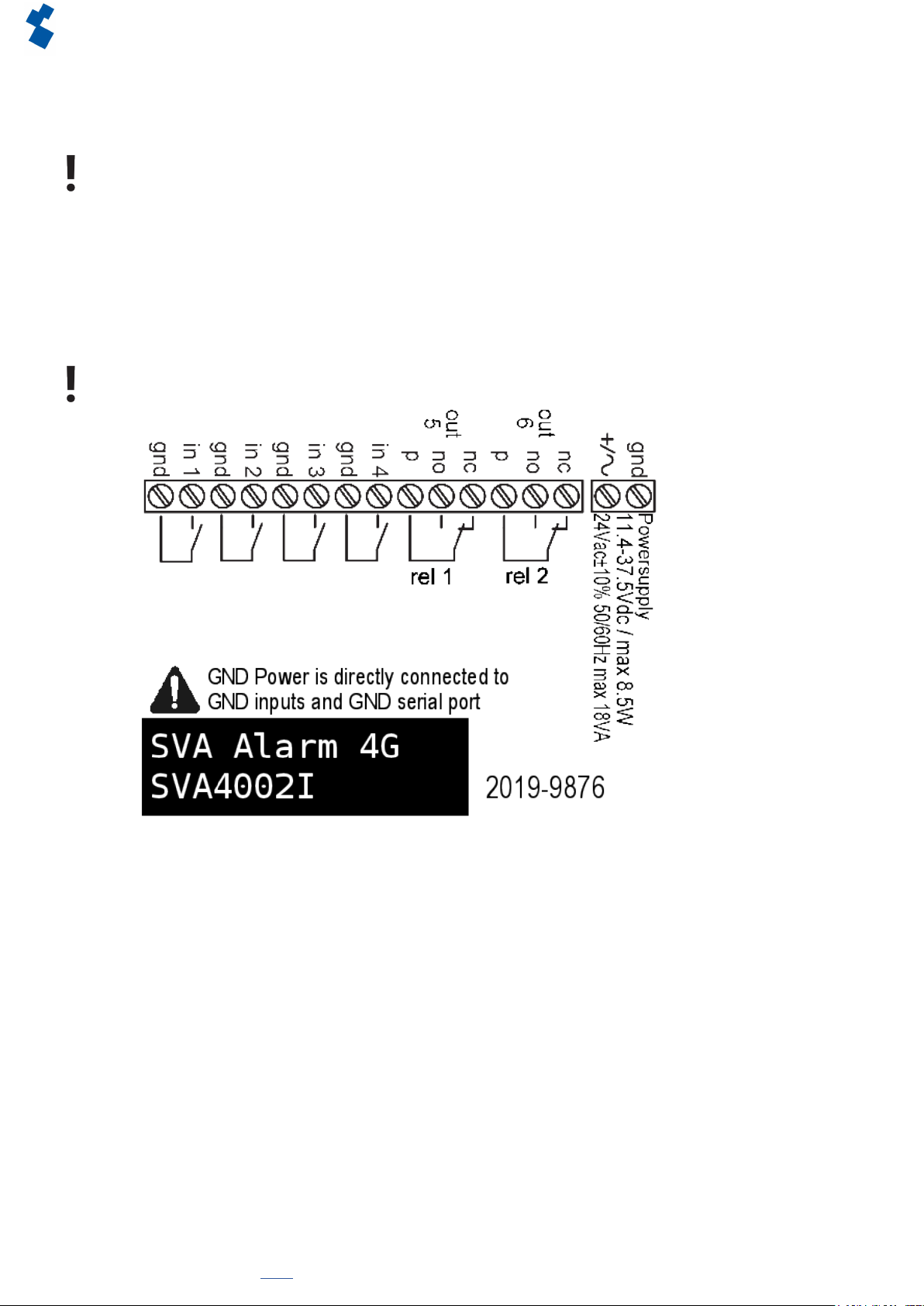
ConnecttheSVAtoaDCpowersupplyof15to35VDC(atleast8.5W)oratransformerof20to30VAC.
ThepowersupplyinputoftheSVAisnotgalvanicallyisolatedfromtheotherconnections.TheGND
connectionofthepowersupplyconnectorisdirectlyconnectedinternallytotheGNDconnectionofthe
input connector and the COM port.
If the SVA is connected to an application (process controller, PLC, computer, active sensor, etc.) without
galvanic isolation and the SVA is connected to the same power supply, there is a real chance of earth loops
and/or short circuits in this power supply.
2.6. Reset key
Theresetkeyhasfourfunctions:rstofall,itisusedtointerruptthealarm.Pressingthisbrieyendsthe
currentnotication;theSMSmessagesthathavenotyetbeensentarenotsent.
A second function of the reset key is to restart the dialler. The dialler can be restarted by holding this key
down for a period of 8 seconds. This only occurs if a power supply is connected.
Ifnopowersupplyisconnected,theresetkeyfunctionsasanobutton.Holdingthekeydownfora
periodof8secondsswitchesothedialler.
Statuses of inputs will not be stored in a permanent memory. If the supply voltage fails, and the built-in
supercap is entirely discharged, the contents of this memory is lost. If the SVA is restarted manually, this
status will also be reset. When the supply voltage is restored, the SVA behaves as if it is being started up
forthersttime.Thismeansthat:
• After the supply voltage has been restored, only active inputs are reported once again;
• No recovery message will be sent if the status of the input has been recovered during this power failure.
The fourth functionality is for when there is something wrong and there seem to be no connection. By
pushingtheresetkeyforadurationof3seconds,releasingit3secondsanddoingthis3timestheDHCP
willbeenabled.ByenablingtheDHCPitispossibletomakechangeswithSV-prog.
2.7. Ethernet
TheEthernetconnectioncanbeusedforanexternalconnection.ThisissetupintheSVA:seechapter“3.
SV-prog”. By default this is set up to connect to Checkmyproces.com.