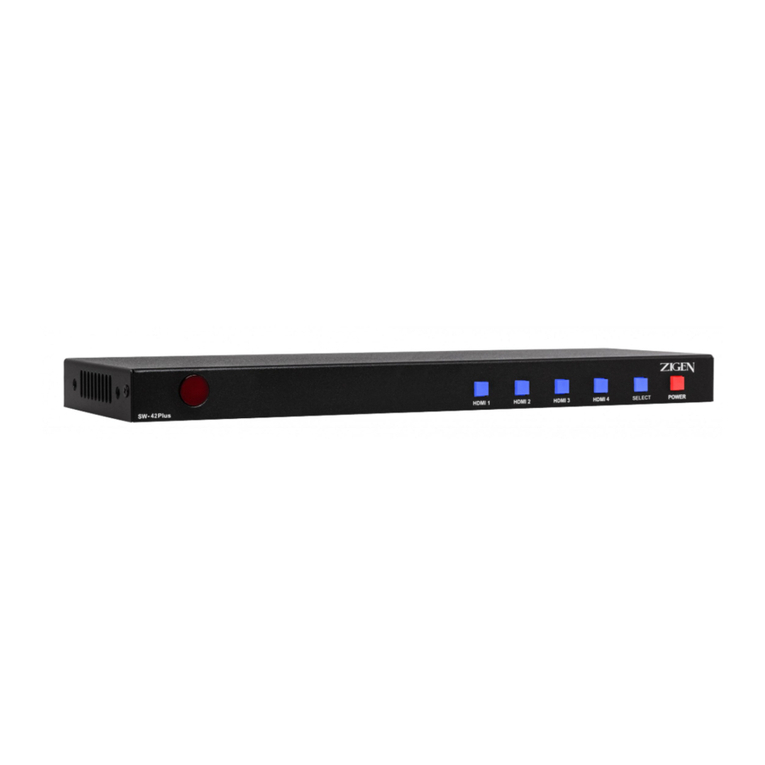
Zigen ZIG-SW41 Manuel utilisateur

! ! !
!
zigencorp.com Toll Free: 877-650-5252
International: +1 818-654-5252
Zigen HDMI 2.0 UHD 600 MHz 4x1
Switch w/HDCP 2.2 & WebOS
ZIG-SW41
USER MANUAL Ver. 1.0

! !!
!
2"
ZIG&SW41"USER"MANUAL!
!
Table of Contents
Copyright and Trademark 3
Introduction 4
Package Contents 4
Features 4
Specifications 5
Block Diagram 7
General Operation 8
Dip Switch Settings 8
Remote Control 10
WebOS 11
Command Syntax 14
Commands 14
Warranty 16

! ! !
!
zigencorp.com Toll Free: 877-650-5252
International: +1 818-654-5252
Copyright and Trademarks:
All rights reserved by ZIGEN, INC. No part of this document may be reproduced
in any form or by any means without written permission from the product
manufacturer. Changes are periodically made to the information in this
document. They will be incorporated in subsequent editions. The product
manufacturer may make improvements and /or changes in the product described
in this document at any time.
All the registered trademarks referred to this manual are belonging to their
respective companies.
Before You Begin
Follow all instructions marked on the device during using.
Do not attempt to maintain the device by yourself, any faults, please contact your
vendor.
!Provide proper ventilation and air circulation and do not use near water.
!It is better to keep it in a dry environment.
!The system should be installed indoor only.
!Only use the power cord supplied with the device.
!Do not use liquid or aerosol cleaners to clean the device.
!Always unplug the power to the device before cleaning.
!Unplug the power cord during lightning or after a prolonged period of
non-use to avoid damage to the equipment.

! !!
!
4"
ZIG&SW41"USER"MANUAL!
!
Introduction
HDMI 2.0 / HDCP 2.2 / 600 MHz HDMI switch designed for switching in home
and commercial environments where switching of high-bandwidth UHD (2160P60
4:4:4) content is required . The SW41-UHD features 4 HDMI 2.0(a) Inputs and 1
HDMI 2.0(a) output, digital audio de-embedding of active channel and an
Ethernet port and WebOS for setup, switching, EDID management, firmware
updates and remote reset. Additionally, the SW41-UHD is controllable via IR,
RS-232 and Ethernet.
Typical Applications:
•Classrooms, Boardrooms, Conference rooms for switching UHD content
sources via multiple control options (3rd party controllers, WebOS, simple
remote or front panel buttons)
•High-end home theaters for showing UHD 2.0 content with HDCP 2.2
copy protection
!
Package Contents
•1 x ZIG-SW41
•1 x 12V/2.5A DC Power Supply
•IEC USA AC Cord 3’
•Remote Control
•1 x User Manual
Features
•HDMI 2.0 (600 MHz UHD) on all ports.
•WebOS Interface
•Supports digital video formats up to 4K UHD (2160P60 @4:4:4 pixel
format)
•Advanced EDID management.
•Supports uncompressed PCM 2- Ch., 5.1, 7.1, Dolby Digital, DTS, Dolby
TrueHD, DTS HD-Master Audio and more.
•Built in IR sensor plus 3.5mm jack and remote control
•Bi-directional RS-232 – Control switch or integrate 3rd party control.
•SPDIF for audio de-embedding

! ! !
!
zigencorp.com Toll Free: 877-650-5252
International: +1 818-654-5252
Specifications
Video Bandwidth
18 GBPS
Video Resolutions
All SMPTE & VESA in HDMI 2.0 Specification. Max SMPTE UHD -
4096x2160P60/RGB/4:4:4
Color Space
RGB, YUV
Color Bit Depth
8-bit, 10-bit, 12-bit & 16-bit per pixel
Note: Resolution and video bandwidth limited – ex. 2160P60 RGB or 4:4:4 8-bit
would use almost the entire 18 GBPS of bandwidth. 2160P60 4:2:2 10-bit (new
Blu Ray) would exceed the previous 10.2 GBPS maximum of HDMI 1.4a and
would not be able to travel over category cable using HDBaseT as of this writing.
Chroma Subsampling
4:4:4, 4:2:2, 4:2:0
See note above – chroma subsampling or color compression is related to bit
depth and video resolution settings with regard to total bandwidth requirements.
A 4K/60 signal at 4:4:4 chroma subsampling can have a maximum bit depth of 8
bits.
Audio
HDMI in & Out – Up to Dolby TrueHD and DTS-HD Master
SPDIF – Up to Dolby Digital & DTS 5.1
Audio Sampling Rates – Up to 1536 KHz

! !!
!
6"
ZIG&SW41"USER"MANUAL!
!
Distance - HDMI – Up to 5M @ 4K
HDCP - 2.2, 1.4 or None
CEC - Pass through
Connections
4 x HDMI type A HDMI Input
1 x HDMI type A HDMI Output
1 x SPDIF Digital Audio Output
1 x RJ45 LAN Port for TCP/IP Control
1 x 9-pin RS-232 port
1 x 3.5mm IR In Port
1 x IR Sensor (In)
1 x 12 VDC Locking Connector
Temperature – Operating 32-122 F (0-50 C), Humidity: 20-90% non-
condensing.
Dimensions
5.9 x 2.9 x .95 inches
150 x 74 x 24 millimeters
Weight
.67 pounds
303 grams
Certifications/Compliance
FCC, HDBaseT, CE, RoHS, HDCP, HDMI

! ! !
!
zigencorp.com Toll Free: 877-650-5252
International: +1 818-654-5252

! !!
!
8"
ZIG&SW41"USER"MANUAL!
!
Block Diagram – Zigen ZIG-SW41
General Operation
SW41 is the ultimate in high-bandwidth UHD switchers. With a full 600 MHz pixel
clock the SW41 support high bandwidth sources and displays. Additionally, the
SW41 supports HDCP 2.2 copy protection so you can be sure your customer is
able to view the latest 4K UHD content – either protected (movies) or computer
content (un-protected).
Basic connections are 4 HDMI 2.0 sources (or below) and one HDMI output to
the display or projector. The is a SPDIF port that de-embeds audio from the
currently selected input and routes it to your audio matrix or multi-zone amplifier.
Advanced EDID management is available through a combination of the 4-pin
dipswitch and WebOS. 15 EDID tables are available, plus you can load custom
EDID tables. Or, leave the SW41 in the default mode and it will pull the EDID
from the connected/selected display. By being able to manage the EDID and
HPD (Hot Plug Detection) you can speed up switching in mixed format systems.
Control the SW41 via the supplied remote control (IR – to built-in sensor or run
an IR receiver to the 3.5mm IR jack). You can also control the SW41 via 3rd party
control, RS-232, LAN (WebOS/Telnet), or via the input selector switch on the
front panel.
DIP Switch Settings
DIP 1: EDID
OFF (UP): As a default the downstream EDID is copied and used from output
port 1.
While DIP 1 is OFF (UP) DIP 2 & 3 are active as follows:
DIP 2: (OFF/UP) audio according to downstream capabilities
DIP 2: (ON/DOWN) audio is restricted to 2-channel regardless of downstream
EDID.
DIP 3: (OFF/UP) audio according to downstream capabilities.
DIP 3: (ON/DOWN) audio is modified for SPDIF maximum capabilities. This
ensures that the SPDIF output always outputs all SPDIF supported formats.
DIP 2 overrides DIP 3. If DIP 2 is down, stereo is selected.

! ! !
!
zigencorp.com Toll Free: 877-650-5252
International: +1 818-654-5252
While DIP 1 is ON (DOWN) the EDID is selected using the WebOS
WebOS has 15 EDID tables to select from (more to come) for various use cases
(see screen shot below). Additionally via the WebOS and custom EDID table can
be loaded into the device. This gives maximum flexibility as customers can load
any EDID they want for the desired application.
Screen Shot – EDID Tables in WebOS
Note: While DIP 1 is ON (DOWN), DIPs 2 and 3 are not used.
DIP 4: Hot Plug Force
UP (OFF) – Hot Plug Detection (HPD) is normal
DOWN (ON) – HPD is forced active. In this mode the DA14 does not process
HPD events from downstream to upstream (from the sink back to the source).

! !!
!
10"
ZIG&SW41"USER"MANUAL!
!
This speeds up the HDMI pipeline and can be very useful to avoid a looping
condition when multiple HDMI devices are connected in series.
ZIG-SW41 Remote Control – NEED TO INSERT
SW41 remote control can be used for switching between inputs and powering the
SW41 up or down.
Table des matières
Autres manuels Zigen Changer

Zigen
Zigen SW-41Plus Manuel utilisateur

Zigen
Zigen SW-41Plus Manuel utilisateur

Zigen
Zigen SW-42Plus Manuel utilisateur

Zigen
Zigen SW-41Plus Manuel utilisateur

Zigen
Zigen ZIG-POEWP-100TX Manuel utilisateur

Zigen
Zigen SW-42Plus Manuel utilisateur

Zigen
Zigen ZIG-SW42 Manuel utilisateur

Zigen
Zigen SW-42Plus Manuel utilisateur

Zigen
Zigen HAX-44/HDBT Manuel utilisateur