
YUGE CLP500 Manuel utilisateur

Product Name
CLP500 4G Routing Equipment User Manual
Number of Pages
27
Produce Version
V1.1
Date
2020/7/15
CLP500 4G Routing
Equipment User Manual
V1.1
Shanghai Yuge Information Technology Co., Ltd.

CLP500 4G Routing Equipment User Manual
Shanghai Yuge Information Technology co., LTD
- 2 -
Revise history
Version
Date
Author
Description
V1.0
2020/6/11
Document Group
Initial
V1.1
2020/7/15
Document Group
Synchronization software V2.3
Synchronous hardware V1.1
Add remote diagnosis function (only
applicable to Qualcomm platform module)

CLP500 4G Routing Equipment User Manual
Shanghai Yuge Information Technology co., LTD
- 3 -
Content
Chapter 1. Overview...............................................................................................................- 4 -
Chapter 2. WEBUI management system................................................................................- 6 -
2.1 Login........................................................................................................................ - 6 -
2.2 Home........................................................................................................................ - 7 -
2.3 Internet......................................................................................................................- 9 -
2.3.1 WAN...................................................................................................... - 9 -
2.3.2 LAN.......................................................................................................- 9 -
2.3.3 Mobile Net...........................................................................................- 10 -
2.3.4 Wi-Fi....................................................................................................- 11 -
2.3.5 Client................................................................................................... - 12 -
2.4 Firewall...................................................................................................................- 13 -
2.4.1 WIFI MAC filter..................................................................................- 13 -
2.4.2 Port Forward........................................................................................- 13 -
2.4.3 DMZ.................................................................................................... - 14 -
2.5 App......................................................................................................................... - 15 -
2.5.1 PING Net............................................................................................. - 15 -
2.5.2 Serial App............................................................................................ - 16 -
2.5.3 Auto Reboot.........................................................................................- 17 -
2.6 Admin..................................................................................................................... - 18 -
2.6.1 User Management................................................................................- 18 -
2.6.2 Time.....................................................................................................- 19 -
2.6.3 Telnet Service...................................................................................... - 19 -
2.6.4 Remote Diag........................................................................................- 20 -
2.6.5 Upgrade Management......................................................................... - 22 -
2.6.6 Reboot................................................................................................. - 26 -
CLP500 4G Routing Equipment User Manual
Shanghai Yuge Information Technology co., LTD
- 4 -
Chapter 1. Overview
CLP500 is a 4G routing terminal device that can be freely equipped with Qualcomm
MDM9x07 and ASR platform 4G wireless communication module. Support three network
ports, support dual WIFI antenna, support serial port transparent transmission function.
The WAN network port can be configured as a LAN port or a WAN port. By default, the IP
address is automatically assigned. After the network cable is inserted, the PC can use this
device to bring 4G network functions.
The device provides Wi-Fi AP function. The default name of the Wi-Fi SSID is the last four
digits of the 4G_AP_MAC address, and the default password is 12345678.
The default address of the device is 192.168.1.1, log in to the http://192.168.1.1 WEBUI
management page, you can make various settings, and the login account is admin:admin.
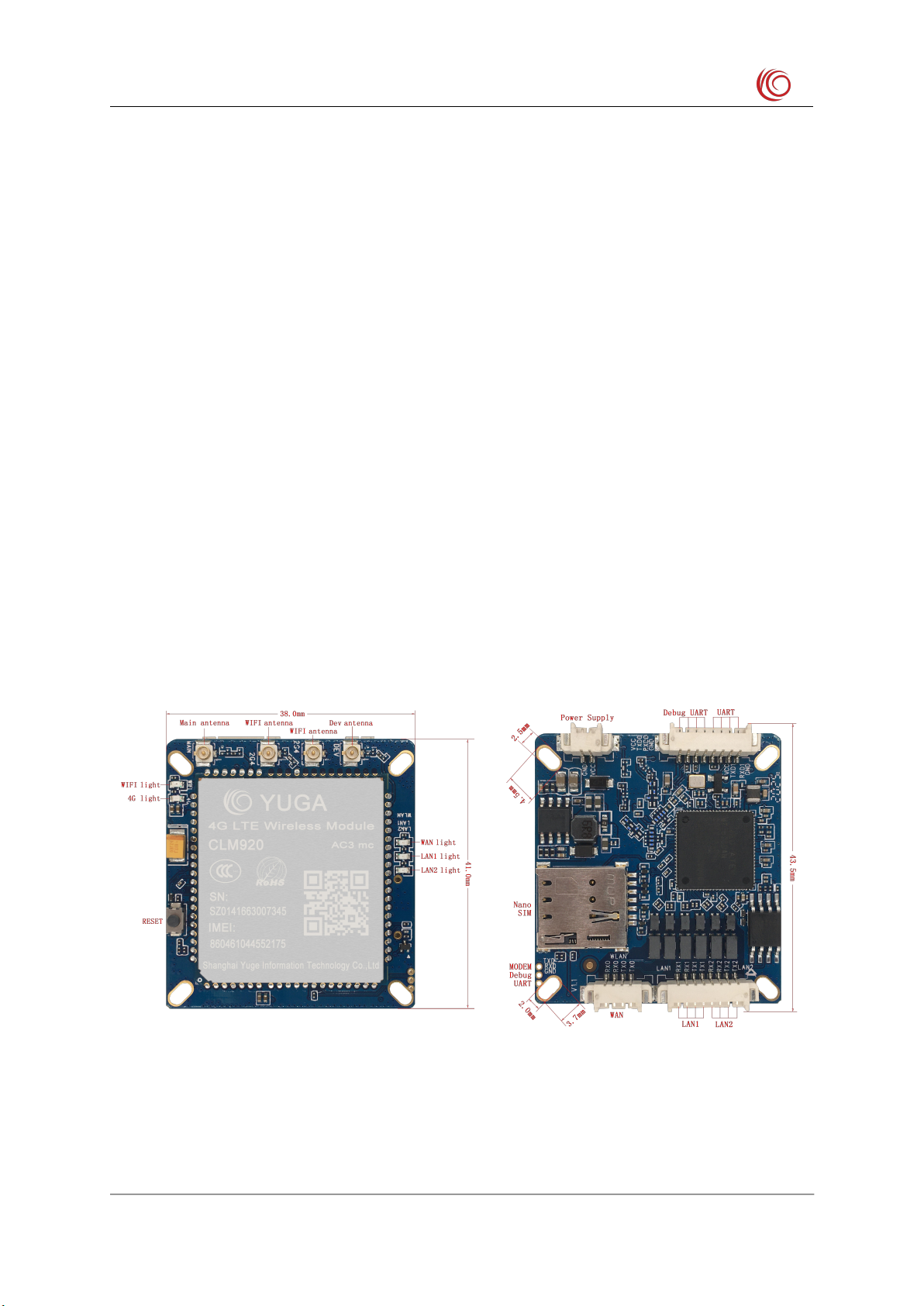
The following is the equipment diagram:
Note:
1) The DC power supply voltage range is 6V to 25V, it is recommended to use the matching
power adapter.

CLP500 4G Routing Equipment User Manual
Shanghai Yuge Information Technology co., LTD
- 5 -
2) Supports LTE network indicator, flashes when there is no card or registration, and always
lights up during normal registration.
3) Support WAN and LAN network port indicator and WiFi indicator.
4) WAN port can be configured as WAN or LAN function on the page.
5) Supports factory reset button.
6) Please clear the browsing history of the browser before using the WEBUI management
function.
CLP500 4G Routing Equipment User Manual
Shanghai Yuge Information Technology co., LTD
- 6 -
Chapter 2. WEBUI management system
The device's default settings can work, or you can modify the default settings through the
WEBUI management page. WEBUI management page supports Internet Explorer 11 and
higher, Firefox, Chrome, Safari and other mainstream browsers.
2.1 Login
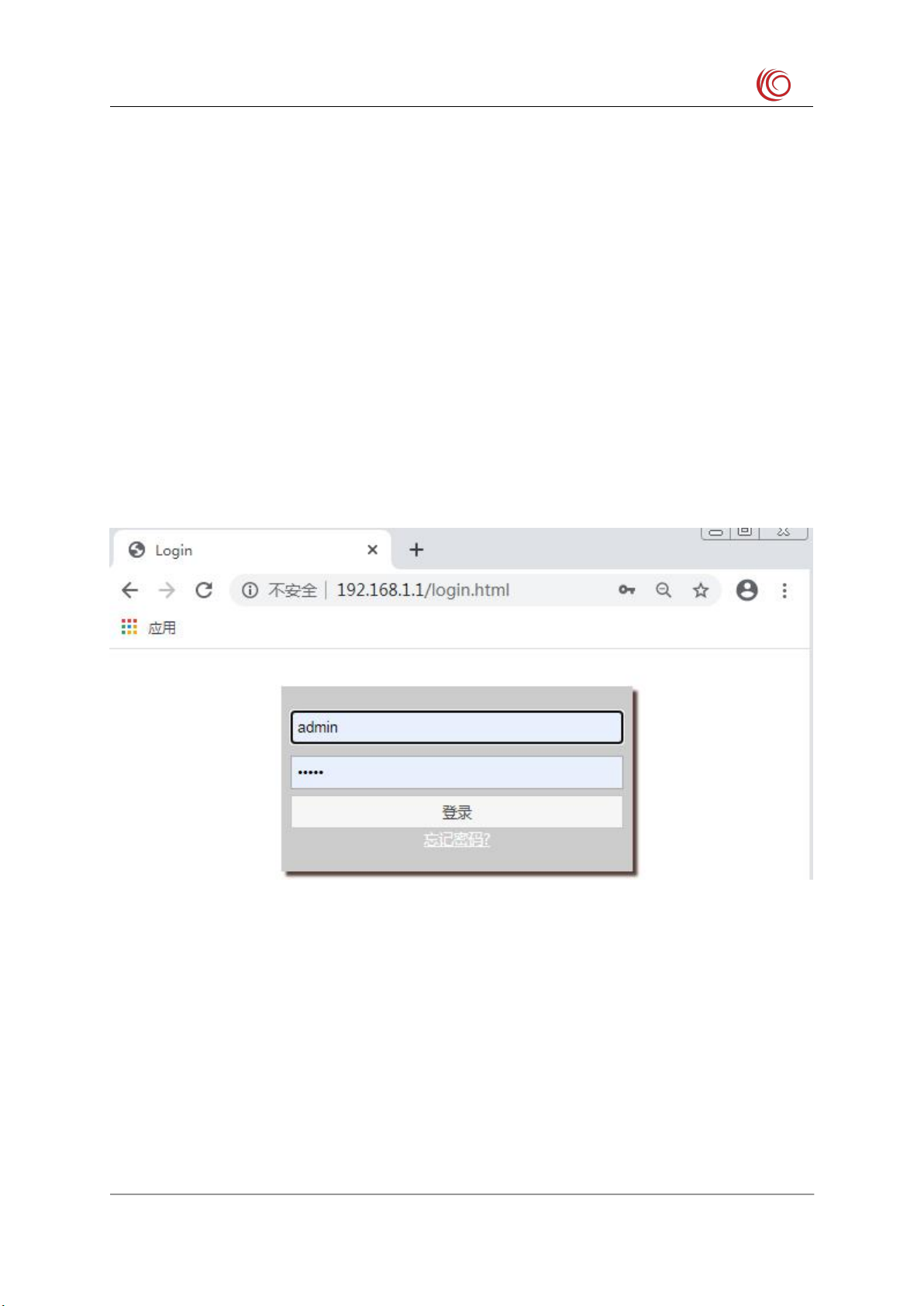
Open the browser, enter the address 192.168.1.1 and press Enter, the browser will display the
login interface of the web management system, enter the user name admin, password admin,
and click login to enter the management system.
Note:
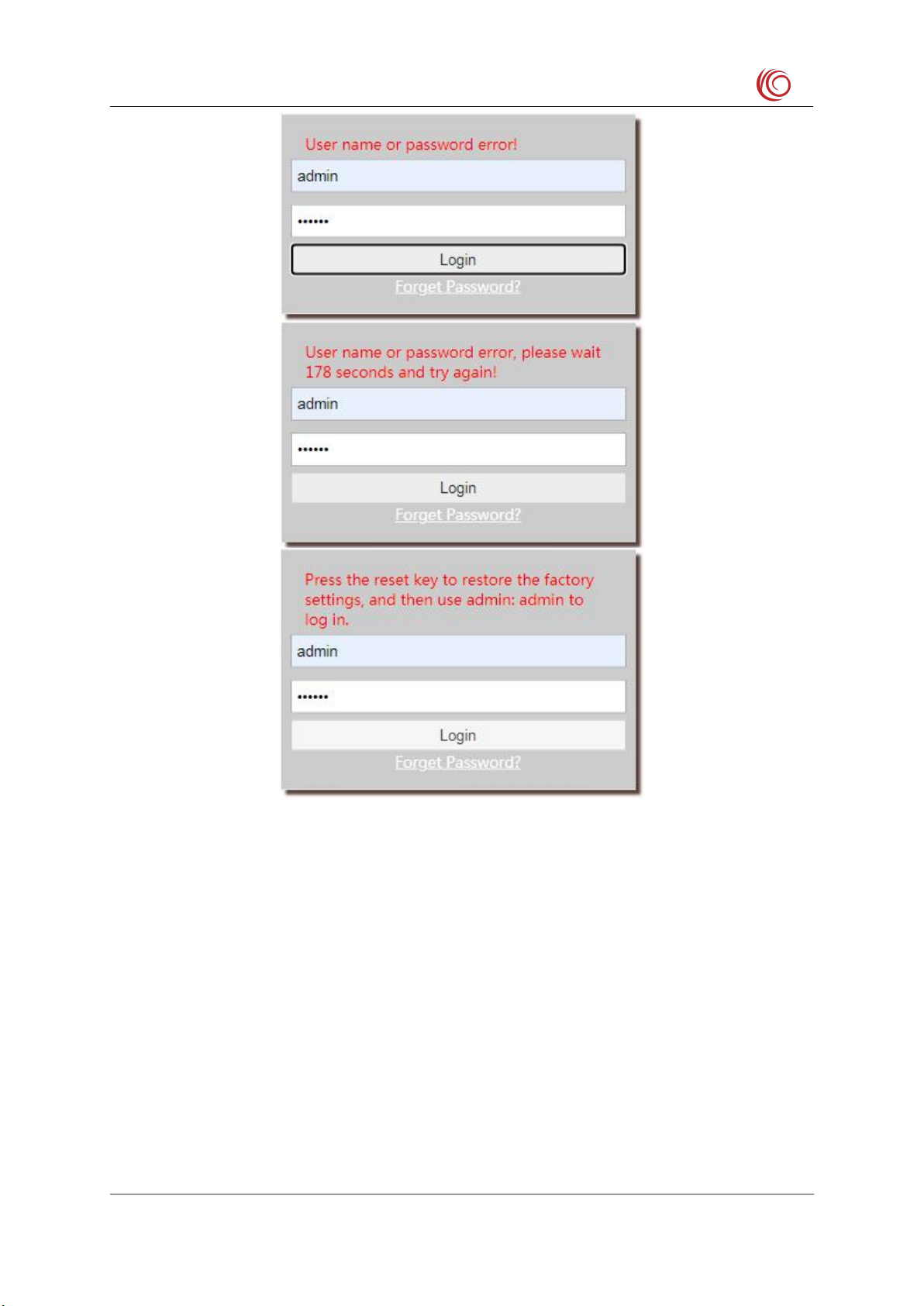
1) If you enter the wrong username/password three times in a row, the login function will be
locked. During the lock, you will not be able to log in to the web management system.
You can only try to enter the password again after the lock time has passed.
2) The default username/password is very simple. For security reasons, users should change
to a more secure username/password after logging in to the system. For how to modify
the user name/password, please refer to the “Admin” chapter.
3) If you have forgotten your password, you can click on the forgotten password to proceed
to the next step according to the prompts.
CLP500 4G Routing Equipment User Manual
Shanghai Yuge Information Technology co., LTD
- 7 -
2.2 Home
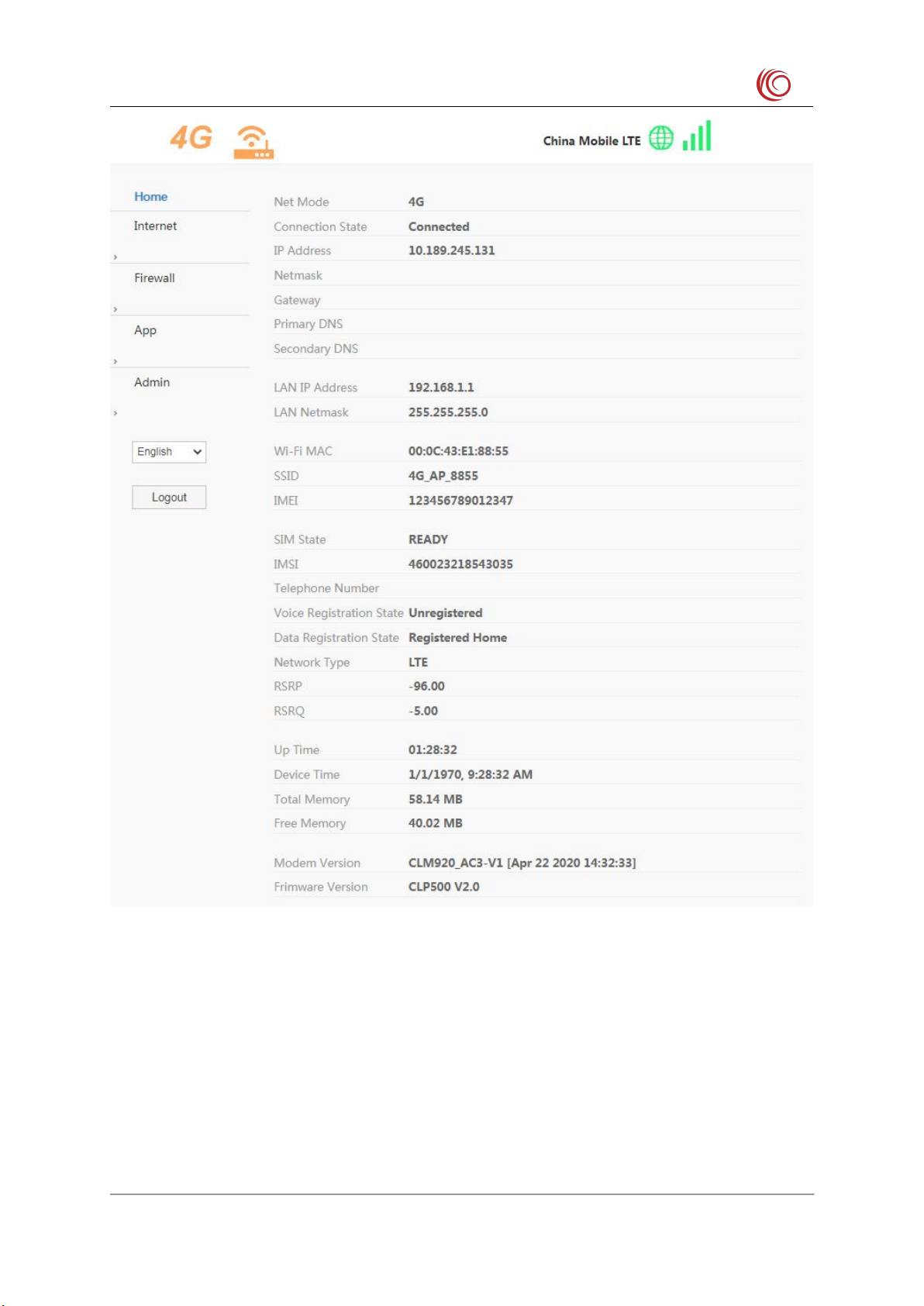
This page displays the current network mode, connection status, IP address, LAN related
information, WIFI related information, device IMEI and SIM card related information and
device information (such as system time, boot time, device version number, etc.). Display
current network status and related information (such as connected network type, signal
strength value, etc.).
CLP500 4G Routing Equipment User Manual
Shanghai Yuge Information Technology co., LTD
- 8 -
Note:
If there is no problem of registering the network or being unable to access the Internet, you
can check whether the connection status has been successfully connected. The device time on
this page shows that the network time cannot be synchronized. If you want to synchronize the
network time, you can modify the settings by referring to "Time " on the "Admin " page.
CLP500 4G Routing Equipment User Manual
Shanghai Yuge Information Technology co., LTD
- 9 -
2.3 Internet
2.3.1 WAN
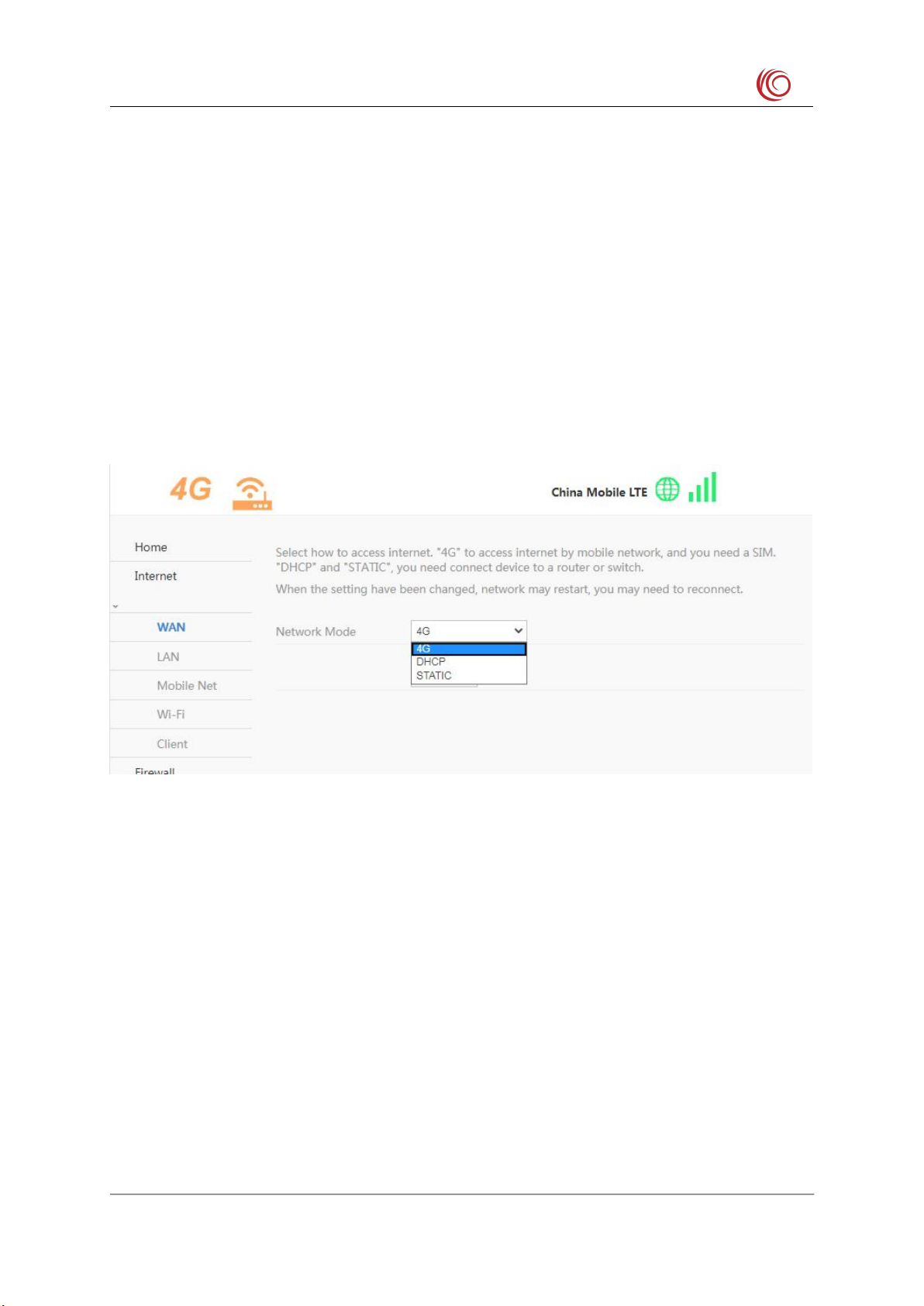
Select the network mode is to choose the way to go online.
4G mode: You need to insert a SIM card to go online.
DHCP mode: You can not insert a SIM card, but you need to insert the interface labeled
WAN into other routers or switches to automatically obtain an IP address for Internet access.
STATIC: Compared to the "DHCP" method, you also need to manually configure Internet
access information such as IP addresses.
The network mode needs to be reconnected after changing.
2.3.2 LAN
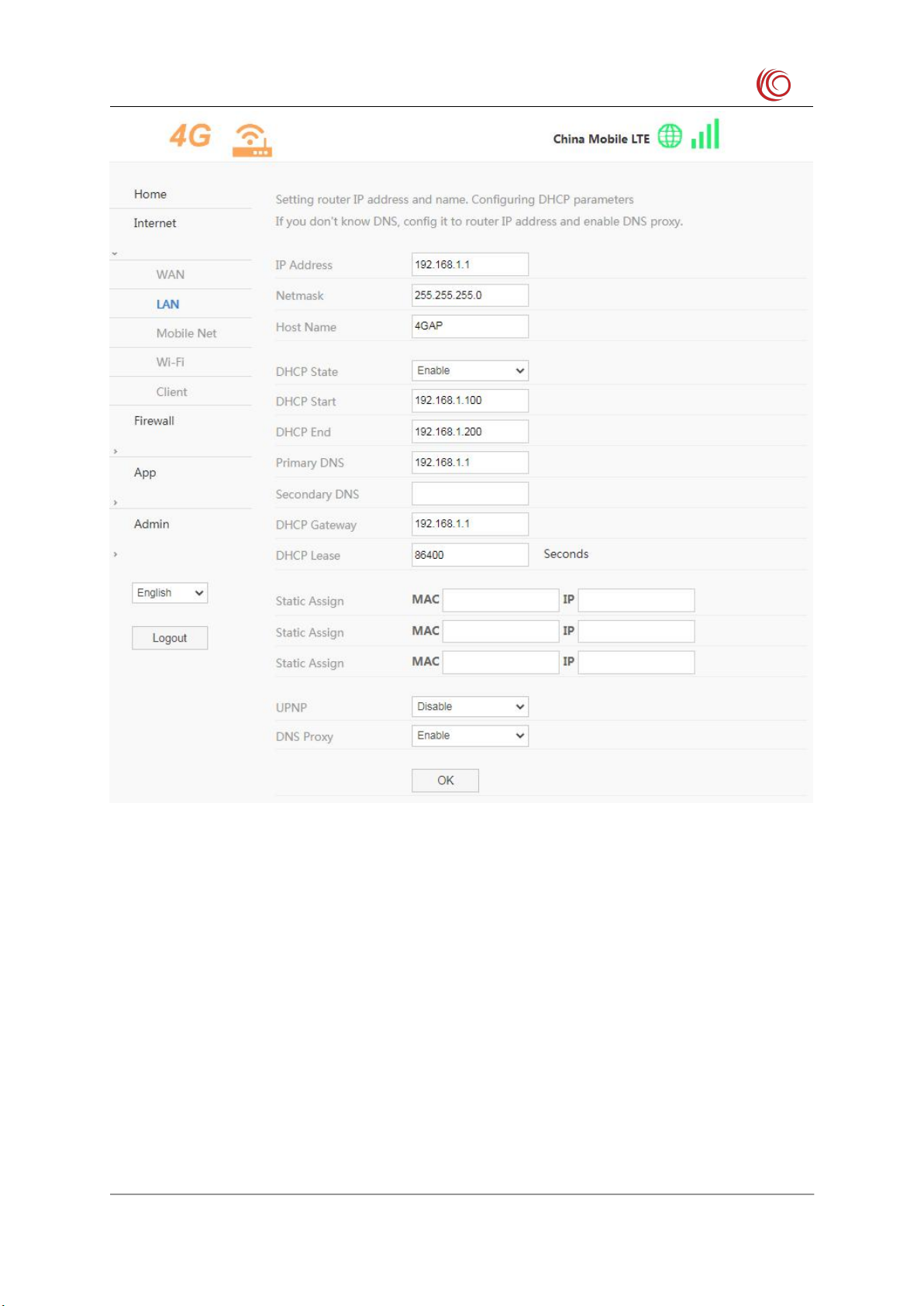
Configure the device IP address and device name, and configure the DHCP service
parameters. After modifying the settings, you need to reconnect to the network.
If you do not know what DNS to use, you can configure only the primary DNS as the device
IP address, leave the standby DNS blank, and enable the DNS proxy function.
Static IP address assignment function can assign fixed IP to the specified MAC address. Up to
3 designated MAC addresses can be assigned fixed IP.
CLP500 4G Routing Equipment User Manual
Shanghai Yuge Information Technology co., LTD
- 10 -
2.3.3 Mobile Net
This setting modifies 4G related parameters, such as modifying the network mode (LTE only,
GSM only, etc.). After setting to automatic mode, the device will automatically search for the
best network according to the SIM card, for example, the LTE network is searched first, the
WCDMA or EVDO network is searched second, and the GSM or CDMA 1x network is
searched last. It is recommended to keep this setting.
APN setting function, the device presets most operator APN related settings, APN is set to
automatically select the mode to automatically match. If the SIM card is special, it may not be
automatically matched. In this case, you can manually set the APN. If the APN is set
Table des matières
Manuels Routeur réseau populaires d'autres marques


NETGEAR
NETGEAR FS526T - Switch Manuel utilisateur

Korenix
Korenix JetNet 5710G Series Manuel utilisateur

Automated Logic
Automated Logic ZN551 Manuel du propriétaire

Cisco
Cisco ASR 1000 Series Manuel de l'opérateur

EnGenius
EnGenius ESR-9710 Manuel utilisateur

Cisco
Cisco 805 Series Instructions d'utilisation et de sécurité