
Yadea PREMIUM E-MOBILITY Manuel utilisateur

USER MANUAL V1.1
www.globalyadea.com

FOREWORD
Dear customers:
First of all, thank you for choosing to buy "YADEA" products.
This manual introduced the knowledge and maintenance methods of electric scooter,
please read the manual carefully to understand the scooter performance, characteristics,
attention tips and maintenance knowledge, give full play to the advantages of "YADEA"
electric scooter to ensure safe driving in the best driving state.
For effective protection of this scooter ,Please be sure to use "original parts for YADEA
products". If you have any questions, please contact our authorized service station or our company.
First maintenance time:one month after buy the scooter.
Next maintenance time:three months after last maintenance.
CONTENTS
General Notice
Precautions
Safety Notice
Parts Info
Operation Guide
Battery & charger Use and Maintenance
Maintenance and Repair
Troubleshooting List
Technical Parameters
Maintenance Record
··············································································································································· 3
············································································································································· 4
·················································································································································· 5
········································································································································· 8
········································································································· 19
····························································································································· 22
·································································································································· 26
································································································································ 28
································································································································· 34
············································································································································ 2

General Notice
Please read this User Manual carefully for proper operation before riding the scooter.
For your safety, please check whether the parts are in good condition according to this User
Manual before riding. Contact your dealer in time in case of any problems.
Please follow the traffic laws. Slow down on slippery roads in bad weather to allow
greater braking distance for your safety.
Please pay attention to deep water. It may cause rusting or failure of the motor,
battery or other parts if water level reaches wheel axle.
Do not dismantle the scooter on your own. Please contact your dealer for replacement
or purchase of original parts.
Do not lend your scooter to those who can’t operate a scooter for others' safety
and preventing unnecessary damage to your scooter.
Please keep this User Manual properly.
Precautions
Rider and Passenger
The is not designed for a ride of more than 2 persons.
Riding Conditions:The is not designed for off-road use.
This User Manual should be deemed as a permanent document of G5. If this scooter is transferred
to others, this User Manual should also be handed over to the new owner.
Reproduction or reprint of any part of this User Manual is strictly prohibited.
Warning: Failure to follow the instructions herein may lead to serious casualties.
Attention: Failure to follow the instructions herein may lead to personal injury or scooter damage.
2 3
Safety Notice
Using a safety helmet and protective goggles is strongly advised.
You are advised to take proper training or exercise before using on open roads.
Please follow the Operation Guide to fully understand how to properly operate the scooter.
It should be noted that the braking distance in bad weather will be much longer.
Please avoid braking on paint markers, manhole covers and oil stains to prevent slipping.
Pay extra attention when riding through railway crossings, junctions, tunnels, and bridges.
Slow down if road conditions are unclear.
Do not use high beam indiscriminately. Continuous use of high beam may disturb the vision
of the drivers and pedestrians.
Do not use mobile phones or other electronic devices which may draw your attention while riding.
Do not change the lane without signaling. Changing the lane at will is one of the major causes for accidents.
When you need to change the lane, remember to switch on the Turn Signal Indicator first. Always
check the vehicles approaching from behind before changing the lane.
Parts Info(G5/G5Pro/G5S)
4 5
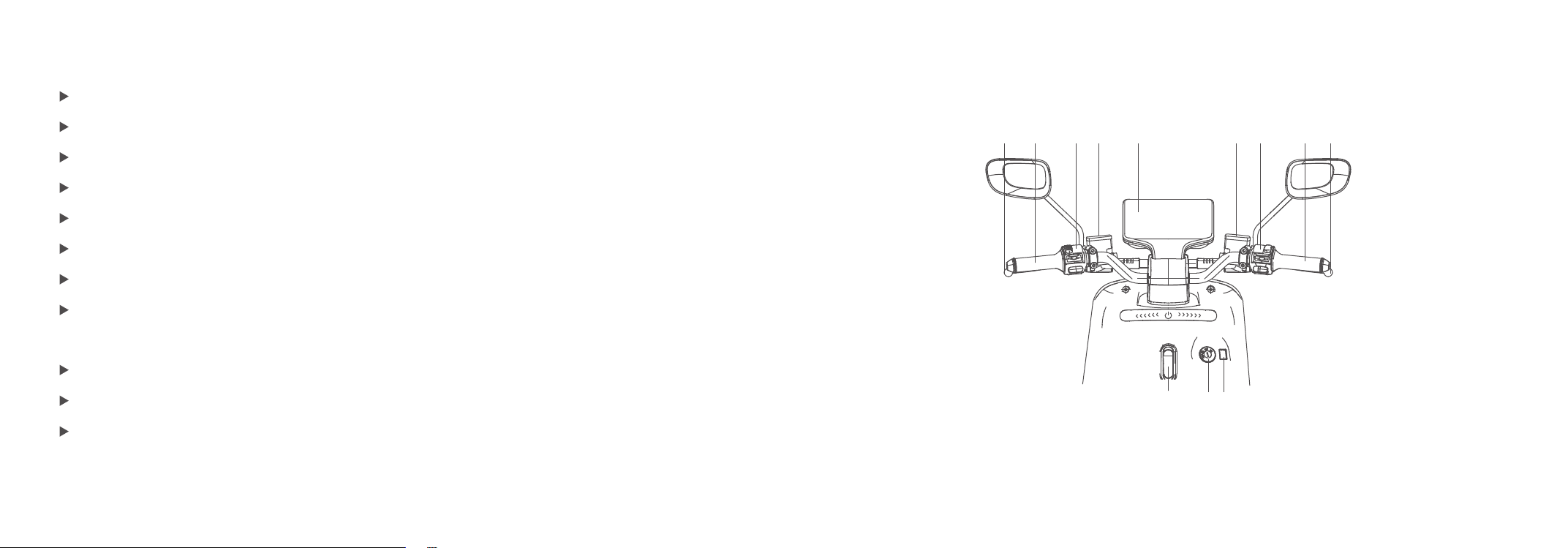
1.Left rear brake handle 2. Left handlebar 3. Left switch group 4. Left disc brake pump 5. Speedometer
6. Right disc brake pump 7. Right switch group 8. Throttle 9. Right front brake handle (upper part)
10.Hook 11. Power lock 12.USB charging hole (lower part)
1 2 3 4 5 6 7 8 9
10 11 12

Parts Info(G5Pro/G5S)Parts Info(G5)
6
1 2 3 4 5 6 7 8 9 10 11
1213141516171819202122
1.Front tire 2. Front fender 3. Headlight 4. LOGO light 5. Speedometer 6. Rear-view mirror 7. Batteries 8. Seat 9. Handrail
10. Taillight 11. Rear license light (upper part) 12. Side reflectors 13. Rear wheel 14. Motor 15. Rear absorbers 16. Main stand
17. Footrest 18. Charging hole 19. Side stand 20. VIN number 21. Front absorbers 22. Front wheel rim (lower part)
1.Front tire 2. Front fender 3. Headlight 4. LOGO light 5. Speedometer 6. Rear-view mirror 7. Batteries 8. Seat 9. Handrail
10. Taillight 11. Rear license light (upper part) 12. Side reflectors 13. Rear wheel 14. Motor 15. Rear absorbers 16. Main stand
17. Footrest 18. Charging hole 19. Side stand 20. VIN number 21. Front absorbers 22. Front wheel rim (lower part)
7
1213141516171819202122
1 2 3 4 5 6 7 8 9 10 11

Operation Guide
Dashboard Display Info (G5/G5Pro)
8 9
Operation Guide
Dashboard Display Info (G5S)
Ready for operation
GPS signal Bluetooth connection Message indication Telephone indication Battery power indication
Low battery indication
Driving current
Mileage displayCharging battery indication Speed display
Right turning light indicationLeft turning light indication
Motor failure indication Constant speed cruise Light failure indication Primary failure ECU failure indication
High beam indication Ready for operation
GPS signal Bluetooth connection Message indication Telephone indication Battery power indication
Low battery indication
Driving current Battery parallel connection
Mileage display
Charging battery indication Speed display
Right turning light indicationLeft turning light indication
Motor failure indication Constant speed cruise Light failure indication Primary failure ECU failure indication
High beam indication

Operation Guide
Power lock switch indication(G5S)
Operation Guide
Power lock switch indication(G5/G5pro)
10 11
OFF
ON
Seat lock
Lock hole
Push and rotate anticlockwise to lock the handle bar
OFF
ON
Lock hole
Seat lcok/Anti-theft lcok
push and rotate anticlockwise to lock the handle bar

High beam
Low beam
Turning light switch
Horn button
Turn left to turn on the left turning light
Turn right to turn on the right turning light
Stop in the middle is turn off the turning light
Constant speed cruise
Operation Guide
Left switch set indication(G5S)
Operation Guide
Left switch set indication(G5/G5pro)
High beam
Low beam
Turning light switch
Horn button
Turn left to turn on the left turning light
Turn right to turn on the right turning light
Stop in the middle is turn off the turning light
12
13

14 15
Warning light on
Warning light off
Light switch group
Shift switch
P-gear switch
Shift
Turn left to turn on the headlight manually,
with the headlight switch in the middle, and turn right to turn off the light.
The operation mode of starting the protection function (P gear) is as follows:
Unlock the P gear: Turn on the power lock and press the P-gear switch.
When the display interface of the instrument changes from the " P" to the " GO" ,
the P gear is unlocked and the whole scooter can ride at this time.
Locking of P gear: when the P gear is unlocked and the scooter is not riding,
press the P gear switch again and the P gear will be locked; Or if the motor stops
rotating for more than 120 seconds after riding, the p gear will be locked automatically.
After the P gear is locked, the instrument display interface will change to the " P", and
the whole scooter will not be able to ride at this time. If you want to ride the scooter,
you need to press P gear again.
Operation Guide
Right switch set indication(G5/G5pro/G5S)

Operation Guide
Battery carrying(G5pro/G5S)
16 17
Operation Guide
Battery carrying(G5)
1 2 3 4 5 6
Open the seat, close the air switch. Insert the key into the lock hole of the battery compartment to open
the battery compartment cover. Open the seat, close the air switch. Insert the key into the lock hole of the battery compartment
to open the battery compartment cover.
Battery 2
Battery 1
1. Battery cover
2. Footplate
3. Battery handle
4. Power wire plug
5. Battery charging and discharging socket
6. Charging hole
Table des matières
Autres manuels Yadea Scooter


Manuels Scooter populaires d'autres marques


First Choice Mobility
First Choice Mobility Roma Medical Corella S741 Manuel utilisateur

Carrera
Carrera impel Manuel utilisateur

Afikim
Afikim Superlight SL-3 Manuel utilisateur

CareCo
CareCo ZOOM Manuel utilisateur

Douglas
Douglas Vespa G.S. Manuel utilisateur

Gazelle
Gazelle with BOSCH System Manuel utilisateur