
Ximeta NetDisk Wireless Access Point Router Manuel utilisateur

U
Us
se
er
r
M
Ma
an
nu
ua
al
l
For Windows 2000 / XP
Software Version 2.3
NetDisk™&NetDisk Mini™
Powered b
y
Technolo
gy
www.ximeta.de
HANTZ + PARTNER
The Upgrade Company! www.hantz.com

NetDisk User Manual Network Direct Attached Storage / NDAS
—————————————————————————————————————————————
English
Software Release Statement
NetDisk User Manual for Windows XP and Windows 2000, Software Version 2.3, Released November 2003,
Made in the U.S.A.
Trademark Statement
NetDisk, NetDisk Mini and XIMETA are trademarks of XIMETA, Inc., registered in the U.S.A and other
countries. All other trademarks are the property of their respective owners.
Copyright Statement
Copyright © 2003 XIMETA, Inc. All rights reserved world. Reproduction, translation, transformation or
adaptation in any manner without prior written permission of XIMETA, Inc. is strictly prohibited.
License Statement
The software described in this document is furnished under a license agreement. The software may be used
only in accordance with the terms of the license agreement
Warranty Statement
XIMETA, Inc. reserves the right to revise this publication and to make changes to the content hereof without
the obligation of XIMETA, Inc. to notify any person of such revision or changes. XIMETA, Inc. provides this
publication “as is” without warranty of any kind, either express or implied, including but not limited to the
implied warranties of merchantability or fitness for a particular purpose.
www.XIMETA.de
—————————————————————————————————————————————
2
HANTZ + PARTNER
The Upgrade Company! www.hantz.com

NetDisk User Manual Network Direct Attached Storage / NDAS
—————————————————————————————————————————————
Contents
Introduction
NetDisk User Manual•
•
•
•
•
•
•
•
•
•
•
•
•
NetDisk and NetDisk Mini Models Covered By This NetDisk User
Manual
Main Features of NetDisk and NetDiskMini
Package Contents
NetDisk and NetDisk Mini Modes
NetDisk / NetDisk Mini Requirements
Hardware Requirements
Software Requirements
Cable Installation
•NetDisk Cable Installation
oNDAS Mode
oEthernet Mode
oUSB Mode
•NetDisk Mini Cable Installation
oNDAS Mode
oEthernet Mode
oUSB Mode
NetDisk Software Installation
For The First Time User
For The Advanced User
NetDisk Administrator Tool
Using NetDisk
Add / Register a New NetDisk
Using NetDisk
Changing from Read / Write to Read Only
Changing from Read Only to Read / Write
NetDisk Status and Mode Indicator
NetDisk Administrator Tool Menu
www.XIMETA.de
—————————————————————————————————————————————
3
NetDisk Functions

NetDisk User Manual Network Direct Attached Storage / NDAS
—————————————————————————————————————————————
Advanced NetDisk Functions
Aggregation•
•
•
•
•
•
Mirroring
Unbind NetDisk
Formatting NetDisk
Initialize NetDisk
Partition NetDisk
Uninstalling NetDisk
NetDisk Uninstall
Change FAT32 File System Format to NTFS File System Format
Using NetDisk in Mac OS and Windows Environment
Frequently Asked Questions
Troubleshooting
Regulatory Statements
Product Warranty
Additional Information and Assistance
www.XIMETA.de
—————————————————————————————————————————————
4

NetDisk User Manual Network Direct Attached Storage / NDAS
—————————————————————————————————————————————
Introduction
Congratulations on your purchase of NetDisk / NetDisk Mini - Network Direct Attached Storage (NDAS)
Solution!
NetDisk User Manual
This NetDisk User Manual is intended to help you install the product quickly and easily.
This NetDisk User Manual shows you how to install a NetDisk / NetDisk Mini onto your Personal Computer or
Ethernet Network and begin using it immediately.
This NetDisk User Manual is intended for users who need to install and support one or more NetDisk / NetDisk
Mini on their Personal Computer or Ethernet Network.
This NetDisk User Manual assumes the user has a basic understanding of Personal Computers and Networks.
NetDisk and NetDisk Mini Models Covered By This NetDisk User Manual
This NetDisk User Manual includes information on the following models:
NetDisk
NDU10-80•
•
•
•
NDU10-120
NDU10-160
NetDisk Mini
NDU20-40
Main Features of NetDisk and NetDisk Mini
•No power adaptor needed for NetDisk Mini when connected to your pc/laptop through USB
•Advanced Network Storage, Network Direct Attached Storage - NDAS
•External and Portable Network Storage Device
•Multiple Interfaces - Ethernet and USB 2.0
•Aggregation
•Backup
•Mirroring
www.XIMETA.de
—————————————————————————————————————————————
5

NetDisk User Manual Network Direct Attached Storage / NDAS
—————————————————————————————————————————————
Package Contents
The following items are included in the NetDisk / NetDisk Mini package:
NetDisk Mini NetDisk
or
Software Installation CD
Ethernet Cable
USB Cable
Power Adapter and Power Cord
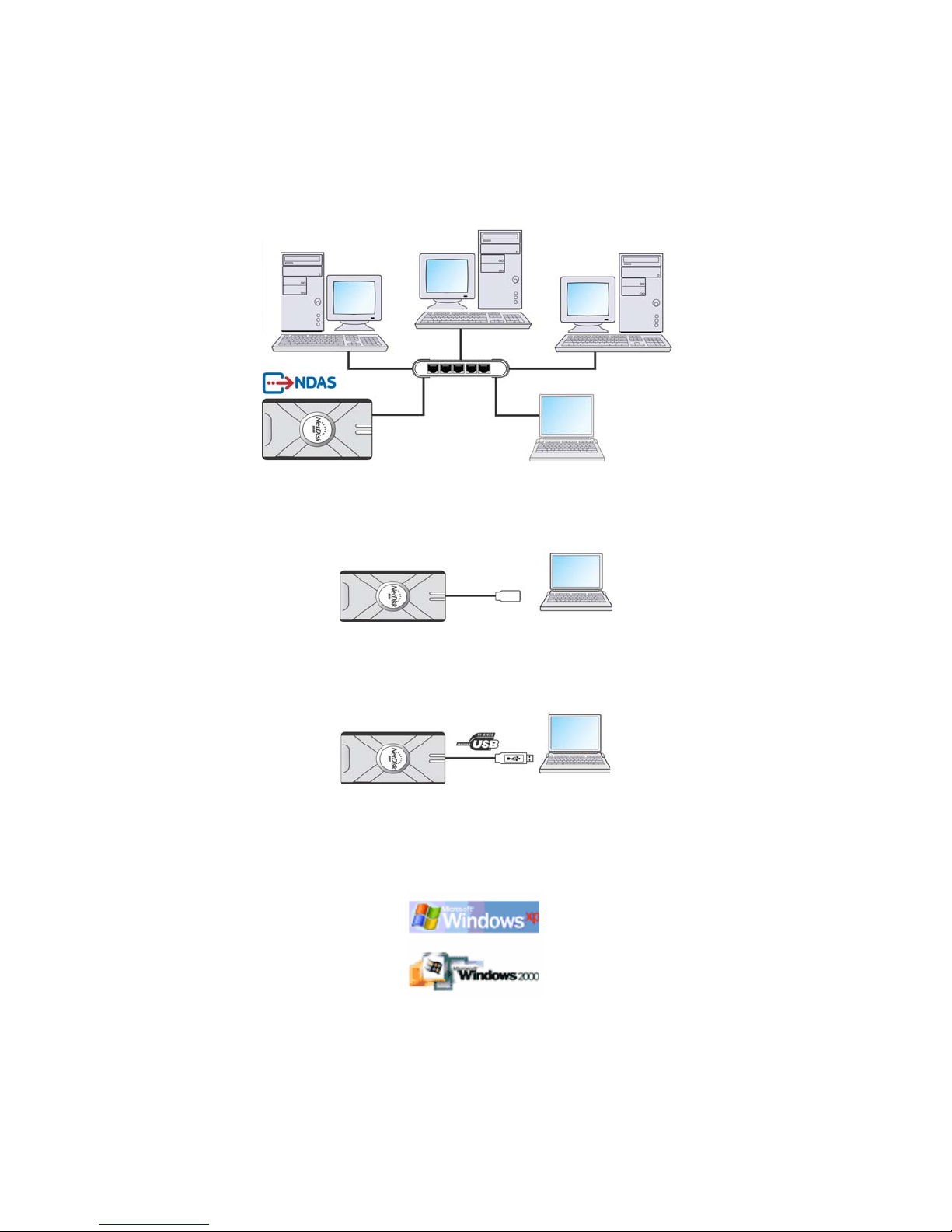
NetDisk and NetDisk Mini Modes
NDAS Mode•
•
•
In NDAS Mode, NetDisk / NetDisk Mini is directly attached to a 100MB/ Full Duplex Fast Ethernet
Switch or Wireless Access Point. Each user on the network can use NetDisk / NetDisk Mini as if it was
a local disk drive.
Ethernet Mode
In Ethernet Mode, NetDisk / NetDisk Mini is directly attached to a PC’s Ethernet Port using a crossover
CAT5 cable, without the need of a switch.
USB 2.0 Mode
In USB 2.0 Mode, NetDisk / NetDisk Mini is directly attached to a PC’s USB 2.0 Port.
In addition, each user can enjoy all of the advanced NDAS features such as aggregation, back-up, mirroring and
flexible expansion
www.XIMETA.de
—————————————————————————————————————————————
6
NetDisk User Manual Network Direct Attached Storage / NDAS
—————————————————————————————————————————————
NetDisk / NetDisk Mini Requirements
Hardware Requirements
NDAS Mode - Fast Ethernet -100BASE-T / Full Duplex / 802.3u, for wired configuration.
Wireless - 802.11a, 802.11b or 802.11g, for wireless configuration.
Ethernet Mode - Direct connection to PC Ethernet Port -100BASE-T / Full Duplex / 802.3u.
Requires crossover CAT5 cable (not included).
USB 2.0 Mode - Direct connection to PC USB 2.0 Port
Software Requirements
May need to install USB 2.0 driver included in installation CD.
www.XIMETA.de
—————————————————————————————————————————————
7

NetDisk User Manual Network Direct Attached Storage / NDAS
—————————————————————————————————————————————
Cable Installation
Warning
Do not connect USB cable and Ethernet cable at the same time.•
•Newer NetDisk does not have dip switches on them. However, NetDisk has the capability of
automatically recognizing NetDisk Mode without the dip switch. In such case, please skip step 1 (dip
switch setting) from the NetDisk Cable Installation below.
NetDisk Cable Installation
NDAS Mode
1
2
3
4
(1) Flip both dip switches down for NDAS Mode.
(2, 3) Connect NetDisk to a switch (100 Base-T) with included Ethernet cable (straight through).
Wireless users: Connect NetDisk to your wireless router or access point with included cable.
(4) Make sure the power connector is connected firmly.
Ethernet Mode
1
2
3
4
www.XIMETA.de
—————————————————————————————————————————————
8

NetDisk User Manual Network Direct Attached Storage / NDAS
—————————————————————————————————————————————
(1) Flip both dip switches down for NDAS Mode.
(2, 3) Connect NetDisk directly to your PC’s Ethernet Port using crossover CAT5 cable (not included).
(4) Make sure the power connector is connected firmly.
USB Mode
1
2
3
(1) Flip both dip switches up for USB Mode.
(2) Connect NetDisk directly to your PC’s USB Port using included USB cable.
(3) Make sure the power connector is connected firmly.
NetDisk Mini Cable Installation
•Turn on NetDisk Mini by sliding On/Off Switch to ON position.
NDAS Mode
1
2
3
(1, 2) Connect NetDisk Mini to a switch (100 Base-T) with included Ethernet cable (straight through).
Wireless users: Connect NetDisk Min to your wireless router or access point with included cable.
(3) Make sure the power connector is connected firmly.
www.XIMETA.de
—————————————————————————————————————————————
9

NetDisk User Manual Network Direct Attached Storage / NDAS
—————————————————————————————————————————————
Ethernet Mode
1
2
3
(1, 2) Connect NetDisk Mini directly to your PC’s Ethernet Port using crossover CAT5 cable
(not included).
(3) Make sure the power connector is connected firmly.
USB Mode
•No power adaptor needed for NetDisk Mini when connected to your pc/laptop through USB
1
(1) Connect NetDisk Mini directly to your PC’s USB Port using included USB cable.
Note: From this point forward, NetDisk will be used to represent both NetDisk and NetDisk Mini.
www.XIMETA.de
—————————————————————————————————————————————
10
Autres manuels pour NetDisk Wireless Access Point Router
4
Ce manuel convient aux modèles suivants
1
Table des matières
Autres manuels Ximeta Stockage


Manuels Stockage populaires d'autres marques


Spectra Logic
Spectra Logic T-Series Spectra T50e Manuel utilisateur

Panasonic
Panasonic LKM-F931-1 Manuel utilisateur

Tabernus
Tabernus Enterprise Erase E2400 Manuel utilisateur

Rocstor
Rocstor COMMANDER 3F series Manuel utilisateur

HP
HP P9000 Manuel utilisateur

Western Digital
Western Digital Ultrastar Data60 Manuel utilisateur