WolfPack HDTV4K604x4 Manuel utilisateur

1
Fixed
Version: V22.08
USER MANUAL
WolfPack 4K 60 Hz 4x4 HDMI Switcher with Apps & WEB GUI
HDTV4K604x4

2
Safety Reminder
To protect the device and operating personnel from electrostatic discharge, you need to check and ensure that
the device is grounding well before the device is powered on. Please observe the following when you install, use,
maintain this equipment.
Make sure the device ground connection.
Important Safety Instructions

1
Warnings of FCC
This equipment has been tested and found to comply with the limits for a Class B digital device,
pursuant to Part 15 of the FCC Rules. These limits are designed to provide reasonable protection
against harmful interference in a residential installation. This equipment generates uses and can
radiate radio frequency energy and, if not installed and used in accordance with the instructions,
may cause harmful interference to radio communications. However, there is no guarantee that
interference will not occur in a particular installation. If this equipment does cause harmful
interference to radio or television reception, which can be determined by turning the equipment
off and on, the user is encouraged to try to correct the interference by one or more of the
following measures:
-- Reorient or relocate the receiving antenna.
-- Increase the separation between the equipment and decoder.
-- Connect the equipment into an outlet on a circuit different from that to which the
decoder is connected.
-- Consult the dealer or an experienced radio/TV technician for help.
Changes or modifications not expressly approved by the party responsible for compliance could
void the user's authority to operate the equipment.

2
Contents
Warnings of FCC ........................................................................................................................................ 1
1. Product Introduction ............................................................................................................................ 3
2. Features .................................................................................................................................................3
3. Specification .......................................................................................................................................... 3
4. Connection Diagram ............................................................................................................................. 4
5. Packing .................................................................................................................................................. 4
6. Panel description .................................................................................................................................. 4
7. Matrix Switcher control ........................................................................................................................ 5
Remote Control .................................................................................................................................6
APP control ........................................................................................................................................6
8. Common Problem Shooting ................................................................................................................. 8
9. After-Sales ........................................................................................................................................... 10

3
1. Product Introduction
the resolution can up to 4K60Hz and all ports are HDCP2.2 compliant. With the friendly user
control methods by IR remote control, 2-Press push buttons with background blue light, WEB
GUI, APP and RS232/UDP commands, this matrix switcher can work with the Blu-Ray Players,
Set-Top boxes, Home Theater, and game consoles etc HDMI input sources to route to the
HDMI displays, it has been widely used in different audio visual applications.
2. Features
4 HDMI2.0 inputs
4 HDMI2.0 outputs with one independent 3.5mm/SPDIF audio
Supports HDMI2.0, HDCP2.2
The resolution can up to 4K@60Hz
Supports LPCM 7.1CH, Dolby TrueHD, Dolby Digital and DTS-HD Master Audio
Supports IR remote control(IR remote control codes are available)
Supports smart EDID management, including 4-output EDID, 15 internal EDID.
Supports RS-232 and TCP/IP Control(WEB GUI, APP and IR remote)
Supports 2-press push buttons control with blue lights
Supports to rename the inputs and outputs, scenes
3. Specification
Name
Resolutions
480i, 576i, 480p, 576p, 720p, 1080i, 1080p@24/30/50/60Hz, 4K@60Hz
Input ports
4 * HDMI, 1* RS-232(control), 1 * RJ-45(control)
Output ports
4 * HDMI, 1* RS-232(control),1*3.5mm/SPDIF audio
ESD Protection
±8kV (Air-gap discharge), ±4kV (Air-gap discharge)
Controlling
IR remote control, front buttons control, RS232, UDP
Power
DC: 12V 2A
Dimension(mm)
440*260*44(mm)
Weight
4kg
WolfPack 4K 60 Hz 4x4 HDMI Switcher withApps &WEB GUI
This is anew WolfPack4K60 HDMI matrix switcher with 4HDMI2.0 inputs and4HDMI2.0 outputs,

4
4. Connection Diagram
5. Packing
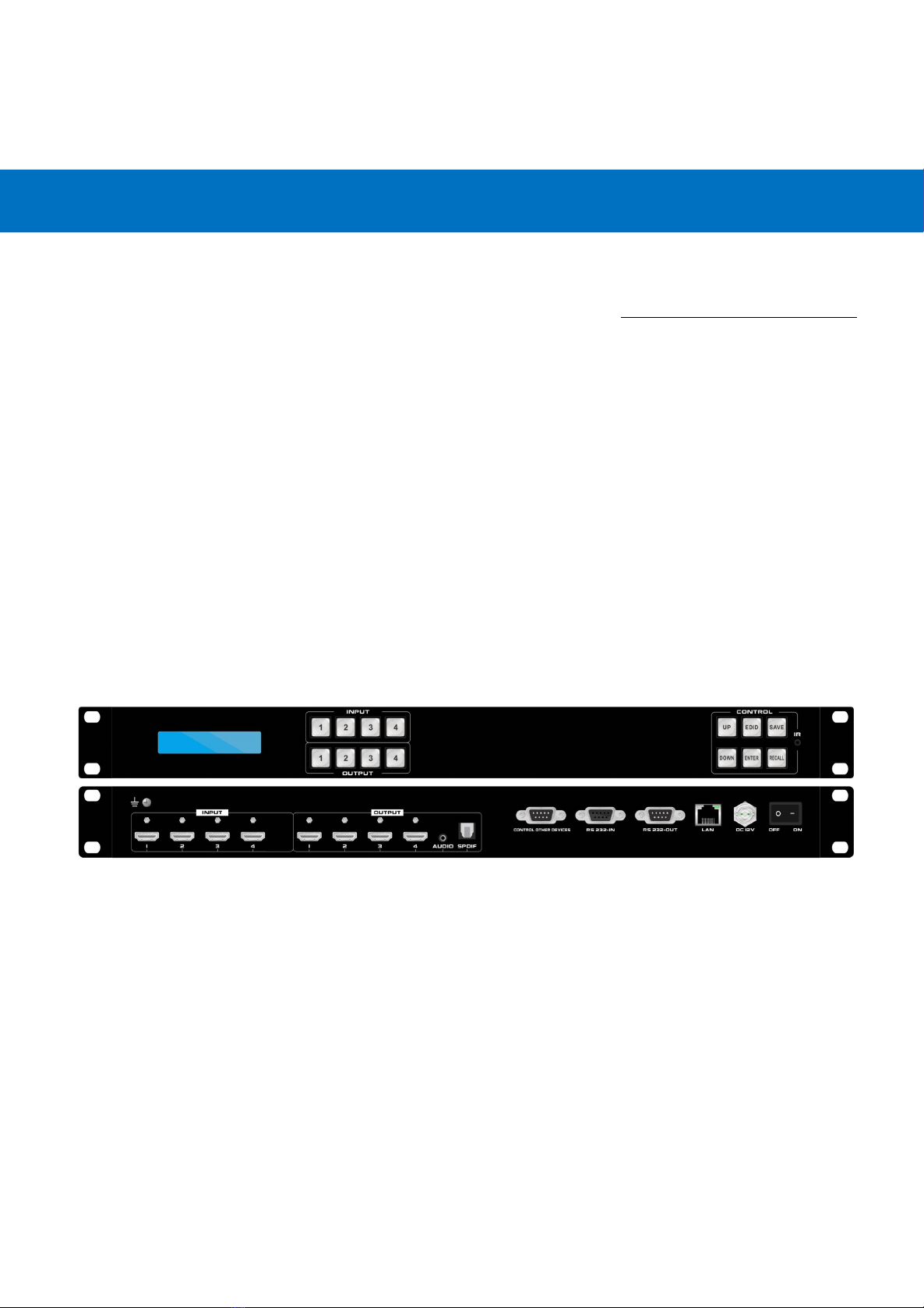
6. Panel description
Front panel
1LCD screen: for the switching, EDID, IP etc information display.
2INPUT: 4 HDMI input buttons
3OUTPUT: 4 HDMI output buttons
No.
Name
Qty
Unit
1
HDMI Matrix Switcher
1
Pcs.
2
DC 12V2A power adapter
1
Pcs
3
Remote Control
1
Pcs
4
Rack ear
2
Pcs

5
4CONTROL:
UP: for upward controlling, or when press input and press UP to all outputs
EDID: Press it to enter EDID set mode.
SAVE: Press to save the switching status.
Down:for upward controlling
ENTER: Press to confirm to save the setting.
RECALL: Press it to recall the presets/scenes.
5IR: IR receiver for the IR remote control
Back panel
1For the ground wiring
2INPUT: 4 female HDMI Input ports
33.5mm audio output from output 1
4OUTPUT: 4 female HDMI output ports
5Control other devices: from the WEB GUI setup to fill out the commands
6RS232 IN: Female RS232 port for the R232 control
7RS232 OUT: Famle RS232 port for the RS232 control
8LAN: for the IP/TCP control, the default IP address is 192.168.1.80
9DC12V: power supply port
10 ON/OFF: power off/on switch
7. Matrix Switcher control
This Matrix switcher can support IR remote, APP, RS232/TCP/IP software, WEB GUI browser or
the front push-buttons control.

6
Remote Control
Users also can control this matrix switcher with the remote control. Note the below buttons are not
functional on this product: Standby, Auto, 4K, 1080p,720P, 1366
Channel switching:
Press the input from number “1~8”, then press the output from number“1~9”, can press the
outputs continually.
Eg. Switch input 1 to output 1, 2, 3:
INPUT 1 OUTPUT 1, 2, 3
Switch any inputs to all outputs:
Press input from number “1~8”, then press “UP”or “ALL”button.
SAVE: for the preset cave. “SAVE”select from the INPUT buttons(1~8) OUTPUT buttons(1~9)
“ENTER”, will hear a beep sound.
RECALL: for the saved presets recalling. “RECALL”select from the INPUT buttons(1~8)
OUTPUT buttons(1~9) “ENTER”, will hear a beep sound.
MENU: for back to homepage/status
CLEAR: to disconnect the selected input to the outputs
ENTER: to confirm the switching, scenes save&recall
WEB GUI/APP control
For the WEB GUI control, recommend the Google Brswoer and for the APP control, can get from the
Google play or Apple store by searching keywords “MCS”, then need to make sure the Matrix
switcher is connected to the WIFI router and the mobile devices is connected to the same WIFI. The
default IP address of the matrix switcher is 192.168.1.80.
Open the WEB GUI/APP and Enter the IP address of the matrix switcher:
Click Enter and login with the user name and password, the default User name is admin, password
is admin.
Click Submit to login after typing the correct user name and password, and it will turn to the home

7
interface for the sources Switch, Scene Recall/Save:
Users can change input, output and Scenes names here, up to 8 characters.
Users can do EDID and audio selection from the Config tap:

8
Users also can do the settings for the “Setup”tap
Users can change the default user name and password from the “Account”Tap:
The 3rd Party Control command
IP address: 192.168.1.80 (default IP)
Protocol: TCP(5000), UDP(4000)
Table des matières
Autres manuels WolfPack Changer


