Wiznet WizFi630 Manuel utilisateur

© Copyright 2012 WIZnet Co., Ltd. All rights reserved. 2
Certification Information
CE for Class B ITE
INFORMATION TO THE USER
Hereby, WIZnet. Declares that this WizFi630 is in compliance with the essential requirements
and other relevant provisions of directive 1999/5/EC.
WARNING: This is a class B product. In a domestic environment this product may cause
radiointerference in which case the user may be required to take adequate measures
FCC for Class B ITE
INFORMATION TO THE USER
This equipment has been tested and found to comply with the limits for a Class B digital
device, pursuant to part 15 of the FCC Rules. These limits are designed to provide reasonable
protection against harmful interference in a residential installation. This equipment
generates, uses and can radiate radio frequency energy and, if not installed and used in
accordance with the instructions, may cause harmful interference to radio communications.
However, there is no Guarantee that interference will not occur in a particular installation. If
this equipment does cause harmful interference to radio or television reception, which can be
determined by turning the equipment off and on, the user is encouraged to try to correct the
interference by one more of the following measures:
-Reorient or relocate the receiving antenna.
-Increase the separation between the equipment and receiver.
-Connect the equipment into an outlet on a circuit different from that to which the
receiver is connected.
-Consult the dealer or an experienced radio/TV technician for help.
WARNING: This equipment may generate or use radio frequency energy. Changes or
modifications to this equipment may cause harmful interference unless the modifications are
expressly approved in the instruction manual. The user could lose the authority to operate
thisequipment if an unauthorized change or modification is made.

© Copyright 2012 WIZnet Co., Ltd. All rights reserved. 3
文档修改历史
日期
修改
变化
2012-07-02
1.0
发布
2012-07-17
1.1
改变第10页的WizFi630的图
更改错误语句
-P6, P18,P19 : WIZ630wi WizFi630
-P24 : DNS服务器 DNS服务器地址
-P38 : WDS WPS

© Copyright 2012 WIZnet Co., Ltd. All rights reserved. 4
<目录>
1. 简介 ...........................................................................................................6
1.1. 特性 ................................................................................................................... 7
1.2. 无线规格 ............................................................................................................ 8
1.3. 硬件规格 ............................................................................................................ 9
1.4. 软件规格 .......................................................................................................... 10
1.5. EVB构造 ........................................................................................................... 10
1.5.1. 内容 ................................................................................................................ 10
1.6. 框图 ................................................................................................................. 12
2. 工作模式及菜单描述 ................................................................................ 13
2.1. 工作模式 .......................................................................................................... 13
2.1.1. 接入点 ............................................................................................................. 13
2.1.2. 网关 ................................................................................................................ 14
2.1.3. 客户端(工作站)................................................................................................ 14
2.1.4. AP客户端模式 .................................................................................................. 15
2.1.5. Ad-hoc模式...................................................................................................... 15
2.2. 工作模式的菜单列表......................................................................................... 16
2.2.1. 接入点(网桥)模式............................................................................................. 16
2.2.2. 网关(路由器)模式............................................................................................. 17
2.2.3. 客户端 (工作站) 模式...................................................................................... 18
2.2.4. AP-客户端模式................................................................................................. 19
2.2.5. Ad-hoc模式...................................................................................................... 21
2.3. 互联网设置 ...................................................................................................... 22
2.3.1. 互联网连接设置 ............................................................................................... 22
2.3.2. 局域网络设置................................................................................................... 24
2.3.3. DHCP客户端信息.............................................................................................. 25
2.3.4. VPN设置 .......................................................................................................... 25
2.3.5. 静态路由设置................................................................................................... 26
2.3.6. QoS(802.1p)设置.............................................................................................. 27
2.3.7. VLAN(802.1p) .................................................................................................. 28
2.4. 无线设置 .......................................................................................................... 29
2.4.1. 基础设置.......................................................................................................... 29
2.4.2. 高级无线设置................................................................................................... 31
2.4.3. 无线安全.......................................................................................................... 34
2.4.4. WDS设置.......................................................................................................... 37
2.4.5. WPS设置 .......................................................................................................... 38
2.4.6. 无线网络状态................................................................................................... 40
2.4.7. AP无线统计...................................................................................................... 41
2.4.8. 工作站QoS/DLS(Direct Link Setup)直接连接安装 配置 ..................................... 43
2.4.9. 资料 ................................................................................................................ 44
2.4.10. 连接状态.......................................................................................................... 45
2.4.11. 站点调查(Site Survey)................................................................................. 46
2.4.12. WIFI 多网桥设置.............................................................................................. 47
2.5. 串口转LAN(有线及无线).................................................................................... 48
2.5.1. 主连接设置 ...................................................................................................... 49

© Copyright 2012 WIZnet Co., Ltd. All rights reserved. 5
2.5.2. Aux连接设置.................................................................................................... 49
2.5.3. 封包条件 (输入串行数据的封包条件)............................................................... 50
2.5.4. 以太网数据标签选项 ........................................................................................ 50
2.6. 防火墙设置 ...................................................................................................... 51
2.6.1. DMZ................................................................................................................. 51
2.6.2. 端口转发.......................................................................................................... 52
2.6.3. 数据包过滤 ...................................................................................................... 53
2.6.4. 内容过滤.......................................................................................................... 54
2.6.5. 系统安全.......................................................................................................... 55
2.7. 管理 ................................................................................................................. 56
2.7.1. 系统管理.......................................................................................................... 56
2.7.2. 固件 ................................................................................................................ 57
2.7.3. 配置设置.......................................................................................................... 58
2.7.4. 端口设置.......................................................................................................... 59
2.7.5. 数据包统计 ...................................................................................................... 60
2.7.6. 系统状态.......................................................................................................... 61
2.7.7. 系统记录.......................................................................................................... 62
3.硬件信息........................................................................................................ 63
3.1.WizFi630引脚图......................................................................................................... 63
3.2.尺寸 ...................................................................................................................... 65
4.Important Notice............................................................................................ 66

© Copyright 2012 WIZnet Co., Ltd. All rights reserved. 6
1. 简介
WizFi630是一款能够将RS-232协议和TCP/IP协议转换为IEEE802.11 b/g/n wireless LAN(无线局域网)协议
的网关模块。WizFi630能够使带有RS-232串行接口的设备连接到LAN或WLAN,以此来进行远程控制、测量
和管理。由于自身带有内置的交换器,WizFi630也可以作为IP路由器来工作。
WizFi630使用了诸如串口(UART)、LAN、WiFi(WLAN)的接口来完成串口(UART)转WiFi、串口转以太网、
和以太网转WiFi等功能。用户可以连接到WizFi630的内置网络服务器或使用串口命令进行简单的WiFi设置;
不仅是串行设备,8/16/32位微控制器也可以使用UART来进行简单的WiFi设置。
WizFi630可以很大程度上减少无线模块设计、测试和认证上的工序。所以,WizFi630可以算是为缺少无线网
络经验的客户提供的最好的解决方案。
WizFi630根据802.11b/g/n标准,并且在无线接口中支持高达150Mbps的速度。
WizFi630提供了一个测试板、pc软件、和一些文档,这样任何人都可以开发一款无线解决方案。

© Copyright 2012 WIZnet Co., Ltd. All rights reserved. 7
1.1.特性
支持IEEE802.11b/g/n
网关/AP(网桥)/AP客户端/客户端(工作站)/Ad-hoc模式,支持WDS/中继器
1T1R RF接口
物理连接速率高达150Mpbs
内置3个以太网端口
支持2个串口
可以作为Wi-Fi路由器
WEP 64/128位, WPA/WPA2-PSK TKIP, AES
802.1x (只在AP模式下)
802.11e和WMM (Wi-Fi多媒体)
支持路由器和防火墙功能
图1. WizFi630的应用举例

© Copyright 2012 WIZnet Co., Ltd. All rights reserved. 8
1.2. 无线规格
种类
描述
无线标准
IEEE802.11b/g/n
频谱
美国: 2.400 ~ 2.483GHz
欧洲: 2.400 ~ 2.483GHz
日本: 2.400 ~ 2.497GHz
中国: 2.400 ~ 2.483GHz
工作信道
美国/加拿大: 11(1 ~ 11)
主要的欧洲国家: 13(1 ~ 13)
法国: 4(10 ~ 13)
日本: 14 for 802.11b(1 ~ 14), 13 for 802.11g(1 ~ 13)
韩国/中国: 13(1 ~ 13)
输出功率
(容差(+/-1dBm)
802.11b: 17dBm@11Mbps
802.11g: 14dBm@54Mbps
802.11n: 14dBm@150Mbps/72Mbps
接收灵敏度
802.11b: -89dBm@11Mbps
802.11g: -74dBm@54Mbps
802.11n(40MHz): -66dBm@150Mbps
802.11n(20MHz): -70dBm@72Mbps
数据速率
802.11b: 1,2,5.5,11Mbps
802.11g: 6,9,12,18,24,36,48,54Mbps
802.11n(20MHz): 7,14.5,21.5,28.5,43.5,57.5,65,72Mbps
802.11n(40MHz): 29.5,86.5,115,130,144,150Mbps
调制类型
11g: OFDM(64QAM, 16QAM, QPSK, BPSK)
11b: DSS(CCK, DQPSK, DBPSK)
天线
u.FL (EVB : 1T1R 2dBi)
表1. WiFi规格

© Copyright 2012 WIZnet Co., Ltd. All rights reserved. 9
1.3. 硬件规格
种类
描述
接口
串口 : 2 EA
LAN端口3EA
USB端口: 1 USB Host Port ( 保留 )
U.FL(无线)
温度
工作: -10℃~70℃
湿度
工作: 10%到90%, 非冷凝
保存: 5%到90%, 非冷凝
串口
波特率 : 1200 ~ 921,600bps
停止位: 1, 2
奇偶校验: 无, 奇, 偶
流量控制:
UART1: XON/XOFF(软件), CTS/RTS(硬件), 无
UART2: XON/XOFF, 无
输入功率
DC 3.3V / 1A
功耗
最大 : 3.3V / 600mA
尺寸
33mm X 43mm X 4.5mm
重量
6g
表2. WizFi630模块规格

© Copyright 2012 WIZnet Co., Ltd. All rights reserved. 10
1.4. 软件规格
类型
描述
工作模式
接入点(网桥), 客户端(工作站), 网关, AP客户端, ad-hoc
协议
TCP, UDP, ARP, ICMP, DHCP, PPPoE, HTTP
安全
WEP 64/128bit
WPA/WPA2-PSK AES/TKIP
802.1x ( 只在AP模式下 )
配置
网络配置, 串行命令, 配置工具
通知
事件记录
串口转WiFi
支持2个串口
表3. 软件规格
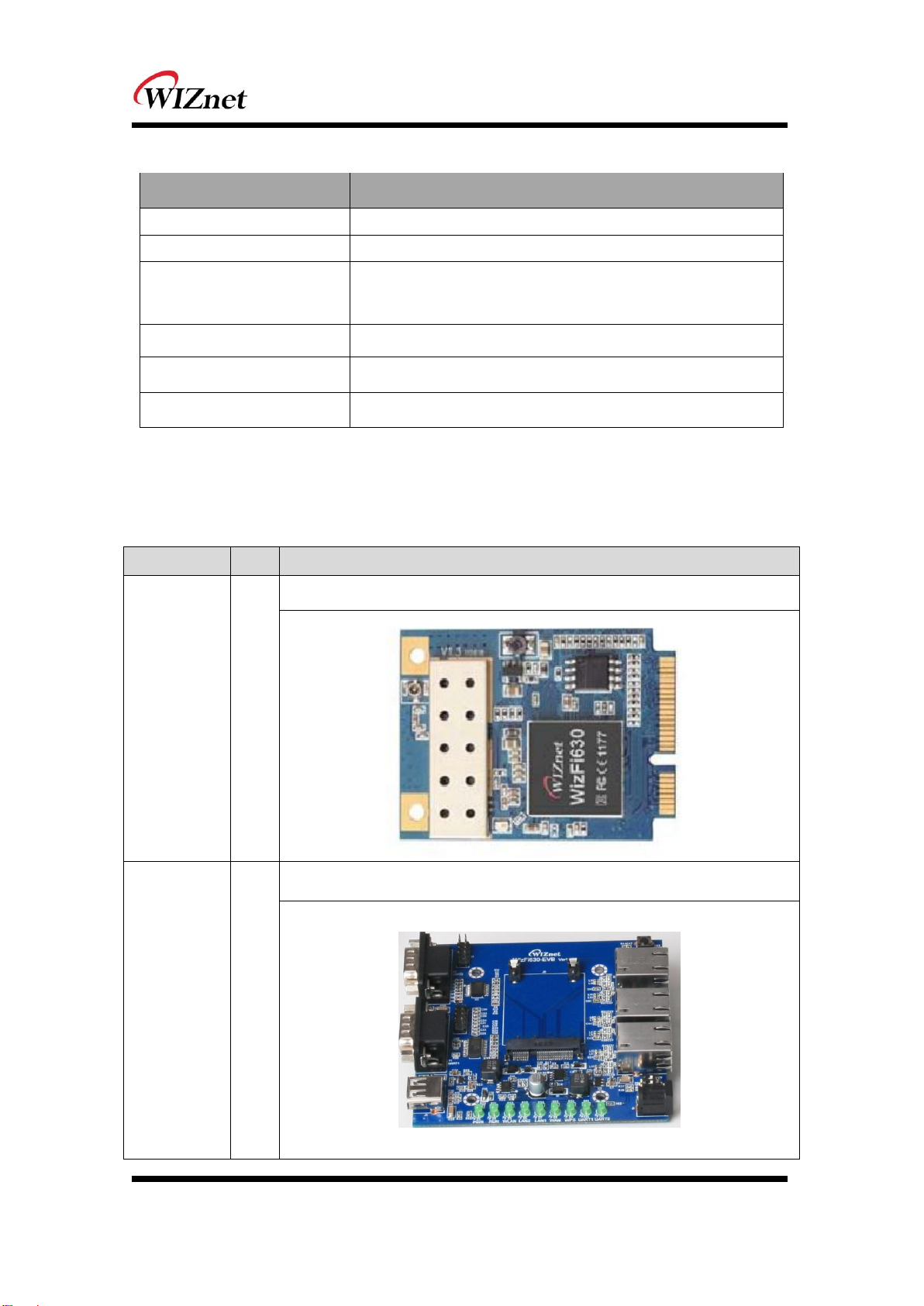
1.5. EVB构造
1.5.1. 内容
部分
数量
内容
WizFi630
1
WizFi630
WizFi630-
EVB
1
WizFi630-EVB
Autres manuels pour WizFi630
8
Table des matières
Autres manuels Wiznet Module sans fil
Manuels Module sans fil populaires d'autres marques

Cooper Wiring Devices
Cooper Wiring Devices ESPIRE RF RFAPM Manuel utilisateur

Yuga
Yuga CLM920 Manuel utilisateur

Waldmann
Waldmann TALK Bluetooth Manuel utilisateur

Telit Wireless Solutions
Telit Wireless Solutions UC864-G Manuel d'installation

Ebyte
Ebyte E07-900M10S Manuel utilisateur

Quectel
Quectel SC690A Series Supplément

Panasonic
Panasonic INDUSTRY PAN9028 Guide de configuration rapide

Ebyte
Ebyte E70-433NW30S Manuel utilisateur

LongSung Technology
LongSung Technology U9507E Manuel utilisateur

Wistron NeWeb
Wistron NeWeb DNUR-S2 Manuel utilisateur

Ebyte
Ebyte E49-400M20S4 Manuel utilisateur

RF-Star
RF-Star SimpleLink RF-BM-2652P1 CC2652P Manuel utilisateur