
Whirlwind H7 Manuel utilisateur

Whirlwind - H7 – User Manual – P. 1
!!
!
!! !
H7 Manual
!

Whirlwind - H7 – User Manual – P. 2
Table of Contents
1.#Principle#to#Self-Balancing#Hoverboard#.............................................................................................#3#
2.#Preparation#before#use#............................................................................................................................#5#
3.#How#to#use#....................................................................................................................................................#6#
4.#General#Advice#.........................................................................................................................................#10#
5.#Technical#Parameters#............................................................................................................................#13#
!
!

Whirlwind - H7 – User Manual – P. 3
1. Principle to Self-Balancing Hoverboard
As one of the new and high-tech outdoor sports products, the self-balancing Hoverboard is based on a basic
principle known as "Dynamic Stabilization" which is the automatic balance of the device itself. The built-in
solid-state gyroscope judges the positioning of the device body by using a sophisticated and high-speed
central microprocessor. It then uses the motor to stabilize and balance the device.
The device can go forwards, backwards, turn and stop all being controlled by dynamic equilibrium. It looks
cool, is simple operate, uses easy controls and it protects the environment.

Whirlwind - H7 – User Manual – P. 4
#
Power ON/OFF:
Press the ON/OFF button for 2 seconds to power on
or power off the Hoverboard. This can be found on
the rear of the Hoverboard.
Control Panels:
The Hoverboard has four sensors under pedals.
When user steps on the pedals, the device will
automatically adjust itself to the balancing mode.
!
Display Panel:
The display panel is located in the middle of the
body, which is used to display the running
information.
Battery display area:
Green light means fully charged. When green light
turns yellow, it means 50% of battery left. When
yellow light turns red, it means 10% of battery left
and you need to charge the device soon.
#

Whirlwind - H7 – User Manual – P. 5
2. Preparation before use
2.1 Charging
Before using the Hoverboard for the first time, please plug the charger in to the power source. Equipped
with high power charger, a full charge usually takes 2-3 hours.When charging, red light indicates charging
is ongoing and green light indicates when the Hoverboard is finished charging. Please try to avoid
unplugging the charger before the device is fully charged.
2.2 Battery indicators
The Hoverboard device has a function to show the battery status.Please check the battery status before using.
When the red light is on, the scooter should be charged first as this means that the battery is below 25%.

Whirlwind - H7 – User Manual – P. 6
3. How to use
Balancing
Decelerate
Slowly move forward
Braking
Accelerate
Reversing

Whirlwind - H7 – User Manual – P. 7
3.1 Going Forwards and Backwards
Accelerate
Slowly move your centre of gravity forward to feel
the motion of the Hoverboard and you should start
to move forward then restore back to the centre.
Lean forwards and backwards slowly to feel the
Hoverboard accelerate and decelerate. Lean at slow
speeds initially and feel the motion controlled by
your centre of gravity.
Decelerate
Look back and lean gradually backward to control
the deceleration and then lean forwards to restore
Hoverboard to its neutral position. Keep practising
and pay attention to the wall and other obstacles to
avoid falling over. For starters, please steer in a
slow and mild manner.
Remember that the more relaxed your body is; the easier it will be. Please avoid drastic shakes or an abrupt shift
in your centre of gravity, which might cause you to slip or fall over.

Whirlwind - H7 – User Manual – P. 8
3.2 Braking
Standard Brake Manner:
Stop the device by shifting your centre of gravity to the opposite
direction of what you are travelling:
a. When the device is in motion, gradually move back your hips
as if you were to sit back to stop the device.
b. When the device stops fully, shift your center of gravity onto
the middle of the platform to get balanced. If you continue to
lean backward, the device will go backward.
c. Mark a spot on the ground and practice balance at that spot.
Please try to stop the unit in a gradual and mild manner, avoid
abrupt brakes. Shift your centre of gravity gradually back from
the travelling direction to stop. Please decelerate beforehand
when approaching obstacles or traffic lights.
Please do not accelerate or brake on slippery surfaces,
otherwise this may cause injuries.

Whirlwind - H7 – User Manual – P. 9
3.3 Turning
The Hoverboard will conduct turns as per the movement your centre of gravity.
a. First, practice turning on one spot by moving your
center of gravity towards the direction you wish to turn
to and pushing one leg left or right whilst pushing the
other leg in the opposite direction to make turns in the
corresponding direction. The Hoverboard will turn on
the spot until you restore yourself to the center
position. Keep practicing to get more comfortable.
b. Turning when in motion. After getting accustomed of
moving forward, backward and turning on one spot,
you may try to make turns while going slowly forward.
Keep your knees slightly bent and prepare to lean
toward the turning direction. Keep practicing.
Sharp turns are dangerous. You might lose balance or even fall off the Hoverboard. In this scenario, please
decelerate and steer using slow movements when making turns, which will help with better balance during a turn.
Low Battery: If both LED lights flash at the same time it means that the H7 is on low battery mode. There will also
be a beeping noise to indicate this. Whilst in low battery mode, the speed limit will be limited to 3mph.
Turn!Clockwise!
Turn!Counter!clockwise
!
Whirlwind - H7 – User Manual – P. 10
4. General Advice
Follow the User Manual to drive the Hoverboard safely. We highly advise you to read the Manual carefully at the
first time. Before driving, make sure that the tires are in good condition and there are no loose parts. Please use
the product sensibly otherwise you risk personal injury and property loss. Please do not modify its components
by yourself because it may alter the capacity of the scooter and make it dangerous to use.
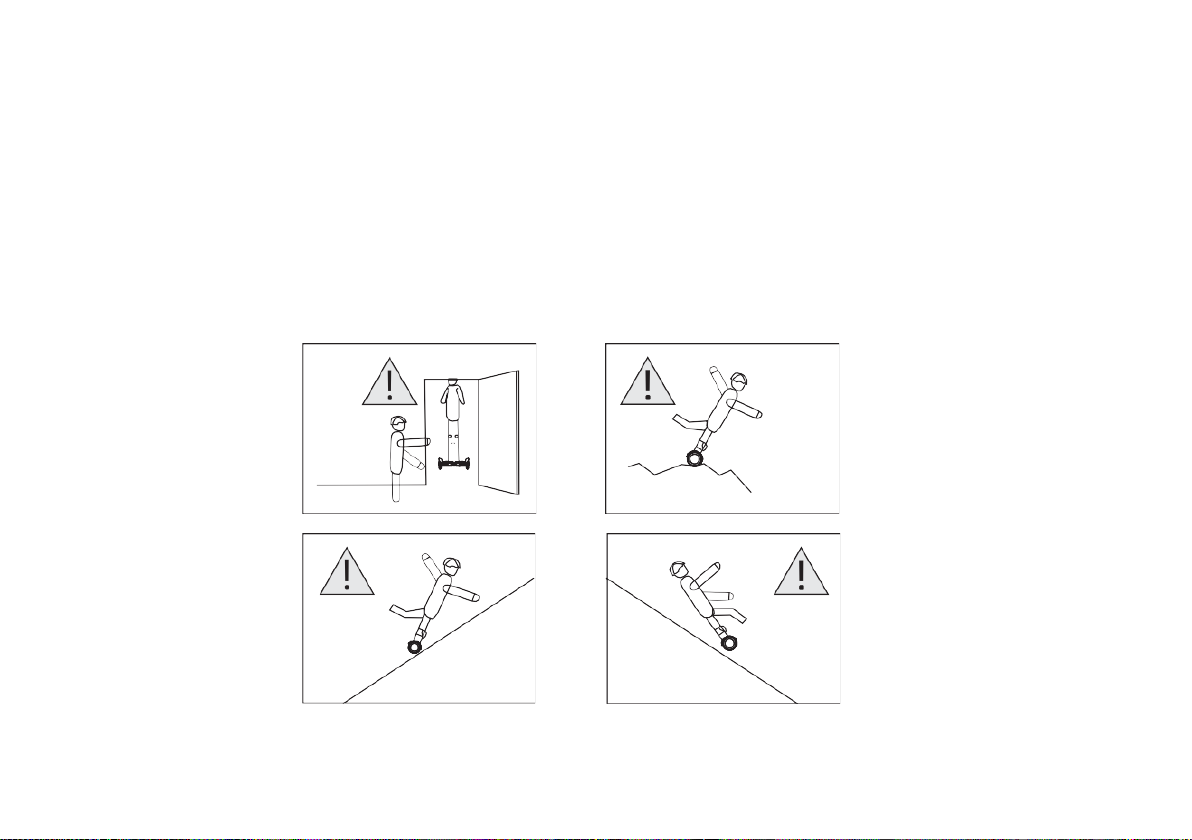
Avoid these Scenarios
Entrance!height!
Bumpy!Terrains!
Upslope!>15°!
Downslope!>15°!
Autres manuels pour H7
1
Table des matières
Autres manuels Whirlwind Hoverboard


