WesAudio _MIMAS Manuel utilisateur

WESAUDIO
3/15/17
_MIMAS USER MANUAL REV4
1
www.WesAudio.com
_MIMAS
User manual
EN
Copyright 2016 by WesAudio

WESAUDIO
3/15/17
_MIMAS USER MANUAL REV4
2
Thank You for the purchase of _MIMAS
_MIMAS
World's first 1176 style compressor with digital control through VST/AAX/AU plugin
With kind regards
Radoslaw Wesolowski and Michal Weglicki

WESAUDIO
3/15/17
_MIMAS USER MANUAL REV4
3
World's first 1176 style compressor with digital control
through VST/AAX/AU plugin.
Since year 1968 this style of compression dominated hundreds of recordings and to this day it is
most commonly used signal processor in the industry. Lightning-fast attack and release times
became main companions of audio engineers. WesAudio proudly presents _MIMAS –ng500
series implementation of legendary FET compressor. This time, along with classic analog sound,
You will receive most demanded feature in audio industry –DIGITAL RECALL.

WESAUDIO
3/15/17
_MIMAS USER MANUAL REV4
4
Contents
1. Abbreviations and terms...........................................................................................................................6
2. Installation and compatibility. ..................................................................................................................6
3. Front panel................................................................................................................................................9
4. Overview.................................................................................................................................................10
5. Specification............................................................................................................................................11
6. Software..................................................................................................................................................12
6.1. Installation..............................................................................................................................................12
6.1.1. WINDOWS .............................................................................................................................................12
6.1.2. OSX......................................................................................................................................................12
6.1.3. Troubleshooting..................................................................................................................................12
6.2. Plugins ....................................................................................................................................................14
6.2.1. Dedicated plugin - _mimas .................................................................................................................14
6.2.2. GConBlackBox.....................................................................................................................................16
6.3. Setup for mixing .....................................................................................................................................17
6.3.1. HW insert/External effect...................................................................................................................17
6.3.2. Direct output ......................................................................................................................................18
6.4. Memories ...............................................................................................................................................19
6.4.1. Synchronization upon connection......................................................................................................19
6.4.2. Memory synchronization between plugin and hardware ..................................................................19
6.4.2.1. Synchronized memory enabled.............................................................................................20
6.4.2.2. Synchronized memory disabled ............................................................................................20
6.4.3. Note about Pro Tools “Compare” functionality..................................................................................20
6.5. Automation ............................................................................................................................................20
6.5.1. Automation record .............................................................................................................................20
6.6. Digital Side Chain....................................................................................................................................21
6.6.1. Reaper note about automatic Side Chain detection in VST3..............................................................21
6.7. Pro Tools Integration..............................................................................................................................21
6.8. Multi Host Support.................................................................................................................................22
6.9. GCon Manager .......................................................................................................................................23

WESAUDIO
3/15/17
_MIMAS USER MANUAL REV4
5
6.9.1. How to check firmware upgrade. .......................................................................................................23
6.9.2. How to perform firmware upgrade. ...................................................................................................24
7. Saturation mode .....................................................................................................................................24
8. LEDs.........................................................................................................................................................25
9. Warranty.................................................................................................................................................25

WESAUDIO
3/15/17
_MIMAS USER MANUAL REV4
6
1. Abbreviations and terms
GCon –high speed communication protocol which allows full management and recall of analog devices.
Please note that this is just management protocol, audio signal transfer is not in scope of its capabilities.
NG500 –Next generation 500 series.
NG500 connector –special connector which extends standardized 500 series connector with additional pins.
2. Installation and compatibility.
WesAudio _MIMAS compressor module is designed to be installed into:
An API™ 500 Series compatible rack
_TITAN or any other ng500 compatible chassis,
WesAudio _MIMAS cannot function standalone, requiring the power source supplied by the rack
system.
After unpacking your _MIMAS module, please check for any visible damage that may have occurred
during transit. If there is any problem, please contact your dealer immediately!
!!!Ensure the rack is completely powered down before attempting
installation to prevent damage to the module!!!
Module installation walkthrough:
Choose the position in the rack to which you will install the module and slide it in so that the edge
connector of the module aligns with the matching connector in the rack. A gentle push and the module
should slide home into the rack connector. Attach the front panel to the front of the rack with screws
supplied by your rack manufacturer. This is important for mechanical rigidity. Do not over tighten these
screws to avoid stripping out the threads. Apply power, test that everything is working OK, and most
importantly, enjoy!
500 series compatibility note:
Each WesAudio device in ng500 (Next Generation 500 series) product line is equipped with special
connector. This connector is an extension to 500 series, and allows your device to be managed/recalled
through specialized GCon protocol (e.g. _Titan 500 series 10 slots frame).

WESAUDIO
3/15/17
_MIMAS USER MANUAL REV4
7
This extension is compatible with 500 series standardized plug type, however some manufacturers
apply enormous screws to the plug itself, which prevent the device to fit in. Based on official research
more than 90% of available 500 series racks will fit just fine. Currently known exceptions:
–Rupert Neve Designs 500 series Rack (confirmed),
–Aphex 500 series rack (not confirmed),
–Some older BAE racks (not produced anymore).

WESAUDIO
3/15/17
_MIMAS USER MANUAL REV4
8
If you are in possession of any of those 500 series
racks, there are two options:
1) NG500 module won’t fit into this racks because
of upper screw attached to 500 series
connector. This particular screw can be
removed without any side effects in most of
listed racks. With such simple modification
your rack is ready to host any NG500 module
on this particular slot.
2) IMPORTANT ORDER NOTE: Each device can be
ordered without special 500 series connector,
however:
–The device compatibility with _titan frame is
broken, and will not work.
–The device can be managed/recalled via
direct USB connection without any problems.

WESAUDIO
3/15/17
_MIMAS USER MANUAL REV4
9
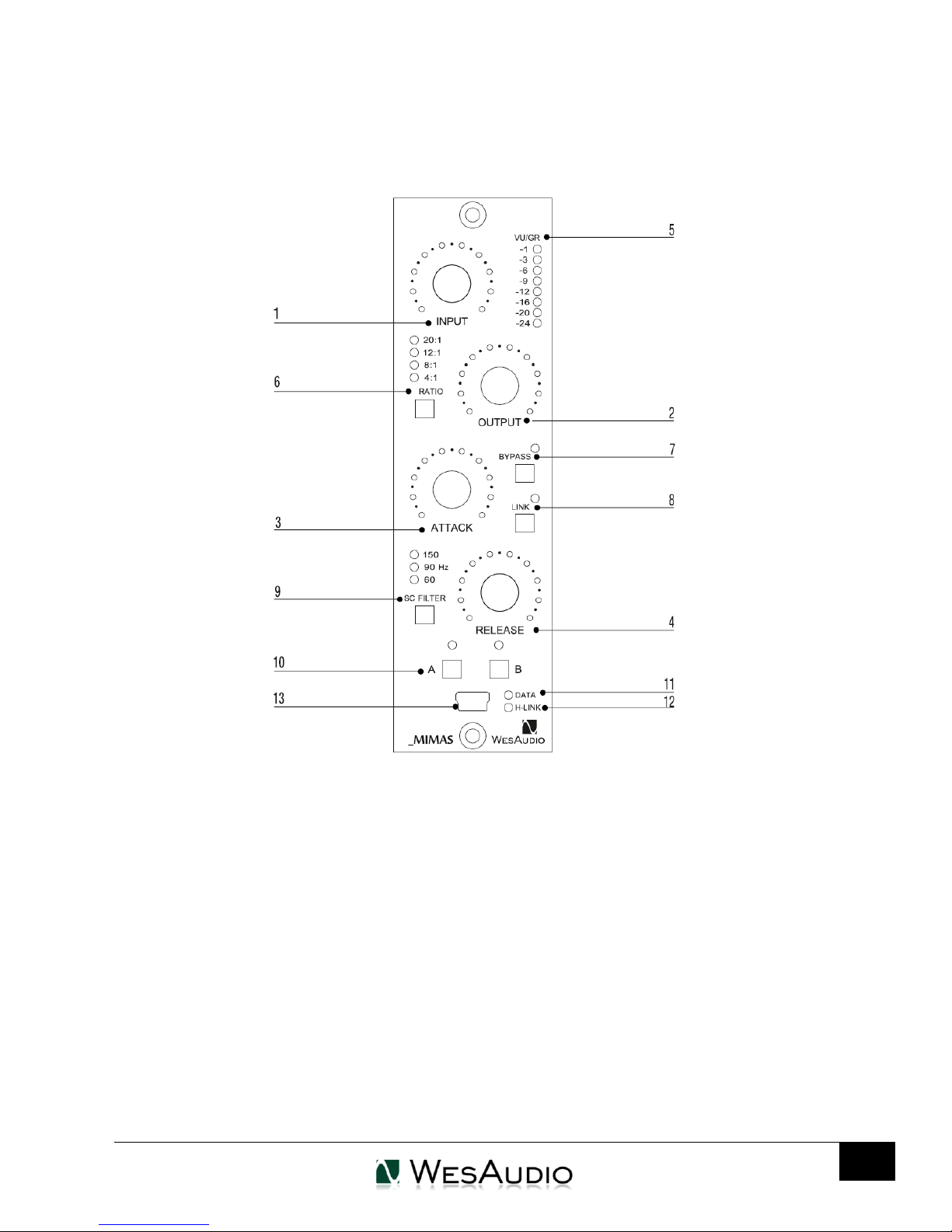
3. Front panel
1 Input –Determines the level of the input signal entering the compressor, as well as the
threshold. Higher settings will increase amounts of compression or limiting.
2Output –Determines the level of the output signal leaving the compressor. It is used to recover
compression lost signal.
3Attack –It sets the Attack time from 20 microseconds to 800 microseconds. The attack time is
fastest when the Attack knob is in fully clockwise position, and it’s slowest when it’s in its fully
counterclockwise position
4Release –It sets the Release time from 50 millisecond to 1100 milliseconds. The release time is
fastest when Release knob is in its fully clockwise position, and is slowest when it is in its fully
counterclockwise position.

WESAUDIO
3/15/17
_MIMAS USER MANUAL REV4
10
5VU/GR LED meter –It can display level of input and output signal as well as gain reduction level.
Switching between display modes is possible from DAW plugin.
6Ratio - This buttons determines deepness of the compression and limiting. A ratio 4:1 is the
smaller possible value of compression, while 20:1 is larger value of limiting. 8:1 is the last button
when compression occur, after that, is only limiting. When all LEDs are active –all button mode
is engaged. Keeping ratio button for more than 1 second will also activate saturation mode
described in chapter 3.
7Bypass –true bypass button
8Link –activate link to other module
9SC Filter/Link –this button determine three side-chain hi-pass filter frequency (60Hz, 90Hz, 150Hz).
10 A/B –two slot memory buttons which can be used to compare two different compressor settings
11 DATA LED –indicates that data is being sent from DAW to device
12 H-LINK LED –indicates state of host-module connection
13 USB –module control USB port
4. Overview
Below picture shows a short overview of _MIMAS implementation.
Table des matières
Manuels Compresseur d'air populaires d'autres marques

Campbell Hausfeld
Campbell Hausfeld RP3300 Guide de démarrage rapide

Ingersoll-Rand
Ingersoll-Rand UP6 20 HP Manuel utilisateur

Hitachi
Hitachi EC99S Manuel de l'opérateur

Parkside
Parkside PKO 270 A1 Manuel utilisateur

Sullair
Sullair 185 Manuel utilisateur

Clas Ohlson
Clas Ohlson QIE-ZTH-15 Manuel utilisateur