
Wen 65812 Manuel utilisateur

12-INCH
DISC SANDER
Model #65812
Your new tool has been engineered and manufactured to WEN’s highest standards for dependability, ease
of operation, and operator safety. When properly cared for, this product will supply you years of rugged,
trouble-free performance. Pay close attention to the rules for safe operation, warnings, and cautions. If
you use your tool properly and for its intended purpose, you will enjoy years of safe, reliable service.
IMPORTANT:
NEED HELP? CONTACT US!
Have product questions? Need technical support?
Please feel free to contact us at:
800-232-1195
WENPRODUCTS.COM
(M-F 8AM-5PM CST)
For replacement parts visit
WENPRODUCTS.COM
NOTICE: Please refer to wenproducts.com for the most up-to-date instruction manual.
226002

PRODUCT SPECIFICATIONS
65812
120V, 60Hz, 8A, S1
1725 RPM
12 in.
16-3/8 x 6-7/8 in.
7-1/2 in.
45° down
60° left & right
2" (O.D.), 1-13/16" (I.D.)
2-1/2" (O.D.), 2" (I.D.)
16-3/8 x 18-1/2 x 14-1/8 in.
60.1 lbs
TABLE OF CONTENTS
2
3
4
6
7
8
9
14
15
16
18
19
Product Specifications
Safety Introduction
General Safety Rules
Specific Rules for Disc Sanders
Electrical Information
Know Your Disc Sander
Assembly & Adjustments
Operation
Maintenance
Exploded View & Parts List
Troubleshooting
Warranty Statement
Model Number:
Motor:
No-load Speed:
Disc Size:
Table Size:
Table Height:
Table Tilting (Bevel) Angle:
Miter Angle:
Dust Port Size:
Dust Hose Size:
Product Dimensions:
Product Net Weight:
2
Replacement sanding discs of various grits can be purchased from
wenproducts.com by searching the part number 65812SD.

SAFETY INTRODUCTION
Thanks for purchasing the WEN Disc Sander. We know you are excited to put your tool to work, but first, please
take a moment to read through the manual. Safe operation of this tool requires that you read and understand this
operator’s manual and all labels affixed to the tool. This manual provides information regarding potential safety
concerns, as well as helpful assembly and operating instructions for your tool.
SAFETY ALERT SYMBOL: Indicates danger, warning, or caution. The safety symbols and the
explanations with them deserve your careful attention and understanding. Always follow the safety
precautions to reduce the risk of fire, electric shock and personal injury. However, please note that
these instructions and warnings are not substitutes for proper accident prevention measures.
NOTE: The following safety information is not meant to cover all possible conditions and situations that may occur.
WEN reserves the right to change this product and specifications at any time without prior notice.
Keep this manual available to all users during the entire life of the tool and review it frequently
to maximize safety for both yourself and others.
3

GENERAL SAFETY RULES
WARNING! Read all safety warnings and instructions. Failure to follow all instructions may result
in electric shock, fire and serious injury. The term “power tool” in the warnings refers to your mains-
operated (corded) power tool. Save all warnings and instructions for future reference.
WORK AREA SAFETY
1. Keep work area clean and well lit. Cluttered or dark areas invite accidents.
2. Do not operate power tools in explosive atmospheres, such as in the presence of flammable liquids, gases or
dust. Power tools create sparks which may ignite the dust or fumes.
3. Keep children and bystanders away while operating a power tool. Distractions can cause you to lose control.
ELECTRICAL SAFETY
1. Power tool plugs must match the outlet. Never modify the plug in any way. Do not use any adapter plugs with
earthed (grounded) power tools. Unmodified plugs and matching outlets will reduce risk of electric shock.
2. Avoid body contact with earthed or grounded surfaces such as pipes, radiators, ranges and refrigerators. There
is an increased risk of electric shock if your body is earthed or grounded.
3. Do not expose power tools to rain or wet conditions. Water entering a power tool will increase the risk of elec-
tric shock.
4. Do not abuse the cord. Never use the cord for carrying, pulling or unplugging the power tool. Keep cord away
from heat, oil, sharp edges or moving parts. Damaged or entangled cords increase the risk of electric shock.
5. When operating a power tool outdoors, use an extension cord suitable for outdoor use. Use of a cord suitable
for outdoor use reduces the risk of electric shock.
6. If operating a power tool in a damp location is unavoidable, use a ground fault circuit interrupter (GFCI) pro-
tected supply. Use of a GFCI reduces the risk of electric shock.
PERSONAL SAFETY
1. Stay alert, watch what you are doing and use common sense when operating a power tool. Do not use a power
tool while you are tired or under the influence of drugs, alcohol or medication. A moment of inattention while
operating power tools may result in serious personal injury.
2. Use personal protective equipment. Always wear eye protection. Protective equipment such as a dust mask,
non-skid safety shoes, and hearing protection used for appropriate conditions will reduce the risk of personal
injury.
3. Prevent unintentional starting. Ensure the switch is in the off-position before connecting to power source and/
or battery pack, picking up or carrying the tool. Carrying power tools with your finger on the switch or energizing
power tools that have the switch on invites accidents.
4. Remove any adjusting key or wrench before turning the power tool on. A wrench or a key left attached to a
rotating part of the power tool may result in personal injury.
4

GENERAL SAFETY RULES
5. Do not overreach. Keep proper footing and balance at all times. This enables better control of the power tool
in unexpected situations.
6. Dress properly. Do not wear loose clothing or jewelry. Keep your hair, clothing and gloves away from moving
parts. Loose clothes, jewelry or long hair can be caught in moving parts.
7. If devices are provided for the connection of dust extraction and collection facilities, ensure these are connected
and properly used. Use of dust collection can reduce dust-related hazards.
POWER TOOL USE AND CARE
1. Do not force the power tool. Use the correct power tool for your application. The correct power tool will do
the job better and safer at the rate for which it was designed.
2. Do not use the power tool if the switch does not turn it on and off. Any power tool that cannot be controlled
with the switch is dangerous and must be repaired.
3. Disconnect the plug from the power source and/or the battery pack from the power tool before making any ad-
justments, changing accessories, or storing power tools. Such preventive safety measures reduce the risk of starting
the power tool accidentally.
4. Store idle power tools out of the reach of children and do not allow persons unfamiliar with the power tool or
these instructions to operate the power tool. Power tools are dangerous in the hands of untrained users.
5. Maintain power tools. Check for misalignment or binding of moving parts, breakage of parts and any other
condition that may affect the power tool’s operation. If damaged, have the power tool repaired before use. Many
accidents are caused by poorly maintained power tools.
6. Use the power tool, accessories and tool bits etc. in accordance with these instructions, taking into account
the working conditions and the work to be performed. Use of the power tool for operations different from those
intended could result in a hazardous situation.
SERVICE
Have your power tool serviced by a qualified repair person using only identical replacement parts. This will en-
sure that the safety of the power tool is maintained.
CALIFORNIA PROPOSITION 65 WARNING
Some dust created by power sanding, sawing, grinding, drilling, and other construction activities may contain
chemicals, including lead, known to the State of California to cause cancer, birth defects, or other reproductive
harm. Wash hands after handling. Some examples of these chemicals are:
• Lead from lead-based paints.
• Crystalline silica from bricks, cement, and other masonry products.
• Arsenic and chromium from chemically treated lumber.
Your risk from these exposures varies depending on how often you do this type of work. To reduce your expo-
sure to these chemicals, work in a well-ventilated area with approved safety equipment such as dust masks spe-
cially designed to filter out microscopic particles.
5

SPECIFIC RULES FOR SANDERS
WARNING: Do not let comfort or familiarity with the product replace strict adherence to product
safety rules. Failure to follow the safety instructions may result in serious personal injury.
1. TOOL PURPOSE. Your disc sander is intended for sanding natural, solid woods and composite materials.
Operations for which the tool was not designed, including modification of the machine, may cause machine dam-
age or personal injury, and invalidate the warranty.
2. WORK ENVIRONMENT. Do not operate the tool in wet or damp conditions; doing so significantly increases
the risk of electrical shock. Do not operate the tool in the presence of flammable liquids or gases; sparks gener-
ated by the tool could ignite these flammable materials. Keep the work area clean.
3. SECURING THE TOOL. For operation safety, mount the machine to a flat and secure work surface or stand.
4. PERSONAL SAFETY. Tie back long hair. Do not wear loose clothing or jewelry as they might get drawn in by
the tool. Always wear ANSI Z87.1-approved glasses with side shields, hearing protection and a dust mask when
using the sander.
5. DO NOT wear gloves while operating this machine.
6. DUST COLLECTION. Use of sanders can produce harmful particles while sanding certain types of woods.
Be sure to wear a dust mask and connect the sander to an adequate dust collection system.
7. TOOL & ACCESSORIES INSPECTION. Before operation, check the tool and accessories for any damage
or missing parts. Do not use the tool if any part is missing or damaged. Make sure all adjustments are correct and
all connections are tight. Keep all guards in place.
8. PREVENT ACCIDENTAL STARTING. Make sure the power switch is in the OFF position prior to plugging
in the machine. Always make sure the power switch is in the OFF position and the machine is unplugged when
doing any cleaning, assembly, setup operations, or when not in use.
9. KEEPS HANDS AWAY. Keep your hands and all other body parts away from the rotating sanding disc. Do
not attempt to stop the sanding disc with your hand. Keep hands at a safety distance from the disc while sanding.
10. SANDING DISC. Use only 12-inch PSA adhesive-backed sanding discs.. The use of any accessories or at-
tachments not recommended may cause injury to you and damage your machine. Replace worn, folded or torn
discs. Replacement sanding discs can be purchased from wenproducts.com by searching 65812SD.
11. TABLE DISTANCE. Maintain a 1/16 inch clearance between the sanding disc and table to avoid trapping the
workpiece or fingers.
12. SUPPORTING THE WORKPIECE. Always support the workpiece firmly on the worktable. Use the miter
gauge or suitable jigs when sanding small workpieces.
13. TURNING OFF THE TOOL. After operation, switch off and unplug the power cord. Allow the tool to stop
completely (takes about 4.5 minutes) before cleaning, changing accessories or making adjustments on the tool.
These safety instructions can’t possibly warn of every scenario that may arise with this tool,
so always make sure to stay alert and use common sense during operation.
6
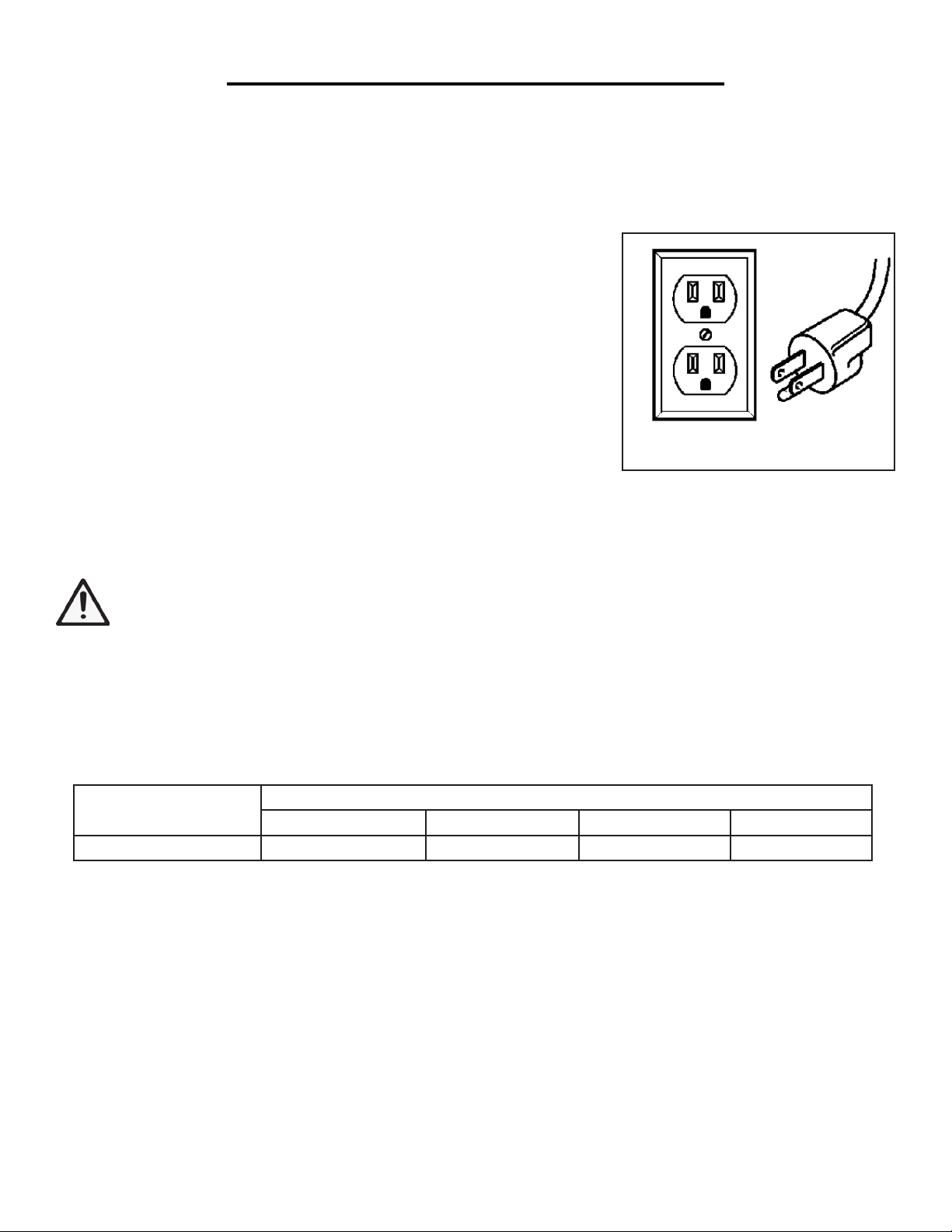
GROUNDING INSTRUCTIONS
This tool is equipped with an electric cord that has an equipment grounding conductor and a grounding plug. In
the event of a malfunction or breakdown, grounding provides the path of least resistance for an electric current and
reduces the risk of electric shock. The plug must be plugged into a matching outlet that is properly installed and
grounded in accordance with all local codes and ordinances.
AMPERAGE REQUIRED GAUGE FOR EXTENSION CORDS
25 ft. 50 ft. 100 ft. 150 ft.
8A 18 gauge 16 gauge 14 gauge 12 gauge
ELECTRICAL INFORMATION
1. Examine extension cord before use. Make sure your extension cord is properly wired and in good condition.
Always replace a damaged extension cord or have it repaired by a qualified person before using it.
2. Do not abuse extension cord. Do not pull on cord to disconnect from receptacle; always disconnect by pulling on
plug. Disconnect the extension cord from the receptacle before disconnecting the product from the extension cord.
Protect your extension cords from sharp objects, excessive heat and damp/wet areas.
3. Use a separate electrical circuit for your tool. This circuit must not be less than a 12-gauge wire and should be
protected with a 15A time-delayed fuse. Before connecting the motor to the power line, make sure the switch is in
the OFF position and the electric current is rated the same as the current stamped on the motor nameplate. Run-
ning at a lower voltage will damage the motor.
GUIDELINES FOR USING EXTENSION CORDS
When using an extension cord, be sure to use one heavy enough to carry the current your product will draw. An
undersized cord will cause a drop in line voltage resulting in loss of power and overheating. The table below shows
the correct size to be used according to cord length and nameplate ampere rating. When in doubt, use a heavier
cord. The smaller the gauge number, the heavier the cord.
Fig. A
7
1. Use only three-wire extension cords that have three-pronged plugs and
outlets that accept the tool’s plug as shown in Fig. A. Do not modify the
plug provided. If it will not fit the outlet, have the proper outlet installed by
a licensed electrician.
2. Improper connection of the equipment grounding conductor can result
in electric shock. The conductor with the green insulation (with or without
yellow stripes) is the equipment grounding conductor. If repair or replace-
ment of the electric cord or plug is necessary, DO NOT connect the equip-
ment grounding conductor to a live terminal.
3. Repair or replace a damaged or worn cord immediately.
CHECK WITH A LICENSED ELECTRICIAN or service personnel if you do not completely understand the
grounding instructions or whether the tool is properly grounded.
WARNING: To avoid electrocution, DO NOT use in wet or damp areas or expose to rain.

KNOW YOUR DISC SANDER
Carefully remove the tool and all contents from the packaging. Check all components against the diagram below.
If any part is damaged or missing, please contact our customer service at (800) 232-1195, M-F 8-5 CST or email
us at [email protected]. Do not discard the packaging until the sander is completely assembled.
CLEANING THE SURFACES
1. Your tool comes protected with a layer of anti-rust coating. Clean all rust protected surfaces using a soft cloth,
moistened with kerosene. Do not use gasoline, or cellulose-based solvents such as paint thinner or lacquer thinner,
as these will damage the painted surfaces.
2. Apply a coat of paste wax to the table to prevent rust. Wipe all parts thoroughly with a clean, dry cloth.
1.
2.
3.
4.
Sander (with 60-Grit Sanding Disc attached)
Work Table
Pivot Indexing Pin (x2)
Bevel Locking Handle & Washer (x2)
5.
6.
7.
PACKING LIST
Miter Gauge
Dust Hose
3mm Hex Wrench
Sanding Disc
(60-Grit)
Motor
ON/OFF
Switch with
Safety Key
Spring-loaded
Bevel Locking
Handle
Disc Guard
Work Table
Dust Cover
Miter Gauge
Base
Dust Port
8

248mm
25mm60mm
200mm
250mm
328mm
FRONT
BACK
Mouting Hole
2xø10mm
Rubber Feet Hole
4xM6
WARNING: To prevent serious injury from accidental operation, make sure the power cord is discon-
nected from the power source and the tool is turned OFF before assembly or making any adjustments.
ASSEMBLY & ADJUSTMENTS
SECURING SANDER TO A WORKBENCH
For safe operation, the machine must be secured onto a flat, secure workbench or stand. Refer to the base dimen-
tsions shown in Fig. 2. For temporary mounting, attach a large C-Clamp to each side of the sander and the work-
bench. For permanent mounting, follow the instructions below:
1. Place the sander on a stable workbench.
2. A mounting hole is located on each leg towards the rear of the
sander body (Fig. 1). Insert a pencil through the two mounting
holes and mark the hole locations on the workbench.
3. Remove sander. Drill two 3/8" holes through the workbench.
4. Align the sander base over the mounting holes and secure it
using two 5/16" screws and washers, locking washers and hex nuts
(mounting hardware not included).
Mounting
holes
Fig. 1
Fig. 2
NOTE: Your sander is compatible with the WEN 6588 Multipurpose Planer Stand, available at wenproducts.
com. Forget measuring and drilling holes on your workbench, simply mount your machine onto the mobile
stand with pre-drilled holes, and transport your machine around the workshop with ease.
9

WARNING: To prevent serious injury from accidental operation, make sure the power cord is discon-
nected from the power source and the tool is turned OFF before assembly or making any adjustments.
ASSEMBLY & ADJUSTMENTS
Fig. 3
10
INSTALLING/CHANGING THE SANDING DISC
Your sander comes with a 60-Grit PSA (pressure sensitive adhesive) sanding disc. This is a coarse sanding disc that
is good for quick stock removal. For finish sanding, you will need a finer-grit sanding disc. Additional sanding discs
can be purchased from wenproducts.com by searching 65812SD. Follow the steps below to replace a sanding disc:
NOTE: Only 12-inch sanding discs with pressure sensitive adhesive (PSA) can be used. Hook & loop sanding
discs or sanding discs of different size cannot be used on this sander.
1. Remove the disc guard and dust cover to expose the sanding disc plate.
2. Peel the used sanding disc from the metal disc plate.
TIP: a putty knife and hair dryer may help with this process.
3. Wipe clean the disc plate to make sure it is clean of any residue. You can use mineral spirits to soften the PSA
adhesives to remove any residue from the plate. Rotate the disc by hand to get access to all of the disc surface.
4. Peel the protective backing from the new PSA 12-inch sanding disc. Align the sanding disc with the plate, and
press the disc firmly onto the plate, leaving no loose edges.
5. Re-install the disc guard on the right side of the sanding disc, and secure with Phillips head screws and washers.
Re-install the dust cover against the bottom of the disc, and fasten with Phillips head screws.
NOTE: It is important to install the disc guard, as it prevents you from sanding on the wrong side of the disc.
ONLY sand on the left side of the disc, where the disc is rotating downwards (toward the table).
USING DUST COLLECTION
Sanding operations are dusty and can produce particles that
are harmful to your health. Always wear a dust mask and use
an adequate dust collection system.
Connect the included dust hose to the sander’s dust port
(Fig. 3), and connect the other end to the dust collection sys-
tem of your choice. A dust port adapter may be needed (not
included), depending on the inlet size of your dust extractor.
Table des matières
Autres manuels Wen Sander

Wen
Wen 6301 Mode d’emploi

Wen
Wen 6500 Manuel utilisateur

Wen
Wen 6510T Manuel utilisateur

Wen
Wen 6301 Manuel utilisateur

Wen
Wen HA5932 Manuel utilisateur

Wen
Wen 6321 Manuel utilisateur

Wen
Wen 94810 Manuel utilisateur

Wen
Wen DW5062 Manuel utilisateur

Wen
Wen HB3216 Manuel utilisateur

Wen
Wen 6307 Manuel utilisateur

Wen
Wen HB632V Manuel utilisateur

Wen
Wen AA6158 Manuel utilisateur

Wen
Wen 6515 Manuel utilisateur

Wen
Wen 6502 Manuel utilisateur

Wen
Wen HB6319 Manuel utilisateur

Wen
Wen 6508 Manuel utilisateur

Wen
Wen 20437 Manuel utilisateur

Wen
Wen 20401 Manuel utilisateur

Wen
Wen 948 Manuel utilisateur

Wen
Wen 6515 Manuel utilisateur


